
Kubernetes CLI (kubectl) Made Easier
Similar to Docker CLI, the kubectl is also not very user-friendly, you have to be explicit about lots of options that actually make sense as defaults in everyday usage and debugging when we are working on multi-namespaced Kubernetes cluster(s). The aim of this post is to define some functions, aliases, and JSON templates to make the CLI easier for us.
The below screenshot shows a glimpse of what it would enable you to do:
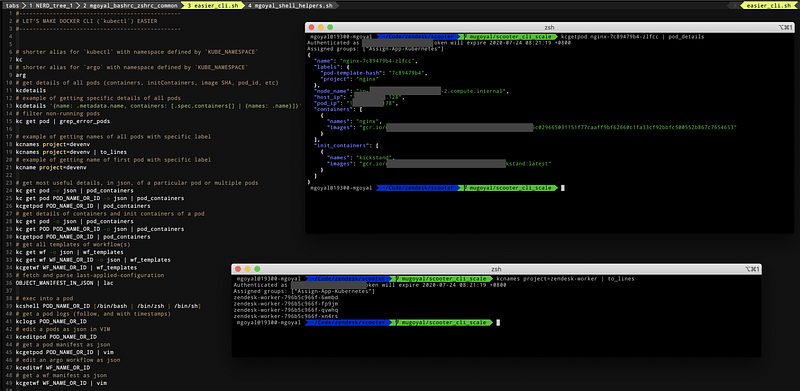
Let’s first look at most frequent kubectl commands and their frequently used options (make sure to pay attention to comments):
Below shortcuts can make your life damn easier. You can source these scripts in your profile or rc file. But, to get everything pre-setup, you can use goyalmunish/devenv Docker image as your development environment.
It uses below helper file (goyalmunish/devenv image takes care of all setup for you):
Note that output of kubectl get pod <pod_name> -o json is a JSON object representing pod with name <pod_name>. But, the output of kubectl get pod -o json is in the format {"apiVersion": "v1", items: POD_MANIFESTS_ARRAY}. Check kubectl, unless you are using kc_plural:
- Use
jq '. | {foo: bar}'on single JSON input. - Use
jq '.items[] | {foo: bar}'on multiple JSON inputs.
Note that kubectl get all does not list everything. Refer Rules for extending special resource alias - all to know these rules. Use kubectl api-resources for a complete list of supported resources.
The kubectl api-resources enumerates the resource types available in your cluster. This means that you can combine it with kubectl get to actually list every instance of every resource type in a namespace:
kubectl api-resources --verbs=list --namespaced -o name \
  | xargs -n 1 kubectl get --show-kind --ignore-not-found -l <label>=<value> -n <namespace>
Output of kubectl:
Output of kubectl get pod looks similar to:
NAME                                                       READY   STATUS      RESTARTS   AGE
guide-graph-app-server-7c98655497-gp4hx                    2/2     Running     0          5h22m
help-center-migrations                                     0/2     Completed   0          5h21m
api-tests-tksd9-3094769849                                 0/2     Error       0          5h10m
Here,
2/2in READY status forguide-graph-app-server-7c98655497-gp4hxmeans that twocontainers(doesn’t say anything aboutinitContainers, but they would have already completed as then onlycontainerscan run) and both are in running status.0/2in READY status forhelp-center-migrationsmeans that it has twocontainersand non-of them is running. Further status isCompleted, which means that both the containers have finished there (and so ended) successfully.0/2in READY status forapi-tests-tksd9-3094769849means none of thecontainersis running and the STATUS statusErrorsuggests that something went wrong.
Output of kubectl get deployment looks similar to:
NAME                                                  READY   UP-TO-DATE   AVAILABLE   AGE
zendesk-worker                                        4/4     4            4           5h56m
Here,
4/4in READY status should be read asstatus.readyReplicas/status.replicas, as4as AVAILABLE status isavailableReplicas(number of available pods (ready for at leastminReadySeconds) targeted by this deployment).
Output of kubectl get job looks similar to:
NAME                         COMPLETIONS   DURATION   AGE
account-service-migrations   1/1           3m25s      6h8m
kafka-bootstrap              1/1           41s        6h8m
Here,
1/1in COMPLETIONS status foraccount-service-migrationsshould be read asspec.completions/status.succeeded.
The kubectl debug:
The addition of kubectl debug command to v1.18 allows developers to easily debug their Pods inside the cluster. This command allows one to create an ephemeral container that runs next to the Pod one is trying to examine, but also attaches to the console for interactive troubleshooting.
Check sig-clie/20190805-kubectl-debug.md for details.
Here are some related interesting stories that you might find helpful:


