
Let’s Implement JWT Based Authentication in Spring boot
Part 2: Integrate database and implement Signup, Login features

In part 1, we implemented the basic JWT auth without real database, by hardcoding user
In this tutorial, we will extend the JWT auth by integrating with real users in the MySQL database and implementing signup, login functionality using BCryptPasswordEncoder for hashing password.
You can find the github code here
Step 1 : Create the User Model
create Jwtuser model and reimplement the UserDetailsService interface of spring security.
Step 2: Reimplement the UserDetailsService Interface of Spring Security
Reimplement the UserDetailsService and override the loadUserByUsername method which we previously hardcoded.
Step 3: Update the SecurityConfigurer
We change the passwordencoder method in SecurityConfigurer file to encrypt the password
@Bean
public PasswordEncoder passwordEncoder(){
    return new BCryptPasswordEncoder();
}
We also need to update the anteaters to not use authentication when using Signup, signIn methods
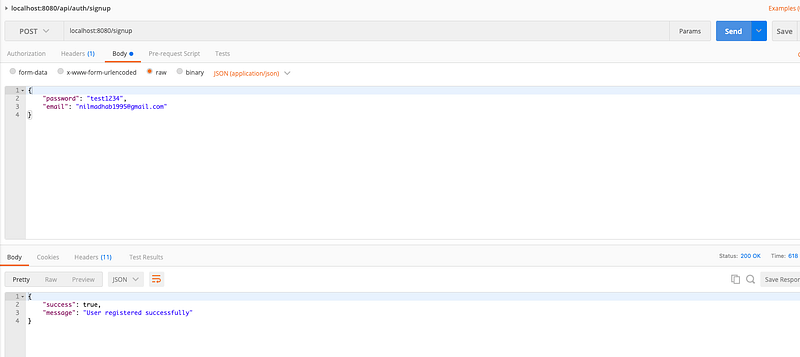
Step 4 Implement the Signup Api
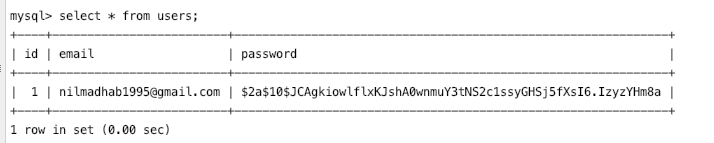
The code is self explanatory, we find if email is not present already, hash the password by passwordencoder, and save the user in DB.
Step 6 Implement the signIn
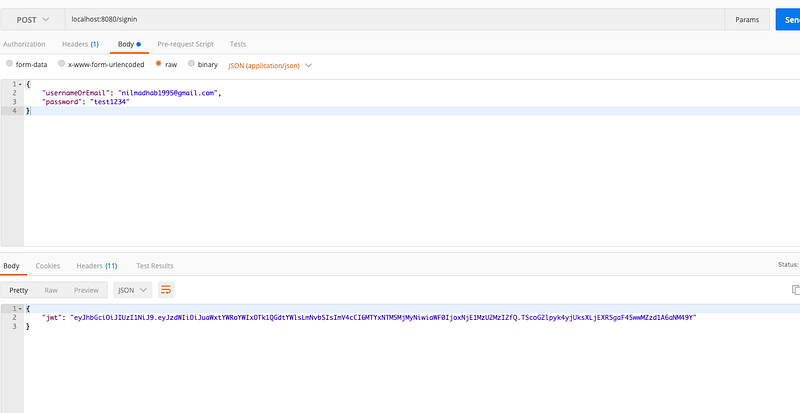
- we authenticate the user, by the spring security authenticate method
- set the authentication in context
- get the user from DB
- Create JWT and send it in response
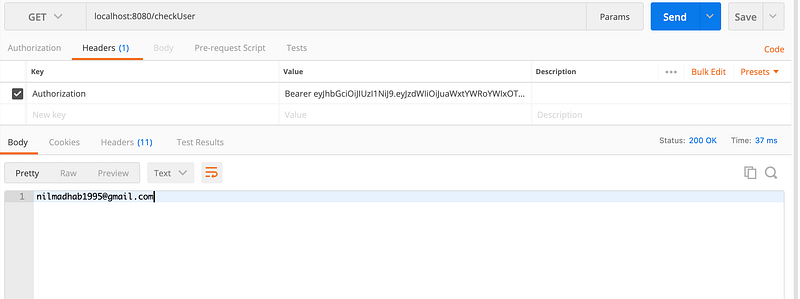
Step 7 : Test an API with an Authorization header consist of JWT token
If the token is expired, we will get this error

If the token is valid, we will get the user from the JWT token and we can create various rules for authorization
Next steps
- create various roles like ADMIN, USER, MODERATOR
- We will integrate it in our e-commerce tutorial
- We will use social login using GitHub and create a frontend using Vue.js


