
Let’s Implement Basic JWT Based Authentication in Spring boot
Step by step guild how to implement JWT Based Authentication, Part 1

JWT based authentication is very useful when we have web and mobile clients and a backend server, which provides a good alternative to session-based authentication. I did not find a good tutorial on this topic, so I decided to make one.
Theory
Session vs Token Based Authentication
Why do we need session or token for authentication?
medium.com
Video Tutorial
I found this awesome tutorial for implementing basic JWT based authentication for noobs like me.
In this tutorial, we will implement basic JWT based authentication, with the mock user and no database, to understand the concept. We will extend it later to integrate database and full signup, login functionalities.
If you just want to check out the code, checkout the Github branch.
Features we will develop
- JWT util file to create and validate JWT token
- A controller to generate JWT token
- User will be hardcoded
- No password encoder
Youtube Demo
I have created a short video of 7 min, to explain all the component, if you do not have time to watch the full 40 min Javabrains video, or you already know about JWT auth, but do not know how to implement it in spring.
Step 1
Create a Spring project with the following dependency in pom.xml
Step 2
Create a custom MyUserDetailsService service, which extend UserDetailsService of security.core package and override the loadUserByUsername by hardcoding an user, for the sake of simplicity.
We will store and retrieve user from the database in a later tutorial.
Step 3
Create a SecurityConfigurer file and enable EnableWebSecurity annotation
Things to note
- We did not use any password encoder in this tutorial. We will use BCrypt encoding in next tutorial
- Antmatcher means except the ‘/
authenticate’endpoint, all other apis will be authenticated - We are using a stateless session creation policy, i.e every api will be authenticated.
- we are providing our implementation of
Userdetailservice to SpringAuthenticationManagerBuilder
Step 4
Create the JWT util file to validate and create tokens. Check out the video (forward to 10:00) above to know more about each function.
Step 5
Create a filter chain to extract the JWT token from Authorization header, validate the token, and set the authentication in a security context.
Step 6
Create the controller to test the authentication
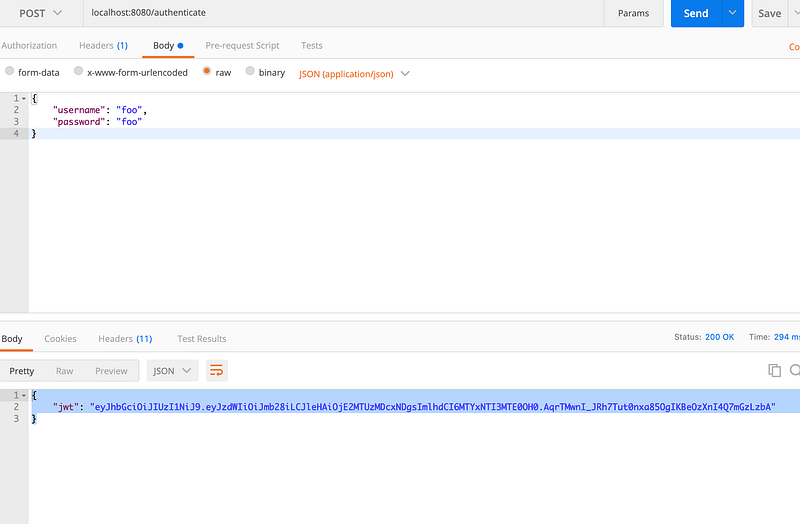
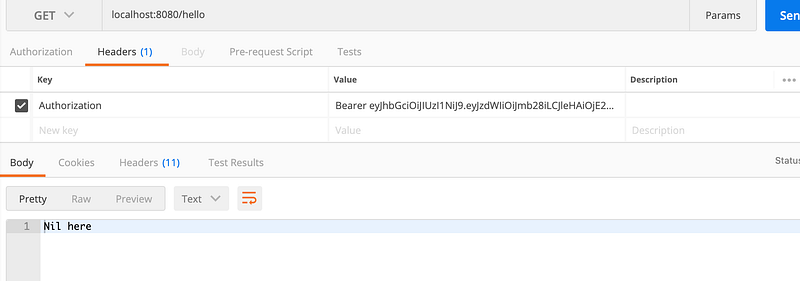
In the next tutorial, we will hook this with real users in the MySQL database and implement signup/login functionality.
https://readmedium.com/lets-implement-jwt-based-authentication-in-spring-boot-7ea5e97fc1f2
If you want a simple authentication
https://readmedium.com/a-simple-user-authentication-api-made-with-spring-boot-4a7135ff1eca
Thanks for reading :)


