
Learning Android Development
Lessons Learned After 3 Days Debugging Jetpack Compose SwipeToDismiss
Lots of Useful Jetpack Compose and Design Relevant Learning Obtained After The Pain of Finding Them Out

Swipe to dismiss is a common feature for any App these days. It should be easy, especially with Jetpack Compose, right?
True, it is supposed to be easy. I even shared a blog on it
Unfortunately, there are some little traps I fell into that altogether took me about 3 days before I can comprehend them well.
My final design works well as shown below
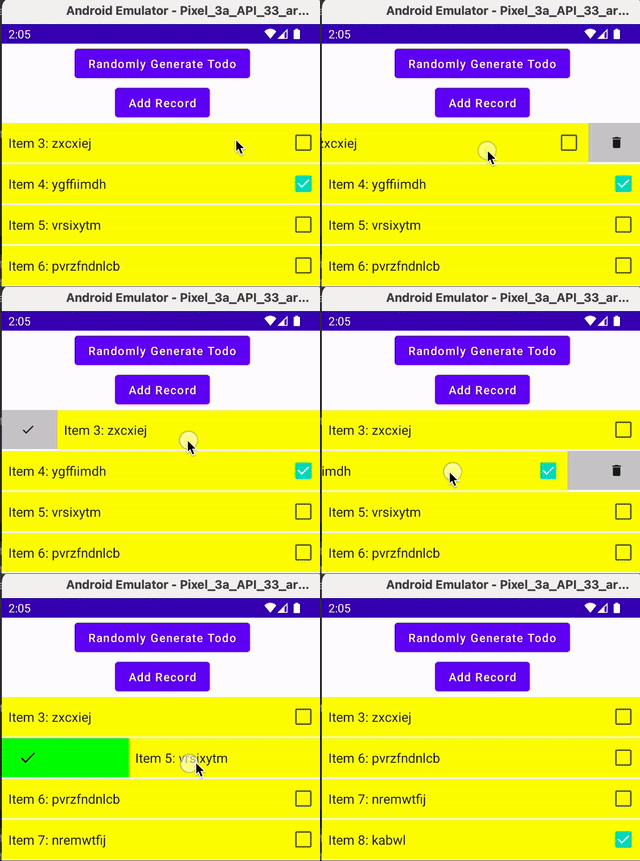
But it took me quite a bit of exploration before I can reach there. I’m glad I got through as I learned other bits along the way.
It is recommended you read the Jetpack Compose Swipe To Dismiss Made Easy first to get some context if you haven’t any experience with it.
If you are already familiar with Compose and think you would be able to grasp it, then proceed.
1. Don’t check for Dismiss State and perform action outside rememberDismissState
When I first look for ways to work on SwapToDismiss, I found this seemingly promising top answer in StackOverflow.
I follow it and code somewhat like below, with the check for isDismissed outside of rememberDismissState, and remove the record when detecting the dismissed state.
LazyColumn(
    modifier = Modifier.fillMaxHeight(),
    state = lazyListState
) {
    items(
        items = todoListState.value,
        itemContent = { item ->
            val dismissState = rememberDismissState()
            if (dismissState.isDismissed(DismissDirection.EndToStart) ||
                dismissState.isDismissed(DismissDirection.StartToEnd)){
                    viewModel.removeRecord(item)
            }
            SwipeToDismiss(....)
        }
}
I got a weird result that removes more than one line at a time and crashes sometimes.
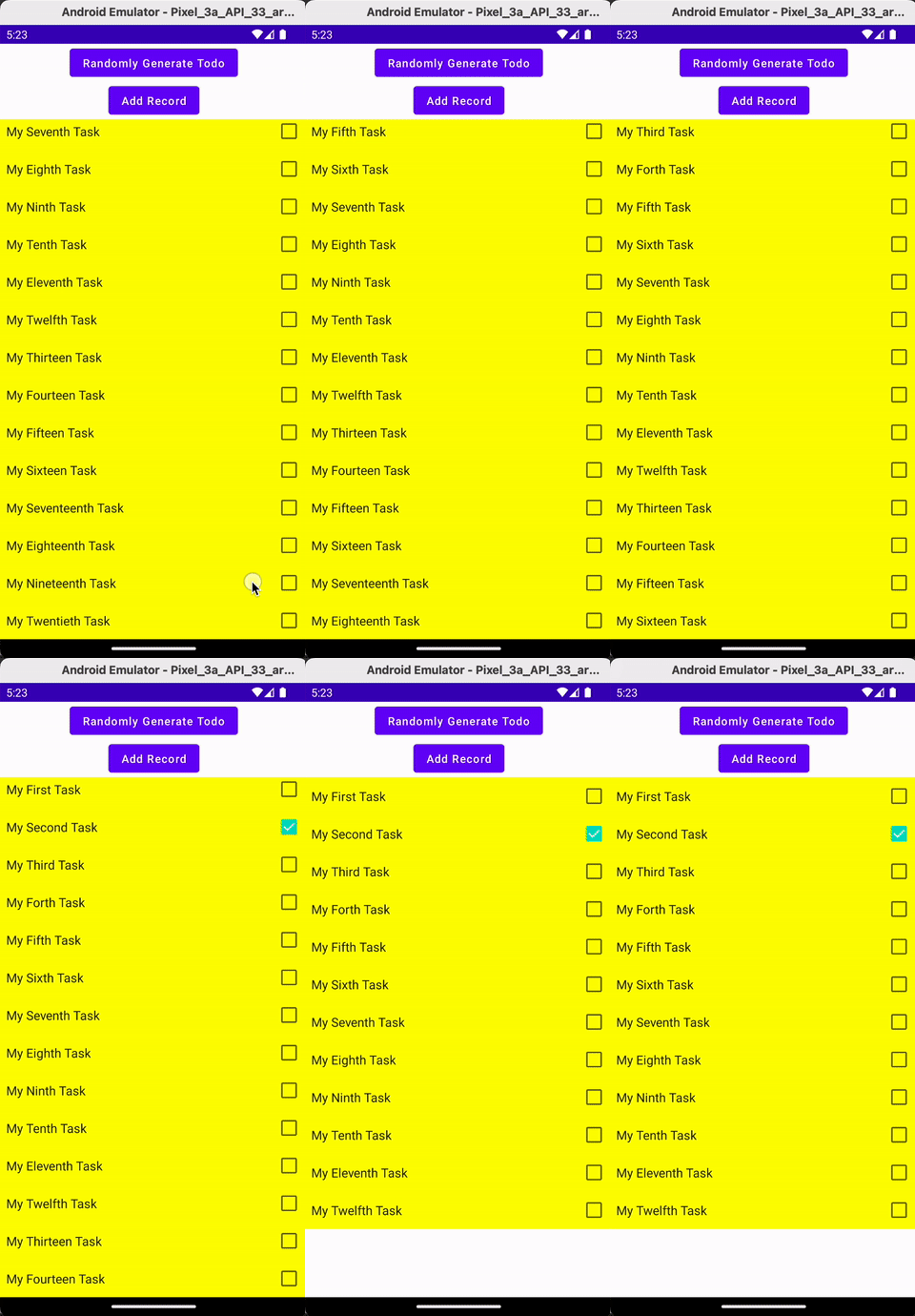
Explanation
The reason is, in the below code, it gets triggered on every single recomposition.
val dismissState = rememberDismissState()
if (dismissState.isDismissed(DismissDirection.EndToStart) ||
    dismissState.isDismissed(DismissDirection.StartToEnd)){
    viewModel.removeRecord(item)
}
Hence the removeRecord is triggered multiple times over and over, causing multiple rows removed, even though only a single swipe is performed.
The Fix
I need to action (the item row removal) within rememberDismissState
val dismissState = rememberDismissState(
    confirmStateChange = {
        if (it == DismissValue.DismissedToStart || it == DismissValue.DismissedToEnd) {
            viewModel.removeRecord(item)
            true
        } else false
    }
)
This will ensure only a single call to removeRecord for the particular row and is not affected by the multiple recomposition call of the UI code.
2. The need for KEY for Lazy Column for SwipeToDismiss to work
Even after fixing that, my code as below, I still have problems.
LazyColumn(
    modifier = Modifier.fillMaxHeight(),
    state = lazyListState
) {
    items(
        items = todoListState.value,
        itemContent = { item ->
            val dismissState = rememberDismissState(
                confirmStateChange = {
                    if (it == DismissValue.DismissedToStart ||
                        it == DismissValue.DismissedToEnd) {
                            viewModel.removeRecord(item)
                        true
                } else false
            }
            SwipeToDismiss(....)
        }
}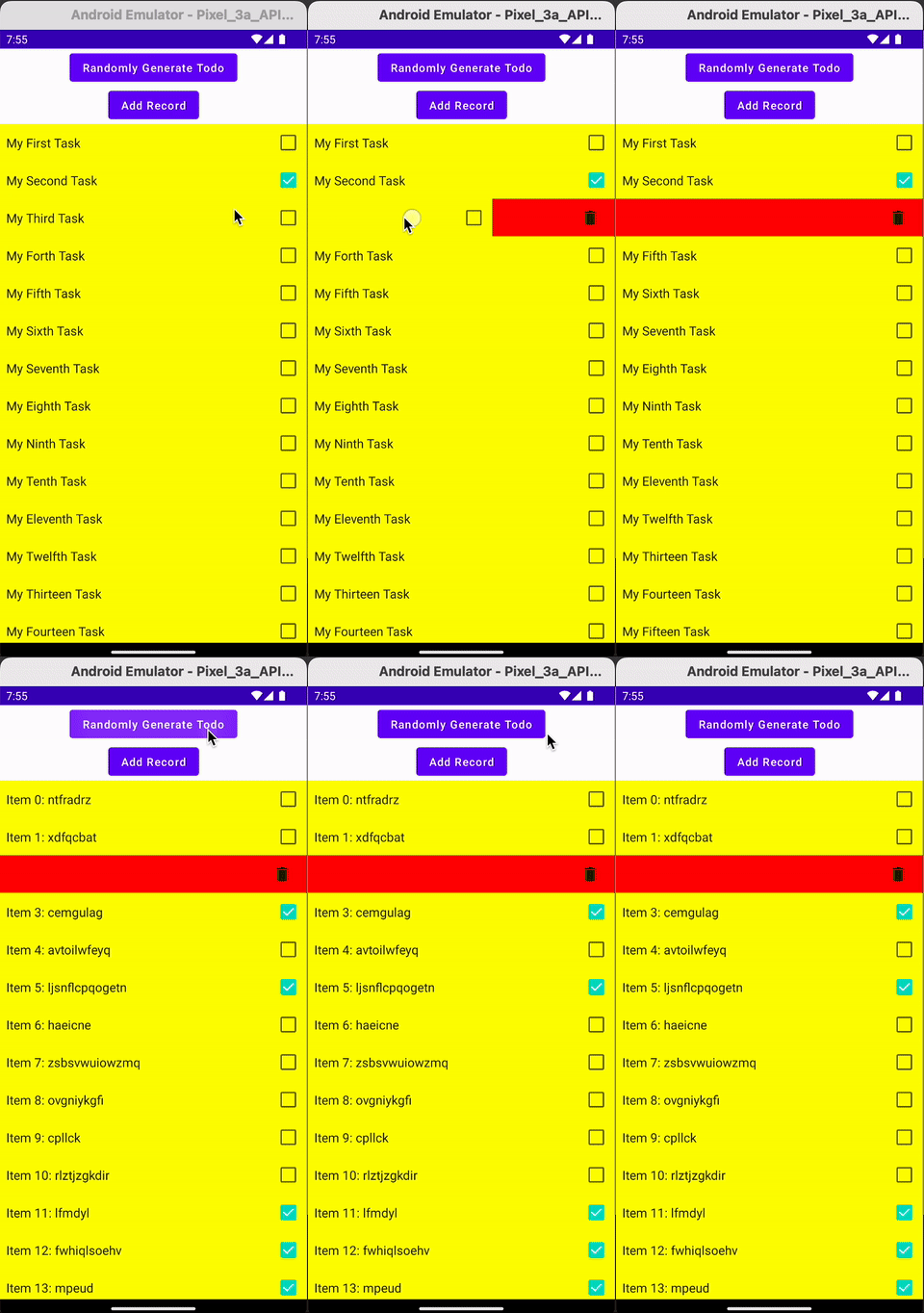
When I swipe to dismiss a row, it still looks like it triggers two rows removal, though, for the actual data, only one row is removed.
The other row is not removed (i.e the physical data is still there) but was in the state of dismissed. Hence it is shown in the background instead of the row data (in red).
And even after loading new data, the row still stays in the same dismissed state (in red background color).
Explanation
After investigation, I realized this is because I didn’t supply the KEY to the LazyColumn.
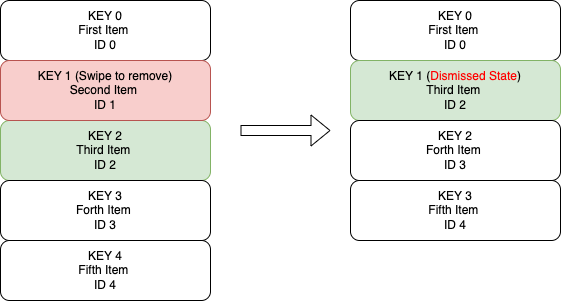
For a simple LazyColumn, the KEY parameter is optional. Without providing the KEY, each row is assigned a KEY of its row number.
LazyColumn(...) {
    items(
        items = todoListState.value,
        itemContent = { ... }
    )
}
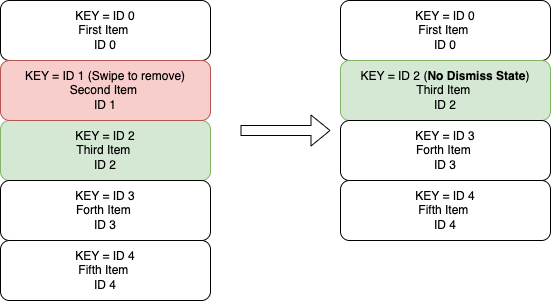
This means if we remove item row 2, row 3 will be moved up to and get the KEY of 2.
The Fix
To fix the issue, we should assign KEY to our LazyColumn
LazyColumn(...) {
    items(
        items = todoListState.value,
         key = { todoItem -> todoItem.id },
        itemContent = { ... }
    )
}
In such cases, when we don’t remove or swap any row within the LazyColumn, it works fine, because the Key for each item is changed. Hence the dismissed state is not taken from the previously removed row’s state, as each row gets its own dismissed state.
3. Dismiss item referring to an old item instead of the updated one
With the fix above, my code looks like below
LazyColumn(
    modifier = Modifier.fillMaxHeight(),
    key = { todoItem -> todoItem.id },
    state = lazyListState
) {
    items(
        items = todoListState.value,
        itemContent = { item ->
            val dismissState = rememberDismissState(
                confirmStateChange = {
                    if (it == DismissValue.DismissedToStart ||
                        it == DismissValue.DismissedToEnd) {
                            viewModel.removeRecord(item)
                        true
                } else false
            }
            SwipeToDismiss(....)
        }
}
It works well when I load the first set of items.
However, if I load the second set of items, and perform a new swipe to remove another row, it crashes as shown in GIF Below.
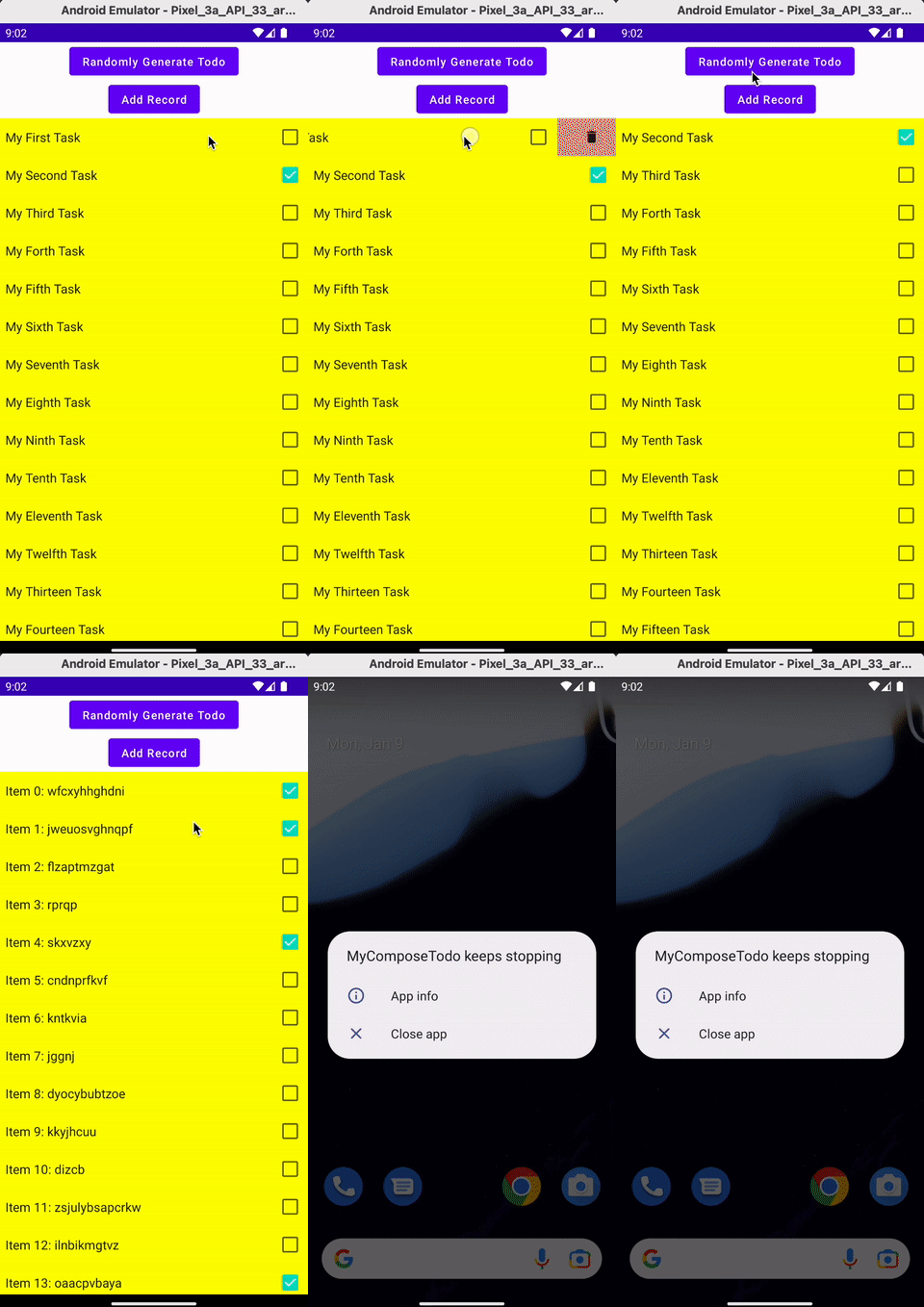
This issue is also reported in this StackOverflow.
Explanation
If we look at the below, the item is captured within lambda of the confirmStateChange
itemContent = { item ->
    val dismissState = rememberDismissState(
        confirmStateChange = {
            if (it == DismissValue.DismissedToStart ||
                it == DismissValue.DismissedToEnd) {
                    viewModel.removeRecord(item)
                    true
            } else false
        }
    SwipeToDismiss(....)
}
Hence the item in the confirmStateChange is retained there even in the subsequent refresh of data
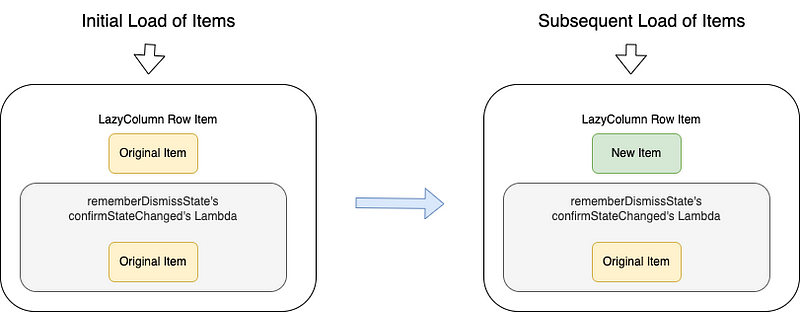
Therefore, when one performed a delete on the subsequent load, the (old) item cannot be found in the new list, and crash the app.
The Fix
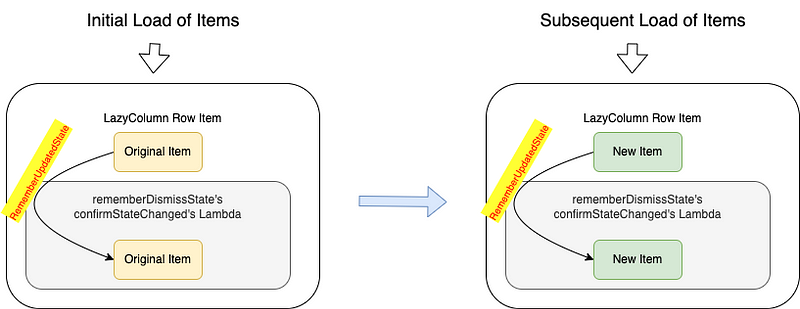
We need to have a way to get the confirmStateChange lambda to retrieve the updated item. Fortunately, we have a function called rememberUpdatedState that can help to retrieve the latest item.
itemContent = { item ->
    val currentItem by rememberUpdatedState(item)
    val dismissState = rememberDismissState(
        confirmStateChange = {
            if (it == DismissValue.DismissedToStart ||
                it == DismissValue.DismissedToEnd) {
                    viewModel.removeRecord(currentItem)
                    true
            } else false
        }
    SwipeToDismiss(....)
}
4. The Optimization of SwipeToDismiss Background
I have the below code to draw the SwipeToDismiss background
@Composable
@OptIn(ExperimentalMaterialApi::class)
fun SwipeBackground(dismissState: DismissState) {
    Box(
        Modifier
            .fillMaxSize()
            .background(Color.Red)
            .padding(horizontal = 20.dp),
    ) {}
}
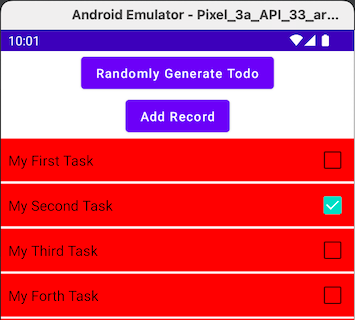
My view will look below.
Explanation
This is because the SwipeToDismiss background is rendered even when no Swipe to Dismiss is performed. This is a little waste of rendering resource
The Fix
We can add some background color to each item, to cover it up. But it is not helping reduce unnecessary rendering on SwipeToDismiss background.
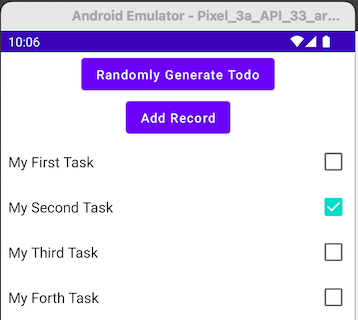
To prevent SwipeToDismiss background from being rendered, we can simply put dismissState.dismissDirection ?: return, so no rendering when there’s no Swipe To Dismiss happening.
@Composable
@OptIn(ExperimentalMaterialApi::class)
fun SwipeBackground(dismissState: DismissState) {
    dismissState.dismissDirection ?: return

    Box(
        Modifier
            .fillMaxSize()
            .background(Color.Red)
            .padding(horizontal = 20.dp),
    ) {}
}
5. The Need to Have Item Background
Despite the above seems good, where we no longer see the SwipeToDismiss background, we still have another issue.
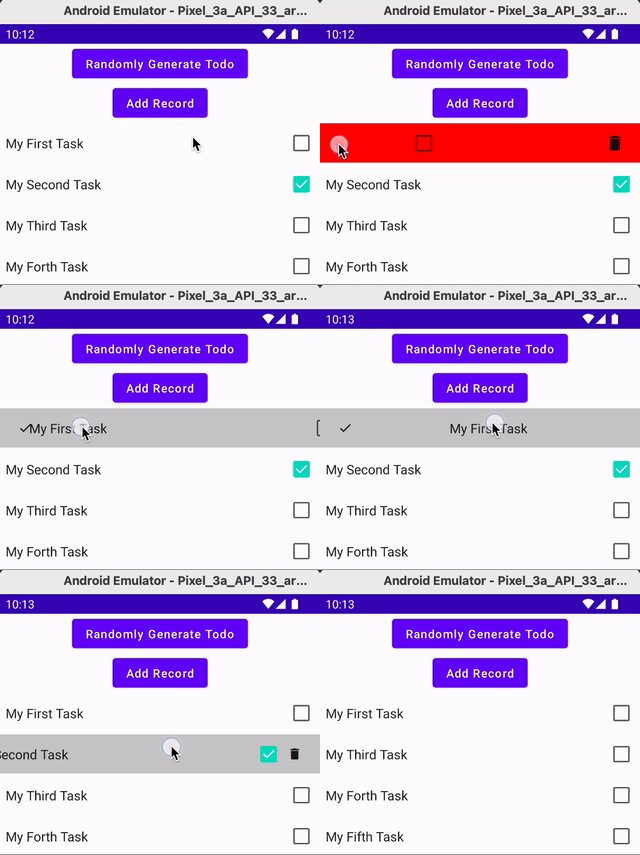
We notice the SwipeToDismiss background is fully seen through from the row Item itself.
Explanation
The reason is, for each Row Item, we didn’t put any background color on it. Hence it is transparent. This makes the SwipeToDismiss background visible when we are performing Swipe to Dismiss.
The Fix
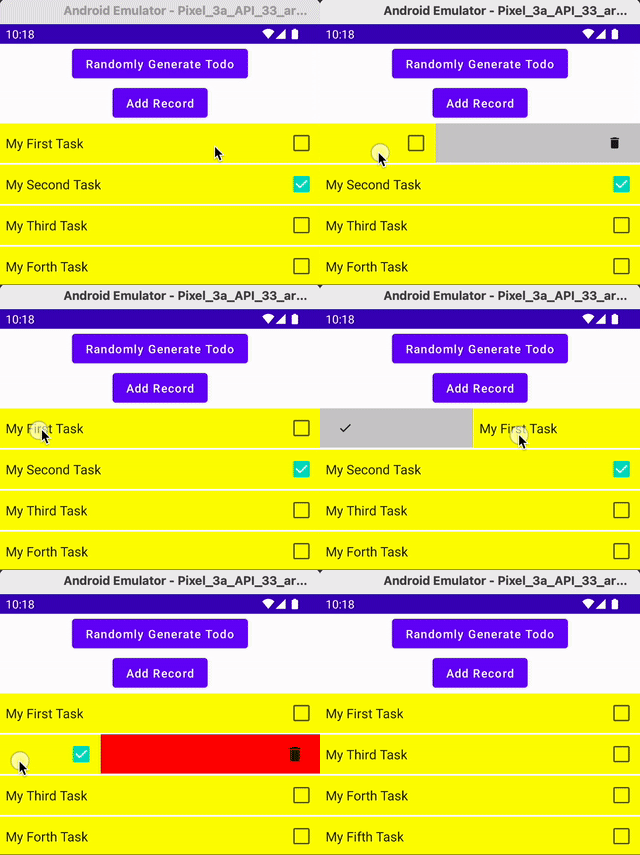
The fix is simple. Put a background color on each Row Item. To make is more natural, we can have the color the same as the original background color.
To illustrate this clearly, I just put Yellow instead.
6. Remember to Scroll to the Top On New Retrieval of Data
This one causes a little unnecessary panic for me.
I have a Randomly Generate Todo button that will generate items starting from Item 0, Item 1 …
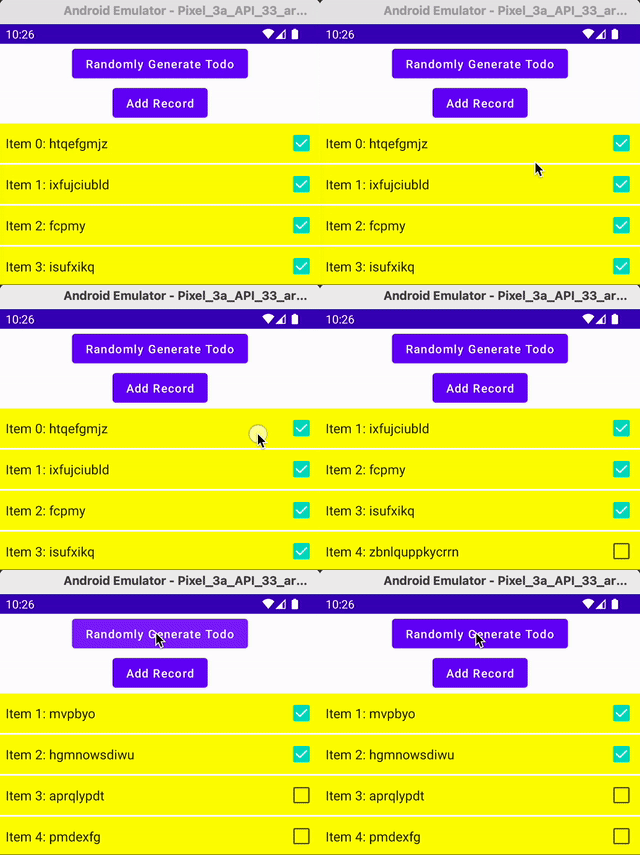
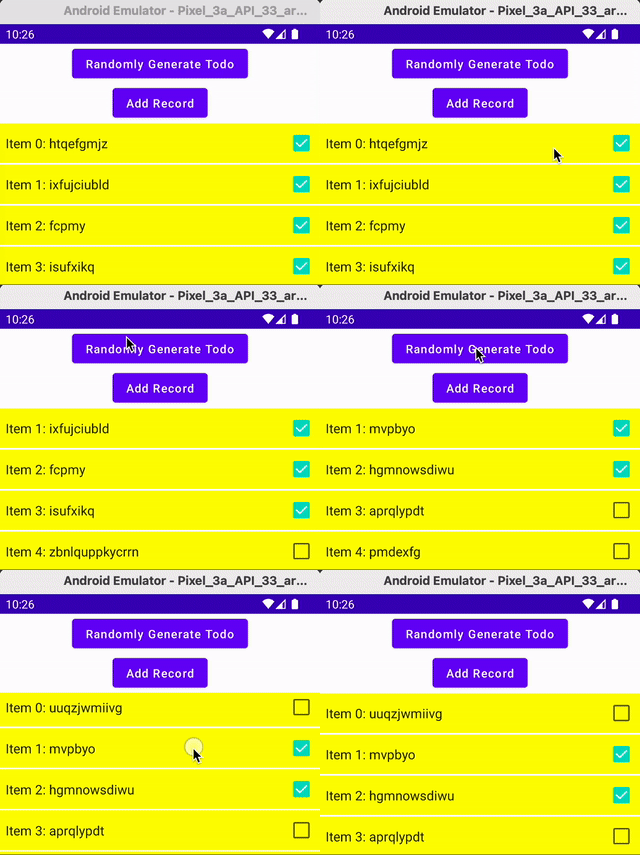
However, after I remove the first item, and generate a new list of items, the first one shown in Item 1. Where did the Item 0 goes?
Explanation
Apparently for LazyColumn, when we remove Item 0, it scrolls down to Item 1. Even after we generate a new set of items, the scroll position stays on Item 1.
It looks like Item 0 is not there, but it is. We just need to scroll up to it in the new list.
The Fix
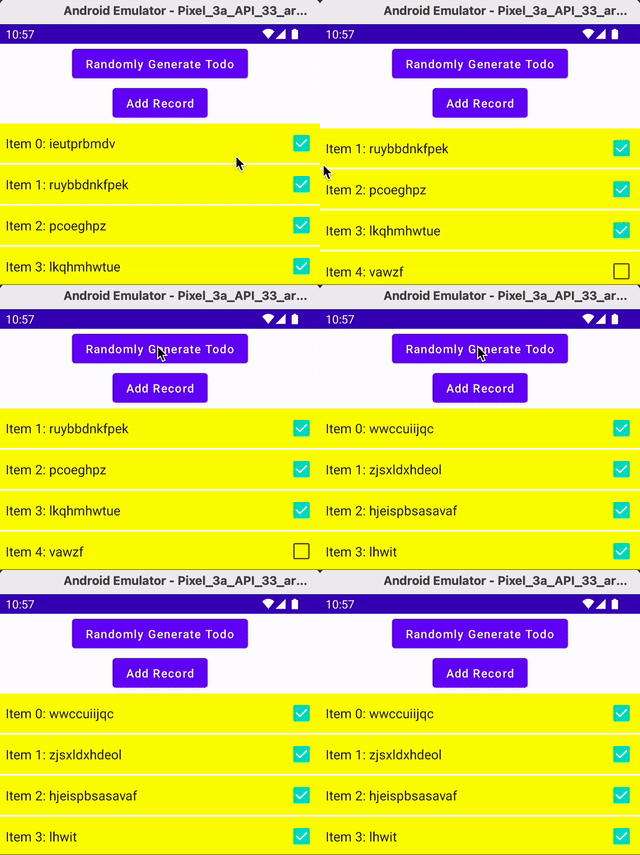
There’s nothing really to fix from the technical point of view. But from the user's point of view, this is confusing.
To address that, I just need to programmatically scroll to the top when a new list is generated.
Button(onClick = {
    viewModel.generateRandomTodo()
    scope.launch {
        lazyListState.scrollToItem(0)
    }
}) {
    Text("Randomly Generate Todo")
}
Recap
Quite a bit of learning from there, not just limited to SwipeToDismiss, but also other aspects of Jetpack Compose. Let’s recap below
- Avoid adding logical operation code on the code that gets executed on every recomposition. It will generate weird behavior. Put into some
rememberlambda instead. - To properly setup
LazyColumn, it is better to provide it with the needed KEY to uniquely identify each item. This ensures if any item is swapped or removed, the KEY is kept the same for each item. - Anything that gets into a
rememberand lambda is persisted until explicitly updated. In Jetpack Compose hoisting purpose, to get the newer item, we can userememberUpdatedStateto help. - Some UI code can be optimized to not perform if it is not being visible. In the case of
SwipeToDismiss, we can usedismissState.dismissDirection ?: return - For design, it is good to explicitly set a UI component background color without relying on the screen background color. We might not know it can change at any time.
- Sometimes, it is not a technical logical issue. Some seemingly illogical views can possibly be just a pure user interface issue that needs some tweak.


