avatarMariam Manzoor

Free AI web copilot to create summaries, insights and extended knowledge, download it at here

3066

Abstract

require little added maintenance, the butt can be a different story.</p><p id="e600">I’m clearly not oblivious to the physiological functions of the rectum; anyone who is, or pretends to be, has no business going <i>there</i> in the first place. Feeling comfortable with your partner is also very important in the instance that accidents <i>do</i> happen…which they might.</p><p id="9bf8">Still, I prefer to keep it as squeaky clean as possible. First then, can I really sink in and relax, worry-free. Call me a prude, but my second hard limit, next to <i>no anal on the first date</i> is <i>no scat-play. </i>When I have visitors, I like it neat and will make sure all surfaces are tidy before anyone steps over my doorstep. For the sake of clarity, I’m talking about <i>both</i> my apartment <i>and</i> my butt right now.</p><p id="1666">How does this make anal sex more intimate? Well, to <i>want</i> to put in the extra time, effort, and dedication required, I need to really be into it, and the person I’m inviting along. That in itself makes it extra meaningful.</p><p id="1702"><i>For all the dirty details on how to get sparkly clean, I wrote this <a href="https://readmedium.com/the-secret-to-enjoying-anal-sex-865d573cc116">in-depth article on anal-prep</a>.</i></p><h2 id="39b4">An asshole is just kinda moody</h2><p id="ef78">Some days butt stuff feels fantastic and other days they don’t—at all! This might be true for all sex, to some degree, but it’s especially true for anal. The sphincter is not only sensitive, but temperamental and therefore any kind of tension, stress, and exhaustion can affect its <i>behavior.</i></p><p id="eea4">It’s exceedingly important for me to trust that my lover is both sensitive and understanding of this, and won’t simply soldier on without paying attention. I prefer someone who knows me well enough to tune into my resonance without me having to spell out every damn word.</p><h2 id="0a33">It’s oh-so-intense, which makes me feel oh-so-vulnerable</h2><p id="464b">This is the most defining point for me: When anal sex is <i>really</i> good, I will momentarily transcend my body to hover somewhere above it for an undefinable amount of time. In these spaced-out moments, I have very little control over the movements and sounds I make. With vaginal sex, on the other hand, I still feel (mostly) in charge.</p><p id="5e13">A slight control freak by nature, letting go completely to allow someone a close up of myself in a state of unhinged pleasure is not always easy for me. Is it for most people? This is as raw as it gets, and therefore an unusually tender space for me to allow anyone access to.</p><p id="9085">In <a href="https://readmedium.com/the-ass-master-who-stole-my-heart-a2bd4959642e">a story about the partner who first taught me to really appreciate anal sex</a> I write, “they say that the way to someone’s heart is through the stomach (…) but I’ve recently come wonder if there may also be a way to our hearts through our…rear ends.”</p><p id="b185">I still believe anal sex to be both more emotio

Options

nally and physically intimate and close than most other things. This is when I feel the most naked, the most open, and as a result the most exposed. It’s also one of the sex acts that have the highest potential for something to go wrong; for it to cause pain, or simply just get embarrassing.</p><p id="8eb9">For the number of posts I see praising anal sex on this site, I see at least as many swearing never to go near it (again), often after having experienced severe physical and mental trauma related to it. So, while I’m excited to see this wonderful act becoming increasingly destigmatized, and more and more people adding it to their sexual repertoire, I can’t help but wish to apply a few words of caution.</p><p id="0677">While opening and sharing our hearts is a beautiful and empowering endeavor—one we should embark on as often and as much as we feel inclined to—we want to take the precautions we can to ensure that we only allow in those who aren’t planning to break it.</p><p id="95f3">If we apply the same logic to anal sex too, we might start to see less of the traumatic horror stories and even more praising the treasured <i>mystery-zone!</i></p><figure id="96b5"><img src="https://cdn-images-1.readmedium.com/v2/resize:fit:800/1*xKxnwqn_EUaHXW-qvkscVQ.png"><figcaption></figcaption></figure><div id="1dbd" class="link-block"> <a href="https://readmedium.com/sex-with-ena-1aecd927677c"> <div> <div> <h2>Sex With Ena</h2> <div><h3>All of my sexy pieces in one place</h3></div> <div><p>medium.com</p></div> </div> <div> <div style="background-image: url(https://miro.readmedium.com/v2/resize:fit:320/1*P6qZqcmqK8vjBMgBXCECcQ.jpeg)"></div> </div> </div> </a> </div><div id="08db" class="link-block"> <a href="https://readmedium.com/the-secret-to-enjoying-anal-sex-865d573cc116"> <div> <div> <h2>The Secret to Enjoying Anal Sex</h2> <div><h3>It’s all about preparation</h3></div> <div><p>medium.com</p></div> </div> <div> <div style="background-image: url(https://miro.readmedium.com/v2/resize:fit:320/1*XlGiQe9GU0DY7vB_viPzDA.jpeg)"></div> </div> </div> </a> </div><div id="875d" class="link-block"> <a href="https://readmedium.com/the-ass-master-who-stole-my-heart-a2bd4959642e"> <div> <div> <h2>An Ass-Master Stole My Heart</h2> <div><h3>A story about anal sex, and my (attempted) polyamorous slave-Master relationship</h3></div> <div><p>medium.com</p></div> </div> <div> <div style="background-image: url(https://miro.readmedium.com/v2/resize:fit:320/1*R_bshJEq85c7o4g9-51DjQ.jpeg)"></div> </div> </div> </a> </div></article></body>

Learning Linux- File & Text Manipulation

Beginner’s Guide to Learning Linux/Ubuntu
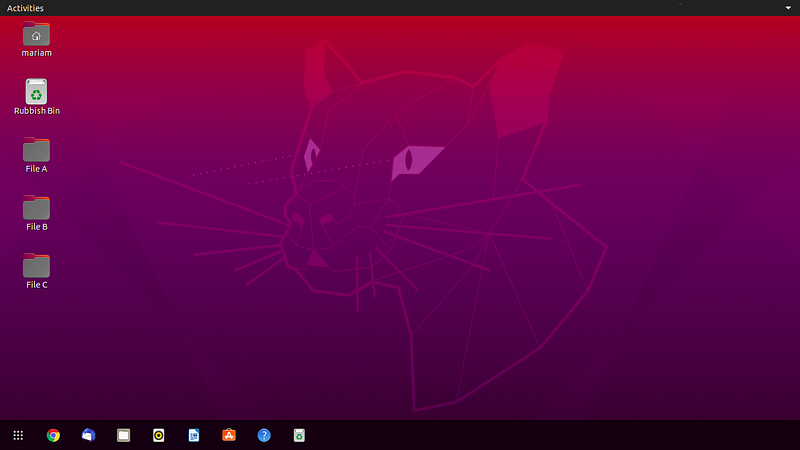
image courtesy author

While using Linux, one will often have to work in the terminal only. It is therefore important for a user to know some basic Linux Commands for file & text manipulation. In this article, we will look into such commands on Ubuntu distro.

If you are new to Linux, check out my article on Learning Linux- Basic Commands first.

Viewing a Text File
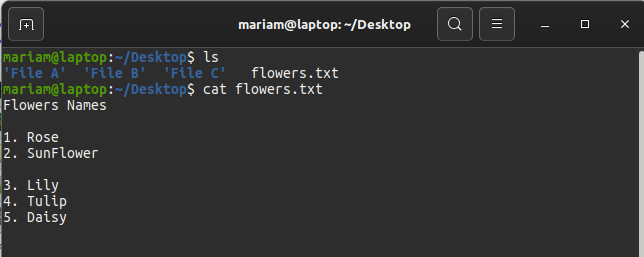
image courtesy author

To look into the contents of a text file, the command used is:

cat <path of file>

If the file is in the current directory, the following command may be used instead:

cat <file name> 
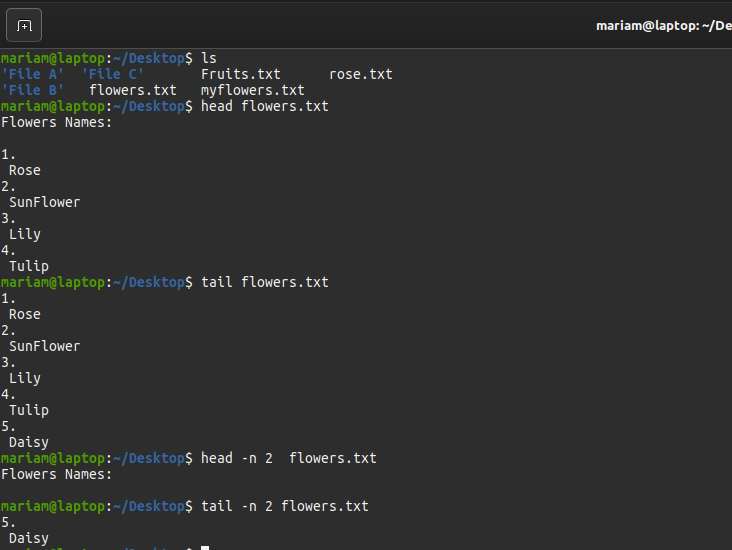
image courtesy author

In order to view the start of the file, use the command:

head <path of file>

By default, it shows the first 10 lines of the file. To change the number of lines displayed -n flag is used as follows:

head -n 2 <path of file>. 

To view the end of a file, the command used is:

tail <path of file>

By default, it shows the last 10 lines of the file. To change the number of lines displayed -n flag is as follows:

tail -n 2 <path of file>

Editing a Text File

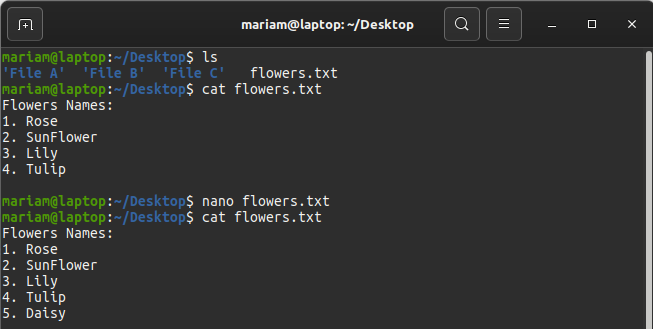
image courtesy author

To modify the contents of a text file, a text editor is used. The easiest and common one being nano. The command used to open the file is:

nano <path of file>

Once the file is modified CTRL-O is used to save the changes, followed by CTRL-X to exit from the editor.

Searching a Word in File
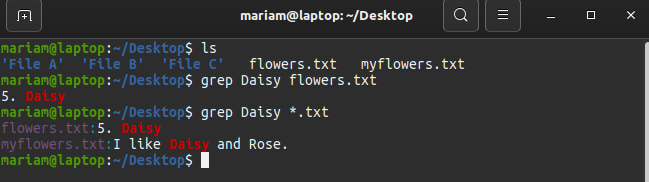
image courtesy author

To search a word within a file type in terminal:

grep <search word> <path of file>

In order to search a word with all files in a directory, use the command:

grep <word> <path of file/*.txt> 

As an example:

grep Daisy ~/Desktop/*.txt

Input/Output Redirection

Using Redirection in Linux, users can change the standard input-output devices. Using Output Redirection instead of displaying the contents on the screen, text output can be saved in a file. Similarly, using Input Redirection the contents of a file can be written onto the screen or attached with another application like Email.
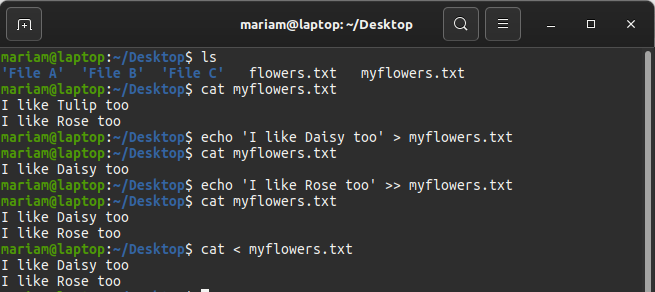
image courtesy author

The symbol used for Output Redirection is > ’. To write redirect output from screen to a file, the command used is

echo <'Message'> > <path of file>

This will create a new file if it is already not present. In case the file is present, its contents would be erased and the new message will be overwritten. In order to append the new message into the file, use >> operator as follows:

echo <'Message'> >> <path of file>

The symbol used for Input Redirection is ‘ < ’ and can be used as follows:

cat < <path of file>

To redirect errors the operator 2> is used. Example, if a user wants to save error messages in a program my program into the file error.txt, the following command will be used:

myprogram 2> <error.txt>

Conclusion

These were some basic Linux commands for File & Text manipulation. Practice is the only way a user can learn these commands efficiently. So do try file handling on your Linux machine, and share your learning experience in the comments.

Ubuntu
Linux
Beginners Guide
Files
Technology
Recommended from ReadMedium