avatarAlena Gorb

Free AI web copilot to create summaries, insights and extended knowledge, download it at here

3446

Abstract

ction, you can specify something like this:</p><figure id="c78f"><img src="https://cdn-images-1.readmedium.com/v2/resize:fit:800/1*ElG64OEv8_9Z_xYocTOPEw.png"><figcaption></figcaption></figure><p id="cb13">Now I do appreciate that, as a beginner, you might not know what Python libraries or functions are, but just trust me on this one! Also, by default, ChatGPT will try to explain the functions and libraries that it uses, so you might not even need to specify this part, but I just think it ensures more consistent responses, so why not?</p><p id="e5c1">3. Save your custom settings and decide whether you want them to be enabled for the other new chats or not:</p><figure id="b623"><img src="https://cdn-images-1.readmedium.com/v2/resize:fit:800/1*5wG-02ldRmmw-BIkf3-yIA.png"><figcaption></figcaption></figure><p id="03ce">If you activate “Enable for new chats,” then every new chat after this one will have these same settings applied to it. If not, then only this current new chat will have the custom settings, and all other new chats will have the default settings or different custom settings applied to them. The choice is yours, but if you are using ChatGPT for things other than learning Python, you might want to restrict the custom settings to the current new chat only to avoid confusion.</p><h2 id="f02f">2. Ask ChatGPT for a study plan and stick to it</h2><p id="dbd6">Now that you are all set, you can ask ChatGPT for a day-by-day study plan so you know which topics you want to cover on which day. If you also have a timeframe that you are working with, make sure to include that. So your first prompt might look something like this:</p><figure id="56a6"><img src="https://cdn-images-1.readmedium.com/v2/resize:fit:800/1*RxdiKXkRW623fN1Kwli6nQ.png"><figcaption></figcaption></figure><p id="b023">This should hopefully give you a decent roadmap as to what you should do first. Here’s what I got in response (part of it actually):</p><figure id="0f96"><img src="https://cdn-images-1.readmedium.com/v2/resize:fit:800/1*YSl0uV-147MCVVf7UoAWEg.png"><figcaption></figcaption></figure><h2 id="ded7">3. Ask ChatGPT to generate the content for the day</h2><p id="7ab6">Now that you have a plan, you can ask ChatGPT to follow it and provide the content needed for you to understand the topic. Don’t forget to ask for code examples. You can copy and paste these code snippets into your favourite IDE (if you read my other blogs, you would know it’s Jupyter Notebook for me, but you can also use others or just ask ChatGPT for suggestions!). Also ask for some practice questions, because it is the best way to learn Python by just doing it! Here’s my prompt:</p><figure id="f37c"><img src="https://cdn-images-1.readmedium.com/v2/resize:fit:800/1*z5ggfGtjREjuSIfCwSP3ww.png"><figcaption></figcaption></figure><p id="746c">And here’s part of ChatGPT’s response:</p><figure id="bd9a"><img src="https://cdn-images-1.readmedium.com/v2/resize:fit:800/1*7oA61JYKqH1NwV_Dl4UnHA.png"><figcaption></figcaption></figure><figure id="6f15"><img src="https://cdn-images-1.readmedium.com/v2/resize:fit:800/1*cXkmDCRj9OcW92bKyq86Zw.png"><figcaption></figcaption></figure><h2 id="d094">4. Feed your code to ChatGPT for instant debugging and feedback</h2><p id="89f8">The great thing about ChatGPT is that it can actually check your code for you and quickly identify where the mistake is, so you can quickly see where you went wrong. In this example, I inte

Options

ntionally gave ChatGPT an incomplete code to see if it could correct it:</p><figure id="a858"><img src="https://cdn-images-1.readmedium.com/v2/resize:fit:800/1*hbpgIowfKq6OQ1yAGP-1Jg.png"><figcaption></figcaption></figure><p id="f7ac">And here’s what it came back with (spoiler: it did identify the mistake correctly):</p><figure id="f526"><img src="https://cdn-images-1.readmedium.com/v2/resize:fit:800/1*nMkEi_txjjj-Rhl6PeaXgg.png"><figcaption></figcaption></figure><p id="4e32">Now, if you are a beginner, you might not want to just be given an answer right away, but you might want some guidance as to where you might’ve gone wrong, so you can modify the prompt above to specify this:</p><figure id="5880"><img src="https://cdn-images-1.readmedium.com/v2/resize:fit:800/1*WdGoM8yxiuS9FmXmsHO9eg.png"><figcaption></figcaption></figure><p id="992d">And now you would get the response, which just guides you in the right direction without outright telling you what the answer is, which is perhaps more useful at the beginning:</p><figure id="35be"><img src="https://cdn-images-1.readmedium.com/v2/resize:fit:800/1*24bEXGAD2VJcTAwJ0iHVsA.png"><figcaption></figcaption></figure><h2 id="28ef">5. Master new libraries to gain new skills with overviews</h2><p id="b4e2">Once you’ve mastered the basics with the help of ChatGPT, you can now use it to quickly familiarise yourself with a new library or function, so you can quickly gain new, more specialised skills on top of your basic Python knowledge, be it data analysis, web design, or even machine learning. You can use the following prompt for a speedy intro:</p><figure id="2a28"><img src="https://cdn-images-1.readmedium.com/v2/resize:fit:800/1*q6xIdsBk0rHtyYK7cqnMTQ.png"><figcaption></figcaption></figure><p id="958a">And here’s a snippet of the output:</p><figure id="4cdf"><img src="https://cdn-images-1.readmedium.com/v2/resize:fit:800/1*chnfOfRbALLyw73_xHxTCg.png"><figcaption></figcaption></figure><p id="6cd4">You can also ask ChatGPT for help with specific tasks, like how to web scrape a page with specific HTML code or how to extract a specific chunk of data from an Excel table, and also to check whether your code is correct or ask why your code is not doing quite what you want it to do; the possibilities are endless!</p><p id="534a">Now this is it for now, and if you enjoyed this blog, you might also find my generative AI chatbot comparison <a href="https://readmedium.com/which-generative-ai-is-the-best-chatgpt-vs-bard-vs-pi-vs-claude-4c94342bbd6a">article</a> interesting. And as always, let me know if you have any comments, suggestions, or ideas for future blogs. Follow and subscribe to my email list so you don’t miss when I post (which is usually once a week on Sundays)!</p><h1 id="13fd">Stackademic</h1><p id="a9f0">Thank you for reading until the end. Before you go:</p><ul><li>Please consider <b>clapping</b> and <b>following</b> the writer! 👏</li><li>Follow us <a href="https://twitter.com/stackademichq"><b>X</b></a><b> | <a href="https://www.linkedin.com/company/stackademic">LinkedIn</a> | <a href="https://www.youtube.com/c/stackademic">YouTube</a> | <a href="https://discord.gg/in-plain-english-709094664682340443">Discord</a></b></li><li>Visit our other platforms: <a href="https://plainenglish.io"><b>In Plain English</b></a><b> | <a href="https://cofeed.app/">CoFeed</a> | <a href="https://venturemagazine.net/">Venture</a></b></li></ul></article></body>

Learn Python Fast with ChatGPT: Top Tips for Prompt Engineering
Photo by Rolf van Root on Unsplash

As a self-taught Python amateur, people often ask me how I learned it and say that I must be smart to do it, and they wish they could code too. Well, today is your lucky day, because I will talk a bit about how I learned Python (before ChatGPT was around) and then explain how you can learn Python even quicker than I did using recent advancements in generative AI.

To cut straight to the chase, I learned Python by doing this MIT Python course on the EdX platform (which I did for free without upgrading to the paid version), which I thought was absolutely brilliant in introducing the basic concepts and explaining “coding logic” in Python, so I highly recommend that. However, I would say that if you are short on time and want to “fast-track” your learning, courses might not be the most suitable since they do require some time commitment to watch the videos and then do the practice exercises. But fear not, because, now that we have ChatGPT, I might have a solution for you that is also completely free!

If you haven’t already, you can check out my generative AI comparison article to learn more about different chatbots available these days, but for this blog, we will talk about the free version of ChatGPT (i.e., GPT 3.5) and how you can use it to learn Python much faster than I did. So let’s get started.

1. Create a suitable “persona” for your needs and current level

Creating personas in ChatGPT is a useful trick if you want it to give you outputs in a specific format or include/exclude specific information. To create a "persona,” do the following steps:

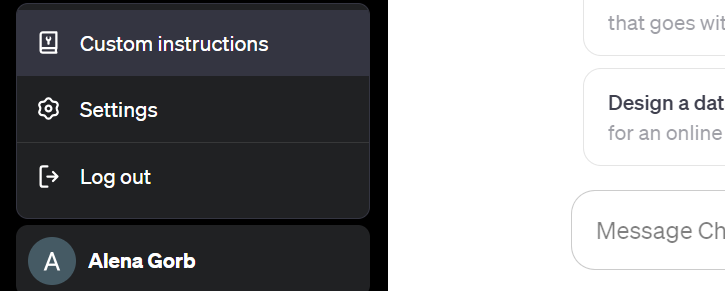
1. Click on your account name in the bottom left-hand corner of the new chat window (after you’ve logged into your ChatGPT account), and then click on “Custom Instructions.”
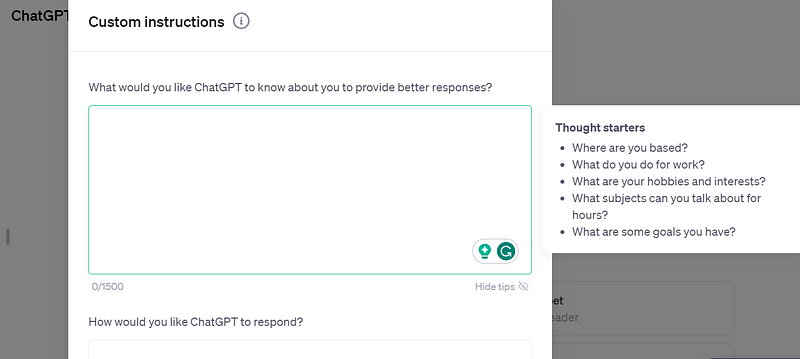
2. A new window will pop up, asking you to set your custom instructions, specifying who you are and what format you want the answers to be in. ChatGPT also gives you some useful tips on what you might want to include there:
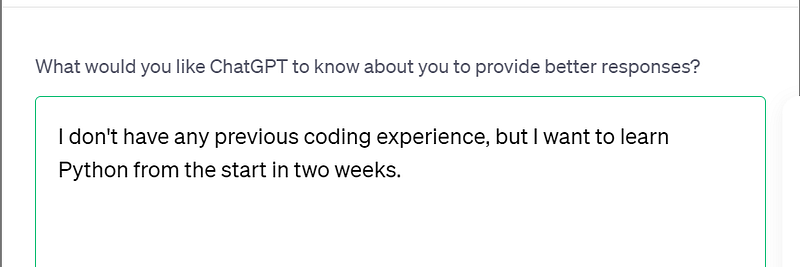
If you are a Python beginner, you might want to let ChatGPT know about it in the first section, saying something like this:
And then, in the format section, you can specify something like this:
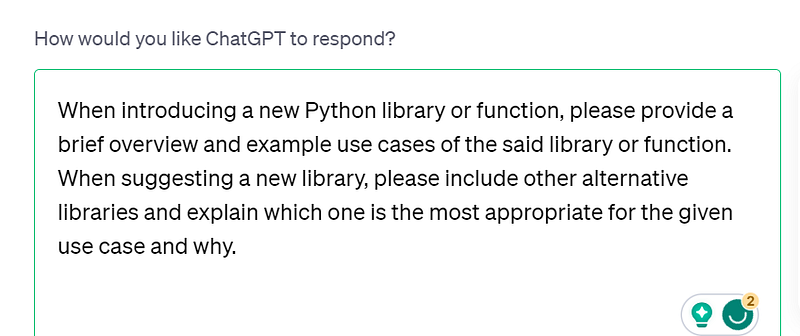
Now I do appreciate that, as a beginner, you might not know what Python libraries or functions are, but just trust me on this one! Also, by default, ChatGPT will try to explain the functions and libraries that it uses, so you might not even need to specify this part, but I just think it ensures more consistent responses, so why not?

3. Save your custom settings and decide whether you want them to be enabled for the other new chats or not:
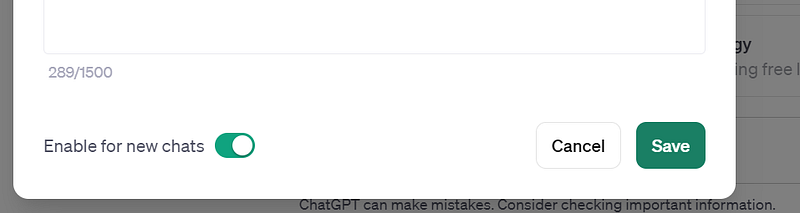
If you activate “Enable for new chats,” then every new chat after this one will have these same settings applied to it. If not, then only this current new chat will have the custom settings, and all other new chats will have the default settings or different custom settings applied to them. The choice is yours, but if you are using ChatGPT for things other than learning Python, you might want to restrict the custom settings to the current new chat only to avoid confusion.

2. Ask ChatGPT for a study plan and stick to it

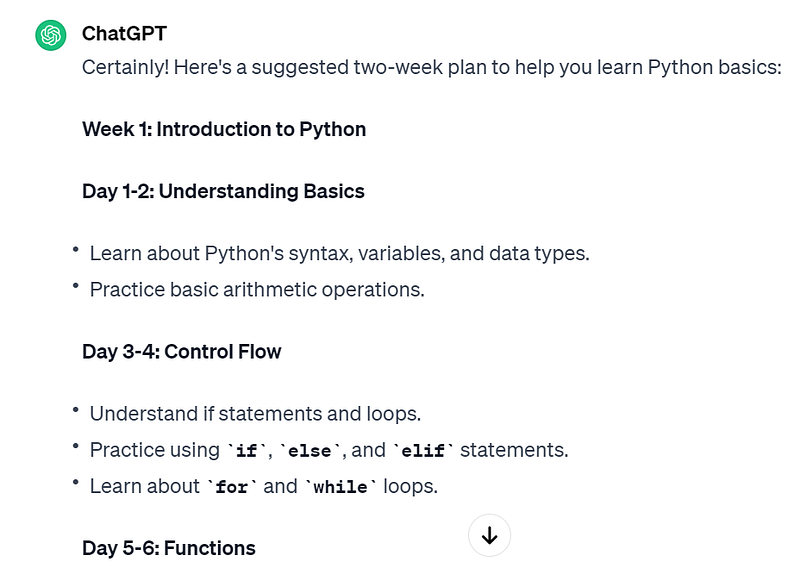
Now that you are all set, you can ask ChatGPT for a day-by-day study plan so you know which topics you want to cover on which day. If you also have a timeframe that you are working with, make sure to include that. So your first prompt might look something like this:

This should hopefully give you a decent roadmap as to what you should do first. Here’s what I got in response (part of it actually):
3. Ask ChatGPT to generate the content for the day

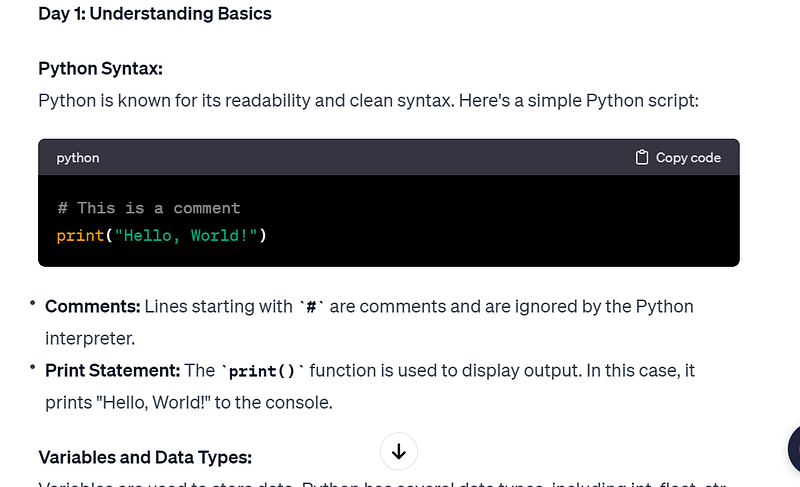
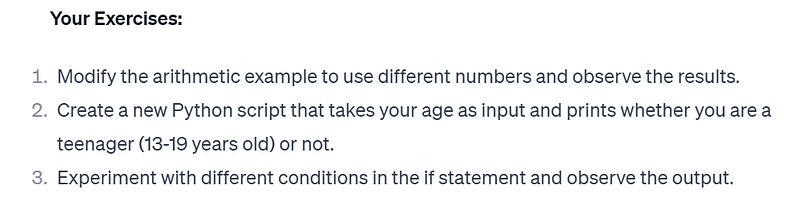
Now that you have a plan, you can ask ChatGPT to follow it and provide the content needed for you to understand the topic. Don’t forget to ask for code examples. You can copy and paste these code snippets into your favourite IDE (if you read my other blogs, you would know it’s Jupyter Notebook for me, but you can also use others or just ask ChatGPT for suggestions!). Also ask for some practice questions, because it is the best way to learn Python by just doing it! Here’s my prompt:

And here’s part of ChatGPT’s response:
4. Feed your code to ChatGPT for instant debugging and feedback

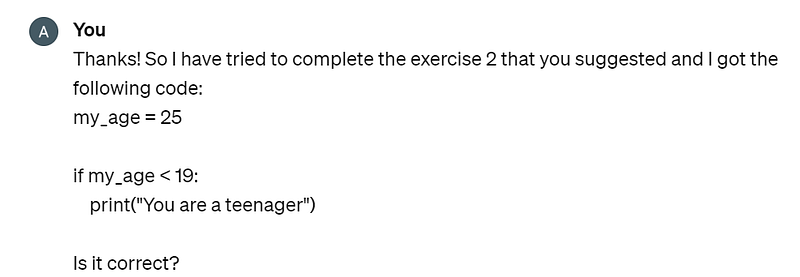
The great thing about ChatGPT is that it can actually check your code for you and quickly identify where the mistake is, so you can quickly see where you went wrong. In this example, I intentionally gave ChatGPT an incomplete code to see if it could correct it:
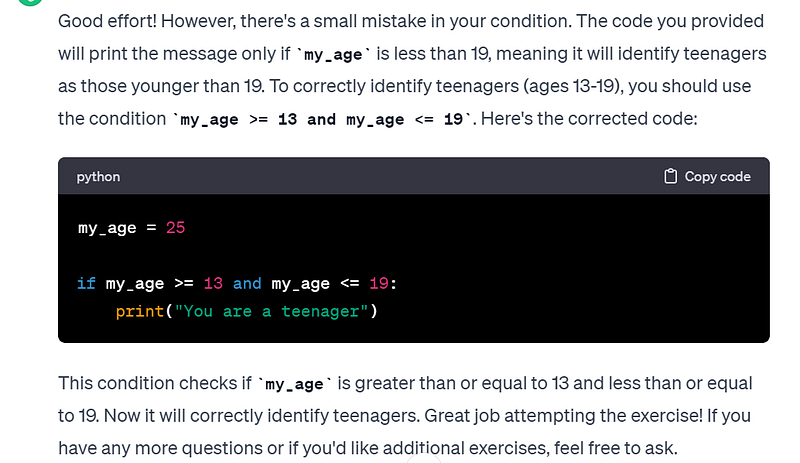
And here’s what it came back with (spoiler: it did identify the mistake correctly):
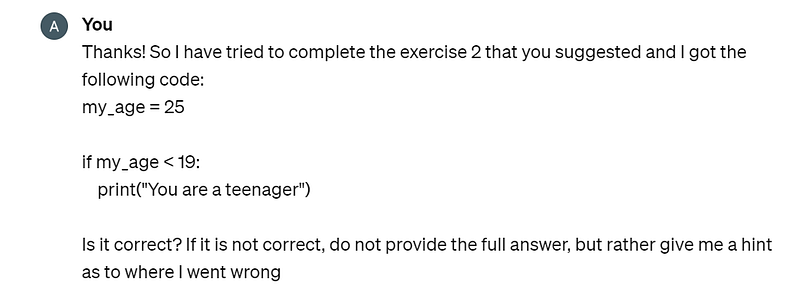
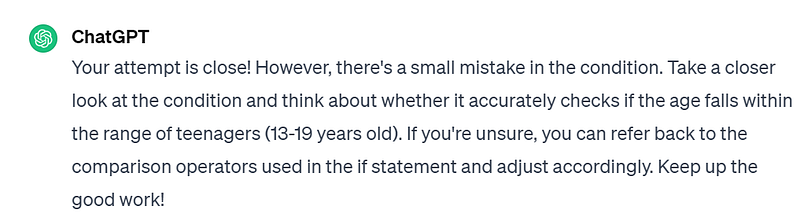
Now, if you are a beginner, you might not want to just be given an answer right away, but you might want some guidance as to where you might’ve gone wrong, so you can modify the prompt above to specify this:
And now you would get the response, which just guides you in the right direction without outright telling you what the answer is, which is perhaps more useful at the beginning:
5. Master new libraries to gain new skills with overviews

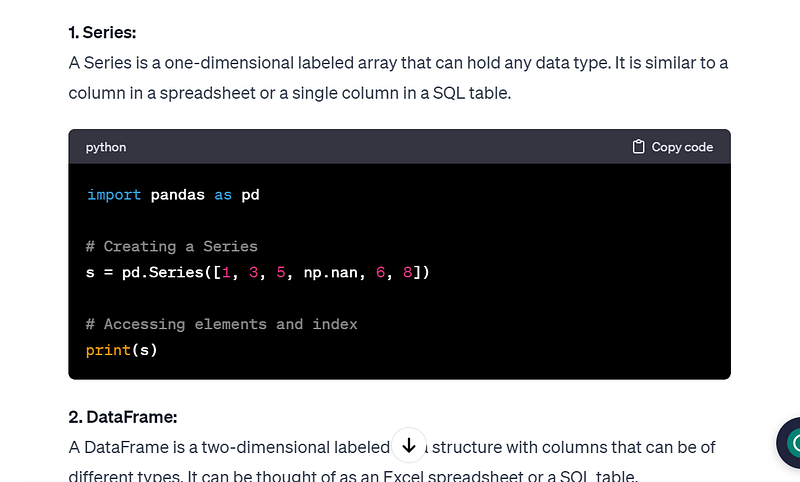
Once you’ve mastered the basics with the help of ChatGPT, you can now use it to quickly familiarise yourself with a new library or function, so you can quickly gain new, more specialised skills on top of your basic Python knowledge, be it data analysis, web design, or even machine learning. You can use the following prompt for a speedy intro:

And here’s a snippet of the output:
You can also ask ChatGPT for help with specific tasks, like how to web scrape a page with specific HTML code or how to extract a specific chunk of data from an Excel table, and also to check whether your code is correct or ask why your code is not doing quite what you want it to do; the possibilities are endless!

Now this is it for now, and if you enjoyed this blog, you might also find my generative AI chatbot comparison article interesting. And as always, let me know if you have any comments, suggestions, or ideas for future blogs. Follow and subscribe to my email list so you don’t miss when I post (which is usually once a week on Sundays)!

Stackademic

Thank you for reading until the end. Before you go:

Python
ChatGPT
Prompt Engineering
Beginner Coding
Generative Ai Tools
Recommended from ReadMedium