
Which Generative AI Is the Best? ChatGPT vs. Bard vs. Pi vs. Claude
If you have read the news for the past year, you have almost certainly heard of OpenAI’s large language model (LLM) called ChatGPT. For those not familiar, simply put, LLM is a type of artificial intelligence (AI) model trained on large amounts of text data. LLM essentially learns how to generate human-like text by predicting which word is most likely to follow the previous one (the actual stats is way more complex than this, but that’s the gist).
ChatGPT broke records for the fastest-growing user base, with 180M+ people using it. Pretty crazy, right? But did you know that ChatGPT is not the only freely available generative AI out there? In March 2023, Google released its own LLM called Bard AI. A few other companies and AI start-ups released theirs as well, but today we will discuss two: Infection’s Pi AI and Anthropic’s Claude.
Just a note before we start: I’m not an AI developer or expert, so I will be comparing the four chatbots from the user perspective rather than their technical specifications (e.g., training methodology, training data, etc.) Also, I will only be considering publicly available free versions of the chatbots, so bear in mind that paid versions could have a lot more functionality available. Finally, all assessments represent my opinions and experience with the aforementioned AIs, so please let me know your thoughts and whether you agree in the comments (but be nice!) Now, with the disclaimers out of the way, let’s get into the discussion itself!
OpenAI’s ChatGPT (plus Microsoft Copilot)
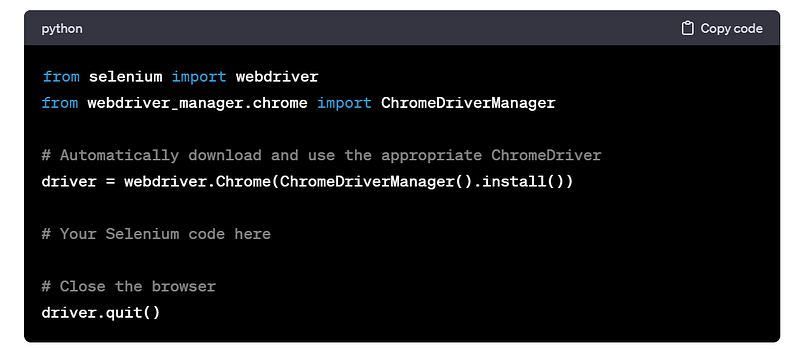
I might be biased here, but ChatGPT was my first experience with generative AI, so it will always be one of my favourites. It usually understands the prompts that are not very clear and generates comprehensive answers to them. One of the features that I use the most, as I previously mentioned, is help with coding problems. Here’s an example of ChatGPT helping me debug my web scraper:
Aside from coding, ChatGPT could do all sorts of other things: solve math problems, write essays on a given topic, summarise large amounts of text, generate custom advice for your problem, and more. ChatGPT can also present data in different formats, including tables, JSON, HTML, and other formats. Each chat is also automatically named (although you can change the name if you like) and stored, so you can come back to it if you want.
What is quite remarkable about ChatGPT is the relatively low rate of AI hallucinations (a fancy term for when AI presents false information as facts in its answer), at least in my experience. This does require the user to input well-designed prompts into it, but overall, I rarely notice mistakes from ChatGPT, and if I do, it usually corrects itself when I ask it to.
The free version of ChatGPT is, however, limited to the data up to January 2022 (in my latest version), which means that ChatGPT can’t comment on or analyse current affairs, which is especially useful for my job as a pharma consultant. Moreover, ChatGPT does not output or accept as input images, tables, or other files. I believe this is not the case for ChatGPT 4, which is connected to the internet and can deal with different input and output data formats, but you have to pay for it.
A way around the need for a paid version would be a tool that I discovered recently called Microsoft Copilot. It is currently available in a preview version to Microsoft 365 users (if admin permissions allow). Copilot runs on ChatGPT 3.5 (the same version as free ChatGPT), but it is connected to the internet and can generate images using another tool from OpenAI, DALL-E 2. For now, however, Copilot is limited to 30 responses per conversation, but this will likely change in the future. Copilot will allow users to essentially use ChatGPT capabilities within Microsoft apps, which would be pretty convenient if you ask me!
Google’s Bard AI
By and large, I would say that Bard is mostly on par with ChatGPT in terms of its different capabilities, like coding help, math problems, data analysis and summaries, etc. However, it’s one big advantage is that it’s connected to the internet. Ironically enough, I found this to be its biggest limitation too. Let me explain. On one hand, having Bard connected to the internet allows me to get answers to the things that are happening in real-time.
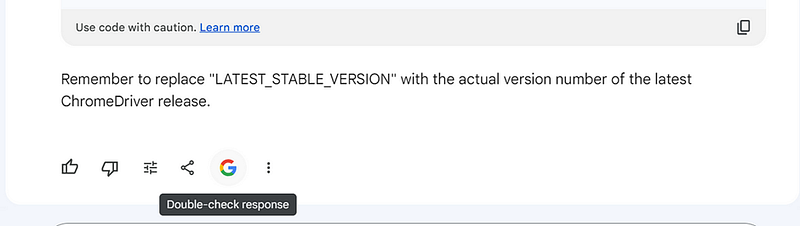
On the other hand, Bard rarely seems to generate correct answers when asked about current affairs (i.e., displays a lot of AI hallucinations), so it is not awfully helpful in this regard. Bard does have a feature that allows you to use Google search to verify Bard’s answers for correctness, although I found that this feature isn’t very helpful when Google can’t find exact matches to Bard’s answers (Google leaves most of the answer unevaluated).
Unlike ChatGPT, Bard also seemed to struggle to process large amounts of text data, giving me an unsatisfactory “I couldn’t complete your request. Try submitting your prompt again,” three times in a row.
Overall, I think Bard is a decent option to have if you need to analyze current news, but I would definitely not rely on it for this. In other aspects, it is pretty interchangeable with ChatGPT, although I found a lower rate of AI hallucinations with the latter.
Inflection’s Pi AI
As far as chatbots go, Pi is the most “conversational” AI of the four. And I mean emoji-at-the-end-of-every-paragraph kind of conversational! But it is the most entertaining one, in my opinion, as well.
Unlike ChatGPT or Bard, Pi is not the most proficient when it comes to helping with code or summarising data in different output formats, but it is the only one that can actually talk to you (as in through your computer’s speakers). Pi also has a 1000-character limit for its prompts, so it cannot analyze large amounts of data at once. Annoyingly, it only allows you to have a single long conversation (no separate chats), which means that finding older responses could be quite a challenge.
Nevertheless, I found Pi to be the most engaging when it comes to conversations on life or career topics. ChatGPT and Bard would most certainly give you quite a formal answer and then send you to a qualified professional (which, don’t get me wrong, is great advice!) But if you are just looking for a way to vent and feel understood, Pi will be your friend! However, always remember that Pi is just an AI chatbot, so please seek professional help for any serious issues you might have.
Anthropic’s Claude AI
I first heard about Claude from a friend and decided to give it a try. Claude can answer simple questions from a text-based prompt, but this seems to be the extent of its capabilities. I wasn’t able to get Claude to do code generation, complex math problems, analyze large amounts of data, or summarise data into different output formats. It is also not connected to the internet or able to interact with images or tables (despite having a button in the prompt to submit different file types). Based on these considerations, I would say that Claude is perhaps the least advanced of the four chatbots, and because the other three offer a lot more capabilities, I personally rarely use Claude, although I imagine it will get better in future iterations.
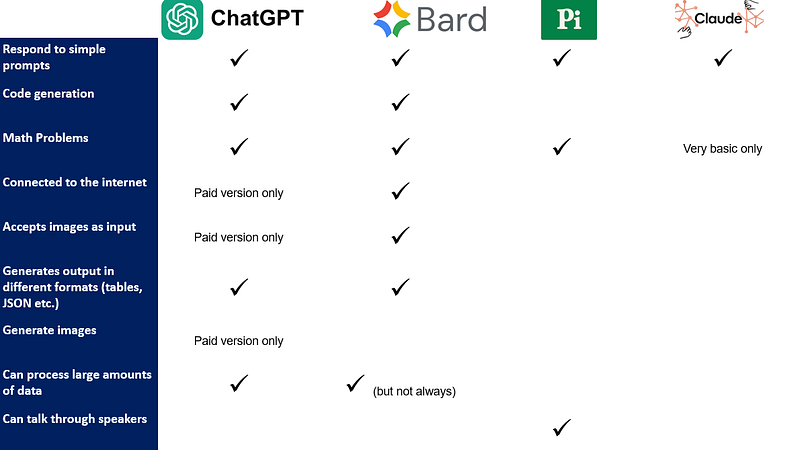
To sum up, all four chatbots have their merits and their limitations, so I think it largely depends on the task at hand which one is actually the “best”. I created a quick summary table to highlight which chatbot has which capabilities (listing the ones I thought were most helpful):
As always, let me know what you think about these, what your experience with them was, and if you are using any other AI in your daily life.
Stackademic
Thank you for reading until the end. Before you go:
- Please consider clapping and following the writer! 👏
- Follow us on Twitter(X), LinkedIn, and YouTube.
- Visit Stackademic.com to find out more about how we are democratizing free programming education around the world.


