
Layering Book: Build and Use a Second Brain
Layering and the Second Brain
This chapter considers the concept of a Second Brain. As an introduction, I want to identify two origin stories to serve as background. The first comes from my background experiencing the early days when personal computers were newly available. I was reading about visionaries imagining the eventual potential of such tools to augment human intelligence (Engelbart, 1962). Using a computer to support and extend the capabilities of human cognition seemed such a powerful idea. The second source came far more recently and involved books by Tiago Forte titled Building a Second Brain (Forte, 2022) and Sonke Ahrens titled How to Take Smart Notes (Ahrens, 2017). Augmenting human intelligence and building a second brain seemed to be based on a similar goal, but were imagined by different individuals starting with different tools.
I associate the timeline of innovators interested in augmenting human intelligence as beginning with Vannevar Bush. Bush was an American engineer and academic appointed to coordinate and oversee scientists’ contributions during the Second World War. His personal experiences allowed him to appreciate the tremendous challenge of what we might now call knowledge work as scientists and engineers reviewed the volumes of background material that might inform their work. He imagined a technological solution called a Memex that might support them in their work. An article in the Atlantic Monthly in 1945 titled “As we may think” described this imaginary device and how it would work. Although the Memex was never built, its conceptual framework laid the groundwork for how digital tools could extend human memory, manage information, and facilitate creative thinking.
The Memex or Memory Extender was proposed based on the hardware of that time. Content was to be stored on microfilm and the text and images projected on viewing screens. As content relevant to a given inquiry was located it could be cross-referenced with information on another screen and the connection stored. I have used microfilm, but am unclear on exactly how such connections were imagined to be created and stored. Bush described the creation of an associative trail among locations that could not only be stored for personal use but also shared with others who might be interested in the connections that have been discovered. It was also imagined that there could be a mechanism for printing or reproducing on new film the newly linked collection of information.
A full reading of “As we may think” is really necessary to create a full personal representation of what Bush imagined, but I hope I have included enough to propose some parallels to the now very real possibility of creating your own second brain.
- Personal use tools — The Memex imagined a user able to break from the fixed nature of the original content and create something built from that content suited to addressing a personal goal.
- Externalized knowledge storage — The Memex was envisioned as an electromechanical device that would allow individuals to store all their books, records, and communications, effectively acting as an external repository of knowledge. It was an improvement over the expectation that the user would have to locate and bring together these original resources and it allowed the addition of personal summaries and structure.
- Associative linking — Bush’s idea of associative trails, where users could create and follow links between related pieces of information, predated the concept of hypertext. The opportunity to link personal notes is also a common feature of modern Second Brain tools.
- Information retrieval and expansion — The Memex was designed as a memory enhancement for fast retrieval of information, but it was more than that. It was a system that allowed exploration and construction.
The recent origin stories for Second Brain tools and techniques (e.g., Ahrens, 2017; Forte, 2022) point to a different history. Common here are links to the following:
- Commonplace Books: The practice of keeping a commonplace book, or a notebook for collecting quotes, ideas, and information, dates back to ancient times. These books served as a way to store and organize knowledge for personal use.
- Zettelkasten: The Zettelkasten system, developed by German sociologist Niklas Luhmann, is a method for organizing and retrieving notes and ideas on individual cards or slips of paper. This system emphasizes the interconnectedness of ideas and the ability to quickly access and link information.
These systems for organization and abstraction of content from other sources relied on traditional pen and paper tools.
Luhmann’s original Zettelkasten was a card-based note-taking system that included a method for connecting or linking notes making use of a system for coding individual paper note slips and for organizing notes within storage boxes. The number and letter tag assigned to each note and the placement of notes within the boxes established relationships among notes. Index notes also indicated multiple notes with identifying tags on a given topic. Luhmann was a prolific academic writer and differentiated the feeding and care of his Zettelkasten from writing in that the Zettelkasten was a resource he would interact with to gain insights that would inform what he wrote. Working with the existing content of the zettels (notes) was an ongoing process whether or not the immediate goal was to write. Working with the Zettelkasten involved reminding Luhmann of past concepts and ideas, reminding him of previously identified connections, and offering the opportunity to extend existing ideas into new areas sometimes saved as new cards and links.
Ahrens (2017) built his recent model of different types of notes and the emphasis on creating links among notes based on Luhmann. Some proponents have adapted the system Ahrens describes to digital technology tools and other recent advocates have insisted on the continued use of pen and paper. The reluctance to take advantage of technology some propose is related to earlier references I have made in earlier chapters to the keyboarding versus handwriting controversy (e.g., Mueller & Oppenheimer, 2014). While I think it important to acknowledge this controversy, I see too many advantages in the use of technology for the purposes promoted here to do anything more than to make sure readers are aware of this issue.
An important insight to be gleaned from these historical antecedents is that of working with stored content repeatedly reviewing, rephrasing, and connecting what is stored. It is the work done within the stored content that extends the benefit of storage and retrieval to generate new insights, critical analysis, and application. This is what Bush may have hoped for and tried to express in his title — As we may think.
Present technology tools to implement the concept of a Second Brain
To review, the concept of a “second brain” refers to the use of technology tools and systems to extend and enhance our cognitive abilities. The notion of a second brain is rooted in the acknowledgment that our cognitive capabilities, while remarkable, have inherent limitations. We can only attend to a limited amount of information at any given time, and our ability to multitask and juggle complex tasks is finite. We learn things at one time we cannot recall at another even though the information we want still exists in mental storage. By leveraging technology tools, we can effectively offload some of the burdens on our brains. We can apply external tools to supplement our brains’ natural capacities for information storage, processing, and retrieval. Storage and retrieval issues seem obvious. We have good ideas that evaporate without storage. We have great stored ideas that we cannot retrieve when potentially useful. External mechanisms for storage and retrieval making use of pen and paper have been helpful for generations. Technology can improve both storage capacity, storage and retrieval speed, and search success.
We are already used to applying technology to search online for what we want to know and to the basic use of storage and retrieval focused on content we have created. However, our cognitive capabilities extend to other important capabilities. We might use the word thinking to describe our capabilities in understanding what we encounter and build from the combination of new inputs and stored information. How external devices and activities might be used to improve the processes of thinking may be less obvious. Maybe not. The potential of external tasks to guide and activate productive internal behaviors was used heavily in our justification for the layered activities we identified in earlier chapters. Some of the activities applied in working with a second brain work in a similar way. Again, developers identify limitations and challenges of cognition and then create external mechanisms that can compensate or augment.
Beyond storage and retrieval, what are some of our other limitations? Well, we have limited space (what we can hold in awareness also called working memory), our awareness has limited duration (how long something stays in our awareness before it is forgotten), and we can only do so much mental work at any point in time (cognitive load). Offloading and alternative representations sometimes offer workarounds. For example, if we can represent our thinking externally (e.g., visually), we can augment what our capacity for internal representation can hold and we are in less danger of losing useful thoughts when the thoughts are not the focus of our attention. External tasks can also encourage, maybe even impose, procedural structures on our thinking. Identifying connections, organization, summarization, and attempted retrieval are prompted tasks that improve understanding and transfer.
In summary, the concept of a second brain revolves around the idea of using technology tools and systems to extend and augment our brains’ capabilities. By externalizing information and leveraging digital tools, we can alleviate cognitive load, enhance productivity, and foster a more efficient and organized approach to managing our thoughts, tasks, and knowledge.
CODE — Second Brain Processes At the Macro Level
Forte (2022) proposed the acronym CODE to describe the major processing distinctions involved in the utilization of a second brain. The acronym stands for Capture, Organize, Distill, and Express. These components while adaptable to individual preferences and implemented using different collections of digital tools, provide a universal framework for thinking about activities that guide the organization, retrieval, and utilization of knowledge.
Capture: The First Step to creating an external representation of personal knowledge
The journey of creating a second brain begins with Capture, the practice of consistently collecting relevant information, ideas, and insights as you encounter them. In the digital age, we’re bombarded with data from various sources: academic research, online courses, meetings, conversations, and everyday life experiences. The principle of Capture is about ensuring that valuable pieces of information we identify in these sources are not lost. Capture is about creating a habit of recording thoughts, questions, quotes, and ideas, freeing our minds from the pressure of remembering them and laying the groundwork for a rich repository of knowledge. Note-taking and highlighting would be layered capabilities already discussed that would qualify as Capture. The key is to make the Capture process as frictionless as possible, ensuring that it becomes a natural part of your daily routine.
Organize: Creating Structure and Accessibility
With a wealth of information captured, the next step is to Organize it into a coherent system that makes retrieval straightforward and intuitive. Our discussion of layering tools to this point has proposed little that would qualify as organization. With digital tools, organization is about categorizing, tagging, and structuring your notes and information in a way that reflects your thinking patterns and priorities. An effective organization system is not static; it evolves with your changing needs and interests, allowing for flexibility and scalability. With Captured information, you can revisit what has been stored to both organize and reorganize
The goal of Organization is to reduce friction in finding information when you need it, thereby enhancing your ability to draw connections and insights across different domains. The processes of organization also involve a type of meaning-making as organization involves abstraction/summarization (tags, categorization) and relationships (organization).
Distill: Enhancing Understanding and Retention
Distillation is the process of synthesizing and summarizing the information you’ve captured and organized. It’s about extracting the essence from the plethora of data, focusing on insights, ideas, and knowledge that are most valuable and relevant to your goals. This principle encourages active engagement with the information, prompting you to review, reflect, and condense your notes into more digestible, memorable formats. It also connects with and depends on the use of existing knowledge.
Distilling can take various forms, from creating summaries and mind maps to developing conceptual frameworks or even annotating texts with personal insights. The distillation process not only aids in retention but also in deepening your understanding of the subjects at hand, making it easier to apply this knowledge creatively in future projects.
Express: Sharing Knowledge and Creating Output
The final principle, Express, is about putting your accumulated knowledge into action. This could mean writing a paper, launching a project, delivering a presentation, or engaging in discussions. The Second Brain supports this process by serving as a wellspring of ideas, facts, and insights that can be drawn upon to support your creative and scholarly endeavors. With those who use their Second Brain as part of self-directed learning, expression often involves multiple applications that may occur over several years.
Expression is the culmination of the second brain’s cycle, where the value of captured, organized, and distilled information is realized. By articulating your thoughts and ideas, you not only contribute to your fields of interest but also reinforce your own learning and potentially inspiring others.
Getting to the level of specific tools and activities
In the construction of a second brain, the selection of tools and techniques plays a critical role. This arsenal of digital and cognitive strategies is what brings the concept to life, transforming abstract principles into a tangible, functional system. With the right tools, capturing, organizing, distilling, and expressing information becomes not just manageable but a seamless part of daily life.
The digital tools offered by companies and open-source projects continue to proliferate and improve. There is some danger in being too specific at this time because offerings come and go and change in important ways such as cost and capability. There is also a danger of attempting to be complete in providing options as an approach such as that would bloat this chapter to the size of a separate book. In the following content, I will identify some key tools that have gained popularity and then eventually explore one tool in some detail. I hope from this approach a reader will be able to generalize tool categories and look for specific functions when exploring personal choices. As I have reviewed the many tools I have explored over the years, I have realized that making clean distinctions is difficult as functions sometimes overlap categories and sometimes do not. What follows is the categorization system I have developed.
Embedded note-taking and highlighting (Kindle, Highlights, Glasp)
I intend this category of tools to represent the initial input phase during which external content and experiences provide concepts and ideas someone building a Second Brain decides to save. While any experience can provide something that could be valuable to save, the inputs considered here will include the digital sources of ebooks, pdfs, and web pages. Notes and images can also be added to a Second Brain directly without going through the sequence of categories I identify here. Again, there are multiple options for each category, but I will provide one as an example.
Ebooks — A large proportion of the recent books are available as ebooks. Devices and applications are available to read, highlight, and annotate these books. Amazon’s Kindle, available as both a device and an app running on most computers, laptops, and phones has a large share of this market. The capability of such devices relevant here is the capacity to export highlights and notes generated while reading Kindle books. The process of exporting these layered additions will be considered in more detail in the next section.
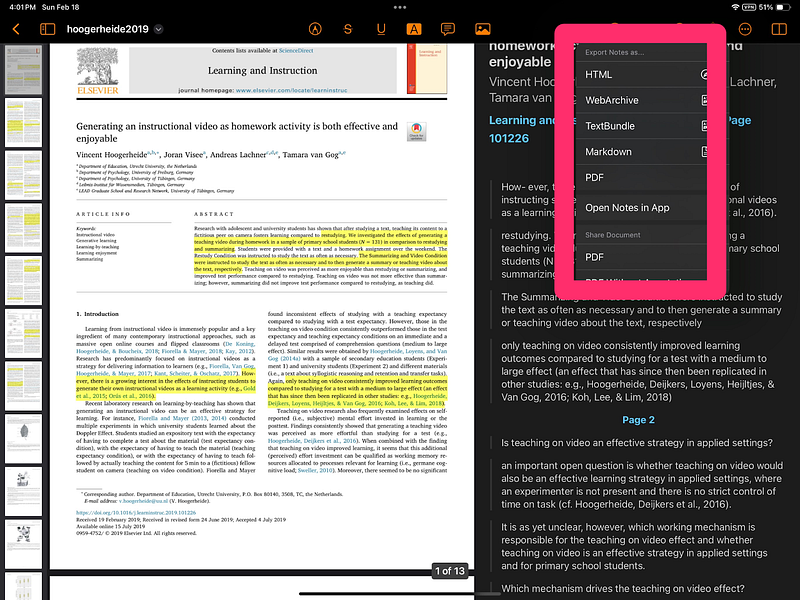
PDF Readers — How frequently an individual relies on pdfs as an information source varies greatly. For those in my type of work, scholarly journal articles are probably a more important source than books. Others may encounter far fewer PDFs in daily life. Highlights is one example of a specialized application for reading and annotating PDFs. I think I can explain the basics of this PDF reader in one screen capture. What you see in this image are three columns. The first column allows the selection of individual pages from a pdf. The middle column shows the content of the PDF at a readable size and allows highlighting and note-taking. The rightmost column shows the highlights and notes isolated from the original text. Overlaid on this column are the contents of the dropdown menu allowing the exportation of the notes and highlights in different formats. It is this exported content or specific entries from this content that would likely be what is stored in a Second Brain. The content to be exported includes citation data so that the source of the notes and highlights is retained.
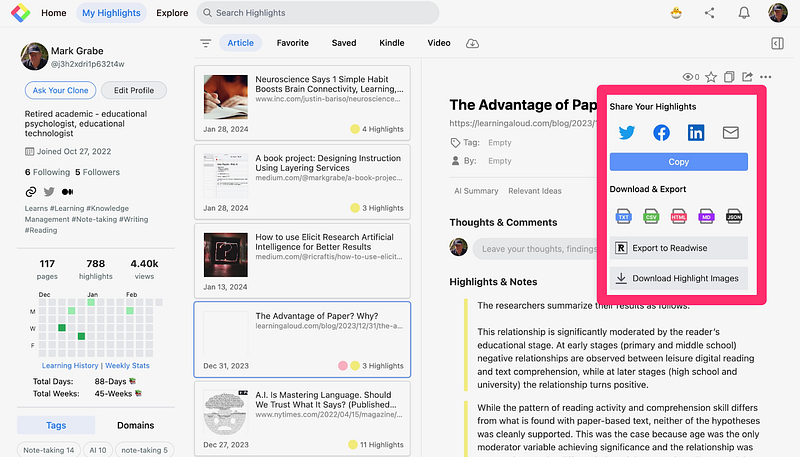
Web Pages — Several extensions are available allowing the user of a browser to highlight, annotate, and export content from web pages while it is displayed within that browser. Extensions are add-ons one installs in a browser and that may or may not be connected to a separate online service that charges a fee for use. The example of this category I include here is called Glasp. This service is presently free, but very possibly will charge for certain capabilities in the future.
The image that follows may seem very similar to the image I included for Highlights. This image a what a user sees when connecting to the Glasp site (the dashboard), after using the Glasp extension to highlight and annotate web pages within a browser. The middle column here stores a link back to the annotated web page and opens the highlights and notes stored from that site (right-hand column). The extracted content can then be exported for use elsewhere.
Transition Storage and extraction (Readwise, Kindle Highlights)
I considered not including this category, but decided to add it because some are willing to end their development of a second brain at this point. The two examples here offer a way to store the exported content from at least some of the extraction tools that make up the first category I identified. Some basic add-ons such as tags may be available. I think of this category as an intermediary between the extraction tools and the full-featured Second Brain environments that I include in the third category. I will explain why this is the case shortly.
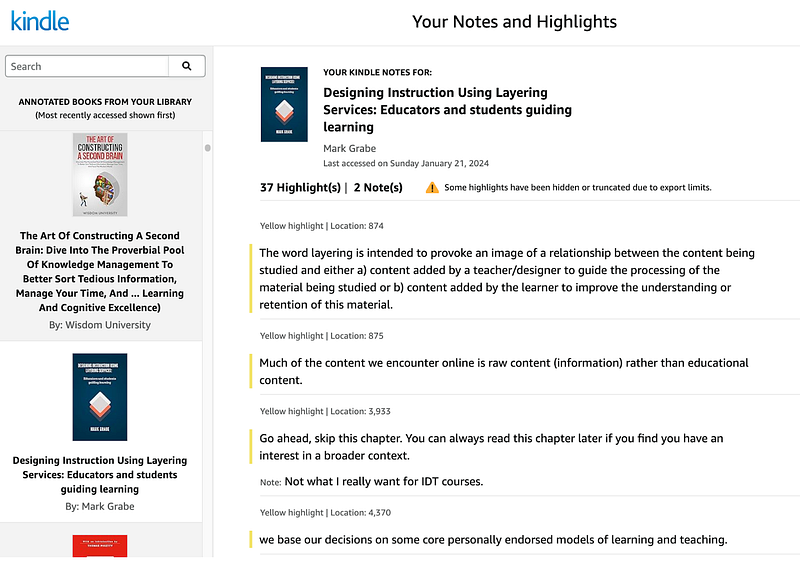
Kindle notebook — Kindle users may not be aware that Amazon offers this capability. Highlights and notes a user has added to individual Kindle books are all available online. The following image shows what my collection looks like. From this site, you can review your notes and from a single note connect back to the location of that note or highlight in your Kindle book.
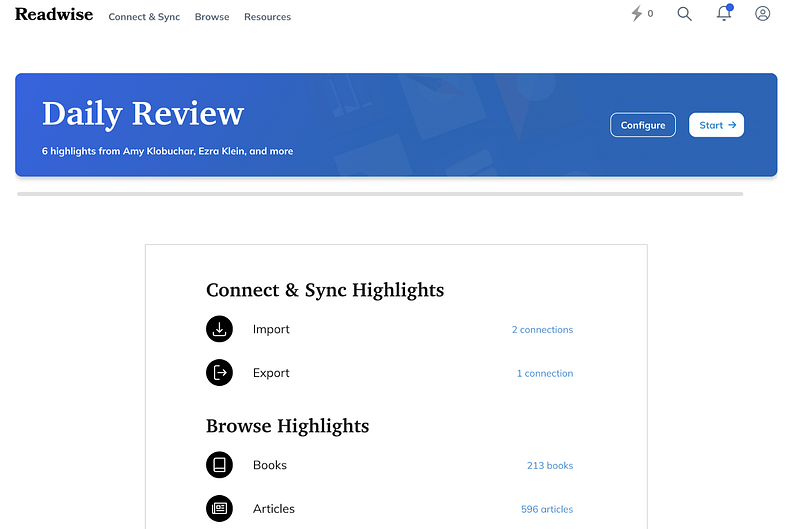
Readwise — Readwise works in a similar way to the Kindle notebook but it collects the notes and highlights from a larger collection of tools. For example, my present collection includes notes and highlights from over 200 books and nearly 600 articles. Readwise allows the addition of notes and tags to the content it imports. A useful feature is that more sophisticated Second Brain services will automatically collect the content stored in Readwise making Readwise a useful intermediary saving the need to manually export and then import highlights and notes each time a new book or article has been studied. All of my notes and highlights collected by Readwise are automatically forwarded to the application I describe in the next section.
Storage and processing (Evernote, Notion, Obsidian, Mem.ai):
Services within this category provide the setting within which information is retained and reworked over time. Rather than expanding on an individual service at this point, the following material first identifies the typical techniques a service makes available. An example will then be explored in depth.
Techniques which enhance the value of a Second Brain
Several techniques enhance the functionality and efficiency of a Aecond Brain.
Regular Review and Maintenance: Second Brain advocates suggest that for optimal value users should explore and work with stored content periodically. This practice is consistent with what has been previously identified as retrieval practice in that it activates the memories of the user and it provides an opportunity within the Second Brain to establish new connections. Some services include a feature that will randomly surface a stored note each day.
Interlinking: Make the most of digital tools that allow for the linking of notes and ideas. This technique creates a web of knowledge making it easier to draw connections and generate new insights. Some services will suggest related material based on automatic search processes.
Tags and Metadata: A consistent tagging system and the potential for the attachment of metadata to notes can significantly enhance searchability and retrieval. The effort to categorize information can contribute to the quick location of specific notes, references, or resources when you need them. The process of adding tags also engages cognitive processing
Adoption of a Hierarchical Structure: While flexibility is a key feature of any second brain, establishing a basic hierarchical structure for notes and files can aid in navigation and organization. This could mean organizing information by subjects, projects, or any other system that matches personal goals.
Note types: Notes can take multiple formats for multiple purposes. My personal implementation includes notes that contain all of the highlights and annotates exported from individual books and articles and notes that attempt to concisely store a single idea or concept. Some who offer advice on implementing a Second Brain (Ahrens, 2017; Forte, 2022) suggest notes might be differentiated as appropriate to an immediate project or stored as part of an archive of potentially useful ideas. Notes might be stored while reading and later refined for long-term storage. For extended storage, learning to write a note that contains sufficient context such that the note does not depend on the source within which the idea was originally embedded for understanding is an important guideline. Will a given note be meaningful to you or another individual with relevant background a year from now?
Obsidian — An example of a Second Brain
I am using Obsidian as an extended example because I have the most experience with this tool and because it is a free resource. Extensions may require a payment and I have added several extensions as I have explored the value of additional capabilities.
Obsidian was developed as a tool intended for use on a personal device. I save the content of my Obsidian implementation using cloud storage which mimics an external hard drive. Because I can access this cloud storage from multiple devices, I can access my implementation as if it were an Internet-based system. This is not recommended by some Obsidian experts because of data vulnerabilities, but I also back up my content from time to time as a safety concession. Other Second Brain options are based on online services often with a subscription fee. The issues here are complex. The approach I use allows me complete control of my own data but costs about the same because I pay for online storage and an added AI capability. I use a second service that requires a subscription but comes with ample storage and embedded AI capability. I include a short video of this second service when this chapter concludes with a discussion of AI applied within a Second Brain.
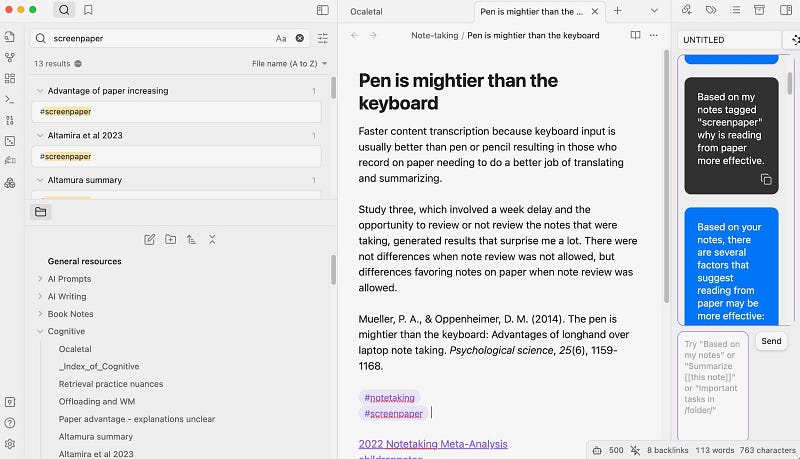
The following image shows one arrangement of the Obsidian tools. At first glance, it may seem similar to the tools I have used as examples of the other stages of the content storage and exploration process I have outlined. Take a look at the middle panel of this display. Here you will see an example of my effort to produce a summary note. It includes a citation for the source because I would want the citation should I use that note in writing something on a related topic. The note itself is intended to summarize an idea in a way I thought I could understand at some future date. Below the note and citation, you will first see tags and then links to other notes. Both tags and links should be updated as your review notes and are aware of new relevant connections. When you create a link, Obsidian also notes the backlink. So if Note A is linked to Note B, Note B will not show a link to Note A, but Obsidian will note this backlink and uses it in searches.
A couple of additional comments on the image that follows. To the very left of the left-most column you should see some icons. These icos activate various additional capabilities. One generates the cloud map showing connections among all of your notes. Another, the die, will reveal a note selected at random. Other icons allow for the addition of plugins, setting up and accessing other vaults (note collections), and access to help.
The main areas of this column are devoted to search (top) and the hierarchical organization of the notes previously created (bottom).
The right-hand column in this display shows an AI tool added as a plugin. The role of AI as an addition to a Second Brain tool allows for chats with the content of stored notes. Within this column, you may be able to read a prompt I have given the AI tool and the response to this prompt. This is an interesting use of AI and I will describe this potential at the conclusion of this chapter.
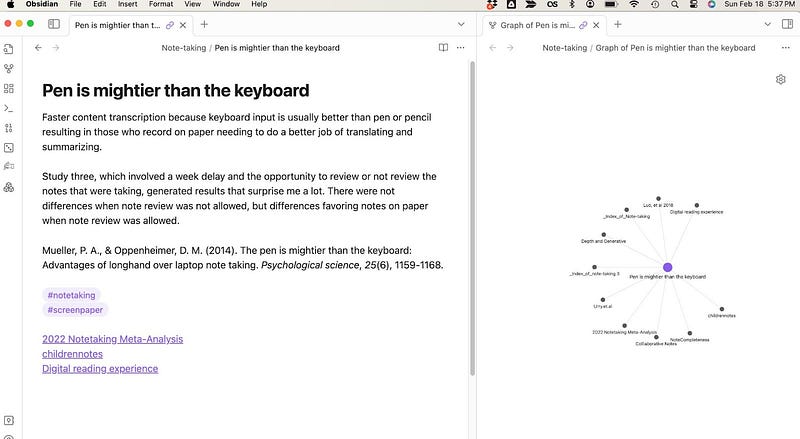
The following image shows a little different configuration of panels. The system is easy to adjust to momentary interests. In this case, the right panel shows connections to the selected note (left panel). The idea is that the dot designated a related note can then be selected for display.
Before I continue, I must emphasize a point I have tried to make before. The goal of a Second Brain environment is to provide a space for thinking and exploration. The environment is intended to be visited regularly and explored even when there is no specific purpose in mind.
AI Applied within a Second Brain
Here is a new phrase to add to your repertoire — retrieval generated augmentation (RAG — yes I know the letters are not in the correct order). I admit when describing such a system I am working at the edge of my technological understanding. RAG works in two stages. The system first retrieves information from a designated source and then uses generative AI to take some requested action using this retrieved information. So, as I understand an important difference, you can interact with a large language model based on the massive corpus of content on which that model was trained or you can designate specific content to which the generative language capabilities of that model will be applied. This description seems at least to be descriptive. Among the benefits of focusing AI on designated content is a reduction in the frequency of hallucinations. Aside from my own applications, the role for retrieval generated augmentation I envision is as an educational tutor or study buddy. Imagine using AI to interact with a chapter from an assigned textbook.
The tool I am using in the following video is Mem.ai. It requires a subscription, but the AI capabilities are part of what you pay for. You should note similarities to Obsidian as you view this short demonstration.
Summary
The concept of a Second Brain and the tools to put this concept into practice is based on many of the same external activities influencing cognitive behavior arguments I have made explaining the benefit of layering activities in earlier chapters. I have included this content mostly because it addresses the needs of advanced (college) students and self-directed learners. The tools described here are only likely to become more powerful as advances are added.