Laravel 5.5 package development from scratch
First of all I want to thank Cristian Tăbăcitu for his cool article about package development.My article is just an extension of his article. Here I will cover all steps of creating, maintaining and using packages. I will be using my laravel-boolean-softdeletes package as an example.
Step 1. Create new project
I prefer using Laravel installer. You can read more about installation here: https://laravel.com/docs/5.5/installation#installing-laravel
laravel new laravel-boolean-softdeletesGenerate unique APP_KEY
php artisan key:generateI prefer using sqlite for testing and package development. Adjust your.env file
DB_CONNECTION=sqlite
DB_DATABASE=/Users/ivan/code/packages/laravel-boolean-softdeletes/database/database.sqlite
Then lets create our package skeleton. We will be using CLI tool. It will generate all necessary files
composer require jeroen-g/laravel-packagerThen you can run generation command. Webkid stands for vendor name(your personal namespace) and LaravelBooleanSoftdeletes as name of your project
php artisan packager:new Webkid LaravelBooleanSoftdeletes --iThen type information about your package and you. It should look like that
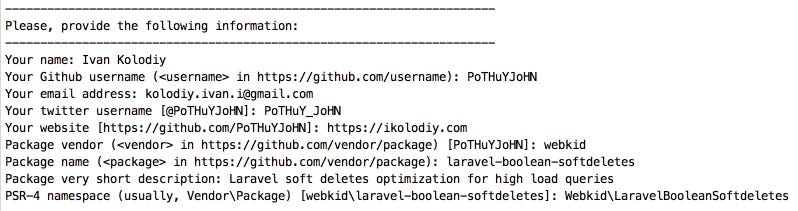
Now you have packages folder inside of your project with Webkid directory inside and all necessary files inside.
Also adjust your composer.json extra section to enable automatic package discovery.
"extra": {
    "laravel": {
        "providers": [
          "Webkid\\LaravelBooleanSoftdeletes\\LaravelBooleanSoftdeletesServiceProvider"
        ]
    }
},
Now you have to autoload your package into your test application. To do that you have to adjust your main project composer.json
"autoload": {
    "psr-4": {
        "Webkid\\LaravelBooleanSoftdeletes\\": "packages/Webkid/LaravelBooleanSoftdeletes/src",
        "App\\": "app/"
    }
},
Now you can create classes inside src folder, but they should have appropriate namespace Webkid\LaravelBooleanSoftdeletes.
For example: I have Commands folder and MigrateSoftDeletes.php class inside. So it should have such namespace:
namespace Webkid\LaravelBooleanSoftdeletes\Commands;If you want to use your migrations, routes, config files, views or even assets(js, css, images) you have to load them in your service provider. You can read about that in official documentation . I was using only commands in my example. Take a look at boot() method in my LaravelBooleanSoftdeletesServiceProvider:
public function boot()
{
    if ($this->app->runningInConsole()) {
        $this->commands([
            MigrateSoftDeletes::class
        ]);
    }
}
Also add your service provider to config/app.php file. It won’t be necessary later when your package will be auto loaded via composer and automatic package discovery.
'providers' => [
\Webkid\LaravelBooleanSoftdeletes\LaravelBooleanSoftdeletesServiceProvider::class
]
I was struggling how to structure my package for the first time. So I want to share my personal preferences with you. I prefer to put all php classes into src folder and all other files outside. Example:
- assets — for all css, js, images
- config — for all configuration files
- migrations — for all migrations
- resources — for all views, lang files etc.
- src — all php classes including main service provider
If you need some other package to be included you have to edit your package composer.json.
"require": {
    "cviebrock/eloquent-sluggable": "^4.3"
}
One more useful tip. When you are working with assets and you need to test changes simultaneously you can use symlink to avoid repeating vendor publish all the time. It will create symlink instead of copying files. It saved me a lot of time once:)
ln -s /path/to/your/project/webkid-cms/packages/webkid/cms/assets /path/to/your/project/webkid-cms/public/vendor/cmsThen update composer autoloading to add new files
composer dump-autoloadStep 2 Put your project on Github.
When you codebase is ready you can go to package folder and initialize repository
cd packages/Webkid/LaravelBooleanSoftdeletes
git init
git add .
git commit -m "first commit"
Create a new GitHub repository and add origin.
git remote add origin [email protected]:yourusername/yourrepository.git
git push -u origin master
git tag -a 1.0.0 -m "release: First version"
git push --tags
Step 3 Put your project on Packagist
First register on Packagist.org. I prefer using my github account for a sign up.
Then submit a new package using this url. Enter you package’s GitHub URL and click Check. If any errors occur, follow the onscreen instructions.
When you’re done, you’re taken to your package’s packagist page, where you’ll probably get a notice like this:
This package is not auto-updated. Please set up the GitHub Service Hook for Packagist so that it gets updated whenever you push!
Let’s take care of that. Get your API token on this page and go to your package’s GitHub page, in Settings / Webhooks & Services / Add a new service. Search for Packagist. Enter your username and the token and hit Submit. Your error in Packagist should dissapear in 5–10 minutes.
My congratulations, you have a working package online, you can now require it via composer
Step 5. Keep working on it from your vendor folder
If the application where you’ve developed the package had this sole purpose — to help you develop the package, you’re done.
But if you’ve developed the package in a bigger project, where you are now requiring it, you have a problem — your composer.json has both:
"require": {
  "webkid/laravel-boolean-softdeletes": "^1.0"
}
and
"autoload" : {
  "psr-4": {
    “Webkid\\LaravelBooleanSoftDeletes\\”: “packages/Webkid/LaravelBooleanSoftDeletes/src”
  }
},
Plus, the same files are in /packages/Webkid/LaravelBooleanSoftDeletes AND in /vendor/webkid/laravel-boolean-softdeletes.
Let’s solve this:
1. Delete the /packages/Webkid/LaravelBooleanSoftDeletes folder.
2. Delete the psr-4 mention in your root composer.json.
Done. Now you only have it in /vendor/ and that’s where your application is using it from. But now you can’t push updates, because /vendor/webkid/laravel-boolean-softdeletes doesn’t have your git repository, only the files. Let’s fix that.
3. Delete /vendor/webkid/laravel-boolean-softdeletes:
cd ../../..
rm -rf vendor/webkid/laravel-boolean-softdeletes
4. Run composer with the — prefer-source flag, so it clones the repo:
composer install --prefer-sourceThat’s it, you can now cd to /vendor/webkid/laravel-boolean-softdeletes, make your changes and push them, just like any other git repository.
Thank you for reading. I hope this article will be helpful for someone.
And lets contribute to open-source!
Materials:
- https://readmedium.com/creating-laravel-5-packages-for-dummies-ec6a4ded2e93
- https://laravel.com/docs/5.5/packages
- https://github.com/Jeroen-G/laravel-packager
Update:
For Laravel 7 you can follow this article


