
Lambda Function Policy With Cross-Account S3 Bucket Access
ACM.349 Modifying our generic App Policy to grant cross account access to a bucket when a Lambda function requires it
~~~~~~~~~~~~~~~~~~~~~~~~~~~~~~~~~~~~~~~~~~~~~~~~~~~~~~~
⚙️ Check out my series on Automating Cybersecurity Metrics | Code.
🔒 Related Stories: AWS Security | Lambda Security | S3
💻 Free Content on Jobs in Cybersecurity | ✉️ Sign up for the Email List
~~~~~~~~~~~~~~~~~~~~~~~~~~~~~~~~~~~~~~~~~~~~~~~~~~~~~~~
In the last post, I demonstrated how S3 access and logging works for local and remote cross-access for a user.
We can grant access to a role the same way, or we could create a cross-account role. The Lambda function already assumes a role so I’m just going to grant permission to access the bucket to the Lambda function.
As explained we don’t need console access. We only need the ListBucket and PutObject actions.
Now let’s consider our generic Lambda Role so far. We’re passing in a list of actions and a list of resources. As I explained in the last post, we may have to use a different ARN for the objects and the ListBucket action. You might even have a Lambda function that only has access to a specific folder in a bucket or that can write to one folder but only read from another.
What happens if we just add the read and write ARN for the two folders to our list of resources and the actions to our list of allowed actions?
We’d end up with a policy like this using our current template:
Actions:
  - s3:getObject
  - s3:putObject
  - s3:listBucket

Resources:
  - [s3arn]/readonyfolder
  - [s3arn]/writeonlyfolder
  - [s3arn]
That doesn’t work, does it? The Lambda function would have access to the read and write only folders for both reading and writing files.
How can we fix it? The same way I fixed the KMS key policy.
We can have separate statements for read, write, and list actions and resources. This aligns with how the actions are laid out when you create a policy in the IAM console as well.
We could also be more explicit about S3 buckets used with Lambda functions. What if we had a rule that a Lambda function can only read from one bucket and write to one bucket? And if we ensured that the read from and write to bucket had to be different then we would eliminate certain types of attacks. I’m going to try this approach but I will change it if needed in the future.
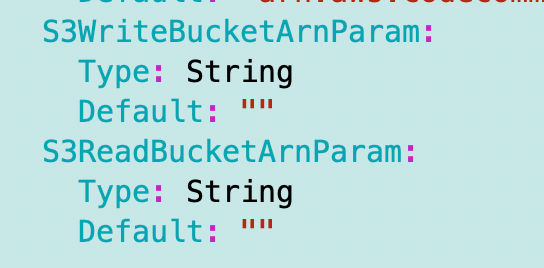
So I’ll have an optional S3WriteBucketARN and an optional S3ReadBucketARN for any Lambda function and those two parameters will drive the bucket configuration. Using this approach will also help prevent errors since as I showed in the last post, S3 bucket configurations can be painful to get right.
I’m going to add the following parameters with a default value of an empty string since these parameters are optional.
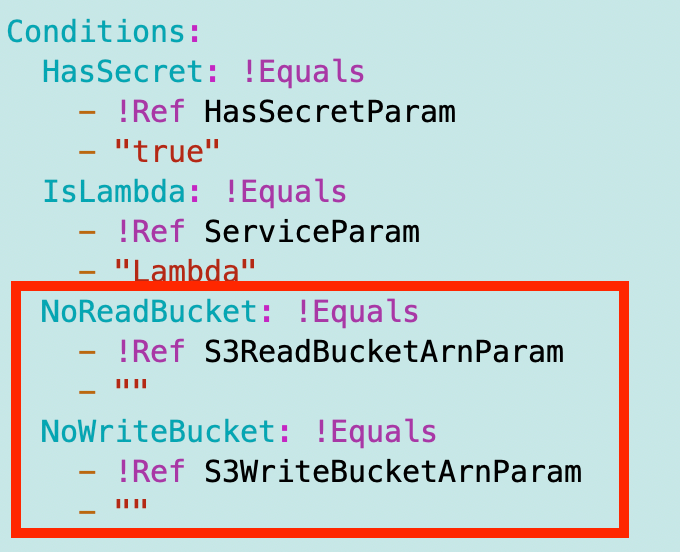
I’ll add a couple of new conditions:
Next I add the required permissions described in the last post if the bucket parameters are set:
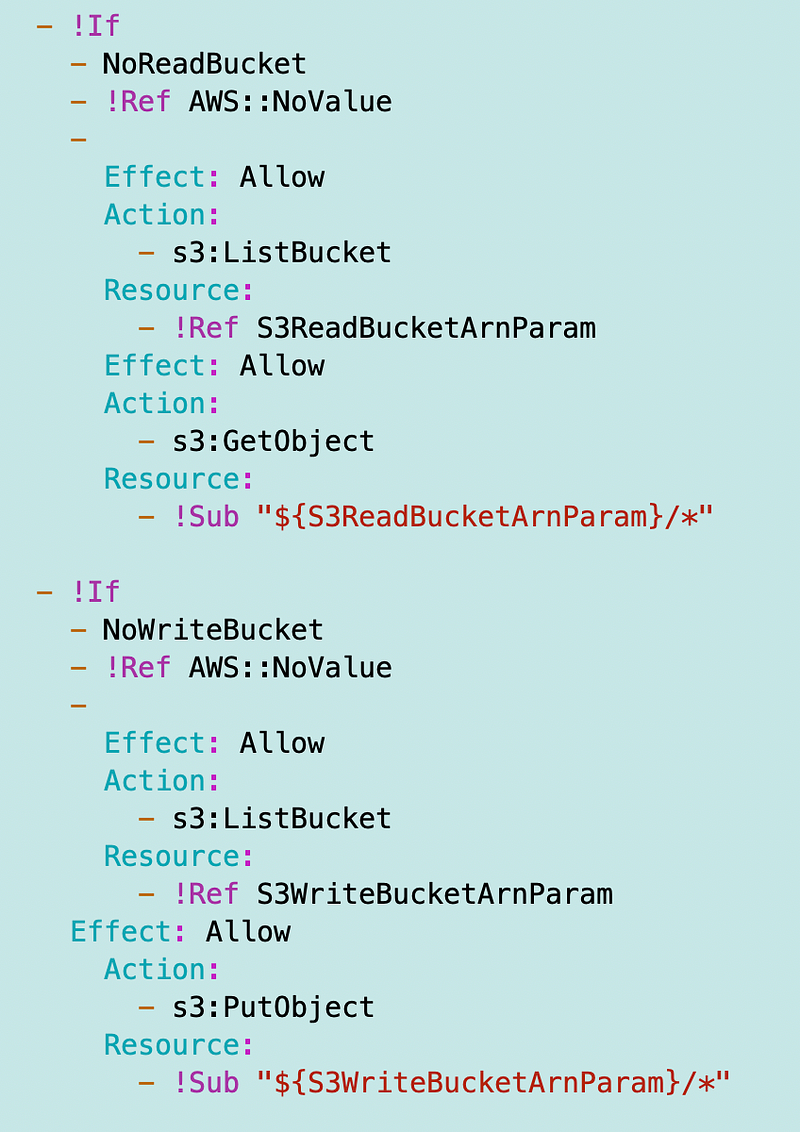
Remember, if you’re trying to learn CloudFormation I covered that in prior posts in this series, so I’m not explaining every detail of this policy.
I can redeploy my Lambda function and pass in the ARN from the bucket where I’m deploying the files.
I’m going to alter my app_role_policy function to move the optional parameters to the end:
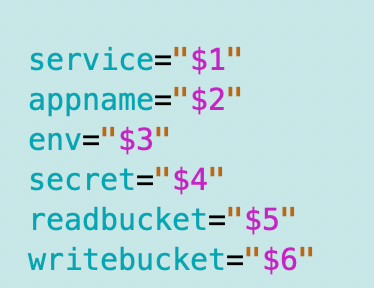
I add the new parameters, but I don’t validate they exist since they are optional:
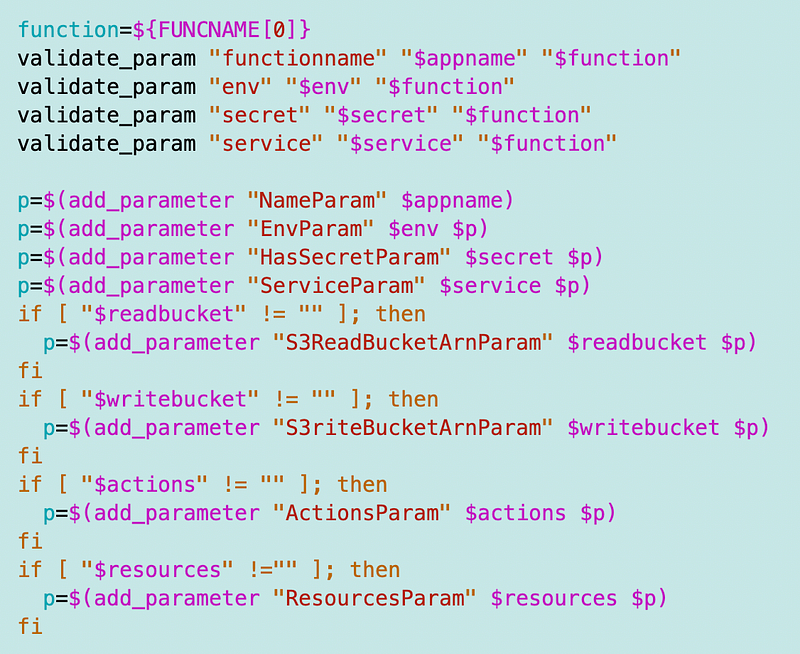
I’m going to change my Lambda deployment script to move the service name to the first position and add the read bucket ARN at the end.
I’ll replace [readbucketarn] with the actual bucket ARN below. I’m hardcoding things for this initial test because I have some revamping planned for my deployments in the near future.
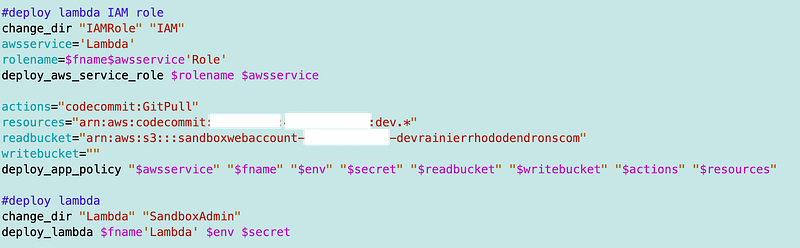
Once I get that done, I can check my policy to make sure it has the expected results. It does.
There’s one other thing I have to change. Recall that I applied an encryption key to my bucket and the CodeCommit repository. Both are using the environment Sandbox key for now.
When I removed the secret, the encryption key also got removed due to the logic in my policy document. Since any data in this environment will be encrypted with that key, I’m going to add permission to use that key to every Lambda function.
I could use different approaches but my current thinking is anything I deploy in a particular environment can use the environment-assigned encryption key. If I don’t want something to use that particular key, it should move to a separate environment. We’ll see how that works out over time.
This is a simple change. I remove the if statement associated with the encryption key permissions:
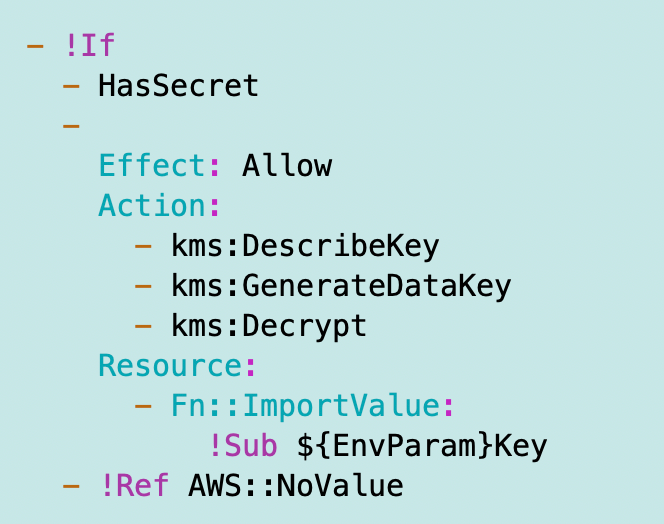
Note the indentation alignment below and location of dashes:
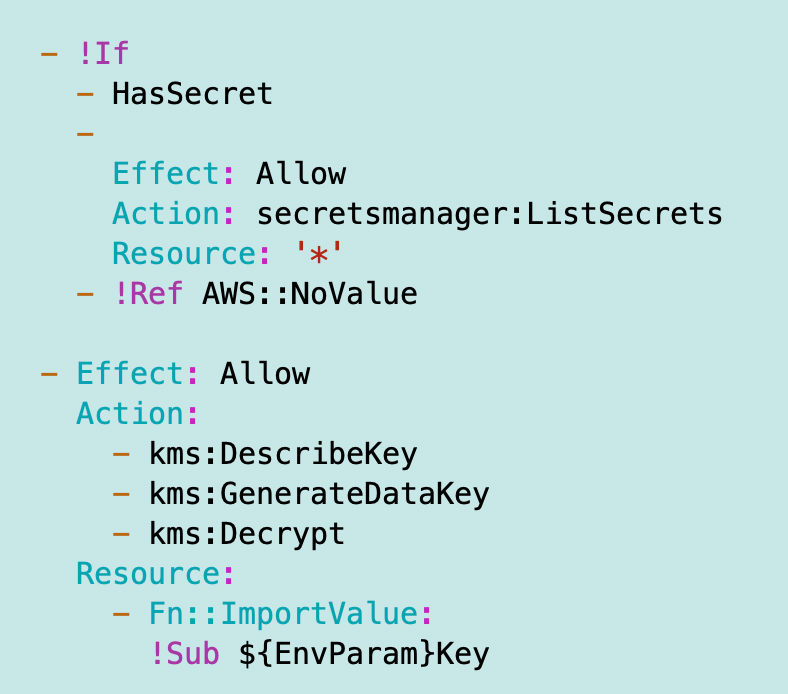
I redeploy that policy and check to make sure the function has permission to use the key and it does.
Now, hopefully, our IAM Role policy for our Lambda function works and we still have a generic policy that we can use to deploy all our Lambda functions.
I’m going to note here that in the future, I plan to use a separate key for S3 buckets used for public websites. The reason for that change is because AWS offers a cheaper option for KMS keys associated with S3 buckets.
If you have a heavily visited web site that is only retrieving publicly available content, using this key will be cheaper than a standard KMS key but possibly not quite as secure. I’ll probably look at those tradeoffs and options in a future post. First, I want to get this web site functionality completed and a website deployed.
Next, I need to update the bucket policy.
Follow for updates.
Teri Radichel | © 2nd Sight Lab 2023
About Teri Radichel:
~~~~~~~~~~~~~~~~~~~~
⭐️ Author: Cybersecurity Books
⭐️ Presentations: Presentations by Teri Radichel
⭐️ Recognition: SANS Award, AWS Security Hero, IANS Faculty
⭐️ Certifications: SANS ~ GSE 240
⭐️ Education: BA Business, Master of Software Engineering, Master of Infosec
⭐️ Company: Penetration Tests, Assessments, Phone Consulting ~ 2nd Sight Lab
Need Help With Cybersecurity, Cloud, or Application Security?
~~~~~~~~~~~~~~~~~~~~~~~~~~~~~~~~~~~~~~~~~~~~~~~~~~~~~~~~~~~~~
🔒 Request a penetration test or security assessment
🔒 Schedule a consulting call
🔒 Cybersecurity Speaker for PresentationFollow for more stories like this:
~~~~~~~~~~~~~~~~~~~~~~~~~~~~~~~~~~~~~~~~~~~~~~~~~~~~~~~~~~~~~
❤️ Sign Up my Medium Email List
❤️ Twitter: @teriradichel
❤️ LinkedIn: https://www.linkedin.com/in/teriradichel
❤️ Mastodon: @teriradichel@infosec.exchange
❤️ Facebook: 2nd Sight Lab
❤️ YouTube: @2ndsightlab


