
IMAGE EDITOR, AI TEXT-TO-IMAGE
lama-cleaner : AI based watermark remover & Intelligent Image Editor
Open source Image Editor with support for Stable Diffusion
About lama-cleaner
Lama Cleaner is the latest opensource project that uses some of the text-to-Image tools like Stable Diffusion for Image editing. Their custom trained model is far superior to the traditional OpenCV methods. Now you can do context-aware-image editing which was only available in costly softwares like Adobe Photoshop.
In case you are impatient and just want to try it out NOW, you can download the latest repo from here : https://github.com/Sanster/lama-cleaner . Else — just to know about the utility , browse on .
Use-cases : What can it do ?
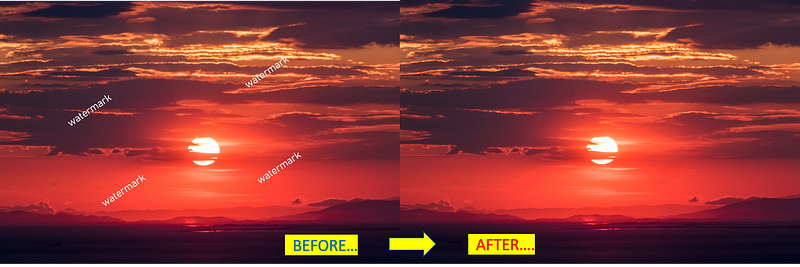
- Remove watermarks from Images
- Remove objects & people from Images & replace with an intelligent background
- Remove blemishes & restore old photographs
- Replace objects with custom generated ‘prmopt-text based images’
Here are the 4 use-cases explained :
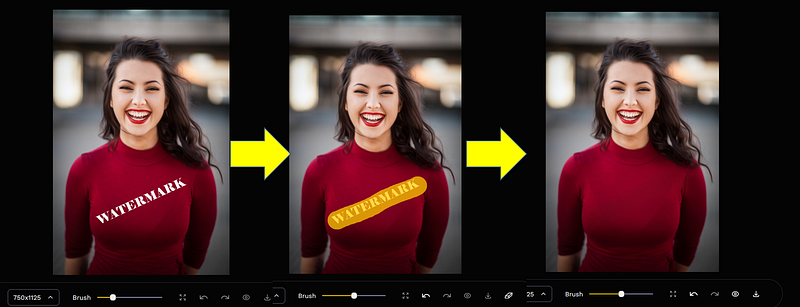
- Removing watermarks. ( pretty self explanatory — see the image below to see the steps )
2. Removing Objects/People/ racoons :) etc from images
Photobombed , did you say ? — dont you worry !
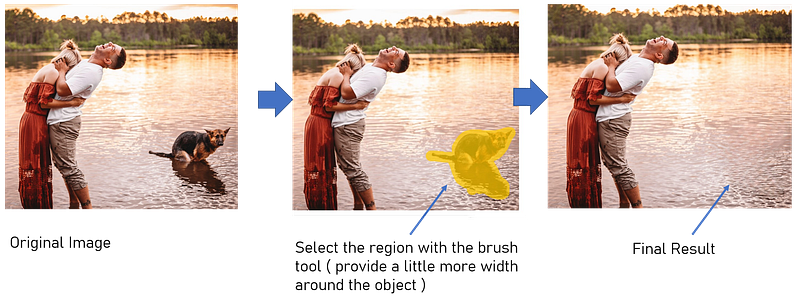
And here is the result … amazing as it is !

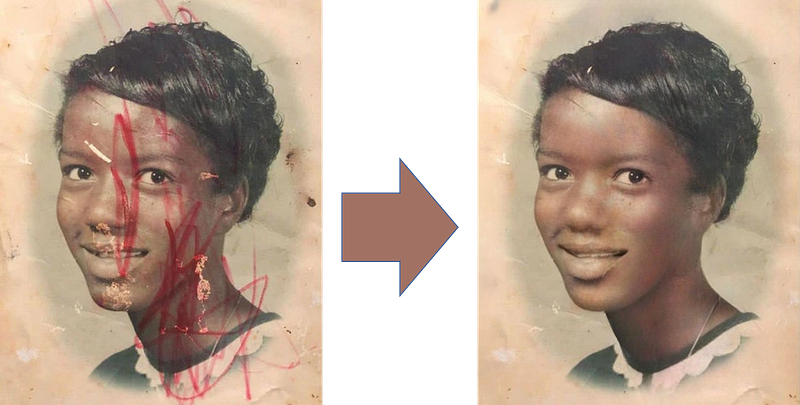
3. Restore your old photographs
Here are two examples and you can see what kind of old-photo-restoration is possible.
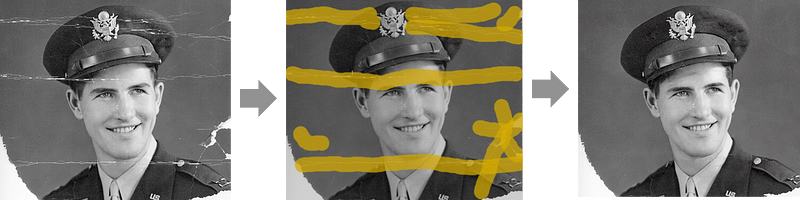
4. Using Stable-Diffusion model for image editing by replacing parts of images with custom ‘prompt-based image snippets’
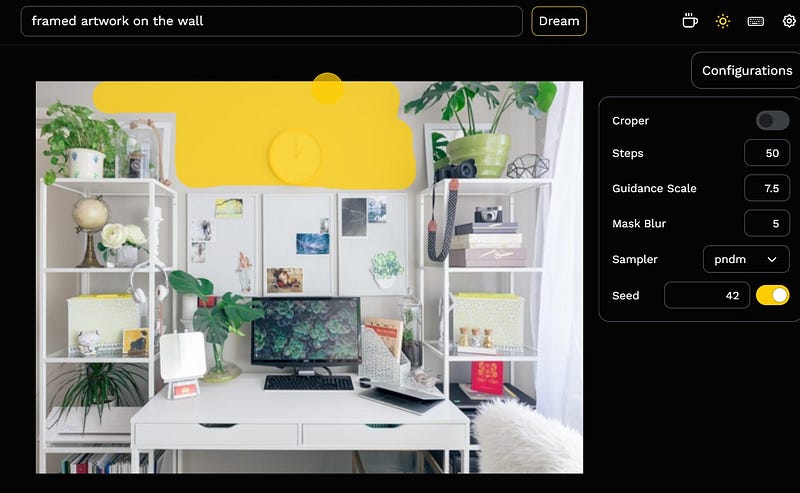
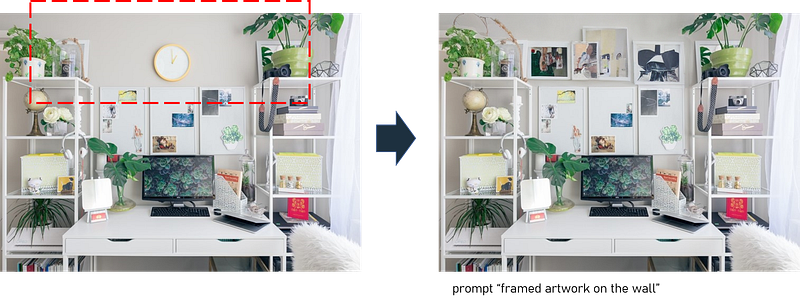
Installation process
The installation process is well documented in their GitHub README file. But to put in one line —
Option a. you can do a pip install of the package !!
>> pip install lama-cleaner

#installs the package


>> lama-cleaner --model=lama --device=cuda --port=8080

#starts the program using the GPU available on the machine
# -model = which model to use ( lama , ldm , cv2, sd1.5 etc )
# --device = cpu / cuda ( for GPU )
# --port = which port to open on the default browser eg: http://127.0.0.1:8080
Option b. One-Click-installer ! ( you should try this !! — Reccomended for a beginner to just try out the application)
For those who do not want to bother with python , virtual environments , dependencies etc, the creators have provided a neat One-Click-installer which you can download and run the program. Details of the installation etc is here : https://github.com/Sanster/lama-cleaner/blob/main/scripts/README.md
Some advanced tips , information and things to keep in mind
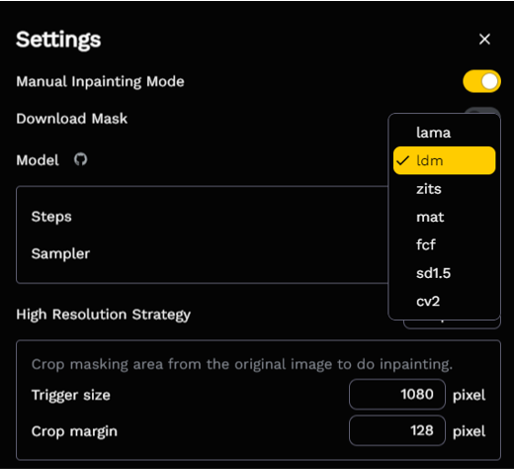
1️⃣ You can choose which model you want to run based on what you want to achieve — if you are doing a simple watermark removal , the deafult model ‘lama’ would be your best option .
2️⃣ When you run it for the first time, the app downloads all the required models that it needs , into your local environment folder. For windows users , it will download to
WINDOWS \ USERS \ <username> \ .cache \ torch \ hub \ checkpoints3️⃣If are using the Stable Diffusion model for the first time, you might have to give your unique token from the hugging-face website . ( needs registration on their site and creation of unique token. )
Note : Make sure the rights specified on the hugging face token are both ‘read’ and ‘write’
4️⃣If you are running into Out-Of-memory (OOM) errors , try the following work arounds .
Here is what an “CUDA out of memory” error looks like :

Some of the tested workarounds :
🍀 Reduce the size of the input image to something close to 500x 500
🍀 Change the Memory allocation in CUDA for Pytorch —
Here are the environment variables to change the memory allocation values :
Windows:
>> set 'PYTORCH_CUDA_ALLOC_CONF=max_split_size_mb:1024'

Linux:
>> export 'PYTORCH_CUDA_ALLOC_CONF=max_split_size_mb:1024'
🍀 The Memory error in the current version is only if you are using the StableDiffusion model. So change the model in the ‘settings’ to ldm or lama if you are doing only the basic operations
Updates to package :
Note : The package is actively being updated ( as of the day of publishing this article ), so watch out for more bug fixes and general improvements in their github repo ( https://github.com/Sanster/lama-cleaner )
Interested in similar topics ?
If you are interested in the use of AI in images/ graphics and design , here are some of the related articles —
- An advanced guide to writing prompts for Midjourney ( text-to-image)
2. How to fix bad face generations in midjourney.
3. How Adobe is implementing AI into its environment.


