
Kubernetes (K8s) Overview
What is Kubernetes — Introduction to Kubernetes (K8s) Orchestration
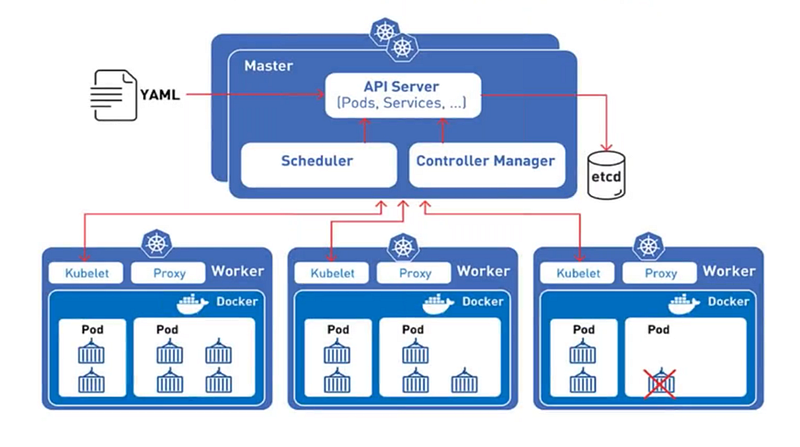
TL;DR
Kubernetes is a portable, extensible, open-source platform for managing containerized workloads and services, that facilitates both declarative configuration and automation.
What is Kubernetes?
Kubernetes is a powerful container management tool that automates the deployment and management of containers. It can run and coordinate containerized applications across a cluster of machines. It is a platform designed to completely manage the life cycle of containerized applications and services using methods that provide predictability, scalability, and high availability. Kubernetes can define how your applications should run and how application interact with other applications or the outside world.
Why you need Kubernetes?
Containers are a good way to bundle and run your applications. They provide you with an easy way to package and deploy services, allow for process isolation, immutability, efficient resource utilization, and are lightweight in creation.
Managing containers for production is challenging: - You need to manage the containers that run the applications and ensure that there is no downtime. For example, if a container goes down, another container needs to start. - You can end up with dozens, even thousands of containers over time. These containers need to be deployed, managed and updated.
It will be very difficult to do all things manually, right? Kubernetes is the solution! Kubernetes provides you with a framework to run distributed systems resiliently. It takes care of scaling and fail-over for your application, provides deployment patterns, and more.
- Package up the app and let something else manage it for us
- Not worry about the containers management
- App Containers can’t live with single server deployment
- Inter-host communication of containers
- Deploying and updating software at scale
- Better management through modularity
- Auto healing
- Logging and Monitoring
What Kubernetes can do?
- Service discovery and load balancing Kubernetes can expose a container using the DNS name or using their own IP address. If traffic to a container is high, Kubernetes is able to load balance and distribute the network traffic so that the deployment is stable.
- Scaling Auto-scaling: Automatically change the number of running containers, based on CPU utilization or other application-provided metrics. Manual scaling: Manually scale the number of running containers through a command or the interface.
- Self-healing Kubernetes restarts containers that fail, replaces containers, kills containers that don’t respond to your user-defined health check, and doesn’t advertise them to clients until they are ready to serve.
- Storage orchestration Kubernetes allows you to automatically mount a storage system of your choice, such as local storages, public cloud providers, and more.
- Automated rollouts and rollbacks You can describe the desired state for your deployed containers using Kubernetes, and it can change the actual state to the desired state at a controlled rate. For example, you can automate Kubernetes to create new containers for your deployment, remove existing containers and adopt all their resources to the new container.
- Automatic bin packing You provide Kubernetes with a cluster of nodes that it can use to run containerized tasks. You tell Kubernetes how much CPU and memory each container needs. Kubernetes can fit containers onto your nodes to make the best use of your resources.
- Secret and configuration management Kubernetes lets you store and manage sensitive information, such as passwords, OAuth tokens, and SSH keys. You can deploy and update secrets and application configuration without rebuilding your container images, and without exposing secrets in your stack configuration.
Kubernetes Key Concepts
- Nodes Nodes are the machines on Kubernetes. They can be either a physical or a virtual machine.
- Pods Pods are composed of a group of one or more containers, the shared storage for them and their options.
- Deployments Deployments are used to make updates on Pods. We can use them to bring up new Pods, change the image version of a container and even recreate the previous state if something goes wrong.
- Services Service consist of a set of Pods and a policy that defines the access control. It is responsible for managing, deploying and operating containers integrates easily with other services.
View more from DevOps Mojo
- Kubernetes — Difference between Deployment and StatefulSet in K8s
- Prometheus — Overview
- Terraform — Overview
Happy Learning!!!