Kotlin Coroutines in Android — Suspending Functions
The power of Suspending Functions and how to implement it to your projects.
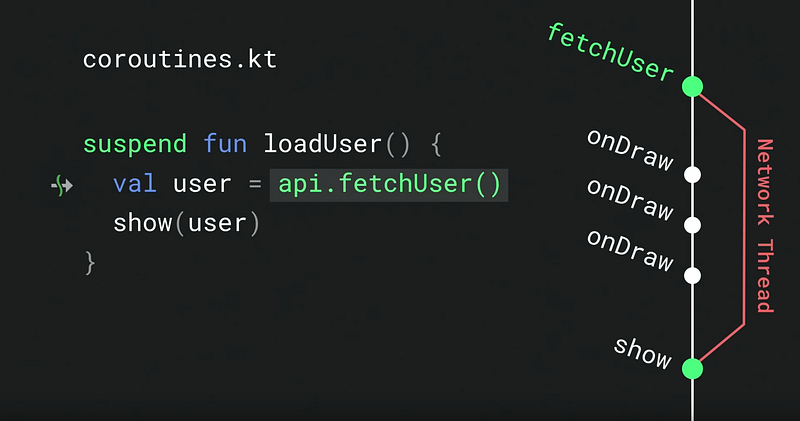
Before we start, I strongly recommend you watch the introduction of Coroutines Suspending Functions in Google I/O`19.
They use great images and animations that could help you to know how the Suspending Function works.
In the previous post, we learn about the basic concepts of Kotlin Coroutines. Please read it if you still have no idea what is Kotlin Coroutines.
I only explained that Suspending Functions allow us to suspend and wait until the function resumes. We didn’t go deeper since there is much to say for it and it worth another post. So today, we’ll introduce how to use Suspending Functions in detail.
Table of contents
- What is Suspending Functions?
- Call blocking functions from suspending
- Callback and SuspendCancellableCoroutine (1) resume(value: T) (2) resumeWithException(exception: Throwable) (3) cancellableContinuation.cancel()
- Call RxJava from suspending functions
1. What is Suspending Functions?
We may consider a suspend function as a regular function that can be paused and resumed after its task is done, which means we can put a time-consuming task into the function and wait for it to complete. That’s why we could write Coroutine in a sequential way without using the callbacks or RxJava.
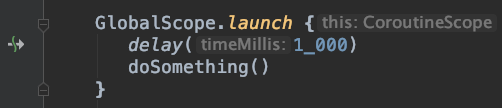
Suspending functions can only be used from a coroutine. A suspend function can be used as a regular function, and it will suspend the execution of the coroutine. For example, delay() is a built-in suspending function. Thank Android Studio for the kindly reminder, here we can know that delay() is a suspend function by the arrow icon on the left of the panel. When we call delay(1_000) in the coroutine, it will suspend execution for 1 sec without blocking the thread, and then go back to the coroutine to execute the function doSomething() after that.
So how to define a suspend function by ourselves? The modifier suspend comes to help. Just add suspend to your normal function, and then the heavy tasks which block the thread will turn into non-blocking function? The answer is NO. Although the official documentation mentions that “It may suspend execution of the code without blocking the current thread of execution by invoking other suspending functions.”, we still need to concern about the Dispatchers we run the suspending functions with.
If you only put the suspend on a normal function, then you’ll get IDE warning “Redundant ‘suspend’ modifier”.
// IDE warning: "Redundant 'suspend' modifier".
private suspend fun doSomething() {
    // do some heavy tasks
}
The easiest and correct way is to wrap the task in withContext() and define the dispatchers we need. For example, if the heavy task is related to computing, then we should wrap it in withContext(Dispatchers.default). (Please refer to the previous post).
private suspend fun doSomething() {
    withContext(Dispatchers.Default) {
        // do some heavy tasks
    }
}
There are several ways to use suspending functions:
2. Call blocking functions from suspending functions
Putting time-consuming tasks into a suspending function is a good idea. Take network tasks, for example, to fetch the user data and update it on the UI is a common thing we usually need to do. The biggest problem is that this kind of heavy task will block the main thread on Android. In order to prevent the app from ANR(Application Not Responding), we put the task into a background thread. The following annoying thing is that updating UI in the background thread is not allowed, so we use Activity.runOnUiThread(Runnable) or even Handler to achieve that…
Umm.. it seems not quite easy for Android developers to maintain lots of tasks like that. Fortunately, Kotlin Coroutines saves our lives.
The code snippet updates the UI after user data is fetched. Moreover, the network task won’t block the main thread, it is executed in the worker thread because we switch the thread with withContext(Dispatchers.IO).
3. Callback and SuspendCancellableCoroutine
Let’s say we already have an Android project online. Lots of asynchronous tasks are used to wait for reading database or fetching data from the server. Using Callback functions is probably a way to handle the data on the main thread. So, how to transform those callback functions into Coroutines? here comes the suspendCancellableCoroutine.
SuspendCancellableCoroutine returns a CancellableContinuation for us to use resume, resumeWithException and throws CancellationException if the continuation is cancelled. (There is another similar function called suspendCoroutine. The difference between them is that suspendCoroutine cannot be cancelled by Job.cancel().)
CancellableContinuation
We can execute a block in suspendCancellableCoroutine with the argument CancellableContinuation. There are three ways to use for CancellableContinuation:
(1) resume(value: T):
Resumes the execution of the corresponding coroutine passing [value] as the return value of the last suspension point.
In our sample code above, If we call CancellableContinuation.resume(user), the function fetchUser() will return [user] value to the val user.
(2) resumeWithException(exception: Throwable):
Resumes the execution of the corresponding coroutine so that the [exception] is re-thrown right after the last suspension point.
In our sample code above, when we call CancellableContinuation.resumeWithException(user), the function fetchUser() will throw [exception].
The updateUser(user) won’t be invoked, and the try-catch will handle the exception instead. Then the following code after try-catch block would be executed continuously.
(3) cancellableContinuation.cancel():
Although Kotlin does not have checked exceptions, we still need to handle all the possible exceptions in try-catch. Otherwise, the app will crash. But there is a special exception I would like to share here, it’s called CancellationException, which is thrown when we invoke cancellableContinuation.cancel().
and even we don’t handle it, it won’t cause a crash. For more detail, please refer to this post. But the following code after that will NOT be executed.
4. Call RxJava from suspending functions
What if we used RxJava in our project? There is a library called kotlinx-coroutines-rx2, which can transform RxJava into Coroutines. Import it with the following code:
implementation "org.jetbrains.kotlinx:kotlinx-coroutines-rx2:1.3.2"You can see here are all the Coroutine builders.
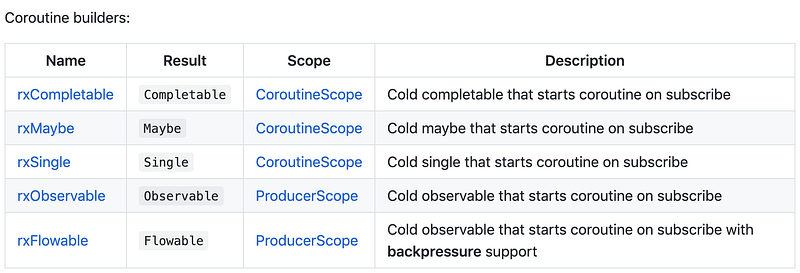
For example, if we use Single in RxJava, Single.await() helps us transform Rxjava into a suspendCancellableCoroutine.
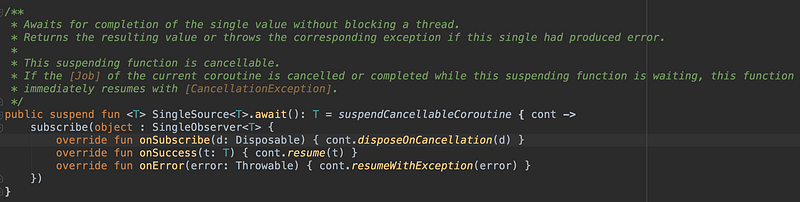
As the above code shows us, the extension await() will pass success case to cancellableContinuation.resume() and failure case to cancellableContinuation.resumeWithException().
Let’s start to implement it on our demo code:
The log will be:
D/demo: (1) fetchUserFromServer start, Thread[RxCachedThreadScheduler-1,5,main]
D/demo: (2) fetchUserFromServer onSuccess, Thread[RxCachedThreadScheduler-1,5,main]
D/demo: (3) updateUser, Thread[main,5,main]
The code fetchUserFromServer().await() suspends the coroutine and waits until the RxJava returns the result.
What if the RxJava Single fails and throws an exception?
Then the exception will be handled in try-catch. Here is the log:
D/demo: (1) fetchUserFromServer start, Thread[RxCachedThreadScheduler-1,5,main]
D/demo: (2) fetchUserFromServer onError, Thread[RxCachedThreadScheduler-1,5,main]
D/demo: (4) {java.io.IOException}, Thread[main,5,main]
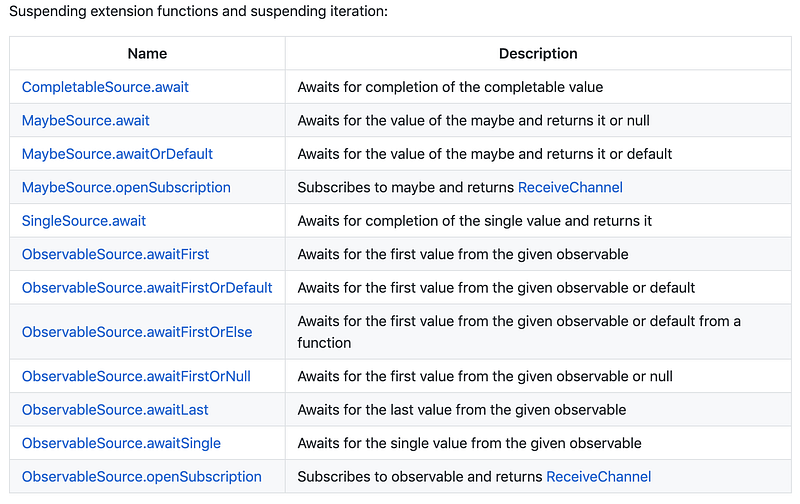
As for RxJava Maybe, Observable, there are corresponding extension functions for us to use. Just give them a try in your code.
I think that’s all for today. Thank you for reading it. I hope the article helps you learn more about the Suspending Functions and be able to implement it in your current projects. If you have any questions or suggestions, welcome to leave a comment below. See you. ✋✋
- Kotlin Coroutines in Android — basics To learn the basic knowledge of Coroutines.
- Team lead of Kotlin libraries talks about the blocking threads and suspending coroutines.


