Kotlin Coroutines in Android — Basics
Learn the basic concepts and usage of Kotlin Coroutines.
What is Coroutines
Essentially, coroutines are light-weight threads. It lets us write asynchronous, non-blocking code in a sequential way.
How to import Kotlin Coroutines in Android?
According to the Kotlin Coroutines Github repo, we need to import kotlinx-coroutines-core and kotlinx-coroutines-android (This library supports for the Android main thread just like the library io.reactivex.rxjava2:rxandroid for RxJava, and also makes sure the uncaught exceptions could be logged before crashing Android application.). Furthermore, if you’re using RxJava in your project, please add kotlinx-coroutines-rx2 for using coroutines with RxJava as well. This library helps to transfer the RxJava to Coroutines.
Import them to your project by adding the following code to app/build.gradle.
implementation 'org.jetbrains.kotlinx:kotlinx-coroutines-core:1.3.2'
implementation 'org.jetbrains.kotlinx:kotlinx-coroutines-android:1.3.2'
implementation "org.jetbrains.kotlinx:kotlinx-coroutines-rx2:1.3.2"
and add the latest Kotlin version to your root/build.gradle.
buildscript {
    ext.kotlin_version = '1.3.50'
    repositories {
        jcenter()
        ...
    }
    ...
}
Okay, it seems like the pre-settings are done. Let’s start today’s topic.
Table of Contents
- Suspending functions
- Coroutine scope (1) CoroutineScope (2) MainScope (3) GlobalScope
- Coroutine context (1) Dispatchers (2) CoroutineExceptionHandler (3) Job — (3.1) Parent-child hierarchies — (3.2) SupervisorJob v.s. Job
- Coroutine builder (1) launch (2) async
- Coroutine body
Coroutines basics
First, here is what Coroutines basically looks like:
We fetch the data from the server in the background thread and then update the UI in the main thread.
1. Suspending functions
There’s a special function called suspending functions in Kotlin Coroutines, we can declare the function with keyword suspend. Suspending functions can suspend the execution of a coroutine, which means it will wait until the suspending functions resume. Since this post is for the basic concept of Coroutines, we’ll discuss more detail of suspending functions in this post.
Let’s back to the code snippet above, it could be divided into four parts:
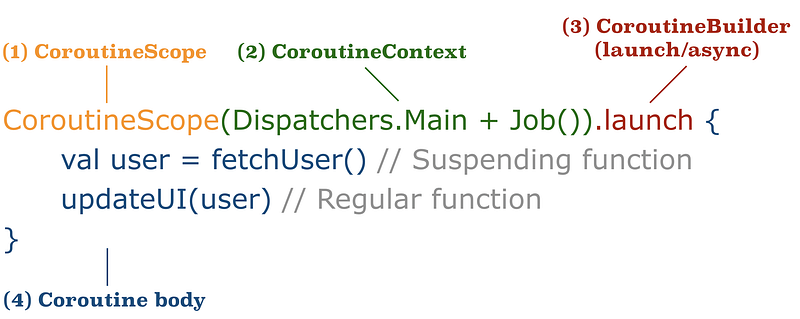
2. CoroutineScope
Defines a scope for new coroutines. Every coroutine builder is an extension on CoroutineScope and inherits its coroutineContext to automatically propagate both context elements and cancellation.
All coroutines run inside a CoroutineScope and it takes a CoroutineContext (I’ll talk about it later) as a parameter. There are several scopes we may use:
(1) CoroutineScope
Creates the scope with custom CoroutineContext. For example, to define the thread, parent job and exception handler by our need.
CoroutineScope(Dispatchers.Main + job + exceptionHandler).launch {
    ...
}
(2) MainScope
Creates the main scope for UI components. It is running on the main thread with SupervisorJob(), which means the failure of one of its child job won’t affect others.
public fun MainScope(): CoroutineScope = ContextScope(SupervisorJob() + Dispatchers.Main)(3) GlobalScope This is a scope which doesn’t bound to any job. It is used to launch top-level coroutines which are operating on the whole application lifetime and are not cancelled prematurely.
3. CoroutineContext
Coroutine always executes in some context represented by a value of the CoroutineContext type. CoroutineContext is a set of elements, to define the threading policy, exception handler, control the lifetime of the coroutine, and so on. We can use plus operator to combine the elements of CoroutineContext.
There are three most important Coroutine context — Dispatchers, CoroutineExceptionHandler and Job.
(1) Dispatchers
Defines which thread runs the coroutine. A coroutine can switch Dispatchers anytime with withContext().
- Dispatchers.Default:
Uses a shared background pool of threads. By default, the maximum number of threads used by this dispatcher is equal to the number of CPU cores, but is at least two. The thread would be like
Thread[DefaultDispatcher-worker-2,5,main]. - Dispatchers.IO:
Shares threads with
Dispatchers.Default, but the number of threads is limited by kotlinx.coroutines.io.parallelism, It defaults to the limit of 64 threads or the number of cores (whichever is larger). The thread would be likeThread[DefaultDispatcher-worker-1,5,main], seems the same asDispatchers.Default. - Dispatchers.Main:
Equals to Android main thread. The thread would be like
Thread[main,5,main]. - Dispatchers.Unconfined: A coroutine dispatcher that is not confined to any specific thread. The coroutine executes in the current thread first and lets the coroutine resume in whatever thread that is used by the corresponding suspending function.
(2) CoroutineExceptionHandler Handles uncaught exceptions.
Normally, uncaught exceptions can only result from coroutines created using the launch builder. A coroutine that was created using async always catches all its exceptions and represents them in the resulting Deferred object.
Sample 1: Cannot catch IOException() with outside try-catch.
We cannot wrap the whole CoroutineScope with try-catch, the app will still crash.
Sample 2: Catches IOException() with CoroutineExceptionHandler.
If the exception is other than CancellationException(), for example, an IOException(), it will be propagated to CoroutineExceptionHandler.
Sample 3: CancellationException() is ignored.
If the exception is CancellationException then it is ignored (Because that is the supposed mechanism to cancel the running coroutine, and this exception won’t be propagated to CoroutineExceptionHandler.)
Sample 4: Use invokeOnCompletion to get all exceptions information.
CancellationException() won’t be propagated to CoroutineExceptionHandler. If we want to print some information after the exception happens, we can use invokeOnCompletion to achieve it.
(3) Job
Controls the lifetime of the coroutine. A job has the following states:
We can simply use Job.isActive to know the current state of a job.
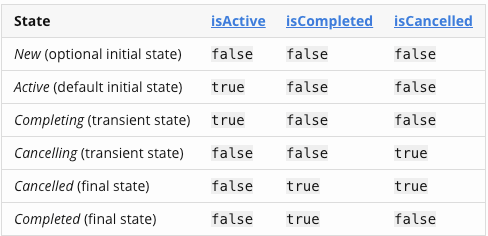
And here is the flow of states change:
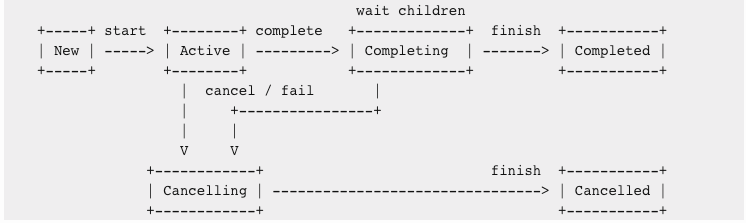
- A job is active while the coroutine is working.
- Failure of the job with exception makes it cancelling. A job can be cancelled at any time with cancel function that forces it to transition to cancelling state immediately.
- The job becomes cancelled when it finishes executing its work.
- Parent job waits in completing or cancelling state for all its children to complete before finishing. Note that completing state is purely internal to the job. For an outside observer a completing job is still active, while internally it is waiting for its children.
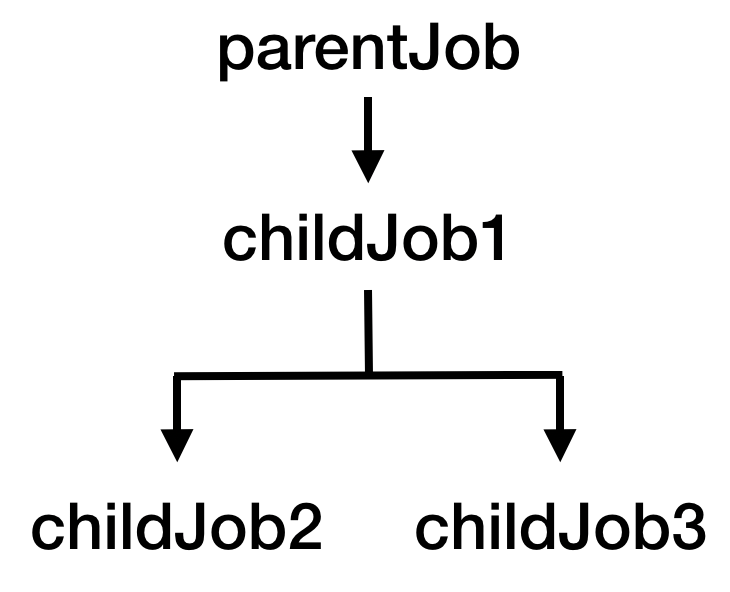
(3.1) Parent-child hierarchies After realizing the states, we need to know how the parent-child hierarchies work. Let’s say we write the code like this:
val parentJob = Job()
val childJob1 = CoroutineScope(parentJob).launch {
    val childJob2 = launch { ... }
    val childJob3 = launch { ... }
}
Then the parent-child hierarchies would be like this:
We can change the parent job while launching like this:
val parentJob1 = Job()
val parentJob2 = Job()
val childJob1 = CoroutineScope(parentJob1).launch {
    val childJob2 = launch { ... }
    val childJob3 = launch(parentJob2) { ... }
}
Then the parent-child hierarchies would be:
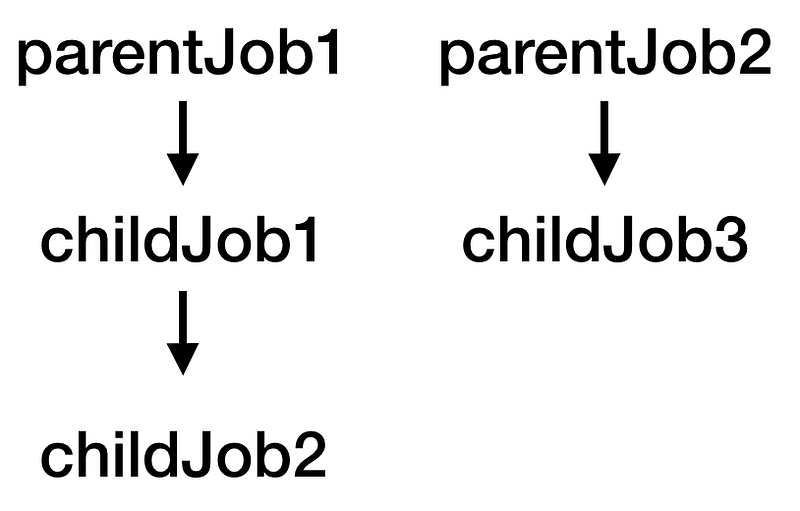
Base on the knowledge above, there are many important concepts that we need to know for a Job.
- Cancellation of a parent leads to immediate cancellation of all its children.
- Failure or cancellation of a child with an exception other than CancellationException immediately cancels its parent and other children. But if the exception is CancellationException, the other jobs not under the cancel job won’t be affected.
If we throw CancellationException, only the job under childJob1 will be cancelled.
If we throw IOException in one of the child jobs, all the relevant job will be cancelled:
- cancelChildren(): A parent can cancel its own children (including all their children recursively) without cancelling itself. Note if a job is cancelled, it could not be used as a parent job to run coroutine again.
If we use Job.cancel(), the parent job will start to be cancelled(Cancelling). And after all the child jobs is cancelled, the parent job status will become cancelled.
If we use Job.cancelChildren() instead, the parent job will still be Active. And we can still use it to run other coroutines.
(3.2) SupervisorJob v.s. Job
Children of a supervisor job can fail independently of each other.
As we told before, if we use a simple Job() as the parent job, all children will be cancelled if one of the child jobs fails:
If we use a SupervisorJob() as the parent job, the failure of one child job won’t affect other child jobs:
4. Coroutines Builder
(1) launch : Launches a new coroutine without blocking the current thread and returns a reference to the coroutine as a Job.
(2) async and await :
The async coroutine builder is defined as an extension on CoroutineScope. It Creates a coroutine and returns its future result as an implementation of Deferred, which is a non-blocking cancellable future — it is a Job with a result.
Async is used with await: Awaits for completion of this value without blocking a thread and resumes when deferred computation is complete, returning the resulting value or throwing the corresponding exception if the deferred was cancelled.
The following code demonstrates a sequential invocation of two suspending functions. We do some time-consuming task which will cost 1 sec in both fetchDataFromServerOne() and fetchDataFromServerTwo(). And then invoke them in the launch builder. We’ll find the final time cost will be the sum of the time cost: 2 secs.
The log will be:
2019-12-09 00:00:34.547 D/demo: fetchDataFromServerOne()
2019-12-09 00:00:35.553 D/demo: fetchDataFromServerTwo()
2019-12-09 00:00:36.555 D/demo: The sum is 3
2019-12-09 00:00:36.555 D/demo: Completed in 2008 ms
The time cost is the sum of the delay time of two suspending functions. It will suspend until fetchDataFromServerOne() finishes, then execute fetchDataFromServerTwo().
What if we want to run both functions concurrently to reduce the time cost? Async comes to help! Async is pretty much like launch. It starts another coroutines that works concurrently with all the other coroutines, and returns Deferred which is a Job with return value.
public interface Deferred<out T> : Job {
  public suspend fun await(): T
  ...
}
We can call await() on a Deferred value for the result. For example:
The log will be:
2019-12-08 23:52:01.714 D/demo: fetchDataFromServerOne()
2019-12-08 23:52:01.718 D/demo: fetchDataFromServerTwo()
2019-12-08 23:52:02.722 D/demo: The sum is 3
2019-12-08 23:52:02.722 D/demo: Completed in 1133 ms
5. Coroutine body
The code running in the CoroutineScope, including a regular function or a suspending functions, which will suspend the coroutine until it finishes. We’ll go into detail in the next post.
That’s all for today. In the next post, we’ll learn deeper about Suspending functions and how to use it. Hope this post helps you know more about Kotlin Coroutines. If you have any questions or suggestions, welcome to comment below. Thanks for reading, see you. 😄
References
- Official Kotlin Coroutines docs It’s good to read the official docs before using it.
- Official Kotlin Coroutines Codelabs
- A great medium series introducing Kotlin Coroutines:
- Team lead of Kotlin libraries talks about the blocking threads and suspending coroutines.


