avatarAvi Kotzer

Free AI web copilot to create summaries, insights and extended knowledge, download it at here

5534

Abstract

ime.datetime.now()), <span class="hljs-string">'price'</span>: price, <span class="hljs-string">'item'</span>: item, <span class="hljs-string">'discount'</span>: discount }</pre></div><p id="7bae">In our case, the output is:</p><div id="477f"><pre>{ 'date': '<span class="hljs-number">2018-05-13</span> 13:37:21.<span class="hljs-number">414342</span>', 'price': '169.99', 'item': 'Dyson AM08 Bladeless Pedestal Fan | White/Silver | Refurbished', 'discount': '399.99 | 57% off' }</pre></div><h1 id="8e42">Step 2: Saving to S3</h1><p id="f971">To save our result to S3, we use <a href="https://boto3.readthedocs.io/en/latest/index.html">Boto 3</a>, the AWS SDK for Python. First we get a reference to S3. Then we create an <code>object</code> with given <code>bucket</code> and <code>file_name</code>(the bucket was created beforehand though this can be done programmatically). Finally, we convert our data to <code>json</code> and write our <code>data</code> into the object.</p><div id="acf2"><pre><span class="hljs-keyword">import</span> boto3 <span class="hljs-keyword">import</span> json</pre></div><div id="34fd"><pre>def <span class="hljs-built_in">save_file_to_s3</span>(bucket, file_name, data): s3 = boto3.<span class="hljs-built_in">resource</span>(<span class="hljs-string">'s3'</span>) obj = s3.<span class="hljs-built_in">Object</span>(bucket, file_name) obj.<span class="hljs-built_in">put</span>(Body=json.<span class="hljs-built_in">dumps</span>(data))</pre></div><p id="1bfc">We will package this utility function in the handler file where we house the actual function Lambda will call. More on this in the following steps.</p><p id="5919">Incidentally, if saving tabular data as in our example, we might choose a database instead of S3. We illustrate S3 here as it is also a good choice for documents, we are also frequently scraped items.</p><h1 id="dd59">Step 3: The Handler Function</h1><p id="6f6c">A Lambda function needs a <a href="https://docs.aws.amazon.com/lambda/latest/dg/python-programming-model-handler-types.html">handler function</a>, which is the function Lambda will execute when it gets called. We will put the handler function, along with our Python dependencies, in a sub-directory called <code>ebay_deal_scraper</code>. This will allow us to separate the files which will be part of the Lambda package, and ancillary project files such as the Serverless config file discussed in later steps.</p><p id="2abf">We name our handler function <code>scrape</code> and give it the signature required by Lambda. We don’t use the <code>event</code> or <code>context</code> parameters, but if you needed to pass data into your Lambda function, they are what you would use.</p><div id="2ee8"><pre><span class="hljs-title">def</span> scrape(event, context): <span class="hljs-class"><span class="hljs-keyword">data</span> = deal_scrape()</span> file_name = f<span class="hljs-string">"deals-{data['date']}"</span> save_file_to_s3('ebay_daily_deals', file_name, <span class="hljs-class"><span class="hljs-keyword">data</span>)</span></pre></div><p id="c7da">Our handler calls our <code>deal_scrape()</code> function, then writes the returned data to S3 under a file name based on the date.</p><h1 id="6b1f">Step 4: Packaging our Function</h1><p id="8815">Our custom code is ready to go, but Lambda also requires you include your dependencies in the package you upload to AWS. In our case this means <code>pip installing</code> our Python packages locally. In the <code>ebay_deal_scrapper</code> directory, we run:</p><div id="bc42"><pre>pip3 <span class="hljs-keyword">install </span>requests <span class="hljs-keyword">bs4 </span>-t .</pre></div><p id="2ef0">(if you have any problems, see this <a href="https://stackoverflow.com/questions/24257803/distutilsoptionerror-must-supply-either-home-or-prefix-exec-prefix-not-both">Stack Overflow issue</a>)</p><p id="8621">This will install the <code>requests</code> and <code>beatiful soup</code> packages in our directory. Lamdba has<code>boto3</code> pre-installed, so you don’t need to include it.</p><p id="bea3">Incidentally, including dependencies can be quite hairy if you require platform-dependent C/C++ libraries like <a href="https://www.boost.org/">Boost</a>, and may require you to use Docker to bundle everything together under the Amazon Linux OS that Lambda requires. But that’s the topic of another blog post.</p><p id="8188">When you have dependencies, you probably want to use a zip file to package everything up. We give ours the generic name of <code>package.zip</code>:</p><div id="f3ce"><pre><span class="hljs-built_in">zip</span> -r package.<span class="hljs-built_in">zip</span> *</pre></div><h1 id="b305">Step 5: Deploying to Lambda</h1><p id="6f52">We will use the Serverless framework to deploy to AWS. Serverless offers a set of command line tools which make it very easy to deploy to the major serverless cloud providers including AWS. You can install it using <code>npm</code>:</p><p id="8fc7"><code>npm install -g serverless</code></p><p id="110d">You specify Serverless deployment instructions in a file called <code>serverless.yml</code>. If you want to generate a boilerplate file, you can run:</p><div id="4295"><pre>serverless <span class="hljs-built_in">create</span> <span class="hljs-comment">--template aws-python</span></pre></div><p id="d62a">This will also create a boilerplate<code>handler.py</code> file, but all we need there is the function which we specify i

Options

n the <code>serverless.yml</code> config file under the <code>functions</code> section.</p><div id="7831"><pre><span class="hljs-symbol">service:</span> ebay-deal-scraper <span class="hljs-symbol"> provider:</span> <span class="hljs-symbol"> name:</span> aws <span class="hljs-symbol"> runtime:</span> python3<span class="hljs-number">.6</span> <span class="hljs-symbol"> package:</span> <span class="hljs-symbol"> artifact:</span> ebay_deal_scraper/package.zip <span class="hljs-symbol"> functions:</span> <span class="hljs-symbol"> ebay_scrape:</span> <span class="hljs-symbol"> handler:</span> handler.scrape</pre></div><p id="8b75">The <code>provider</code> section tells Serverless we’re deploying to AWS and that we’re using <code>python 3.6</code>.</p><p id="5fec">The <code>package</code> section is where we specify the zip file we created in the last step.</p><p id="5313">We are ready to deploy!</p><p id="273c">From the top directory of your project run:</p><div id="d1ed"><pre><span class="hljs-attribute">serverless deploy</span></pre></div><p id="c024">If you have multiple AWS profiles (such as work and personal), you can specify a profile:</p><div id="981f"><pre>serverless <span class="hljs-keyword">deploy</span> <span class="hljs-params">--aws-profile</span> profile_i_want_to_use</pre></div><p id="eed1">If all goes well, you should get the following output:</p><div id="4f5e"><pre>➜ ebay<span class="hljs-params">-deals</span><span class="hljs-params">-scrape</span> git:(master) ✗ sd -<span class="hljs-params">-aws</span><span class="hljs-params">-profile</span> michael Serverless: Packaging service<span class="hljs-params">...</span> Serverless: Uploading CloudFormation file <span class="hljs-keyword">to</span> S3<span class="hljs-params">...</span> Serverless: Uploading artifacts<span class="hljs-params">...</span> Serverless: Validating template<span class="hljs-params">...</span> Serverless: Updating <span class="hljs-built_in">Stack</span><span class="hljs-params">...</span> Serverless: Checking <span class="hljs-built_in">Stack</span> update progress<span class="hljs-params">...</span> <span class="hljs-params">...</span><span class="hljs-params">...</span><span class="hljs-params">...</span> Serverless: <span class="hljs-built_in">Stack</span> update finished<span class="hljs-params">...</span> Service Information service: ebay<span class="hljs-params">-deal</span><span class="hljs-params">-scraper</span> stage: dev region: us<span class="hljs-params">-east</span><span class="hljs-number">-1</span> <span class="hljs-built_in">stack</span>: ebay<span class="hljs-params">-deal</span><span class="hljs-params">-scraper</span><span class="hljs-params">-dev</span> api keys: <span class="hljs-literal">None</span> endpoints: <span class="hljs-literal">None</span> functions: ebay_scrape: ebay<span class="hljs-params">-deal</span><span class="hljs-params">-scraper</span><span class="hljs-params">-dev</span><span class="hljs-params">-ebay_scrape</span> Serverless: Removing old service versions<span class="hljs-params">...</span></pre></div><p id="d320">You can now try to invoke your function with:</p><div id="b911"><pre>serverless<span class="hljs-built_in"> invoke </span>-f ebay_scrape <span class="hljs-comment"># --aws_profile profile_name </span></pre></div><p id="4385">This will result in an AccessDenied error. To fix this, you need to add permission to your Lambda function’s role (this gets created together with the function).</p><h1 id="da14">Step 6: Giving Lambda S3 Privileges</h1><p id="b13d">Go to the Roles page in the IAM section of the AWS dashboard. Find the role for your Lambda function, in our case <code>ebay-deal-scraper-dev-us-east-1-lambdaRole</code> and add a policy which allows it to access S3. <code>AmazonS3FullAccess</code> will work for our demo, though in production you may want to create a new policy which is more restrictive.</p><p id="e0d1">Once your function is deployed you should also be able to view and test it from the AWS console.</p><figure id="dc68"><img src="https://cdn-images-1.readmedium.com/v2/resize:fit:800/1*A1uCWEB2Hb-YS7lMEiXCww.png"><figcaption></figcaption></figure><h1 id="6080">Step 7: Scheduling the Lambda Function Using CloudWatch</h1><p id="8cd3">Final step! Go to the CloudWatch Management Page and click the<code>Rules</code> tab. Under Event Source, select <code>Schedule</code> and fill in a cron expression. We set ours to run every day at 6PM GMT, or afternoon in US Eastern Time. Next, in the <code>Targets</code> section, choose <code>Lambda function</code> in the select and then your Lambda function from the list in the <code>Function</code> select. You’re done!</p><figure id="1595"><img src="https://cdn-images-1.readmedium.com/v2/resize:fit:800/1*amgaVqAlsAl0pQdYaAP_PA.png"><figcaption></figcaption></figure><p id="eb37">That’s the whirlwind tour of scraping the serverless way. I hope this gives a taste of the technologies involved, though each of them could be the subject of many, many blog posts.</p><p id="f860">As far as scraping goes, with the rise of big data/machine learning, data acquisition is becoming more and more important. And if, for instance, you wanted to do something like feed your machine learning model with data to <a href="https://www.dataquest.io/blog/machine-learning-tutorial/">make price predictions for AirBnB</a>, scraping might be your only option. The serverless architecture exemplified here offers an efficient way to do this.</p></article></body>

Kiltie

We’re fashionably Scottish today!

Photo by British Library on Unsplash

Today’s New York Times Spelling Bee letters:
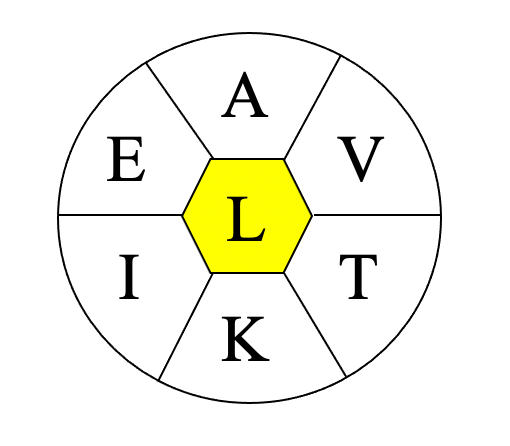
Art: Iva Reztok

A, E, I, K, T, V, and center L (all words must include L)

Merriam-Webster says…
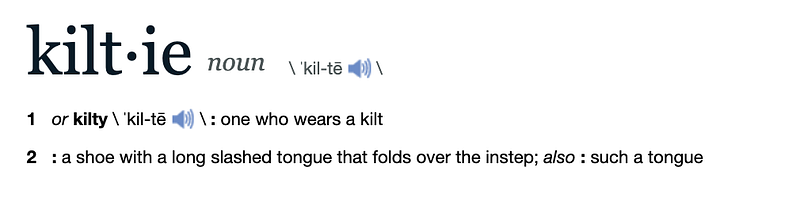
Credit: merriam-webster.com

Silly little dictionary! Don’t you know kiltie can’t possibly be a word if the New York Times says it ain’t?

For further fascinating facts, check out the Spelling Bee Master.

What’s your favorite dord* from today’s puzzle?

My Two Cents

The photo at the top of today’s column was taken during World War I. I did my best to check that by doing a reverse image search of the image. Although I was pretty certain the picture had that 1910s look as opposed to a 1940s vibe, I wanted to be as sure as I could.

Those poor Scots in the trenches! Word War I was horrific enough already without having to fight it in kilts. Although I’ve never actually worn one. Perhaps it was to their advantage somehow.

Clothes make the man

The dictionary explains that the word kilt comes from “Middle English, of Scandinavian origin; akin to Old Norse kjalta lap, fold of a gathered skirt”. Add the suffix -ie (in the sense of belonging to or having to do with) and you get kiltie as in definition 1. With the suffix -ie in the sense of “little one” you get kiltie per definition 2.

The kilt is a garment in the shape of a skirt that usually extends down to around the knees. It is typically worn by men ––especially those of Scottish descent–– as it’s a huge part of Scottish culture and a key piece of their traditional national garb, also known as the Highland dress. Another popular garment called the plaid is sometimes worn along with the kilt. The plaid is a rectangular-shaped length of cloth that is usually slung over the left shoulder.

Photo by Melody Ayres-Griffiths on Unsplash

Both the kilt and plaid are usually made of cloth woven with a cross-checked repeating pattern known as a tartan. The plaids in the above photo show that pattern.

Kilts are usually fashioned from wool with permanent pleats except for the ends, which the person wraps around their waist. The end effect is that he pleats end up at on the rear end, while the flat, unpleated ends overlap forming a double layer at his front.

This is one of the earliest depictions of the kilt, as German print showing Highlanders around 1630. If you have an older one, please contact Wikipedia so they can update their page.

Image by Georg Cöler — [| Ralphus]

And here’s a more recent depiction, courtesy of my friend Joe Kennedy: writer, amateur Scotsman, and history aficionado (among many other things), showing us his kilts:
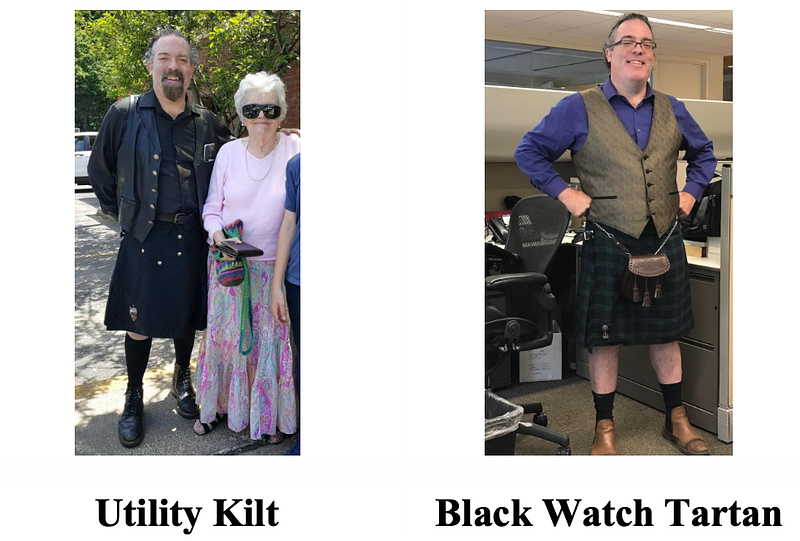
Credit: The inimitable Joe Kennedy

That thing in front of the kilt on the right? That’s a type of pouch called a sporran (Gaelic for “purse”), which is hung around the waist from a chain or leather strap. The kilt Joe is wearing on the left is known as a utility kilt, can be made of material other than cloth, and has pockets. This eliminates the need for a sporran.

So right here in living technicolor Kodachrome we have photographic evidence of a kiltie named Joe. And these photos have not been faked, unlike the ones of Bigfoot, the Lochness monster, and the Moon landing. Just kidding… about Bigfoot. I know you’re out there, you humongous, hairy beauty, you.

Looks like the shoe’s got your tongue!

Take this quote: “A kiltie is a long fringed tongue of leather that attaches to a golf shoe’s inside tongue and folds over the laces.” You know where that’t from? That’s right! The New York Times themselves!

Caught them red-handed again! Here’s the full 2012 article about the kiltie and the shoes it adorns. Read it here before they delete it!

Even though they don’t call the shoe itself a kiltie, they clearly still knew the word existed. Not so obscure then, is it, editors of the Spelling Bee?

Of course not, as they explain:

Once an inescapable facet of 1950s country clubs, a kiltie is a long fringed tongue of leather that attaches to a golf shoe’s inside tongue and folds over the laces. But just as those golf shoes, with their treacherous metal spikes, were verboten inside the clubhouse, the kiltie itself almost never appeared other than on golf shoes. The style, which was first spotted on George V in 1905, was widely adopted in the ’20s, then faded out in the ’70s. Today a kiltie is as likely to be found on a golf shoe as those old metal spikes are.

Okay, okay, that last sentence does not help my case. But here’s an example that will: a current kiltie on a current shoe sold in current stores:
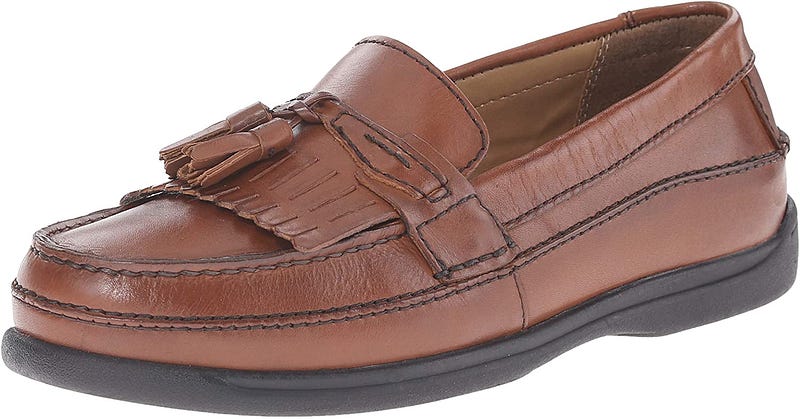
Screenshotted by Iva Reztok

We’ve proved the New York Times knew about the existence of the word kiltie at least ten years ago. Yes, the editors of the Spelling Bee decided that kiltie is a dord*.

You can check out my previous entry on another dord* here:

*What the heck is a dord, you ask? Here’s the answer:

Spelling Bee
Language
Fashion
Scotland
History
Recommended from ReadMedium