avatarDr. Derek Austin 🥳

Free AI web copilot to create summaries, insights and extended knowledge, download it at here

3458

Abstract

code>true</code> or <code>false</code>, which are the Boolean <a href="https://javascript.plainenglish.io/what-are-primitive-types-in-javascript-671909def6ca">primitive types</a>.</p><p id="dfdc">It’s important to note that you don’t use the <a href="https://developer.mozilla.org/en-US/docs/Web/JavaScript/Reference/Operators/new"><code></code>new keyword</a>, like you would if you were creating a <a href="https://readmedium.com/how-to-use-set-to-filter-unique-items-in-javascript-es6-196c55ce924b">new <code></code>Set object</a>. In this case, you’re using <code>Boolean()</code> for <a href="https://readmedium.com/es6-object-is-vs-in-javascript-7ce873064719">type coercion</a>, not to create an “<a href="https://javascript.plainenglish.io/how-to-check-for-a-string-in-javascript-a16b196915ff#cd00">object-wrapped primitive</a>.”</p><p id="c1a6">Object-wrapped primitives are what happens if you were to accidentally use the <code>new</code> keyword in this situation, something I discussed here:</p><div id="4d16" class="link-block"> <a href="https://javascript.plainenglish.io/how-to-check-for-a-string-in-javascript-a16b196915ff"> <div> <div> <h2>How to check for a string in JavaScript</h2> <div><h3>When checking for strings, typeof works great unless someone uses a primitive object wrapper, which is considered bad…</h3></div> <div><p>javascript.plainenglish.io</p></div> </div> <div> <div style="background-image: url(https://miro.readmedium.com/v2/resize:fit:320/0*kJdgB2fxms-ce_EZ)"></div> </div> </div> </a> </div><figure id="0486"><img src="https://cdn-images-1.readmedium.com/v2/resize:fit:800/0*52n_pONHdzIT-xwd"><figcaption>Photo by <a href="https://unsplash.com/@cosmictimetraveler?utm_source=medium&amp;utm_medium=referral">Cosmic Timetraveler</a> on <a href="https://unsplash.com?utm_source=medium&amp;utm_medium=referral">Unsplash</a></figcaption></figure><h1 id="d2fe">How to remove falsy array items in JS</h1><p id="43b7">The one-liner we saw in Kent’s tweet is <code>[].filter(Boolean)</code>. <a href="https://www.urbandictionary.com/define.php?term=clear%20as%20mud">Clear as mud</a>, right? Let’s look at another code example:</p><figure id="d7de"><img src="https://cdn-images-1.readmedium.com/v2/resize:fit:800/1*9GDJ0mkKvMWfLjBWv0oNDg.png"><figcaption><a href="https://gist.github.com/DoctorDerek/e57ee1326bd4a77eff8cda0def2d9670">View raw code</a> as a GitHub Gist</figcaption></figure><p id="944b">To remove falsy items, we use <a href="https://towardsdatascience.com/should-you-use-includes-or-filter-to-check-if-an-array-contains-an-item-1a8365dfc363"><code>.filte</code>r()</a> (<a href="https://developer.mozilla.org/en-US/docs/Web/JavaScript/Reference/Global_Objects/Array/filter"><code>Array.prototype.filte</code>r()</a>), which returns a new array containing just the array items for which the function passed in to <code>.filter()</code> evaluated to <code>true</code>.</p><p id="2e63">The JavaScript interview question here is: Please explain why you can abbreviate <code>.filter(item=>Boolean(item))</code> to <code>.filter(Boolean)</code>.</p><p id="ec57"><b><i>Answer</i></b>: The first argument to <code>.filter()</code> is a <a href="https://developer.mozilla.org/en-US/docs/Glossary/Callback_function">callback function</a>, so you

Options

can pass in any existing function instead of making a new one.</p><p id="81f6">In this case, <code>Boolean</code> and <code>(item)=>Boolean(item)</code> are the same callback function. (You can always try it <a href="https://levelup.gitconnected.com/5-ways-to-log-an-object-to-the-console-in-javascript-7b995c56af5a">in the console</a> to be sure.)</p><figure id="483f"><img src="https://cdn-images-1.readmedium.com/v2/resize:fit:800/0*cIMtHwzzqANk-KBW"><figcaption>Photo by <a href="https://unsplash.com/@korpa?utm_source=medium&amp;utm_medium=referral">Jr Korpa</a> on <a href="https://unsplash.com?utm_source=medium&amp;utm_medium=referral">Unsplash</a></figcaption></figure><h1 id="776a">How I actually filter out falsy array values</h1><p id="daf9">I had never actually figured out a great reason to use <code>.filter(Boolean)</code> in production until I was working on string matching this week.</p><p id="3564">String matching feels a little convoluted in JavaScript, because the <a href="https://readmedium.com/how-to-parse-a-date-using-a-regular-expression-in-javascript-f4e5b1d02935">regular expression</a> comes first, followed by <code>.exec()</code>, then the string.</p><p id="7d2e">The <code>.exec()</code> (<a href="https://developer.mozilla.org/en-US/docs/Web/JavaScript/Reference/Global_Objects/RegExp/exec"><code>RegExp.prototype.exe</code>c()</a>) method will return an array if a match is found or <code>null</code> if no match was found.</p><p id="7261">Since arrays are truthy, we can use <code>.filter(Boolean)</code> to generate an array of match results from an array of strings without any <code>null</code> values.</p><figure id="f699"><img src="https://cdn-images-1.readmedium.com/v2/resize:fit:800/1*E2CmRb3vr4UVxAviPlf7_g.png"><figcaption><a href="https://gist.github.com/DoctorDerek/71d9f6ecdaea6657474e51383c890944">View raw code</a> as a GitHub Gistt</figcaption></figure><p id="5378">This is TypeScript code from a <a href="https://javascript.plainenglish.io/the-10-next-11-0-0-features-you-need-to-know-about-from-next-js-conf-ac31d795accd">Next.js</a> project I’m working on that searches for Markdown (<code>.md</code> or <code>.mdx</code>) files to generate <a href="https://nextjs.org/docs/routing/dynamic-routes">dynamic routes</a>.</p><p id="d170">Any strings that don’t match <code>data\[path]\[slug].md</code> will be turned into <code>null</code> by <code>.exec()</code> in the <code>.map()</code> (<a href="https://developer.mozilla.org/en-US/docs/Web/JavaScript/Reference/Global_Objects/Array/map"><code>Array.prototype.ma</code>p()</a>) call.</p><p id="d5c0">While we could imagine many different <code>.filter()</code> conditions would work, this particular use of <code>.filter(Boolean)</code> makes a lot of sense to me.</p><p id="d521"><b>Happy coding!</b> 🥞🎭😎🚡💌</p><figure id="2973"><img src="https://cdn-images-1.readmedium.com/v2/resize:fit:800/0*bdOPpWoQYPyikssz"><figcaption>Photo by <a href="https://unsplash.com/@humaamhassan?utm_source=medium&amp;utm_medium=referral">Humaam Hassan</a> on <a href="https://unsplash.com?utm_source=medium&amp;utm_medium=referral">Unsplash</a></figcaption></figure><p id="3f76"><a href="https://www.linkedin.com/in/derek-austin/">Dr. Derek Austin</a> is the author of <a href="https://www.amazon.com/dp/B0BRJDLJ43"><i>Career Programming: How You Can Become a Successful 6-Figure Programmer in 6 Months</i></a>, now available on Amazon.</p></article></body>

Kent C. Dodds’ .filter() Trick Will Change How You Use JavaScript

This one-liner uses the Boolean constructor to magically remove all falsy values from an array ✨

Photo by Yousef Espanioly on Unsplash

I wanted to share a trick I picked up a few years ago from señor Kent C. Dodds, the “Epic React” and “Testing JavaScript” guy.

Did you find that example kind of convoluted? No worries, let’s break it down real quick, and then I’ll share why I filter Boolean values.

Photo by Jr Korpa on Unsplash

What does falsy mean in JavaScript?

In JavaScript, falsy values are those values like null and >-0 that evaluate to false when using >== (loose equality). All other values, including objects such as arrays and Dates, are considered truthy.

You can use the Boolean constructor (Boolean()) to “coerce” a value to either true or false, which are the Boolean primitive types.

It’s important to note that you don’t use the new keyword, like you would if you were creating a new Set object. In this case, you’re using Boolean() for type coercion, not to create an “object-wrapped primitive.”

Object-wrapped primitives are what happens if you were to accidentally use the new keyword in this situation, something I discussed here:

Photo by Cosmic Timetraveler on Unsplash

How to remove falsy array items in JS

The one-liner we saw in Kent’s tweet is [].filter(Boolean). Clear as mud, right? Let’s look at another code example:
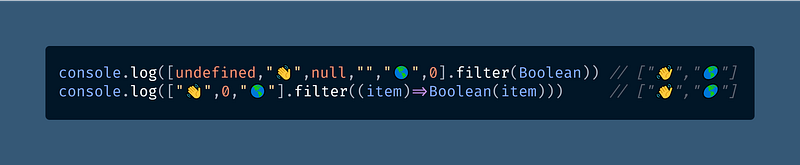
View raw code as a GitHub Gist

To remove falsy items, we use .filter() (Array.prototype.filter()), which returns a new array containing just the array items for which the function passed in to .filter() evaluated to true.

The JavaScript interview question here is: Please explain why you can abbreviate .filter(item=>Boolean(item)) to .filter(Boolean).

Answer: The first argument to .filter() is a callback function, so you can pass in any existing function instead of making a new one.

In this case, Boolean and (item)=>Boolean(item) are the same callback function. (You can always try it in the console to be sure.)

Photo by Jr Korpa on Unsplash

How I actually filter out falsy array values

I had never actually figured out a great reason to use .filter(Boolean) in production until I was working on string matching this week.

String matching feels a little convoluted in JavaScript, because the regular expression comes first, followed by .exec(), then the string.

The .exec() (RegExp.prototype.exec()) method will return an array if a match is found or null if no match was found.

Since arrays are truthy, we can use .filter(Boolean) to generate an array of match results from an array of strings without any null values.
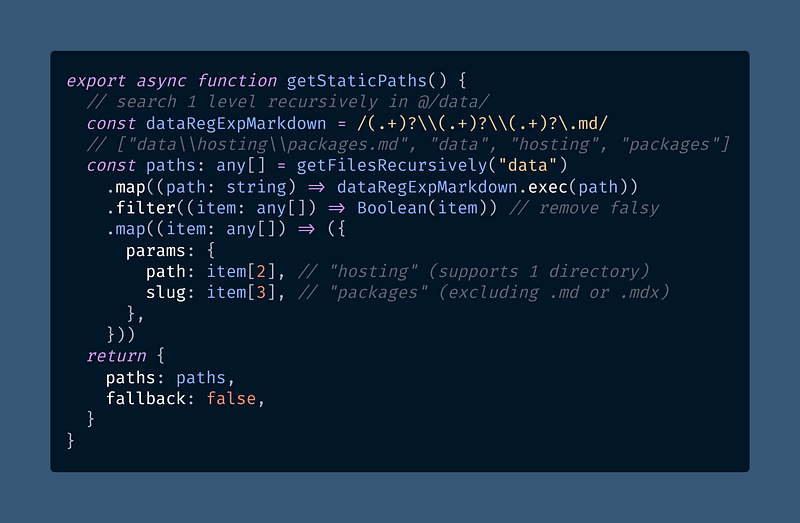
View raw code as a GitHub Gistt

This is TypeScript code from a Next.js project I’m working on that searches for Markdown (.md or .mdx) files to generate dynamic routes.

Any strings that don’t match data\\[path]\\[slug].md will be turned into null by .exec() in the .map() (Array.prototype.map()) call.

While we could imagine many different .filter() conditions would work, this particular use of .filter(Boolean) makes a lot of sense to me.

Happy coding! 🥞🎭😎🚡💌

Photo by Humaam Hassan on Unsplash

Dr. Derek Austin is the author of Career Programming: How You Can Become a Successful 6-Figure Programmer in 6 Months, now available on Amazon.

JavaScript
Programming
Web Development
Software Engineering
Arrays
Recommended from ReadMedium