
Kafka: Multi-Node Cluster Explained Like You’re 10

Introduction to Kafka
Apache Kafka is like a digital post office that can handle a huge number of messages quickly and efficiently. It allows different parts of a computer system (called producers) to send messages and others (called consumers) to receive them in real-time. This makes it great for applications that need to process lots of data quickly and without delays.
We need Kafka because:
- It’s super fast: Kafka can manage a massive number of messages every second.
- It grows with you: If you need more capacity, you can add more computers to your Kafka system.
- It keeps your data safe: Kafka stores copies of your data on multiple computers, so if one fails, your data is still secure.
- It’s quick to react: Kafka can process data almost instantly, which is great for applications that need fast responses.
- It works well with others: Kafka can be combined with different tools and programming languages, making it versatile and easy to use.
We need Multi-Node Kafka Cluster because:
Kafka multi-node cluster is like having a team of super-fast mail carriers (Kafka) who can deliver messages (data) between your favorite games and apps on your devices. Each mail carrier (node) is super-fast, can handle tons of messages, and is great at working together with others.
Now, imagine if you only had one mail carrier. What if they get tired or have a problem? Your messages might not get delivered on time, and that would be a bummer! But if you have a team of mail carriers (a multi-node cluster), they can help each other out, so your messages always get delivered quickly and safely.
A Kafka multi-node cluster is like having that awesome team of mail carriers. They can:
- Share the work: If one mail carrier needs a break, the others can handle their messages.
- Keep your messages safe: If something happens to one mail carrier, the others have copies of your messages, so nothing gets lost.
- Grow with you: If you start using more apps and games, you can add more mail carriers to your team to handle all the new messages.
So, having a Kafka multi-node cluster means that you can always count on your messages being delivered super-fast, safely, and reliably between your apps and games. Plus, it can grow with you as you use more cool stuff on your devices!
How does a 3-Node Kafka Cluster work:
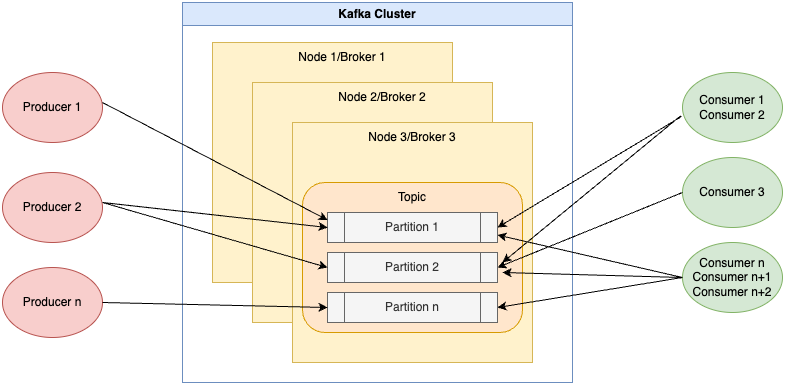
Alright! Imagine a Kafka cluster like a post office that has three different branches (3-node Kafka cluster). In this system, we have three main components: people who send letters (producers), post office branches (brokers/nodes), and people who receive letters (consumers).
- Producers (people who send letters): These are like the people who write and send letters. They create messages and send them to a specific topic (like addressing the letter to a person).
- Brokers (post office branches): These are like the three branches of the post office that work together to receive, sort, and store the letters. They make sure that the letters are organized and that there are backup copies in case something goes wrong (like if one of the branches has a problem).
- Topics (addresses): These are like the addresses people write on letters. Producers send messages to specific topics, and consumers receive messages from those topics. Topics are divided into smaller units (partitions) to make it easier to organize and manage the letters.
- Consumers (people who receive letters): These are like the people who receive and read the letters. They subscribe to specific topics (addresses) to get the messages they’re interested in.
In a 3-node Kafka cluster (3 post office branches), here’s how the process looks like:
- A producer (person sending a letter) creates a message and sends it to a specific topic (address).
- The message is sorted into a partition (smaller unit) of that topic at one of the post office branches.
- The message (letter) is copied to the other branches for backup, just in case something goes wrong.
- A consumer (person receiving the letter) who’s interested in the topic gets the message from one of the post office branches.
This system allows many people to send and receive letters (messages) quickly and efficiently, even if one of the post office branches has a problem.
Now, let’s set up a 3-node Kafka Cluster. To set up a 3-node Kafka cluster, you’ll need the following prerequisites:
- Hardware: At least three machines (physical or virtual) to act as nodes in the cluster. Each machine should meet the minimum hardware requirements for Kafka, such as having sufficient RAM, CPU, and storage to handle the expected load.
- Operating System: A compatible operating system installed on each machine, such as Linux (e.g., Ubuntu, CentOS, or RHEL) or macOS. Kafka works best on Unix-based systems.
- Java Development Kit (JDK)
- Zookeeper
- Kafka
- Network Connectivity: Ensure that all machines are connected to the same network and can communicate with each other. You should also make sure that the required ports for Kafka and Zookeeper are open and accessible between the nodes.
Installation:
Before setting up a Kafka cluster, you need to install Java (preferably the latest version) and Zookeeper.
Step 1: Install Java (JDK) on each node:
Visit https://www.oracle.com/java/technologies/javase-jdk14-downloads.html and follow the instructions to install Java on your system.
Step 2: Install Zookeeper on each node:
Download the latest version of Zookeeper from https://zookeeper.apache.org/releases.html and extract the archive. Zookeeper is required for managing and coordinating Kafka brokers.
Step 3: Install Kafka on each node:
Download the latest version of Kafka from https://kafka.apache.org/downloads and extract the archive.
Setting Up a 3-Node Kafka Cluster:
Step 1: Configure Zookeeper Create a zoo.cfg file in the conf directory of your Zookeeper installation folder. Add the following contents:
tickTime=2000
dataDir=/path/to/zookeeper/data
clientPort=2181
initLimit=5
syncLimit=2
server.1=192.168.0.1:2888:3888
server.2=192.168.0.2:2888:3888
server.3=192.168.0.3:2888:3888
Create a file named myid in the dataDir folder on each Zookeeper node, containing the respective server ID (1, 2, or 3).
Step 2: Start Zookeeper On each Zookeeper node, run the following command from the Zookeeper installation folder:
bin/zkServer.sh start
Step 3: Configure Kafka Brokers Create a server.properties file for each Kafka node in the config directory of your Kafka installation folder. Edit the following properties:
broker.id=1 # Use 2 and 3 for the other nodes
zookeeper.connect=192.168.0.1:2181,192.168.0.2:2181,192.168.0.3:2181
listeners=PLAINTEXT://192.168.0.1:9092 # Use respective server ID for other nodes
log.dirs=/path/to/kafka/data
Step 4: Start Kafka Brokers On each Kafka node, run the following command from the Kafka installation folder:
bin/kafka-server-start.sh config/server.properties
Example: Producing and Consuming Messages:
Step 1: Create a Topic From any Kafka node, run the following command:
bin/kafka-topics.sh --create --bootstrap-server 192.168.0.1:9092 --replication-factor 3 --partitions 1 --topic topic_nameStep 2: Produce Messages From any Kafka node, run the following command to start a producer:
bin/kafka-console-producer.sh --broker-list 192.168.0.1:9092,192.168.0.2:9092,192.168.0.3:9092 --topic topic_name
Type some messages and press Enter after each message. Press Ctrl+C to exit the producer.

Step 3: Consume Messages From any Kafka node, run the following command to start a consumer:
bin/kafka-console-consumer.sh --bootstrap-server 192.168.0.1:9092,192.168.0.2:9092,192.168.0.3:9092 --topic topic_name --from-beginningThe consumer will display messages sent to the topic_name topic. To exit, press Ctrl+C.

Congratulations! You have successfully set up a 3-node Kafka cluster and experimented with producing and consuming messages. In our next article, we’ll dive deeper and create a fully functional Kafka pipeline using the Arduino Temperature Sensor, as discussed in this guide: https://readmedium.com/getting-started-with-arduino-a-step-by-step-guide-to-setting-up-and-programming-a-temperature-dc74dc65199b
Thanks for Reading!
If you like my work and want to support me…


