
K8s for Data Engineers — Deployment, Statefulset & Daemonset
Managing Pods in K8s
Part I | Part II | Part III | Part IV | Part V | Part VI | Part VII | Part VIII | Part IX
A Pod is the smallest deployable unit in Kubernetes. Pods hold the container(s) for an application. To help deploy Pods, Kubernetes provides three different options:
- Deployments
- DaemonSets
- StatefulSets
In this blog, I will be discussing these ways of pod deployment.
Deployments
Deployments allow us to define the lifecycle of applications, including the container images they use, the number of pods, and the manner of updating them. They ensure that a specified number of identical pods with common configurations are always running and available. The entire update process is recorded. We can roll back to the previous version if there is an error in our new version of the application. Deployments also provide options for pausing, and resuming the update.
Above mentioned features make the deployment, the default method of deploying our applications.
Deployments are typically used for stateless applications, but we can its state by attaching a persistent volume and making it stateful. All pods in a deployment share the same volume, with the same data.
Components of deployment:
- Deployment template — This is a YAML configuration file that is used to define the Deployment’s configuration specs.
- Service: Defines a single endpoint that is used to enable network access and expose workloads running on the pods within the Deployment.
- Persistent Volume: Allows pods within the Deployment to access a portion of node storage to store data.
apiVersion: apps/v1
kind: Deployment
metadata:
  name: nginx-deployment
  labels:
    app: nginx
spec:
  replicas: 3
  strategy:
    type: RollingUpdate
    rollingUpdate:
      maxSurge: 2
      maxUnavailable: 1
  selector:
    matchLabels:
      app: nginx
  template:
    metadata:
      labels:
        app: nginx
    spec:
      containers:
      - name: nginx
        image: nginx:1.14.2
        ports:
        - containerPort: 80
        volumeMounts:
          - name: demo-vol-mount
            mountPath: /app/
      volumes:
       - name: demo-vol
         persistentVolumeClaim:
          claimName: demo-volume-claim
Useful commands:
kubectl get deploy -n <namespace>
kubectl delete deploy deploy-name -n namespace
kubectl scale deploy deploy-name --replicas=5 -n namespace
kubectl rollout restart deploy deploy-name -n test-namespace
kubectl rollout status deploy deploy-name -n test-namespace
StatefulSets
StatefulSets are designed to run our app’s stateful components. StatefulSets solve the challenges of running stateful services in Kubernetes. It creates a set of identically configured Pods from a spec we supply, but each Pod is assigned a non-interchangeable identity. Pods retain their identity if they have to be rescheduled or during the scaling of the StatefulSet. Pods are added and removed in a predictable order. Each Pod in the StatefulSet is also assigned a predictable and consistent network identity in the form <statefulset-name>-<pod-ordinal-index>. Kubernetes terminates Pods in the reverse order of their creation. StatefulSets provide persistent storage to their pods through Kubernetes PersistentVolumes, which can be dynamically provisioned and attached to pods as needed. This allows stateful applications to store their data reliably across pod restarts and rescheduling, which is important for applications that need to maintain stateful data, such as databases or distributed file systems. Each Pod has a PersistentVolume (PV) attached to it. If the Pod crashes, the data is not lost; a new Pod is created and attached to the PV.
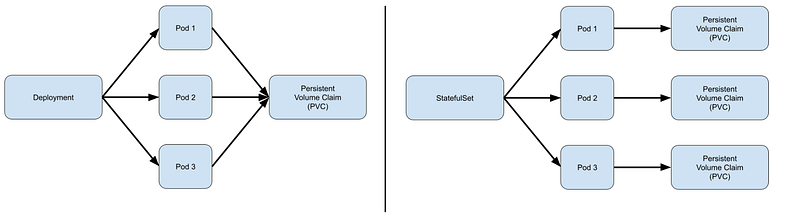
StatefulSets don’t create any ReplicaSet or anything of that sort, so we can’t rollback a StatefulSet to a previous version. We can only delete or scale up/down the Statefulset. If we update a StatefulSet, it also performs RollingUpdate i.e. one replica pod will go down and the updated pod will come up, then the next replica pod will go down and so on.
Usually, the zeroeth index pod allows both read & write whereas the other pods only allow read.
Statefulsets require a headless service to return the IPs of the associated pods and enable direct interaction with them.
Components of Statefulsets:
- StatefulSet: The YAML template that defines pod selectors and replicas of containers that will run on the pods.
- Headless service: The network domain controller that allows clients to connect with the pods using a DNS entry.
- Volume claim template: The template specification that allows administrators to provision stateful storage using persistent volumes.
apiVersion: apps/v1
kind: StatefulSet
metadata:
  name: nginx-statefulset
  labels:
    app: nginx
spec:
  replicas: 3
  updateStrategy:
    type: RollingUpdate
  selector:
    matchLabels:
      app: nginx
  template:
    metadata:
      labels:
        app: nginx
    spec:
      terminationGracePeriodSeconds: 10
      containers:
      - name: nginx
        image: nginx:1.14.2
        ports:
        - containerPort: 80
        volumeMounts:
        - name: nginx-data
          mountPath: /var/www/html
  serviceName: nginx
  volumeClaimTemplates:
  - metadata:
      name: nginx-data
    spec:
      accessModes: [ "ReadWriteOnce" ]
      resources:
        requests:
          storage: 1Gi
Common commands:
kubectl get sts -n namesapce
kubectl scale sts statefulset-name --replicas=5 -n namesapce
kubectl delete sts statefulset-name -n namesapce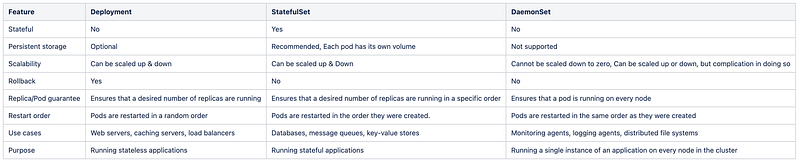
Daemonset
A DaemonSet is a controller that ensures that the pod runs on all the nodes of the cluster. If a node is added/removed from a cluster, DaemonSet will automatically add/delete the pod.
If we update a DaemonSet, it also performs RollingUpdate i.e. one pod will go down after that the updated pod will come up, then the next pod will go down and the updated pod will come up. This continues till all pods are replaced. Unlike Deployments, we cannot roll back our DaemonSet to a previous version.
apiVersion: apps/v1
kind: DaemonSet
metadata:
  name: fluentd
spec:
  selector:
    matchLabels:
      app: fluentd
  template:
    metadata:
      labels:
        app: fluentd
    spec:
      nodeSelector:
        - log-enabled: "true"
      containers:
      - name: fluentd
        image: fluent/fluentd:v1.7.4-1.0
        volumeMounts:
        - name: varlog
          mountPath: /var/log
      terminationGracePeriodSeconds: 30
      volumes:
      - name: varlog
        hostPath:
          path: /var/log
Common commands:
kubectl get daemonset
kubectl delete daemonset/fluentd
kubectl patch daemonset fluentd -p '{"spec": {"nodeSelector": {"non-existent-nodeselector": "NA"}}}'