avatarNikhil Vemu

Free AI web copilot to create summaries, insights and extended knowledge, download it at here

4671

Abstract

<figcaption>Image by the author</figcaption></figure><p id="0805">It looks round and bold.</p><div id="7b1d"><pre><span class="hljs-comment">* Also, a limited-edition badge for achieving the Unity challenge by completing the Move ring 7 days in a row this February.</span></pre></div><h1 id="367e">#3. Handoff to HomePod Guide 🤳</h1><p id="8393">Handing off music to HomePod isn’t a new thing. But maybe Apple thought many people aren’t using it — not knowing it exists. So in iOS 16.3,</p><p id="be52">If you’ve setup a HomePod already, you’ll see a cool animation showing how to transfer music and control its playback on a HomePod.</p><p id="a4c1">It will also appear when you setup your first HomePod after updating to iOS 16.3.</p><h2 id="3a25">A frame of that →</h2><figure id="97a1"><img src="https://cdn-images-1.readmedium.com/v2/resize:fit:800/1*8U7A6AZJ-5CPKRSbBRHAmg.jpeg"><figcaption>Credit: <a href="undefined">Maxwell “Max” Weinbach</a> on <a href="https://twitter.com/MaxWinebach">Twitter</a></figcaption></figure><h1 id="d763">#4. Massive Changes to Emergency SOS 🛟</h1><h2 id="5f1e">(1). Call with Hold (and Release)</h2><p id="6825">Before, you only had to press and hold the side-button and either of the vol. buttons till iPhone calls Emergency Services.</p><p id="891e">But now, you’ll have to <i>release</i> the buttons after the countdown to trigger the call.</p><figure id="9dd6"><img src="https://cdn-images-1.readmedium.com/v2/resize:fit:800/1*yx_eIfwsWhqWmlmzngT3VA.jpeg"><figcaption>Image by the author</figcaption></figure><p id="470d">But if you aren’t releasing it thinking countdown isn’t over yet, a <b>dull, lifeless TTS voice</b> will tell you to do that.</p><h2 id="d384">The voice</h2> <figure id="3cb9"> <div> <div> <img class="ratio" src="http://placehold.it/16x9"> <iframe class="" src="https://cdn.embedly.com/widgets/media.html?src=https%3A%2F%2Fw.soundcloud.com%2Fplayer%2F%3Furl%3Dhttps%253A%252F%252Fapi.soundcloud.com%252Ftracks%252F1421565997%26show_artwork%3Dtrue%26secret_token%3Ds-oXusnX84iGy&amp;display_name=SoundCloud&amp;url=https%3A%2F%2Fsoundcloud.com%2Fnikhil-vemu%2Frelease-to-call-emergency-services%2Fs-oXusnX84iGy%3Fsi%3D69321e1c34024fe8acb619ee582d7e11%26utm_source%3Dclipboard%26utm_medium%3Dtext%26utm_campaign%3Dsocial_sharing&amp;image=https%3A%2F%2Fi1.sndcdn.com%2Fartworks-GEmLWS5cYu19rC6p-2exZqg-t500x500.jpg&amp;key=a19fcc184b9711e1b4764040d3dc5c07&amp;type=text%2Fhtml&amp;schema=soundcloud" allowfullscreen="" frameborder="0" height="166" width="800"> </div> </div> </figure></iframe></div></div></figure><h2 id="e90d">(2). Call Quietly</h2><p id="62cd">The new <b><i>‘Call Quietly’</i></b> setting now replaces the existing <b><i>‘Countdown Sound’</i></b> setting in <i>Settings ⚙️ &lt; Emergency SOS 🆘</i>.</p><figure id="2257"><img src="https://cdn-images-1.readmedium.com/v2/resize:fit:800/1*wJdhHwe9CqSs_b92qQ2GdQ.jpeg"><figcaption>Image by the author</figcaption></figure><p id="2776">It’s does the <i>exact same thing</i>, <b><i>in reverse</i></b>. If it’s toggled on,</p><p id="b399">You won’t hear loud beeps and flashes while the countdown to Emergency Call.</p><p id="b47e">Better <i>use</i> the feature, coz if not, the beeps and flashes may alert the person or animal threatening you.</p><h1 id="aeae">#5. Everyone can use ‘Advanced Data Protection’ now 🛡️</h1><p id="833e">People in specific regions already got the ‘Advanced Data Protection’ feature with iOS 16.2.</p><div id="4896" class="link-block"> <a href="https://readmedium.com/the-ios-16-2-update-is-way-bigger-than-weve-expected-7-amazing-features-a47ca64a47d4"> <div> <div> <h2>iOS 16.2 Keeps Getting Impressive — 7 More Features!</h2> <div><h3>The update keeps getting impressive with every beta</h3></div> <div><p>medium.com</p></div> </div> <div> <div style="background-image: url(https://miro.readmedium.com/v2/resize:fit:320/1*oNOYvd1KUvLa33B7plWQEQ.jpeg)"></div> </div> </div> </a> </div><p id="c314">With iOS 16.3, it’ll now be available to everyone in the world. If toggled on,</p><p id="2bf5">This feature end-to-end encrypts your iCloud-synced data, which can only be decrypted back on your trusted devices.</p><p id="4127">So even if some evil hacker steals a copy of your backup, they won’t be able to know what’s inside. — <i>Crazy, right?</i></p><p id="69fc">Toggle it on in <i>‘Settings ⚙️ &lt; your name &lt; iCloud ☁️ &lt; Advance # Options d Data Protection’</i>.</p><h2 id="2979">What data is covered?</h2><div id="7fb2"><pre>• Device <span class="hljs-keyword">Backup </span>🔄 • Reminders • Messages <span class="hljs-keyword">Backup </span>💬 • Safari <span class="hljs-keyword">Bookmarks </span>🧭 • iCloud Drive ☁️ • Siri <span class="hljs-keyword">Shortcuts </span>• Notes 📝 • Voice Memos • Photos • Wallet Passes 🪪</pre></div><h1 id="491c">#6. A Ridiculous Private Relay Change 🫤</h1><p id="02fa">Private Relay is an iCloud+ feature.</p><div id="aa1d" class="link-block"> <a href="https://readmedium.com/i-upgraded-to-icloud-yesterday-heres-why-you-should-upgrade-too-14de6c889ad4"> <div> <div> <h2>Four Reasons Why You Should Consider Upgrading To iCloud+ Today</h2> <div><h3>And why it left me speechless</h3></div> <div><p>medium.com</p></div> </div> <div> <div style="background-image: url(https://miro.readmedium.com/v2/resize:fit:320/1*fAhcI8XYft_e6q31dtlQqA.png)"></div> </div> </div> </a> </div><p id="2111">If you try toggling it off in <i>Settings ⚙️ &lt; your name &lt; iCloud &lt; Private Relay</i>,</p><h2 id="678f">In iOS 16.2, this appeared</h2><figure id="04a4"><img src="https://cdn-images-1.readmedium.com/v2/resize:fit:800/1*P14zS7iunp74f38AAxOu-g.jpeg"><figcaption>Image by the author</figcaption></figure><p id="d863">But,</p><h2 id="d5a7">In iOS 16.3, this will appear</h2><figure id="66ee"><img src="https://cdn-images-1.readmedium.com/v2/resize:fit:800/1*g_K1xgYQSmetoWX5hDYcrw.jpeg"><figcaption>Image by the author</figcaption></figure><p id="2597">‘Cancel’ button gone!</p><p id="5a10">So if you’ve accidentally toggled off Private Relay switch, you can’t press cancel and revert back.</p><p id="1527">And no, you can’t tap anywhere else to come back.</p><h2 id="7d5d">Two workarounds for this.</h2><ol><li>Turn off Private Relay, and turn it on.</li><li>Don’t do anything, just swipe up, and close Settings :)</li></ol><h1 id="c44f">#7. Reserve Parking Spots in Maps 🅿️</h1><p id="a1c4">Living in a big city feels like a status symbol — but a drawback: Not enough parking spaces.</p><p id="c34f">I hate keeping my family at wait, while I circle around crowded parking lots to find a slot for my car and come back.</p><p id="39c9">It takes off half the fun from the trip.</p><p id="21b4">Same with you? No worries.</p><p id="c6d4">From iOS 16.3, you can reserve parking spots in supported public places — right from the Maps app.</p><p id="b9a9">To do that,</p><ul><li>Search for the public place on Maps,</li><li>Click ‘More’.</li></ul><figure id="8eff"><img src="https://cdn-images-1.readmedium.com/v2/resize:fit:800/1*fEqyWUePZCPk5C0dixrDPw.jpeg"><figcaption>Credit: <a href="https://youtu.be/PV24-TiyrjQ">iReviews</a></figcaption></figure><p id="a94f">If the place’s supported, you’ll see ‘Parking 🚘’ popped up, which, when clicked, will redirect to a website where you can book parking in advance.</p><p id="6de8">As of now, it’s supported only for a few places. Hope Apple includes more places soon :)</p><h2 id="2c6e">Isn’t iOS 16 awesome?</h2><h2 id="ffdd">185+ new features of iOS 16: A Compilation (Always Updated):</h2><div id="be71" class="link-block"> <a href="https://nikhilvemu.medium.com/list/bfb16160e680"> <div> <div> <h2>All iOS 16 Features</h2> <div><h3>146</h3></div> <div><p>nikhilvemu.medium.com</p></div> </div> <div> <div style="background-image: url(https://miro.readmedium.com/v2/resize:fit:320/0*a147cd3c738317b7b915c9a922f76082eaf2e657.jpeg)"></div> </div> </div> </a> </div><p id="0fb8"><i>Join <b>225+</b> others to <a href="https://nikhilvemu.medium.com/subscribe"><b>get notified</b></a> whenever I publish a new story.</i></p><div id="c839" class="link-block"> <a href="https://nikhilvemu.medium.com/membership"> <div> <div> <h2>Join Medium with my referral link — Nikhil Vemu</h2> <div><h3>Read every story from Nikhil Vemu (and thousands of other writers on Medium). Your membership fee directly supports…</h3></div> <div><p>nikhilvemu.medium.com</p></div> </div> <div> <div style="background-image: url(https://miro.readmedium.com/v2/resize:fit:320/0*mBIp7BmNza2bZ74G)"></div> </div> </div> </a> </div></article></body>
Photo by TheRegisti on Unsplash

iOS 16.3 Would be a Kick-Ass Update — 7 Amazing Features!

They’re mind-boggling

After the massive feature-spree of iOS 16.1 and iOS 16.2, I thought there wasn’t much left for iOS 16.3, poor update.

But, Apple proved me wrong, again.

Though there are less features this update, they’re boggled my mind at par with those of previous updates. Here are 7 of them.

#1. A BRAND NEW way to login to Apple ID 🔑

You can now login to Apple ID using FIDO®-Certified security keys.

This 2-FA method will replace the verification codes you receive on your devices while logging in. So,

Until those physical keys are in your custody, no one else can login to your Apple ID.

If you don’t know, here’s how they look.
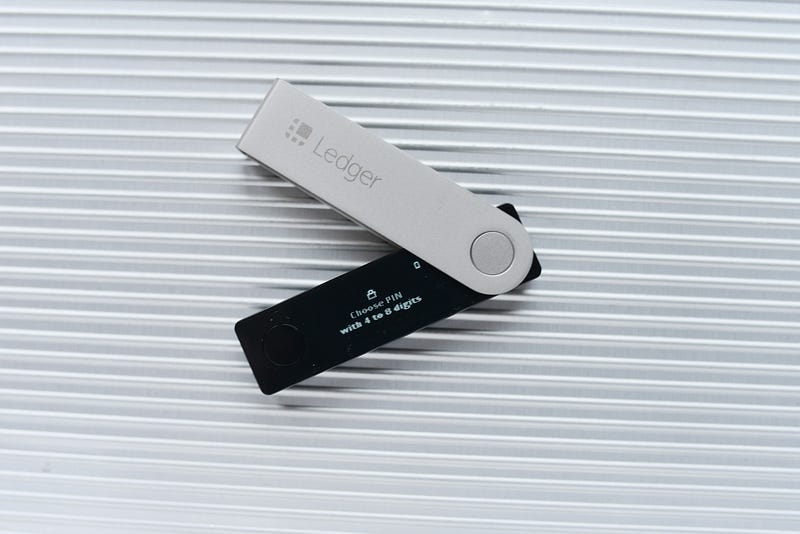
Photo by regularguy.eth on Unsplash

You’ll need two security keys to perform this. Why? Coz it makes sure you can always login to your account, even if you lose one.

How to setup →

Go to ‘Settings ⚙️ < your name < Password & Security’, and click on ’Add Security Keys’.

  • Accept everything that comes along,
  • Type your iPhone passcode,
  • Link Security Keys (NFC or lightning), give them nicknames, and

You’re done.

What if I lose both keys? You Apple account is gone forever. And even Apple can’t help restore it.

So, it’s advised you store the second key safely in a locker, preferably in a local bank.

Notes:
If Security Keys are your preferred method of logging in, 
1. Any of your Apple devices, if inactive for over 90 days, will be logged off your account. And you'll have to use Security Keys to login again.
2. Security Keys sync with all your Apple devices.

#2. A new wallpaper and time font

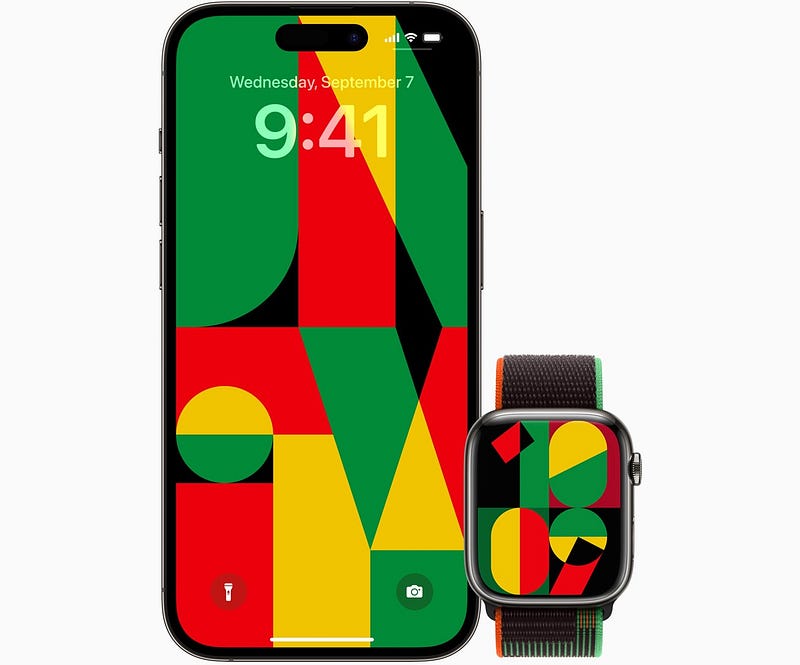
Celebrating Black History month, Apple releases a new Unity wallpaper* for Apple Watch and iPhone.
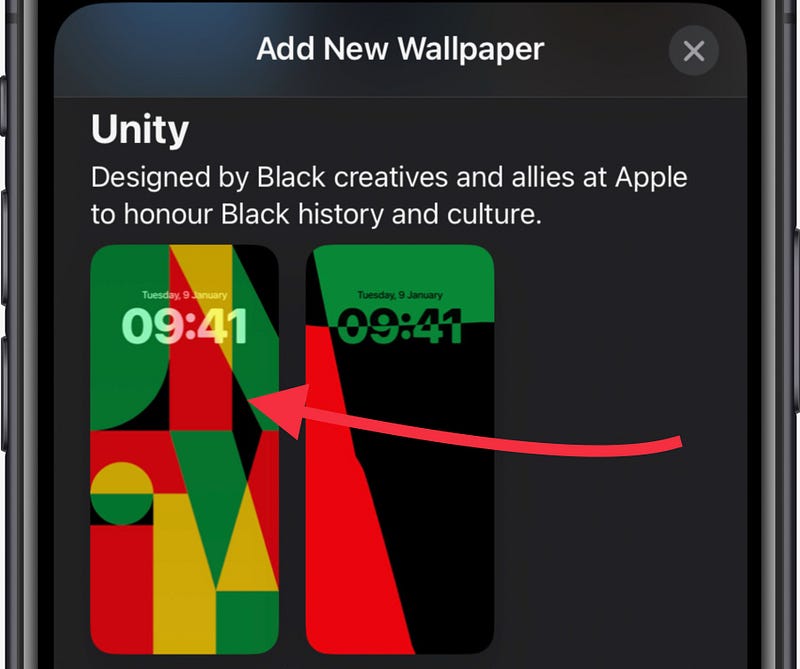
Image by the author

Official pic:

Credit: Apple

It comes in 11 colour variations. Switch between them by swiping left or right in the wallpaper customisation page.

Also, there’s a new font exclusive to the new Unity wallpaper.

This.
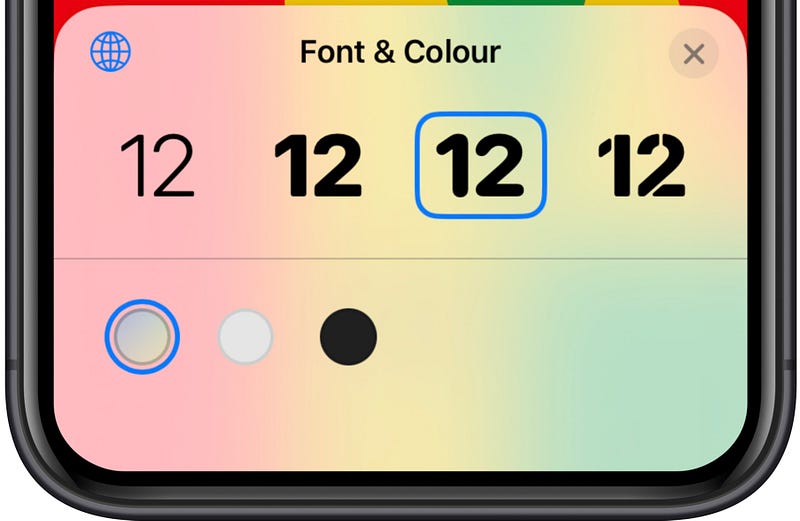
Image by the author

It looks round and bold.

* Also, a limited-edition badge for achieving the Unity challenge by completing the Move ring 7 days in a row this February.

#3. Handoff to HomePod Guide 🤳

Handing off music to HomePod isn’t a new thing. But maybe Apple thought many people aren’t using it — not knowing it exists. So in iOS 16.3,

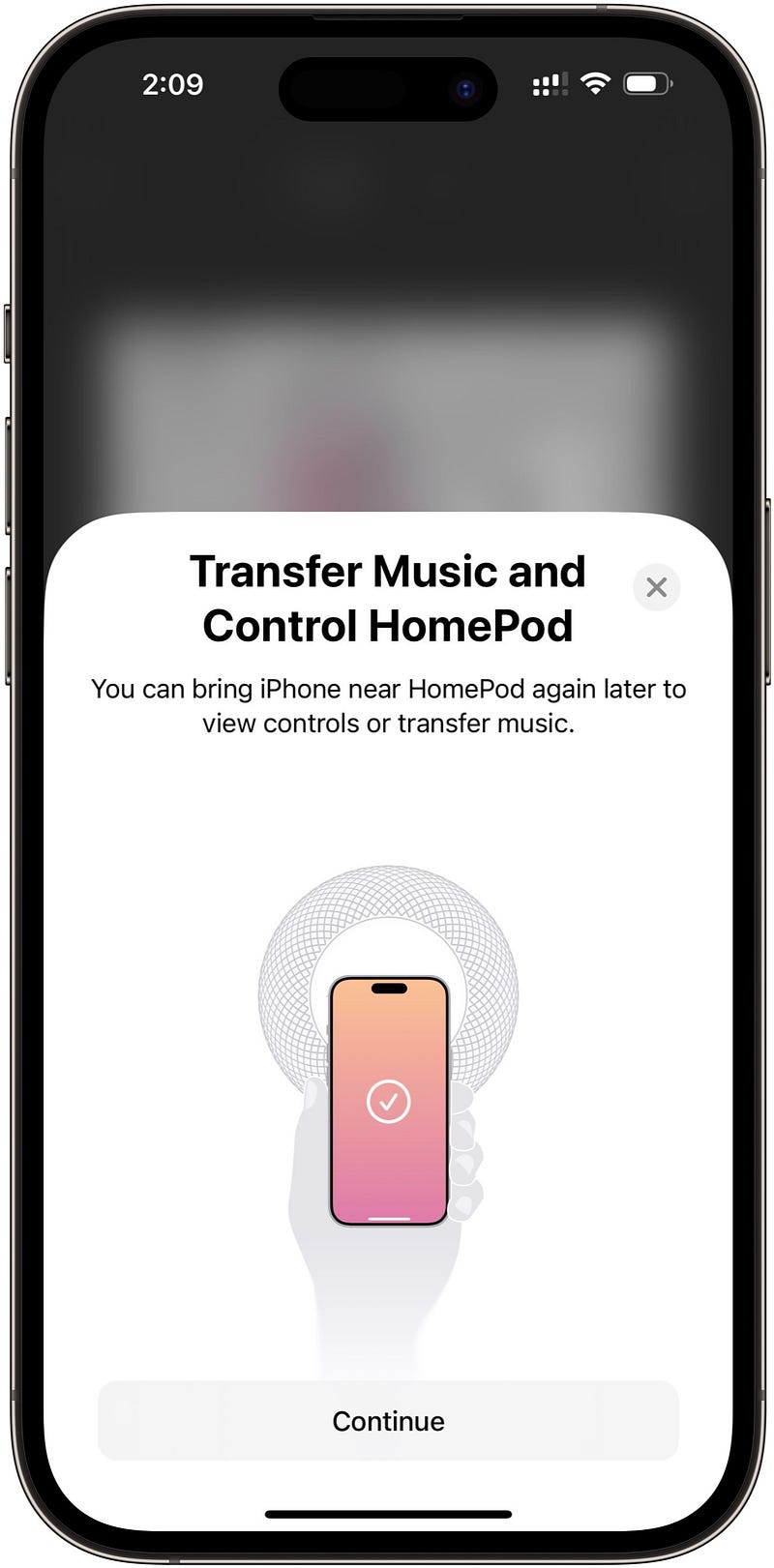
If you’ve setup a HomePod already, you’ll see a cool animation showing how to transfer music and control its playback on a HomePod.

It will also appear when you setup your first HomePod after updating to iOS 16.3.

A frame of that →
Credit: Maxwell “Max” Weinbach on Twitter

#4. Massive Changes to Emergency SOS 🛟

(1). Call with Hold (and Release)

Before, you only had to press and hold the side-button and either of the vol. buttons till iPhone calls Emergency Services.

But now, you’ll have to release the buttons after the countdown to trigger the call.
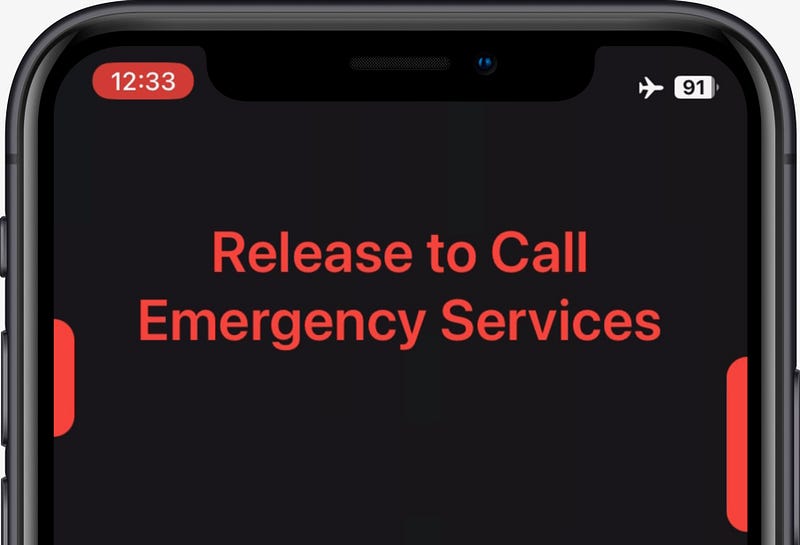
Image by the author

But if you aren’t releasing it thinking countdown isn’t over yet, a dull, lifeless TTS voice will tell you to do that.

The voice

(2). Call Quietly

The new ‘Call Quietly’ setting now replaces the existing ‘Countdown Sound’ setting in Settings ⚙️ < Emergency SOS 🆘.
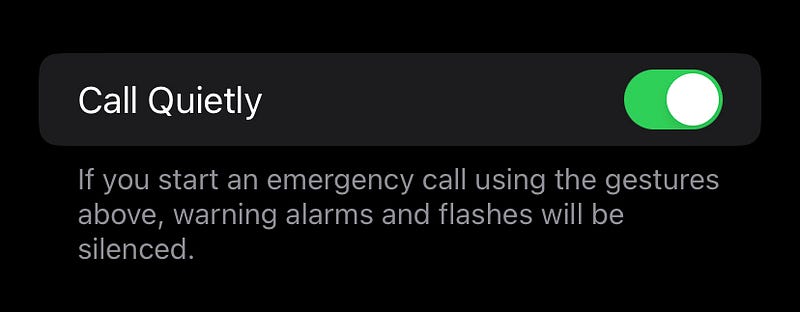
Image by the author

It’s does the exact same thing, in reverse. If it’s toggled on,

You won’t hear loud beeps and flashes while the countdown to Emergency Call.

Better use the feature, coz if not, the beeps and flashes may alert the person or animal threatening you.

#5. Everyone can use ‘Advanced Data Protection’ now 🛡️

People in specific regions already got the ‘Advanced Data Protection’ feature with iOS 16.2.

With iOS 16.3, it’ll now be available to everyone in the world. If toggled on,

This feature end-to-end encrypts your iCloud-synced data, which can only be decrypted back on your trusted devices.

So even if some evil hacker steals a copy of your backup, they won’t be able to know what’s inside. — Crazy, right?

Toggle it on in ‘Settings ⚙️ < your name < iCloud ☁️ < Advanced Data Protection’.

What data is covered?

• Device Backup 🔄
• Reminders
• Messages Backup 💬
• Safari Bookmarks 🧭
• iCloud Drive ☁️
• Siri Shortcuts
• Notes 📝
• Voice Memos
• Photos
• Wallet Passes 🪪

#6. A Ridiculous Private Relay Change 🫤

Private Relay is an iCloud+ feature.

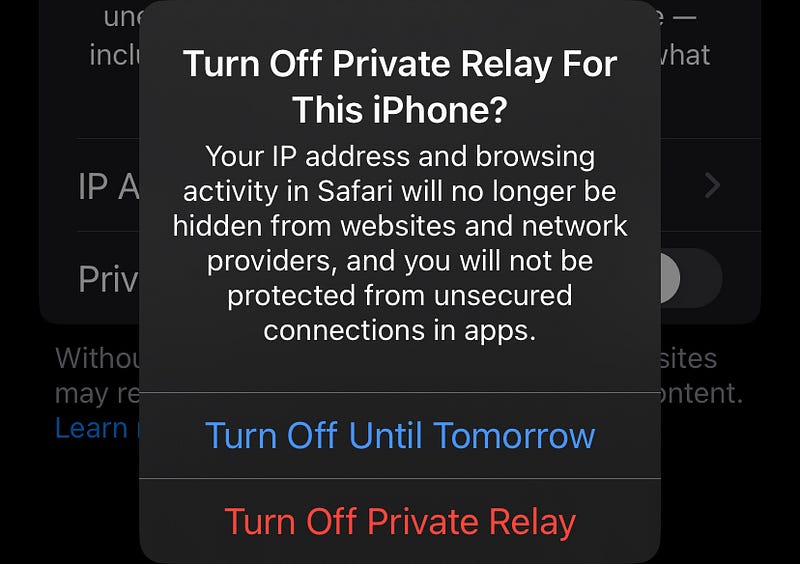
If you try toggling it off in Settings ⚙️ < your name < iCloud < Private Relay,

In iOS 16.2, this appeared
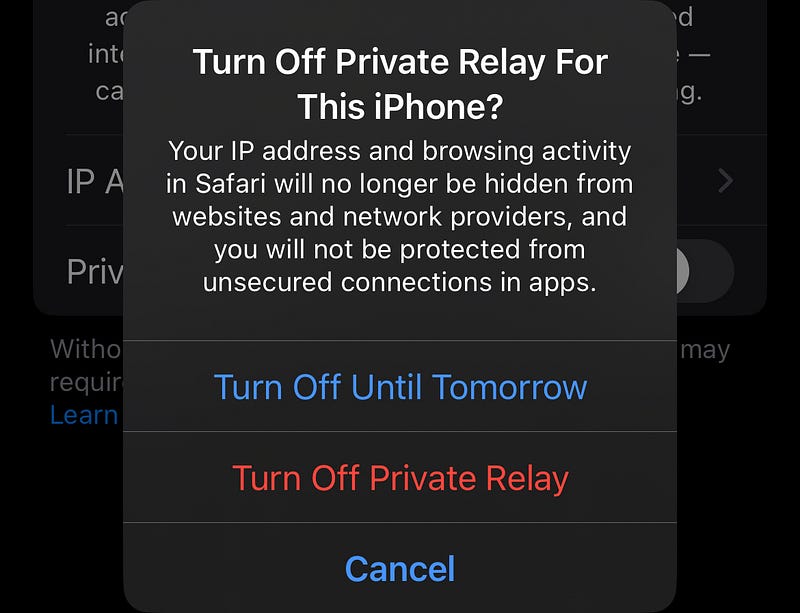
Image by the author

But,

In iOS 16.3, this will appear

Image by the author

‘Cancel’ button gone!

So if you’ve accidentally toggled off Private Relay switch, you can’t press cancel and revert back.

And no, you can’t tap anywhere else to come back.

Two workarounds for this.

  1. Turn off Private Relay, and turn it on.
  2. Don’t do anything, just swipe up, and close Settings :)

#7. Reserve Parking Spots in Maps 🅿️

Living in a big city feels like a status symbol — but a drawback: Not enough parking spaces.

I hate keeping my family at wait, while I circle around crowded parking lots to find a slot for my car and come back.

It takes off half the fun from the trip.

Same with you? No worries.

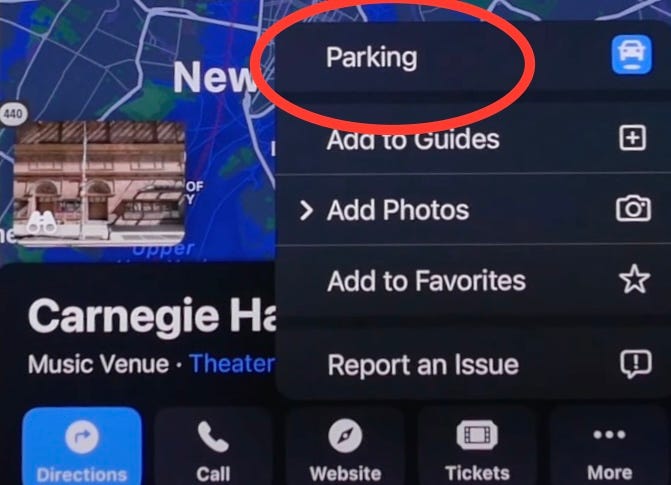
From iOS 16.3, you can reserve parking spots in supported public places — right from the Maps app.

To do that,

  • Search for the public place on Maps,
  • Click ‘More’.
Credit: iReviews

If the place’s supported, you’ll see ‘Parking 🚘’ popped up, which, when clicked, will redirect to a website where you can book parking in advance.

As of now, it’s supported only for a few places. Hope Apple includes more places soon :)

Isn’t iOS 16 awesome?

185+ new features of iOS 16: A Compilation (Always Updated):

Join 225+ others to get notified whenever I publish a new story.

Technology
Apple
iOS
Mobile
Tech
Recommended from ReadMedium