
Python IO basics and Open(), Read() and write() methods
Understand basic concepts to manipulate files
Why do we use input and output in a program?
It is used to show the output of the program. There are various ways to show the output with the print method or to write in a file method for further use.
The memories can be of two types i.e. Hard disk and RAM. The hard disk memory is a non-volatile memory in which the data will be changed in the file and saved in the disk. The RAM is a volatile memory i.e. the data will be erased when we shut down or restart the system.
Examples of volatile memory with python
In every programming language, we take input from the keyboard and print it to display the output in the console.
print(“Hello World”)output:
Hello WorldAnother way to print the output is by giving input from the keyword by the user.
user_input = input(“Enter your input: “)
print (“The input you entered: “, user_input)output:
The input you entered: I am very HappyThese are some of the non-volatile memory examples in which, if we close our IDEs, these data will have vanished or even shutdown
Let’s see the examples of non-volatile memory
In this type of memory, we almost do work with files. Any format files can be open i.e. text, audio, video, image, etc.
The first thought that will come to mind, is how to open an open?
There are some file attributes and modes associated to use the file accordingly. First, let’s see the file object and its argument.
Suppose you make a file object or variable name and use a built-in function in python before reading and writing i.e. open()
The syntax and parameters of the open method are shown below:
File_variable_name = open(input_file, access_mode)Input_file: It is a name of an input file that we want to access.
Access_mode: This parameter is used to make the file in reading mode, writing mode, read-write mode, etc.
Types of access mode
- r mode: If we mention this mode, the file will be open in reading format only. The cursor will be at the start of the file.
- w mode: If we mention this mode, the file will be open in write format only to overwrite the file content. If the file is not in the working location, then it will create the file first and write the content in it.
- r+ mode: In this mode, the file will be open in both read and write mode.
- w+ mode: In this mode, it opens the file and overwrites the content.
- wb mode: File opens in writing mode with the binary format.
- a mode: This mode is for appending the content in the file. The cursor is at the last end of the content to add something to the file.
Attribute types of file object
- file_object.name: It gives the name of the file.
- file_object.closed: It gives the boolean, if the file is closed then it will give true otherwise false.
- file_object.mode: It gives the access mode type of the file.
Python examples
- Open() method: It is used to open the file.
# Open a file
file = open("IOinputs.txt", "wb")#file attributes
print("Text file name is: ", file.name)
print ("The access mode of the opened file : ", file.mode)output:
Text file name is: IOinputs.txt
The access mode of the opened file : wb- Write() method: After opening the file, we can write and add the content to the file.
- Closed() method: It is used to close the file. It is a good practice to use the close method after writing the file to free up the space from the memory.
file = open("IOinputs1.txt", "w")
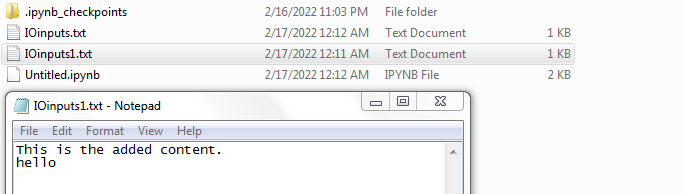
file.write( "This is the added content.\nhello\n")
# Close opend file
file.close()
As we see in the above image, a new file is created in the folder. The overwrite content of the file is shown below.
- Read() method: It is used to read the content of the file with r as an access mode.
# Open a file with r
file2 = open("IOinputs1.txt", "r")
#reading the whole content
file2.read()output:
'This is the added content.\nhello\n'#reading the first line of the file
file2.readline()output:
'This is the added content.\n'#reading next line by calling readline method two times
file2.readline()output:
'hello\n'#if we call again the readline method, then it will give the empty
file2.readline()output:
' '#always close file in the last
file2.close()Conclusion
These methods are very useful in python programming and data analytics.
I hope you like the article. Reach me on my LinkedIn and twitter.
Recommended Articles
1. 8 Active Learning Insights of Python Collection Module 2. NumPy: Linear Algebra on Images 3. Exception Handling Concepts in Python 4. Pandas: Dealing with Categorical Data 5. Hyper-parameters: RandomSeachCV and GridSearchCV in Machine Learning 6. Fully Explained Linear Regression with Python 7. Fully Explained Logistic Regression with Python 8. Data Distribution using Numpy with Python 9. Decision Trees vs. Random Forests in Machine Learning 10. Standardization in Data Preprocessing with Python