
Introduction to External DNS in Kubernetes
How to automatically create DNS records in Kubernetes using External DNS
Are you running your workloads in GKE / EKS / AKS? Do you use Services of type LoadBalancer? If yes then this is the right article for you. Let us suppose you have a web application running in your Kubernetes Cluster. You might have a public-facing load balancer so that your application is accessible to the entire world. Imagine you have a domain name called kubernetesisgreat.com and you want to map that to your public-facing load balancer provisioned by Kubernetes. For this, you can either use a gcloud command or maybe do it manually. Now, what if you have hundreds of projects and thousands of DNS records to be created? What if the LoadBalancer Endpoint changes? How do you keep a track of hundreds of thousands of DNS records? Here come external-dns to the picture. ExternalDNS allows you to control DNS records dynamically via Kubernetes resources in a DNS provider-agnostic way. ExternalDNS synchronizes exposed Kubernetes Services and Ingresses with DNS providers. ExternalDNS supports multiple DNS providers. A few of them are
- Google Cloud DNS
- AWS Route53
- Azure DNS
- Digital Ocean, etc.

What is the entire story all about? (TLDR)
- Create a GKE cluster.
- Deploy ExternalDNS to our GKE Cluster.
- Deploy a sample Web-Application.
- Automate the creation of DNS records in Google Cloud DNS using External DNS.
Prerequisites
- Google Cloud Account ( You can get a Free tier Account with $300 ).
- GitHub Account ( Optional ).
Creating a GKE Cluster
In the scope of this article, we will use Terraform to create the cluster. We can automate the process of creating the GKE cluster using Github actions. You can refer to my article on how to create a GKE cluster using GitHub Actions. You can also clone my GitHub repository to apply it from your cloud shell machine. Or the cluster can be simply created using the gcloud CLI.
gcloud auth login#Create a GKE Clustergcloud container clusters create "production-cluster" \
--num-nodes 3 \
--scopes "https://www.googleapis.com/auth/ndev.clouddns.readwrite" \
--zone us-central1-a \
--node-locations us-central1-a,us-central1-b \
--project <project_name>#Connect to the GKE Clustergcloud container clusters get-credentials production-cluster --zone us-central1-a --project <project_name>Creating Google Cloud DNS and Cloud Domain
You can follow the steps here to register a new Domain or Either Import your existing domain to the GCP and then create a Managed Public Zone. You can alternatively use freenom to get a free domain for yourself and create a Public zone in your GCP account.
Deploy ExternalDNS to the GKE Cluster.
Once the aforementioned steps are completed let us now deploy external-dns to our cluster.
Before you deploy you might have to change the name of the domain in the domain-filter section ( line 56 ). In my case, the name of my domain is bettercallpavan.tk ( You can also get a free domain using freenom.com ). Let us now deploy the external dns manifests to our cluster
curl -s https://gist.githubusercontent.com/pavan-kumar-99/3761b6dbbe3eb5ff3768299d5236531b/raw/25eddc9ae2a3027883bf5a750e9179d1da7ba504/external-dns.yaml > external-dns.yaml #Now change the name of your dns in line number 56 and apply the manifests kubectl apply -f external-dns.yaml 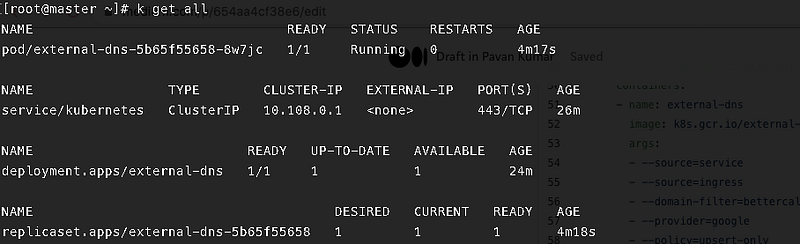
Once you apply the manifests, you should find the following components up and healthy. Let us check the logs of the external-dns pod now.
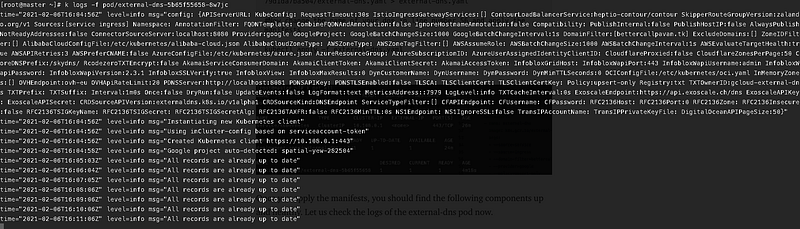
You can now see that the pod external dns is able to communicate with our Google Cloud DNS.
Deploy a sample web application
Let us now deploy a sample web application that has an httpd Deployment and a service of type LoadBalancer.
#Annotations external-dns.alpha.kubernetes.io/hostname: This annotation specifies the name of the DNS record to be created in our hosted zone. kubectl apply -f https://gist.githubusercontent.com/pavan-kumar-99/d906abb1963ce469af4bbf13eac23c7c/raw/b9bc5833cf46822a8a6bfdc53ffeddc3f69d6de4/external-dns-webapp
Automate the creation of DNS records in Google Cloud DNS using External DNS.
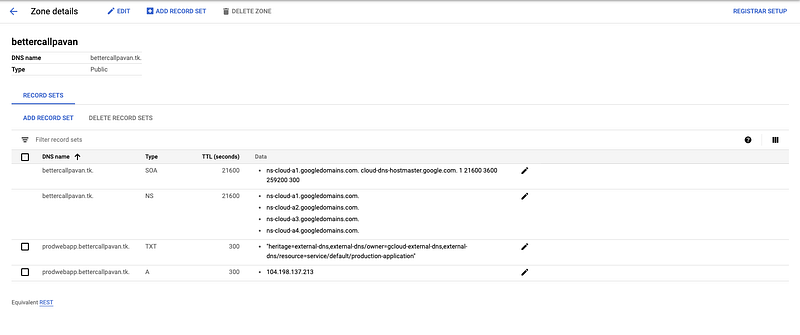
Let us now check the logs of the external DNS pod. You can see that the records are already being created. Let us also verify the same from the Google Cloud Console.

The entries for my LoadBalancer are created in the GCP console.
Let me now try to access my application from the browser by navigating to http://prodwebapp.bettercallpavan.tk.

Hurrah, our application is now accessible from the Internet. You can thus use ExternalDNS to automatically create DNS records in your hosted zone.

Conclusion
Thanks for reading my article. Hope you have liked it. Here are some of my other articles that may interest you.
Recommended
Reference

👋 Join FAUN today and receive similar stories each week in your inbox! ️ Get your weekly dose of the must-read tech stories, news, and tutorials.
Follow us on Twitter 🐦 and Facebook 👥 and Instagram 📷 and join our Facebook and Linkedin Groups 💬


