avatarTeri Radichel

Free AI web copilot to create summaries, insights and extended knowledge, download it at here

10640

Abstract

"encrypted"</span>: <span class="hljs-string">"true"</span>, <span class="hljs-string">"kms_key_id"</span>: <span class="hljs-string">"{{ user kms-key-id }}"</span>, <span class="hljs-string">"volume_size"</span>: <span class="hljs-string">"{{ user volume-size }}"</span>, <span class="hljs-string">"delete_on_termination"</span>: <span class="hljs-literal">true</span> }]</pre></div><p id="2913">Here’s what I did this time:</p><p id="4c0e">I built another AMI using the prior AMI as a base with a device mapping (only one) where I inadvertently changed the name like this:</p><div id="3af1"><pre><span class="hljs-string">"launch_block_device_mappings"</span>: [{ <span class="hljs-string">"device_name"</span>: <span class="hljs-string">"/dev/[something different here]"</span>, <span class="hljs-string">"encrypted"</span>: <span class="hljs-string">"true"</span>, <span class="hljs-string">"kms_key_id"</span>: <span class="hljs-string">"{{ user kms-key-id }}"</span>, <span class="hljs-string">"volume_size"</span>: <span class="hljs-string">"{{ user volume-size }}"</span>, <span class="hljs-string">"delete_on_termination"</span>: <span class="hljs-literal">true</span> }]</pre></div><p id="9743">Then I built two more AMIs, each with the prior AMI as a base and I used the original <b>launch_block_device_mappings</b>.</p><p id="f7b2">I noticed this discrepancy when reviewing that configuration further. I changed the anomalous launch_block_device_mappings to match the other three AMI packer templates —<b> and then it worked.</b></p><p id="37b5">As noted above there is one other possible scenario.</p><p id="96d3">First some background: I automate this entire process:</p><ul><li>Build AMI 100% automated using Packer.</li><li>Update an SSM Parameter in the account that builds the AMI with the latest AMI ID.</li><li>Manually add KMS permissions in new account (still need to automate that).</li><li>CloudFormation references the parameter with the latest AMI ID to build an EC2 instance in the new account.</li></ul><p id="7c93">I recently added a new account to build the AMIs so the step to build the AMIs is in one account and the step to run CloudFormation deployments is in a separate account. I also put the KMS keys in a separate account. The CloudFormation builder account still has old AMIs, encryption key, and SSM parameters that store old AMI IDs.</p><p id="4748">I manually added two new SSM parameters in the CloudFormation builder account (automation change to point to new parameters in AMI account TBD). The CloudFormation script may have been pointing at the old SSM parameters and an old AMI. But even if they were — why did the Windows deployment work and not the Linux deployment? Those old AMI IDs worked fine in the past in another account that had permission to the old key, but the new account would not have permission to the old KMS key used to encrypt the old AMIs. Both the Linux and Windows deployments should have failed if that’s what I did because neither would have access to the old keys. So I think it still may have been the Packer template but I don’t have time to test.</p><p id="54c0">To ensure I don’t use the wrong AMI ID, I need to automate those last few steps. I can also write out a message showing the AMI ID, AMI name, device names and which is the boot volume, and encryption keys for each device prior to deploying the CloudFormation template so I can verify but that’s more work for me.</p><p id="0243">If the error message was less cryptic, then I would know that instantly. I don’t think using the old AMI ID was the issue but cannot say with 100% certainty. If that was the issue perhaps the old AMI was using a different key and it was the KMS issue all along. In that case here is a more appropriate error message:</p><div id="fb3c"><pre>IAM <span class="hljs-keyword">User</span> (<span class="hljs-keyword">or</span> <span class="hljs-keyword">role</span> <span class="hljs-keyword">or</span> whatever) does <span class="hljs-keyword">not</span> have <span class="hljs-keyword">access</span> <span class="hljs-keyword">to</span> key ID (the KMS key being accessed) <span class="hljs-keyword">to</span> <span class="hljs-keyword">perform</span> action (encrypt/decrypt/<span class="hljs-keyword">grant</span>, etc.) <span class="hljs-keyword">on</span> the device (device <span class="hljs-type">name</span>) attached <span class="hljs-keyword">to</span> ami (ami id).</pre></div><p id="3a27">What is very strange:</p><div id="5c20"><pre>Why does this only fail <span class="hljs-keyword">in</span> CloudFormation but it works <span class="hljs-keyword">in</span> the console? <span class="hljs-built_in">Is</span> one <span class="hljs-keyword">of</span> those options <span class="hljs-built_in">or</span> the other doing something it should <span class="hljs-built_in">not</span> <span class="hljs-keyword">do</span>? <span class="hljs-built_in">Or</span> did I <span class="hljs-keyword">do</span> something <span class="hljs-keyword">else</span> wrong that caused this anomaly? It would be helpful <span class="hljs-keyword">to</span> output the AMI ID <span class="hljs-built_in">and</span> <span class="hljs-keyword">Key</span> ID <span class="hljs-built_in">or</span> Device Mapping that <span class="hljs-built_in">is</span> causing the problem <span class="hljs-keyword">in</span> the <span class="hljs-keyword">error</span> message. I don<span class="hljs-comment">'t think IDs alone should be a security risk to expose - are they? Then I can validate that I'm spinning up the AMI ID I think I am, the device names I think I am, and that the correct encryption key is being used.</span></pre></div><div id="849f"><pre>Should Packer be failing <span class="hljs-keyword">on</span> the incorrect (<span class="hljs-keyword">is</span> it incorrect?) <span class="hljs-keyword">template</span> <span class="hljs-keyword">configuration</span>? </pre></div><div id="64be"><pre>Am I even doing this right <span class="hljs-keyword">to</span> ensure my AMI boot drive <span class="hljs-keyword">and</span> <span class="hljs-keyword">any</span> additional drives are properly <span class="hljs-keyword">encrypted</span> <span class="hljs-comment">-- because the documentation from Hashicorp Packer is not entirely clear in terms of the Packer configuration and I haven't found an explanation from AWS as to how this works in relation to CloudForamtion and how that maps back to the EBS encryption process details in the AWS documentation.</span></pre></div><div id="8acd"><pre>I think I'm doing <span class="hljs-keyword">it</span> correctly <span class="hljs-keyword">but</span> how can I <span class="hljs-keyword">tell</span>? I need <span class="hljs-keyword">to</span> see <span class="hljs-keyword">if</span> <span class="hljs-keyword">the</span> <span class="hljs-built_in">contents</span> <span class="hljs-keyword">of</span> <span class="hljs-keyword">my</span> drive are encrypted <span class="hljs-keyword">or</span> <span class="hljs-keyword">not</span>. How can I do <span class="hljs-keyword">that</span>? I mean, I know there may be a key listed <span class="hljs-keyword">in</span> <span class="hljs-keyword">the</span> configuration (sometimes - <span class="hljs-keyword">it</span>'s missing <span class="hljs-keyword">in</span> <span class="hljs-keyword">some</span> places <span class="hljs-keyword">in</span> <span class="hljs-keyword">the</span> console <span class="hljs-keyword">for</span> EC2 <span class="hljs-keyword">where</span> I think <span class="hljs-keyword">it</span> should be listed.) Pondering this question....<span class="hljs-keyword">but</span> right now I've lost so much <span class="hljs-built_in">time</span> I have <span class="hljs-keyword">to</span> <span class="hljs-keyword">get</span> work done...<span class="hljs-keyword">and</span> <span class="hljs-keyword">that</span>'s how security problems proliferate.</pre></div><div id="c958"><pre><span class="hljs-keyword">Also</span>, this <span class="hljs-keyword">is</span> <span class="hljs-keyword">not</span> clearly documented <span class="hljs-keyword">and</span> the <span class="hljs-keyword">configuration</span> you have <span class="hljs-keyword">to</span> <span class="hljs-keyword">write</span> seems misleading <span class="hljs-keyword">to</span> me: I think <span class="hljs-keyword">when</span> you <span class="hljs-keyword">add</span> a device block <span class="hljs-keyword">mapping</span> that matches the root volume <span class="hljs-keyword">and</span> <span class="hljs-keyword">add</span> a KMS key <span class="hljs-keyword">in</span> packer that it <span class="hljs-keyword">is</span> encrypting the root device. <span class="hljs-keyword">Is</span> that <span class="hljs-keyword">true</span>? I <span class="hljs-keyword">read</span> <span class="hljs-keyword">all</span> this documentation <span class="hljs-keyword">in</span> painstaking detail <span class="hljs-keyword">when</span> creating the templates <span class="hljs-keyword">initially</span>, but forgot since have been doing a lot <span class="hljs-keyword">of</span> other things since. </pre></div><div id="b694"><pre>It would be more appropriate <span class="hljs-built_in">to</span> have <span class="hljs-keyword">a</span> configuration <span class="hljs-keyword">item</span> <span class="hljs-keyword">in</span> Packer like <span class="hljs-keyword">a</span> boot disk configuration block <span class="hljs-keyword">and</span> <span class="hljs-keyword">then</span> configuration <span class="hljs-keyword">for</span> additional drives you want <span class="hljs-built_in">to</span> <span class="hljs-built_in">add</span>. Or perhaps you have <span class="hljs-built_in">to</span> indicate <span class="hljs-keyword">with</span> <span class="hljs-keyword">a</span> flag which added volume is <span class="hljs-keyword">the</span> boot volume. How does <span class="hljs-keyword">the</span> image know which is <span class="hljs-keyword">the</span> boot drive? Based <span class="hljs-keyword">on</span> <span class="hljs-title">the</span> <span class="hljs-title">device</span> <span class="hljs-title">name</span>? <span class="hljs-title">Maybe</span> <span class="hljs-title">that</span><span class="hljs-string">'s documented somewhere and I forgot.</span></pre></div><div id="d1d3"><pre>There's also <span class="hljs-keyword">some</span> flag <span class="hljs-keyword">to</span> encrypt root volume (encrypt_boot) <span class="hljs-keyword">in</span> packer. Do I also have <span class="hljs-keyword">to</span> <span class="hljs-keyword">set</sp

Options

an> <span class="hljs-keyword">that</span> <span class="hljs-keyword">and</span> <span class="hljs-keyword">to</span> what? After reviewing <span class="hljs-keyword">the</span> documentation seems like <span class="hljs-keyword">not</span>:</pre></div><div id="8b98"><pre><span class="hljs-keyword">If</span> you have used the launch_block_device_mappings <span class="hljs-keyword">to</span> <span class="hljs-keyword">set</span> an encryption key <span class="hljs-keyword">and</span> that key <span class="hljs-keyword">is</span> the same <span class="hljs-keyword">as</span> the one you want the image <span class="hljs-keyword">encrypted</span> <span class="hljs-keyword">with</span> at the <span class="hljs-keyword">end</span>, <span class="hljs-keyword">then</span> you don<span class="hljs-string">'t need to set this field; leaving it empty will prevent an unnecessary extra copy step and save you some time.</span></pre></div><div id="8f17"><pre>I'm<span class="hljs-built_in"> not </span>sure how that device name got altered in the second template. Maybe I didn't<span class="hljs-built_in"> check </span>in my code after the last fix.</pre></div><div id="f042"><pre><span class="hljs-keyword">In</span> Packer, <span class="hljs-keyword">for</span> appropriate encryption <span class="hljs-keyword">of</span> the boot drive <span class="hljs-keyword">while</span> Packer <span class="hljs-keyword">is</span> building my AMI, I presume I need <span class="hljs-keyword">to</span> use launch_block_device_mappings <span class="hljs-keyword">not</span> ami_block_device_mappings correct? Because <span class="hljs-keyword">if</span> I <span class="hljs-keyword">do</span> <span class="hljs-keyword">not</span> <span class="hljs-keyword">add</span> the <span class="hljs-keyword">encrypted</span> volume <span class="hljs-keyword">until</span> the <span class="hljs-keyword">end</span> the volume <span class="hljs-keyword">is</span> <span class="hljs-keyword">not</span> <span class="hljs-keyword">encrypted</span> <span class="hljs-keyword">while</span> I<span class="hljs-string">'m building the image. Is that the correct interpretation?</span></pre></div><div id="f3ed"><pre>Fix: Fix ALL the cryptic error messages and <span class="hljs-keyword">state</span> exactly what the problem is.</pre></div><div id="b3ff"><pre>Fix: Make sure <span class="hljs-keyword">all</span> the documentation provides <span class="hljs-keyword">in</span> technical detail what <span class="hljs-keyword">is</span> going <span class="hljs-keyword">on</span> <span class="hljs-keyword">with</span> device mappings, KMS keys, <span class="hljs-keyword">and</span> the root device so people know that their data <span class="hljs-keyword">is</span> <span class="hljs-keyword">encrypted</span> <span class="hljs-keyword">and</span> they have configured things properly. </pre></div><div id="38f1"><pre>Fix: <span class="hljs-keyword">Add</span> the KMS key used <span class="hljs-keyword">to</span> encrypt <span class="hljs-keyword">each</span> volume <span class="hljs-keyword">on</span> the main EC2 Instance page so it clearly shows which drives are <span class="hljs-keyword">encrypted</span> <span class="hljs-keyword">and</span> <span class="hljs-keyword">with</span> which KMS key, <span class="hljs-keyword">or</span> the <span class="hljs-keyword">default</span> AWS key.</pre></div><div id="7ce6" class="link-block"> <a href="https://www.packer.io/plugins/builders/amazon/ebs"> <div> <div> <h2>Packer by HashiCorp</h2> <div><h3>The amazon-ebs Packer builder is able to create Amazon AMIs backed by EBS volumes for use in EC2. For more information…</h3></div> <div><p>www.packer.io</p></div> </div> <div> <div style="background-image: url(https://miro.readmedium.com/v2/resize:fit:320/0*3iVRHIIOV3E6YArg)"></div> </div> </div> </a> </div><div id="0dcd" class="link-block"> <a href="https://docs.aws.amazon.com/AWSEC2/latest/UserGuide/EBSEncryption.html"> <div> <div> <h2>Amazon EBS encryption</h2> <div><h3>Use Amazon EBS encryption as a straight-forward encryption solution for your EBS resources associated with your EC2…</h3></div> <div><p>docs.aws.amazon.com</p></div> </div> <div> <div style="background-image: url(https://miro.readmedium.com/v2/resize:fit:320/0*GJLQbXiaZbVsI_as)"></div> </div> </div> </a> </div><div id="a53c" class="link-block"> <a href="https://docs.aws.amazon.com/AWSCloudFormation/latest/UserGuide/aws-properties-ec2-blockdev-mapping.html"> <div> <div> <h2>AWS::EC2::Instance BlockDeviceMapping</h2> <div><h3>Specifies a block device mapping for an instance. You must specify exactly one of the following properties…</h3></div> <div><p>docs.aws.amazon.com</p></div> </div> <div> <div style="background-image: url(https://miro.readmedium.com/v2/resize:fit:320/)"></div> </div> </div> </a> </div><div id="ecf0" class="link-block"> <a href="https://docs.aws.amazon.com/AWSCloudFormation/latest/UserGuide/aws-properties-ec2-mount-point.html"> <div> <div> <h2>AWS::EC2::Instance Volume</h2> <div><h3>Specifies a volume to attach to an instance. Volume is an embedded property of the AWS::EC2::Instance resource. To…</h3></div> <div><p>docs.aws.amazon.com</p></div> </div> <div> <div style="background-image: url(https://miro.readmedium.com/v2/resize:fit:320/)"></div> </div> </div> </a> </div><div id="a665" class="link-block"> <a href="https://docs.aws.amazon.com/AWSCloudFormation/latest/UserGuide/aws-properties-ec2-blockdev-template.html"> <div> <div> <h2>AWS::EC2::Instance Ebs</h2> <div><h3>Specifies a block device for an EBS volume. Ebs is a property of the Amazon EC2 BlockDeviceMapping property. After the…</h3></div> <div><p>docs.aws.amazon.com</p></div> </div> <div> <div style="background-image: url(https://miro.readmedium.com/v2/resize:fit:320/)"></div> </div> </div> </a> </div><p id="ae85">When I worked on the original Capital One cloud engineering team this came about as a result of one of our feature requests (a list I had to manage at the time):</p><div id="b465" class="link-block"> <a href="https://aws.amazon.com/blogs/aws/new-encrypted-ebs-boot-volumes/"> <div> <div> <h2>New - Encrypted EBS Boot Volumes | Amazon Web Services</h2> <div><h3>Encryption is an important part of any data protection strategy. Over the past year or two, we have introduced many…</h3></div> <div><p>aws.amazon.com</p></div> </div> <div> <div style="background-image: url(https://miro.readmedium.com/v2/resize:fit:320/0*Ykh3MfYDk_VruBTR)"></div> </div> </div> </a> </div><p id="dce7">~~~~~~~~~~~~</p><p id="a99e">For the KMS issue, follow my instructions in this other post to add credentials.</p><div id="a17d" class="link-block"> <a href="https://readmedium.com/client-internalerror-client-internalerror-client-error-on-launch-cdd20146f14e"> <div> <div> <h2>Client.InternalError: Client.InternalError: Client error on launch</h2> <div><h3>Annoying error messages that don’t tell you what the problem is.</h3></div> <div><p>medium.com</p></div> </div> <div> <div style="background-image: url(https://miro.readmedium.com/v2/resize:fit:320/1*SAkMu7b94iY5uEUn3V7akA.png)"></div> </div> </div> </a> </div><p id="bb10">Note that SSO works differently:</p><div id="bddd" class="link-block"> <a href="https://readmedium.com/aws-kms-key-policy-documentation-lacks-sso-information-37d997293743"> <div> <div> <h2>AWS KMS Key Policy Documentation Lacks SSO Information</h2> <div><h3>And…this whole process needs a little love.</h3></div> <div><p>medium.com</p></div> </div> <div> <div style="background-image: url(https://miro.readmedium.com/v2/resize:fit:320/1*4oxP4LXk8l8c3mpRvO7ejg.png)"></div> </div> </div> </a> </div><p id="810f">Follow for updates.</p><p id="4a3a">Teri Radichel | <i>© <a href="https://2ndsightlab.com/?source=post_page---------------------------">2nd Sight Lab</a> 2022</i></p><div id="8b5f"><pre><span class="hljs-section">About Teri Radichel:

⭐️ Author: Cybersecurity Books
⭐️ Presentations: Presentations by Teri Radichel
⭐️ Recognition: SANS Award, AWS Security Hero, IANS Faculty
⭐️ Certifications: SANS ~ GSE 240
⭐️ Education: BA Business, Master of Software Engineering, Master of Infosec
⭐️ Company: Penetration Tests, Assessments, Phone Consulting ~ 2nd Sight Lab</pre></div><div id="caae"><pre><span class="hljs-section">Need Help With Cybersecurity, Cloud, or Application Security?
~~~~~~~~~~~~~~~~~~~~~~~~~~~~~~~~~~~~~~~~~~~~~~~~~~~~~~~~~~~~~</span>
🔒 Request a penetration test or security assessment
🔒 Schedule a consulting call
🔒 Cybersecurity Speaker for Presentation</pre></div><div id="46f6"><pre>Follow <span class="hljs-keyword">for</span> more stories like <span class="hljs-keyword">this</span>:

❤️ Sign Up my Medium Email List ❤️ Twitter: <span class="hljs-meta">@teriradichel</span> ❤️ LinkedIn: https:<span class="hljs-comment">//www.linkedin.com/in/teriradichel</span> ❤️ Mastodon: <span class="hljs-meta">@teriradichel</span><span class="hljs-meta">@infosec</span>.exchange ❤️ Facebook: 2nd Sight Lab ❤️ YouTube: @2ndsightlab</pre></div><figure id="550c"><img src="https://cdn-images-1.readmedium.com/v2/resize:fit:800/1*4oxP4LXk8l8c3mpRvO7ejg.png"><figcaption></figcaption></figure></article></body>

Instance i-xxxxxxxxx failed to stabilize. Current state: shutting-down. Reason: Client.InternalError: Client error on launch

~~~~~~~~~~~~~~~~~~~~~~~~~~~~~~~~~~~~~~~~~~~~~~~~~~~~~~~

⚙️ Check out my series on Automating Cybersecurity Metrics | Code.

🔒 Related Stories: Bugs | AWS Security | Secure Code

💻 Free Content on Jobs in Cybersecurity | ✉️ Sign up for the Email List

~~~~~~~~~~~~~~~~~~~~~~~~~~~~~~~~~~~~~~~~~~~~~~~~~~~~~~~

Usually no access to KMS Key causes this error. I already wrote about this error and what to do about it if it’s a KMS Key issue in another post. This is just another variation.

This is one other tricky case which cost me loads and loads of time. I think I am getting this error again so trying to document it a bit better because it took hours of searching to find the answer last time it occurred — maybe days or a week. Here’s what my notes say at the top of a packer build script:

# OMG OMG spent way too long on this: the volume name you add to an 
# ami cannot overlap with the root volume name and AWS 
# doesn't block from doing that when creating an image.
# UGGGGHHHH. Way too much time.

What does that mean exactly? I think it means that you can’t have two block devices added to an AMI with the same name. I *think* that you do want to add a block device with the *same* name as the root volume when you want to encrypt it. See below for details and I hope the documentation all gets updated to make this more clear as right now it’s not. Maybe it will be by the time you read this.

When you create an AMI it has a boot volume (also known as root drive, boot drive, or root volume). It’s a disk that contains the code that starts up your operating system. Then you can attach other volumes to it such as I do in Packer scripts to store data on a separate virtual drive or disk. I assign a KMS key to the block device I’m adding to the volume. I also want to encrypt the root volume.

Here’s some sample code.

"launch_block_device_mappings": [{
"device_name": "/dev/xvda",
"encrypted": "true",
"kms_key_id": "{{ user `kms-key-id` }}",
"volume_size": "{{ user `volume-size` }}",
"delete_on_termination": true
}]

The problem occurred last time when I had overlapping block devices where two devices had the same name — I think. I forgot exactly what caused it but I remember I took out or changed those mappings and then it worked. I read that the new nitro instances should not be getting that error.

The way I build AMIs is that one builds a base AMI, then another adds tools, another configures project settings for people who work for me and the last one builds an admin image. That way I have shorter steps to troubleshoot instead of rebuilding everything all the time.

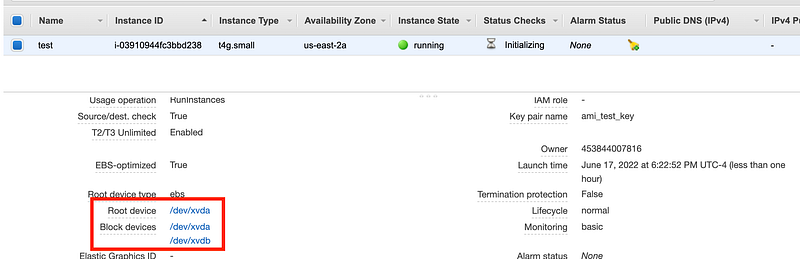
On each Packer build, I had put in the device mapping and the KMS key to encrypt it. In one of the templates I named the block device a different name inadvertently so I ended up with two block devices with two different names and one of them overlaps with the root device as shown here. I need to go back and fix that.
o I

The odd thing is that when I launched the instance using that AMI in the console it worked, as you can see here. Note that in the test above I’m testing the AMI in the account where I built it. I got the CloudFormation error when deploying an instance using the shared AMI from another account to a third account. Not sure if that is relevant.

I also build a Windows instance the same way and did not have this typo and it worked fine so it’s not KMS permissions or some issue with my deployment. It’s specific to the Linux AMI I built with Packer and am trying to deploy with CloudFormation.

The only possible difference from what I am presenting here as a possible cause is that I passed in the incorrect AMI ID which was pulling up and old AMI that doesn’t work right for some reason not clear from this cryptic message. I could re-test this scenario but I don’t have time right now to make sure my drive mapping configuration was the actual problem.

The main frustration of all of this wasted time is that the error message is too cryptic and doesn’t provide enough detail to tell me exactly why this is failing. If I had the AMI ID, drive id, and KMS key ID, I would look and see those were different and instantly know that it didn’t match and that was the cause. But I *think* I was passing in the correct AMI. I can’t go back and test this as I’ve overwritten all my configuration with the new and improved AMI ID that definitely works.

The error occurred for me when trying to build a CloudFormation stack with the AMI I built. I presume (after validating KMS permissions are correct) that this is the device mapping issue I got before or some variation. I’ll test it out, and update this blog post. I initially thought it was the other KMS key issue when I hit this, but KMS permissions don’t seem to be the issue, and then I remembered what my notes on this issue where it was somehow related to the drive mappings.

I figured this out last time off one obscure blog post that doesn’t seem to match the error message exactly, but I checked my device names and somehow resolved the problem. But now it’s back. What is going on.

As a test, I just rebuilt the one AMI with the device name that does not match the others to see if the CloudFormation error goes away.

Update ~~~~~~~~

It’s all about the launch_block_device_mappings (and KMS keys?)

It’s working now. I don’t know exactly why but here’s what I did.

I build a base AMI with device mapping like this:

"launch_block_device_mappings": [{
"device_name": "/dev/xvda",
"encrypted": "true",
"kms_key_id": "{{ user `kms-key-id` }}",
"volume_size": "{{ user `volume-size` }}",
"delete_on_termination": true
}]

I thought what I did last time was something like this to try to add a second volume and that this caused the error. Note that both the devices have the same device_name.

"launch_block_device_mappings": [{
"device_name": "/dev/xvda",
"encrypted": "true",
"kms_key_id": "{{ user `kms-key-id` }}",
"volume_size": "{{ user `volume-size` }}",
"delete_on_termination": true
},
{
"device_name": "/dev/xvda",
"encrypted": "true",
"kms_key_id": "{{ user `kms-key-id` }}",
"volume_size": "{{ user `volume-size` }}",
"delete_on_termination": true
}]

Here’s what I did this time:

I built another AMI using the prior AMI as a base with a device mapping (only one) where I inadvertently changed the name like this:

"launch_block_device_mappings": [{
"device_name": "/dev/[something different here]",
"encrypted": "true",
"kms_key_id": "{{ user `kms-key-id` }}",
"volume_size": "{{ user `volume-size` }}",
"delete_on_termination": true
}]

Then I built two more AMIs, each with the prior AMI as a base and I used the original launch_block_device_mappings.

I noticed this discrepancy when reviewing that configuration further. I changed the anomalous launch_block_device_mappings to match the other three AMI packer templates — and then it worked.

As noted above there is one other possible scenario.

First some background: I automate this entire process:

  • Build AMI 100% automated using Packer.
  • Update an SSM Parameter in the account that builds the AMI with the latest AMI ID.
  • Manually add KMS permissions in new account (still need to automate that).
  • CloudFormation references the parameter with the latest AMI ID to build an EC2 instance in the new account.

I recently added a new account to build the AMIs so the step to build the AMIs is in one account and the step to run CloudFormation deployments is in a separate account. I also put the KMS keys in a separate account. The CloudFormation builder account still has old AMIs, encryption key, and SSM parameters that store old AMI IDs.

I manually added two new SSM parameters in the CloudFormation builder account (automation change to point to new parameters in AMI account TBD). The CloudFormation script may have been pointing at the old SSM parameters and an old AMI. But even if they were — why did the Windows deployment work and not the Linux deployment? Those old AMI IDs worked fine in the past in another account that had permission to the old key, but the new account would not have permission to the old KMS key used to encrypt the old AMIs. Both the Linux and Windows deployments should have failed if that’s what I did because neither would have access to the old keys. So I think it still may have been the Packer template but I don’t have time to test.

To ensure I don’t use the wrong AMI ID, I need to automate those last few steps. I can also write out a message showing the AMI ID, AMI name, device names and which is the boot volume, and encryption keys for each device prior to deploying the CloudFormation template so I can verify but that’s more work for me.

If the error message was less cryptic, then I would know that instantly. I don’t think using the old AMI ID was the issue but cannot say with 100% certainty. If that was the issue perhaps the old AMI was using a different key and it was the KMS issue all along. In that case here is a more appropriate error message:

IAM User (or role or whatever) does not have access to key ID (the KMS key being accessed) to perform action (encrypt/decrypt/grant, etc.) on the device (device name) attached to ami (ami id).

What is very strange:

Why does this only fail in CloudFormation but it works in the console? Is one of those options or the other doing something it should not do? Or did I do something else wrong that caused this anomaly? It would be helpful to output the AMI ID and Key ID or Device Mapping that is causing the problem in the error message. I don't think IDs alone should be a security risk to expose - are they? Then I can validate that I'm spinning up the AMI ID I think I am, the device names I think I am, and that the correct encryption key is being used.
Should Packer be failing on the incorrect (is it incorrect?) template configuration? 
Am I even doing this right to ensure my AMI boot drive and any additional drives are properly encrypted -- because the documentation from Hashicorp Packer is not entirely clear in terms of the Packer configuration and I haven't found an explanation from AWS as to how this works in relation to CloudForamtion and how that maps back to the EBS encryption process details in the AWS documentation.
I think I'm doing it correctly but how can I tell? I need to see if the contents of my drive are encrypted or not. How can I do that? I mean, I know there may be a key listed in the configuration (sometimes - it's missing in some places in the console for EC2 where I think it should be listed.) Pondering this question....but right now I've lost so much time I have to get work done...and that's how security problems proliferate.
Also, this is not clearly documented and the configuration you have to write seems misleading to me: I think when you add a device block mapping that *matches* the root volume and add a KMS key in packer that it is encrypting the root device. Is that true? I read all this documentation in painstaking detail when creating the templates initially, but forgot since have been doing a lot of other things since. 
It would be more appropriate to have a configuration item in Packer like a boot disk configuration block and then configuration for additional drives you want to add. Or perhaps you have to indicate with a flag which added volume is the boot volume. How does the image know which is the boot drive? Based on the device name? Maybe that's documented somewhere and I forgot.
There's also some flag to encrypt root volume (encrypt_boot) in packer. Do I also have to set that and to what? After reviewing the documentation seems like not:
If you have used the launch_block_device_mappings to set an encryption key and that key is the same as the one you want the image encrypted with at the end, then you don't need to set this field; leaving it empty will prevent an unnecessary extra copy step and save you some time.
I'm not sure how that device name got altered in the second template. Maybe I didn't check in my code after the last fix.
In Packer, for appropriate encryption of the boot drive while Packer is building my AMI, I presume I need to use launch_block_device_mappings not ami_block_device_mappings correct? Because if I do not add the encrypted volume until the end the volume is not encrypted while I'm building the image. Is that the correct interpretation?
Fix: Fix ALL the cryptic error messages and state exactly what the problem is.
Fix: Make sure all the documentation provides in technical detail what is going on with device mappings, KMS keys, and the root device so people know that their data is encrypted and they have configured things properly. 
Fix: Add the KMS key used to encrypt each volume on the main EC2 Instance page so it clearly shows which drives are encrypted and with which KMS key, or the default AWS key.

When I worked on the original Capital One cloud engineering team this came about as a result of one of our feature requests (a list I had to manage at the time):

~~~~~~~~~~~~

For the KMS issue, follow my instructions in this other post to add credentials.

Note that SSO works differently:

Follow for updates.

Teri Radichel | © 2nd Sight Lab 2022

About Teri Radichel:
~~~~~~~~~~~~~~~~~~~~
⭐️ Author: Cybersecurity Books
⭐️ Presentations: Presentations by Teri Radichel
⭐️ Recognition: SANS Award, AWS Security Hero, IANS Faculty
⭐️ Certifications: SANS ~ GSE 240
⭐️ Education: BA Business, Master of Software Engineering, Master of Infosec
⭐️ Company: Penetration Tests, Assessments, Phone Consulting ~ 2nd Sight Lab
Need Help With Cybersecurity, Cloud, or Application Security?
~~~~~~~~~~~~~~~~~~~~~~~~~~~~~~~~~~~~~~~~~~~~~~~~~~~~~~~~~~~~~
🔒 Request a penetration test or security assessment
🔒 Schedule a consulting call
🔒 Cybersecurity Speaker for Presentation
Follow for more stories like this:
~~~~~~~~~~~~~~~~~~~~~~~~~~~~~~~~~~~~~~~~~~~~~~~~~~~~~~~~~~~~~ 
❤️ Sign Up my Medium Email List
❤️ Twitter: @teriradichel
❤️ LinkedIn: https://www.linkedin.com/in/teriradichel
❤️ Mastodon: @teriradichel@infosec.exchange
❤️ Facebook: 2nd Sight Lab
❤️ YouTube: @2ndsightlab

Error Message
Cloudformation
Kms
Ec2
AWS
Recommended from ReadMedium