
AWS KMS Key Policy Documentation Lacks SSO Information
And…this whole process needs a little love.
~~~~~~~~~~~~~~~~~~~~~~~~~~~~~~~~~~~~~~~~~~~~~~~~~~~~~~~
⚙️ Check out my series on Automating Cybersecurity Metrics | Code.
🔒 Related Stories: Bugs | AWS Security | Secure Code
💻 Free Content on Jobs in Cybersecurity | ✉️ Sign up for the Email List
~~~~~~~~~~~~~~~~~~~~~~~~~~~~~~~~~~~~~~~~~~~~~~~~~~~~~~~
The following documentation for creating a KMS key policy does not currently explain how a user can access a KMS Key.
This is related to my recent post about Client.InternalError: Client.InternalError: Client error on launch.
As it turns out, AWS SSO does not support resource based polices, but this statement alone is not very helpful:
Other services, such as Amazon S3, also support resource-based permissions policies. For example, you can attach a policy to an S3 bucket to manage access permissions to that bucket. AWS SSO doesn’t support resource-based policies.
OK great, so how then, do I provide access to allow a user to run an encrypted AMI? Need to take this documentation a step further.
I find the AWS SSO UI to be completely convoluted. But let’s try to sort this out.
Go to SSO > Click Users on the left > Click on your username.
Here you will find no useful information about what permissions this user has or what roles they are assigned to. You can’t add any permissions on this user screen either.
You can see groups. Maybe groups have some permissions assigned to them like AWS IAM groups do so click on groups. Nope. No information here about what permissions are assigned to this group. No ability to assign permission to these groups here either.
Fix: ^^^^^ One of the biggest flaws with the AWS SSO UI that makes it very difficult to use.Alright there’s this thing called permission sets. Let’s click that. Well, if you click on the one that you want to allow to access the key you can see some policies that grant permissions set. It’s not a role, though. So it’s not something I can grant access to in a KMS policy.
This policy is assigned to an account. So I guess you can grant access to users and roles in this account to this policy. But wait. Users and groups in SSO are not “in” an account.
Well next we have accounts and there’s one account assigned to this permission set. This is the thing I choose when I sign into SSO so somehow I want to add the ability to access a KMS key to this permission set. Right? I mean that seems logical but I don’t know. It’s not at all intuitive.
When I click on the account, I can see users and groups assigned to that account. So I guess when I click a link to log into a particular account then I’m sort of “in” that account at that point? I guess.
So for each user or group they can be assigned to a permission set and account. This all got so confusing that I just temporarily granted myself admin access to all my accounts until I can sort this out. If I’m a security conscious security professional and I’m doing this with plans to fix it…consider how many other people are doing this due to a UI design that doesn’t make sense.
I use GCP, Azure, and AWS. I’ve used AWS for years — and I find the AWS UI to be the most confusing for cross account access. With the exception of granting access to multiple tenants in Azure which feels like an afterthought. GCP made the most sense. They have the concept of role assignments which link a policy, an account, and a user. Here…my head is still spinning. I still use AWS primarily but I cannot get used to AWS SSO. I’m trying, I really am.
So anyway, I have a user that I want to access an instance with an AMI encrypted with a key in one account, but I’m launching the instance from a different account than the one where the key exists. This user also builds and tests the AMI in one account and uses instances run with that AMI in other accounts throughout the organization.
Is there a way that I can grant access for only this user across the organization in specific OUs? I don’t want access in the root account, back up account, and log account. So I can’t just allow access to the key for the entire organization and that specific user. And I can’t assign a resource policy to an SSO user or group anyway apparently.
But to keep it simple — I want to launch an AMI in one account — the one where I build the AMI and I want to test it. Let’s just get that working.
So let’s go to that account from the accounts list and see what we can find. I see here I have my user name and a permission set associated with this account. It is similar to the way GCP does it but a much more complicated UI (and GCPs is not that simple either). So the user is just a user that doesn’t have an ARN that I could use in a key policy, and the permission set is just a policy and an account is an account.
I could use the account, but I don’t want to allow access to every user in that account. Only a specific group of users, or to start maybe just this one user as a proof of concept. I think somehow AWS SSO uses a role under the hood. When you login to use these permissions sets in this account that translates to a role. I could use that IAM role in a KMS policy, but what is it? It’s not shown anywhere here.
Let’s go over to that other account and see if we can find a role that is applicable to these permission sets. Back to SSO and I click on the link that is used to get into the AMI-builder account. I will lose access to SSO by doing this, but I’ve given myself the ability to read IAM. Let’s look at roles.
Here’s a role with SSO and administrator in the name. Is this the role I’m using? Can I grant this role access to the KMS key policy? It says reserved so it was created by default I guess. I read something about the myriad of roles SSO and Control Tower creates and it’s a lot of info to parse and remember when you’re working across multiple cloud environments.
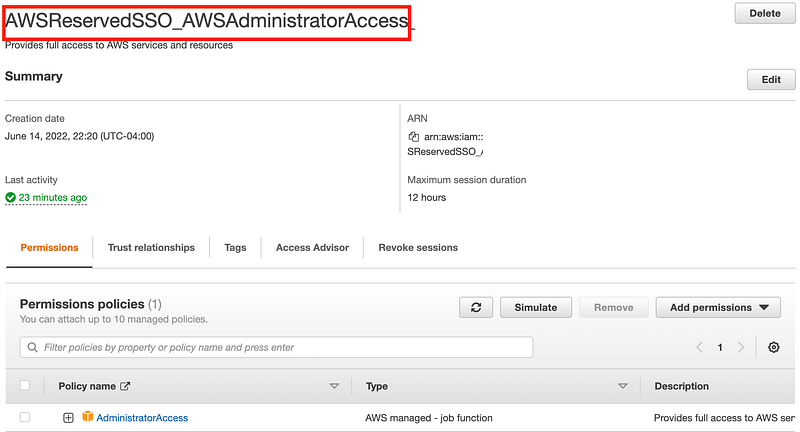
Well, let’s see what happens if I create a custom permission set for this user in this account and if some kind of IAM Role gets added. Back to my SSO Administrator account and role.
Ultimately I want a builder role that is allowed to do certain things across the organization, but not in every account. Ransomware often gets admin credentials and encrypts backups too so I want to exclude the root and backup accounts and possibly some others from this builder role.
What I really want is to create two top level OUs — one the builder has access to and one that has accounts the builder is not supposed to access. Then assign the permissions at that OU level for all accounts below it. So for this key I’m trying to assign permissions for I want to be able to grant access specific to that user (or a group) in that OU — but not to every user in that OU. So I can’t just grant access to the entire OU.
Two problems prevent even considering how to do this: 1. You can’t assign permissions to OUs. 2. Control Tower doesn’t support nested OUs.
Fix that ^^^^^And while you're at it separate the billing hierarchy in AWS Organizations from the security policy hierarchy in AWS Control Tower. These boundaries do not always align. In fact, billing does not fall into a hierarchy since things might apply across different accounts and resources. So allow a hierarchy to start with the ability to apply accounting cost centers for things that need to get billed to different places.But I digress.So I have to try to create a role in every account for this purpose via a permission set, if that even works. I’m going to create a Builder permission set and assign it to that account where I’m trying to launch this AMI and assign myself to it. Then I’ll go into that account and see if a new role exists that I can use.
Ok I go back to my screen with all the accounts and roles and I don’t see my new builder role. Let’s see if it appears if I log out and log back in. The Sign out link is a tiny link on the top right.
I still don’t see it. Back to SSO to see what I did wrong. I look at SSO and cannot find that I did anything wrong but the role is not appearing for my user. I can’t just click on the user to see what permissions I have because like I said, nothing shows up there. I have to wade back into the account hierarchy. On the screen that lists users associated with the account, it doesn’t show the email address. I need to verify I added the correct user with the right email address since I have multiple accounts that use my name.
Fix: Add email address to the list of users and permissions sets associate with an account.Well I figured it out. That was my problem. I assigned the wrong user. Fix that and try again. Now I can see the link just by refreshing. I don’t need to log out and log back in.
Now when I navigate to the account where I assigned the permission set, I see a new role for this permission set:
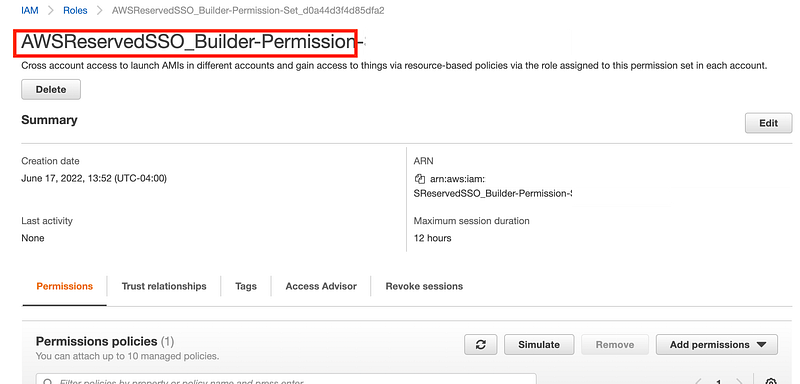
Let’s see if I can assign this role to the KMS key policy to allow the user assigned to this permission set to decrypt the AMI and run it.
Grab the ARN above using the copy icon.
Navigate back to the account where we have the KMS keys.
Add the policy for the role.
No.

What if I just give access to anyone in that account? This is ok because the people building AMIs need to test the AMIs they build, I guess. So I gave access to the key to the entire account.
Now navigate back to the account using SSO and see if I can launch the encrypted AMI.
And…it seems to be working. So I guess I have to assign key permissions to the entire organization, an OU, or an account. Assuming the user has access to the account, they will have access to the cross-account shared key.
This requires some prior thought into how you structure your accounts. It also does not allow for, let’s say, a security related AMI in every account that only the security team should be allowed to access and decrypt. It doesn’t enable a separate encryption key per application in an account. You’d have to put critical apps in their own account — and anyone with access to that account can launch the instances encrypted with that AMI key.
If you want defense in depth — requiring access to the account, the key, and IAM permissions, then you’re a bit limited. But if you plan out your account structure it can work.
Perhaps I’m missing something, but this meets my current needs and due to all these issues I’m way, way behind on a project so that’s it for now.
I wrote about assigning policies to keys here to allow cross-account access:
Related posts:
Follow for updates.
Teri Radichel | © 2nd Sight Lab 2022
About Teri Radichel:
~~~~~~~~~~~~~~~~~~~~
⭐️ Author: Cybersecurity Books
⭐️ Presentations: Presentations by Teri Radichel
⭐️ Recognition: SANS Award, AWS Security Hero, IANS Faculty
⭐️ Certifications: SANS ~ GSE 240
⭐️ Education: BA Business, Master of Software Engineering, Master of Infosec
⭐️ Company: Penetration Tests, Assessments, Phone Consulting ~ 2nd Sight Lab
Need Help With Cybersecurity, Cloud, or Application Security?
~~~~~~~~~~~~~~~~~~~~~~~~~~~~~~~~~~~~~~~~~~~~~~~~~~~~~~~~~~~~~
🔒 Request a penetration test or security assessment
🔒 Schedule a consulting call
🔒 Cybersecurity Speaker for PresentationFollow for more stories like this:
~~~~~~~~~~~~~~~~~~~~~~~~~~~~~~~~~~~~~~~~~~~~~~~~~~~~~~~~~~~~~
❤️ Sign Up my Medium Email List
❤️ Twitter: @teriradichel
❤️ LinkedIn: https://www.linkedin.com/in/teriradichel
❤️ Mastodon: @teriradichel@infosec.exchange
❤️ Facebook: 2nd Sight Lab
❤️ YouTube: @2ndsightlab