
Implement a Service-Oriented Architecture in Swift 5
Why using just MVC/MVVM/VIPER isn’t enough

Intro
Why is just using MVC, MVVM, MVP, or VIPER not enough? These architectural patterns handle only the higher level (UI) of your application. But very often, you also have to implement network managers, API clients, data sources, persistence containers, and so on. Service-oriented architecture makes your life easier by structuring the interaction between the high-level and lower-level implementations.
In this piece, I’ll show you how you can implement a service-oriented architecture (SOA). I did it by using a demo app I created for my VIPER piece and refactoring it according to SOA recommendations.
The source code of the project is available on GitHub.
Project Structure
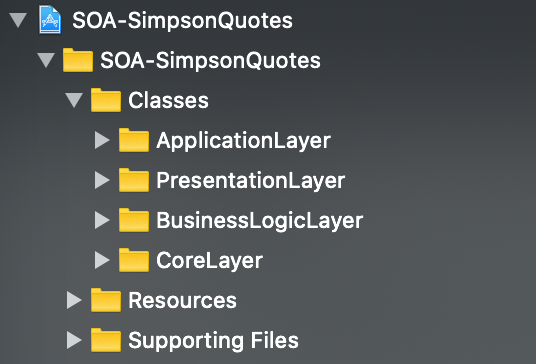
The root of the project is divided into three folders: Classes, Resources, and Supporting Files. The Resources folder contains Assets.xcassets, and the Supporting Files folder contains LaunchScreen.storyboard and Info.plist.
As you can see, in Classes, we have the following folders:
- The
ApplicationLayerfolder contains theAppDelegate.swiftfile - The
PresentationLayerfolder has two VIPER modules:QuotesandQuoteDetail - The
BusinessLogicLayerfolder containsServicesandEntities[aka models in MV(X)] - The
Servicesfolder has three services we use in our app:QuoteService, which fetches quotes from the API;KingfisherService, which obtains image data from an URL; andImageDataService, which generates an image from that data - The
CoreLayerfolder contains all the helper files we’ll need to work with services:ApiUrls, request configurators, and network clients
Define a Service
First, we need to provide a base functionality of a service that’ll be subclassed by specific services in the future:
Service.swift
Each service must have a unique serviceName and a register() method.
By using ServiceRegistryImplementation, we’ll register our services in AppDelegate.swift.
Having the base implementation done, now we’re ready to define specific services for our app.
QuoteService
This service is responsible for fetching quotes from the API.
Here’s how we define it:
QuoteService.swift
In the extension of QuoteService, we implement the actual networking:
KingfisherService
This service is responsible for fetching image data from an URL.
It’s defined similarly to the QuoteService:
In the extension of KingfisherService, we implement image data downloading:
ImageDataService
ImageDataService provides a UIImage when given Data.
Yep, no surprises. We use a similar implementation:
The data-to-image conversion implemented in the extension:
Registering Services
To make services available to use in the app, we define a ServiceRegistryImplementation inside the AppDelegate:
AppDelegate.swift
Using Services
Let’s take a look at how we’d use the QuoteService to fetch a list of quotes to be displayed in the QuotesViewController:
If you’re not familiar with the VIPER architecture, simply know the QuotesInteractor handles all business logic related to the quotes screen by passing the QuoteService as a dependency and calling its getQuotes method. You could call the same method inside a UIViewController if you were following an MVC architecture or a ViewModel in the case of MVVM.
Similarly, this is how we use the KingfisherService to display a character’s image in the QuotesDetailViewController:
The usage of the ImageDataService is also pretty straightforward but with some of the nuances of VIPER:
In VIPER, the Presenter is responsible for receiving the result of a business operation from the Interactor, preparing it into a UI-displayable format, and forwarding it to the ViewController — which implements the InteractorToPresenterQuoteDetailProtocol.
Wrapping Up
Consider checking out these resources if you’re curious about how others implemented a service-oriented architecture: SOA in Swift, SOA-Services.
If you’re curious about different architectural patterns, feel free to check out my other related pieces:
Thank you very much for reading!


