
IAM Administrator Permissions for An AWS Organization
ACM.130 Disallowing IAM Admins from changing their own permissions
~~~~~~~~~~~~~~~~~~~~~~~~~~~~~~~~~~~~~~~~~~~~~~~~~~~~~~~~~~~
⚙️ Check out my series on Automating Cybersecurity Metrics. The Code.
🔒 Related Stories: IAM | AWS Security | Application Security
💻 Free Content on Jobs in Cybersecurity | ✉️ Sign up for the Email List
~~~~~~~~~~~~~~~~~~~~~~~~~~~~~~~~~~~~~~~~~~~~~~~~~~~~~~~~~~~
In recent posts I was considering the following:
- How to manage domain names and DNS settings
- Migrating existing domain names and web sites into a single account
- DNS administration from a single account for better governance
- SSO for automation (which I decided against as noted)
My last post was a consideration of transferring files in S3 from one AWS account to another.
So now I am back to using AWS IAM again for automation — with MFA and segregation of duties through the roles I’ve created in this blog series. Now I need to manage the IAM permissions in my DNS or Domains account for my DNS administrators. In order to programmatically add a DNS role with permission to manage that account, I first need to have a user that has permission to access and manage IAM in that account.
Here’s where I need to stop and think for minute. We have a kind of catch 22 because I *only* want the domain admins to be able to manage domain names and take actions on them. Yet I need to give IAM administrators the permission to create IAM permissions in that account somehow.
The Root automation user for initial IAM administrator privileges
This brings me to a topic I fixed earlier in my code but haven’t yet written about. I added a “ROOT” user that is the first user who logs in and deploys the IAM administrator permissions. This “ROOT” user can have an AWS developer key with global permissions to our organization, but is not normally used. It is only used to set up the initial IAM administration group, and then give that IAM administration group the permission they need to manage IAM for the organization.
The IAM users, after that point, can create permissions throughout the organization, however they cannot alter their own permissions. That should be excluded by the IAM policy for the IAM administrators group.
The first time you run the script in my GitHub repository you’ll need an aws profile named “ROOT” that can create the IAM administrators and related permissions. After that point, the IAM administrators can create all the other roles and users.
If you look at my GitHub scripts I edited my scripts to run as a “ROOT” cli profile to create the initial IAM Admin Users, Group, and Role. This name is not to be confused with the AWS “Root account” that is the first user created with your AWS account where you login at the AWS console, but it has a similar security risk so I gave it that name in my script.
It is an IAM user with similar root privileges to run the initial script to create the IAM admin users. Naming it as such indicates how powerful it is and that it should not be used except when absolutely necessary.
In fact, you could use the AWS root user to create the IAM privileges but best practice is to never give your root user developer credentials. Therefore I suggest creating a separate automation “ROOT” user for this purpose.
Once the IAM Admin group is created, we should no longer need this “ROOT” user account except in the case of emergency. The keys used for automation can be disabled. The credentials can be locked away in a safe place that require two people to access it in a high security environment.
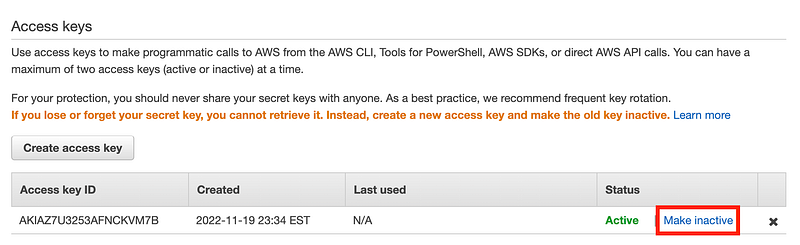
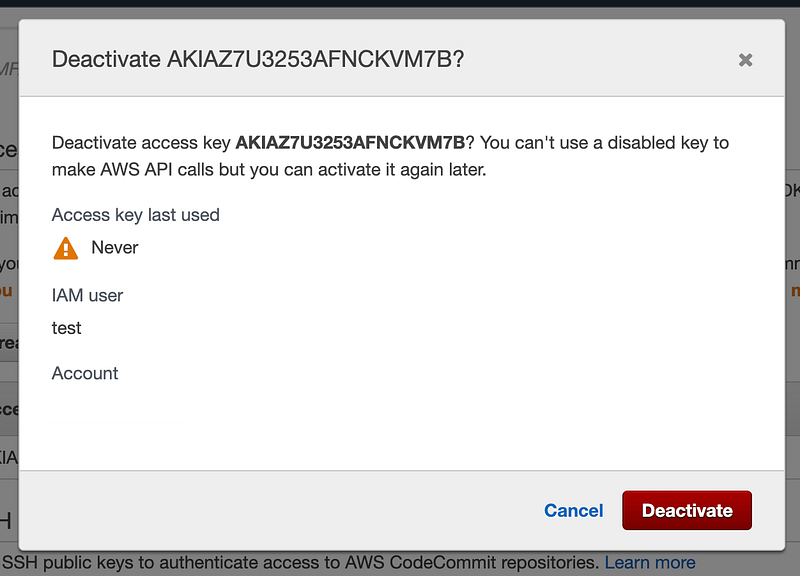
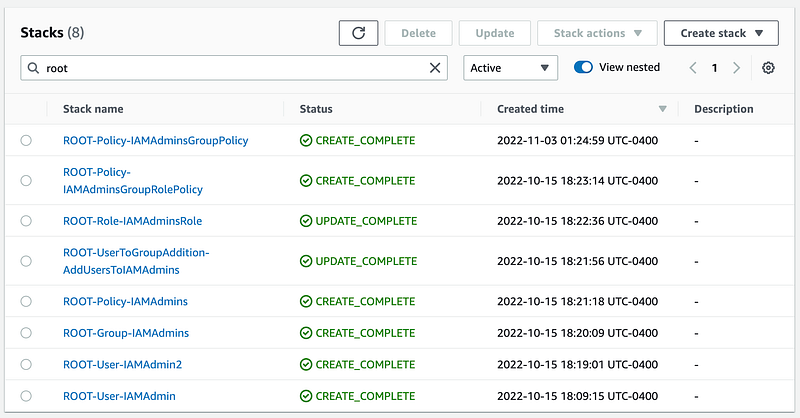
When this user creates the IAM user, group, role, the CloudFormation stack name will start with “ROOT-” and as you may recall, our IAM administrators will not be able to modify those stacks. Their role policy is limited to editing stacks that start with “IAM”.
How an IAM user could still abuse privileges
Now, although we have locked down the stacks, how could an IAM user abuse their privileges and change their own permissions?
- They could simply add another policy to their role, group, or user.
- They could create new admins by adding a user and adding it to the IAM admin group.
- They cloud create a new user and group and grant it IAM permissions.
- They could create a new user with the permissions the IAM administrator wants to use and reset the password to something known by the IAM administrator.
- They could give a compute resource or application the permission they want and leverage that resource’s permissions to carry out the actions the IAM administrator wants to take.
How can we disallow the above?
We can start by add more restrictions the IAM administrator policies such as the following:
- Limit the ability for IAM Administrators to modify their own role
- Limit the ability for IAM Administrators to modify their own policy
- Limit the ability for IAM Administrators to modify their own Group
- Limit the ability for IAM Administrators to add a new user to the IAM Group
- Limit the ability for an anyone besides root to create a new policy with IAM Permissions
- Limit the ability for anyone besides the root user from using a policy that contains IAM permissions (assign it to a role, user, group, etc.)
- Prevent the IAM administrators from getting new user passwords or changing them through a secure user deployment process.
- Restrict use of compute resources and privileges such that an IAM administrator cannot deploy and leverage a compute resource to use any roles except those explicitly defined for their IAM deployment needs.
- Make sure IAM administrators cannot log into, create, or access resources used for other purposes. For exmaple, the IAM administrators should not be able to create compute resources in the Domains account, use roles related to Route 53 management, etc.
Some of these bullet points require further thought and analysis for a completely secure implementation, but you get the idea. My source code is not perfect at related to all of the above restrictions but it gives you a starting point.
A central account for IAM administration
Just like with domain names, I am thinking I don’t want users scattered about throughout my organization.
What if I put all my IAM users in one account and grant them the cross-account roles they need to take actions in other accounts? That way all my permissions and role management exists in one place. We can restrict the creation of new users in other accounts through the organization.
On the other hand, we could put each user in the account where it is allowed to work and grant no cross-account roles. This might be simpler to manage in some ways because users in one account would have no way to access the IAM management in the account we use to manage permissions. Additionally we can put our sensitive data and information in a separate account where those users cannot access it because they are in completely separate accounts with no cross-account access.
If we use the latter approach, we can restrict IAM users from creating new users in the IAM administration account, and we can restrict all other accounts from creating users with IAM privileges, or at least a subset of risky IAM privileges if you want to allow users to create roles for applications.
We’ll explore those topics further in the upcoming posts. For now, I need my IAM administrators to be able to deploy permissions in any account. I need each user to be able to take actions in the appropriate AWS account where the resources they are allowed to manage exist. We’ll start with the IAM role and account in the next post.
Follow for updates.
Teri Radichel | © 2nd Sight Lab 2023
About Teri Radichel:
~~~~~~~~~~~~~~~~~~~~
⭐️ Author: Cybersecurity Books
⭐️ Presentations: Presentations by Teri Radichel
⭐️ Recognition: SANS Award, AWS Security Hero, IANS Faculty
⭐️ Certifications: SANS ~ GSE 240
⭐️ Education: BA Business, Master of Software Engineering, Master of Infosec
⭐️ Company: Penetration Tests, Assessments, Phone Consulting ~ 2nd Sight Lab
Need Help With Cybersecurity, Cloud, or Application Security?
~~~~~~~~~~~~~~~~~~~~~~~~~~~~~~~~~~~~~~~~~~~~~~~~~~~~~~~~~~~~~
🔒 Request a penetration test or security assessment
🔒 Schedule a consulting call
🔒 Cybersecurity Speaker for PresentationFollow for more stories like this:
~~~~~~~~~~~~~~~~~~~~~~~~~~~~~~~~~~~~~~~~~~~~~~~~~~~~~~~~~~~~~
❤️ Sign Up my Medium Email List
❤️ Twitter: @teriradichel
❤️ LinkedIn: https://www.linkedin.com/in/teriradichel
❤️ Mastodon: @teriradichel@infosec.exchange
❤️ Facebook: 2nd Sight Lab
❤️ YouTube: @2ndsightlab