
I Started Using a Customized Image for Every Article I Publish
Everything you need to know about choosing your next feature image.

We are all visual creatures, and no matter how well-written a blog post is, we will all be more attracted to the one that’s most aesthetically pleasing to us. It’s just how we are wired.
As content writers, we rely on copyright-free (safe and legal to use) stock images and videos from well-known websites like Pexels, Unsplash, Pixabay, Wix, Canva, and more.
It’s foolish to leave images out of any blog or article you post on the internet. Most bloggers know that using images not only keeps the reader engaged but helps the article to rank higher with search engines like Google.
If you want to understand more about why every article you write should have an image or two, check out this article.
Click me to skip to section
∘ Poor Experience for the User
∘ What Image Should I Use Then?
∘ Renaming Your Image Helps With SEO
∘ How Do I Name it?
∘ Let the Image Speak for Itself
Stock Photos Vs. My Own
During my SEO research I read that stock photos don’t rank as well as unique photos. Then I read more that claimed the opposite. I found a lot of controversy on this topic.
Hmm!
I wanted to dig deep into the “why” behind this. Even if it could be true that stock photos were hurting my ranking, why would I still keep doing it?
What I found…
Stock photos are recycled over and over again across the internet. Google has to decide which photo/blog/website combination deserves to be bumped up based on a massive criterion.
Poor Experience for the User
When you use the same image that has already been used 1000 times over the last few years, it’s not exciting anymore. It may not get others to click. Since the reader has likely seen it already elsewhere, it may appear outdated, even if it’s a new post. This thought process may not even be something that happens consciously.
This could make the experience for the user feel inauthentic. Though when John Mueller, Google’s Senior webmaster was prompted with the question, he sort of gave an indirect answer.
“It doesn’t matter for web-search directly.”
“For image search, if it’s the same image as used in many places, it’ll be harder…” (He is talking about ranking in Google images which is far easier with unique, original, modified imagery.)
Kind of a roundabout answer, but still, kept me thinking…
What Image Should I Use Then?
There are a few places you can find free, legal images. Though, the rules for editing vary depending on where you source the pic from. Here is the difference among the types of photos you will come across.
- Royalty-free: use these images freely but do not edit or sell
- Rights managed: purchase a single-user license but you cannot reuse in a separate post (eg: use in blog, but cannot use again in video)
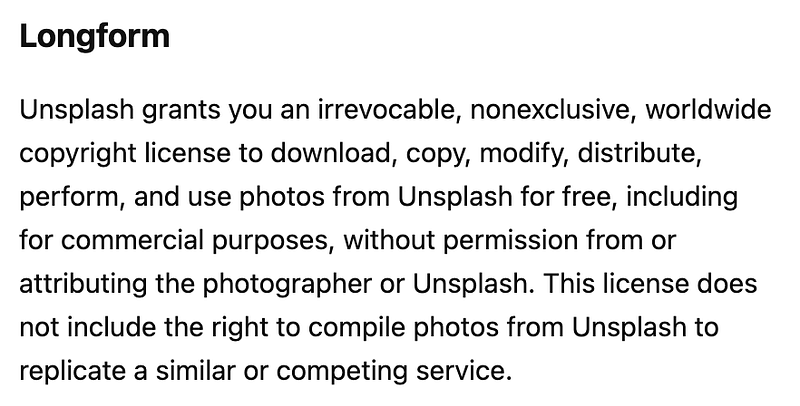
- Public domain: you are free to use and modify as you wish. Find them on Shutterstock, Wikimedia Commons, Flickr Commons, Magdeleine, etc. (Stay tuned for a separate post that dives deep into the pros and cons of all of these public domain sites. I’ll link it back here.) My #1 fave will always be Unsplash.
- Creative Commons: One way to access creative commons photos is to use this website.
- Include Screenshots. You can try a Chrome extension called Awesome Screenshots that gives you a beautiful, entire-screen image along with your annotations.
If you source every photo you use from somewhere like Unsplash (like me), you are legally allowed to edit or modify the photo to your liking, and attribution is not legally mandated (though appreciated).
Renaming Your Image Helps With SEO
When you download a stock photo, it has a random file name attached to it. When you download your edited image from Canva, it automatically generates a new, unrelated name. It takes a few seconds to rename your photo, and research shows that it helps Google to rank your post higher.
Why?
It helps Google or other search engines understand what your photo is about. Search engines already favor content with digital media attached to it above content that doesn’t. When you rename it to match your post, you are helping the Google algorithm do a little less work to determine if you are legit and trustworthy.
How Do I Name it?
When I rename my pictures, I use the exact name of the article title and separate each word by a hyphen, otherwise it would just read like a big blob of never-ending letters.
The photos used in this article are named I-started-using-a-customized-image-for-every-article-I-publish.png.
From what I know, file names should:
- be lowercase
- separated by hyphens
- contain keyword(s) for relevancy
- avoid any spaces
- best when short but descriptive (still trying to figure this one out) Sarah Does Seo recommends 5 words or shorter. This is something I need to work on. Sarah also recommends naming every single image in the post something different. While this is super time-consuming, she swears it’s worth it.
Admittingly, I still have a lot to learn about this, so if I am missing something, let me know!
Let the Image Speak for Itself
We have all heard the expression, “a picture speaks a thousand words.” So let it. Create a photo that is magical, captures the essence of the piece, is unique to the world, and is irresistible. Make sure it’s relevant, holds purpose, and is targeted towards the audience you are hoping to entice.
Let me know if this helped clear the air a little about the best ways to utilize images to your advantage. Feel free to share what I missed. I have just started to dip my toes in the waters of SEO, and it can be overwhelming. Though, I know as a professional content writer and copywriter, I either have to learn SEO or die trying.
Want to learn how to be a better writer? Look no further with my free writer’s resources. Many hours of research went into creating these for both myself and you!
Best,
🆂🆄🆉🍊
Are you a member yet? Consider signing up for just 5 bucks a month to get access to millions of fantastic stories. Get yourself a DIY-degree in just about anything by reading from talented writers on Medium. Please use my link at no additional cost to you. I will earn a small commission. Thank you!
Tap into positivity at Live Life Now, my new blog✨Have questions? Sign up for a tier to get 1on1 access with me.


