avatarJenn Leach

Free AI web copilot to create summaries, insights and extended knowledge, download it at here

2520

Abstract

cover</figcaption></figure><p id="142a">Set your category on the Share page in your product settings…</p><figure id="7dc4"><img src="https://cdn-images-1.readmedium.com/v2/resize:fit:800/1*_ggnrslK4__dJhJwT3ct3g.png"><figcaption>Gumroad</figcaption></figure><h1 id="ff27">4. NOT sending posts/emails to your audience</h1><p id="a523">I haven’t really known about this feature for a long time.</p><p id="c1c5">It’s right here>></p><figure id="3f2d"><img src="https://cdn-images-1.readmedium.com/v2/resize:fit:800/1*-yhvoIcTKLjE_jlsByrgxg.png"><figcaption>Gumroad</figcaption></figure><p id="699f">This is a good way to notify your audience of…</p><ul><li>Upcoming sales</li><li>Announcements</li><li>Updates to your products</li></ul><p id="8d6f">With my open rates between 55% and 89% and VERY HIGH click-through rates, this is one of my best marketing channels!</p><p id="a9e3">It’s excellent for growing your Gumroad sales and connecting with your audience.</p><h1 id="ff48">5. NOT Marketing</h1><p id="69ba">If you’re not marketing your Gumroad products, you are making the #1 biggest mistake!</p><p id="bbba">And leaving so much money on the table.</p><p id="a432">Here’s how I do it (it doesn’t feel like marketing)…</p><ol><li>Use Pinterest</li><li>Plug products in my Medium stories</li><li>Plug products in my blog posts</li><li>Mention products in my email newsletters</li></ol><h2 id="64e8">Pinterest</h2><p id="f4fe">All you do is create a pin about your product. Write a keyword-rich description and headline and post it!</p><p id="f85b">Done!</p><div id="8fa3" class="link-block"> <a href="https://readmedium.com/how-to-make-money-on-pinterest-without-followers-d56ad2675891"> <div> <div> <h2>How to make money on Pinterest without followers</h2> <div><h3>The beginner-friendly way to start</h3></div> <div><p>medium.com</p></div> </div> <div> <div style="background-image: url(https://miro.readmedium.com/v2/resize:fit:320/1*xkxHcudnfLQpbvwfxkByCA.jpeg)"></div> </div> </div> </a> </div><p id="a473">Your Pinterest pin will circulate across the platform and live there forever. I do this MULTIPLE times (10 to 20+ times each) for each product I have.</p><p id="f8cc">If you do this, you don’t want to create 10 pins for the same product and post the pins back to back. That could get your Pinterest account flagged for spam.</p><

Options

p id="f7b0">Instead, create your 10 pins and then use the Pinterest scheduler to drip your pins over a long period of time. You can schedule the dates/times you want your pins posted.</p><h2 id="b72c">Medium marketing</h2><p id="3536">Mention your products in the Medium stories you’re writing. Or, create a plug at the end of your story to share your Gumroad product.</p><p id="7fdf">Here’s one of my plugs:</p><p id="0493" type="7">Join 300+ customers who’ve bought my ebook How to Build a Faceless Business on TikTok and grab your copy!</p><p id="e897">Easy peasy!</p><div id="e9e0" class="link-block"> <a href="https://readmedium.com/ive-published-over-900-medium-stories-a3b65fb6c401"> <div> <div> <h2>I’ve Published Over 900 Medium Stories!</h2> <div><h3>Photo by Clay Banks on Unsplash</h3></div> <div><p>medium.com</p></div> </div> <div> <div style="background-image: url(https://miro.readmedium.com/v2/resize:fit:320/0*AB9jFHiaLm7IljAb)"></div> </div> </div> </a> </div><h2 id="e6ee">Blog post-marketing</h2><p id="6428">It has the same strategy as Medium.</p><p id="8f05">Plug your products within the content of your blogs and at the end as a takeaway or plug.</p><h2 id="d01c">Email marketing</h2><p id="e536">You can create full, dedicated emails about your products or mention them casually. You can also plug them throughout your email or at the end.</p><p id="7463">So many ways to do it with emails.</p><div id="0d2a" class="link-block"> <a href="https://bettermarketing.pub/i-suck-at-email-marketing-7e4aef62da08"> <div> <div> <h2>I Suck at Email Marketing</h2> <div><h3>But, I’ve Still Made Thousands From It</h3></div> <div><p>bettermarketing.pub</p></div> </div> <div> <div style="background-image: url(https://miro.readmedium.com/v2/resize:fit:320/0*T-ZWaHiem7lT2Lma)"></div> </div> </div> </a> </div><h1 id="88a4">There you go!</h1><p id="2c7c"><b><i>Did I cover it all?</i></b></p><p id="bbd7"><b><i>What mistakes can you share for others to avoid with Gumroad selling?</i></b></p><p id="4dad">Want to read more stories like this? Check out my Substack, where I talk about side hustles, social media, content creation, and business.</p></article></body>

I Make $1,500+ Per Month from Gumroad — Here are 5 Things to Avoid

Plus, take a look at my marketing strategy, which you can steal!
Photo by Emiliano Vittoriosi on Unsplash

I’m excited to share some tips, tricks, and tactics I’ve used to grow my Gumroad account over the years. Some things feel like second nature now, and I hardly feel like I’m marketing.

After over 2 years, hundreds of students, and tens of thousands earned on the Gumroad platform, here are 5 things I recommend you avoid when starting, plus my marketing strategy, which you can get your hands on.

Let’s go!

5 Things to Avoid When Selling on Gumroad

Here’s what to look out for…

1. Selling ONLY 1 product

Sounds funny but, if you can, sell at least 2 or more products on Gumroad. You can use each product to cross-sell one another or upsell.

This is a simple one. Just take my advice here.

2. NOT using Gumroad Recommendations

When you set up your product for sale, on the last page, it’ll ask you if you want to turn on Gumroad recommendations.
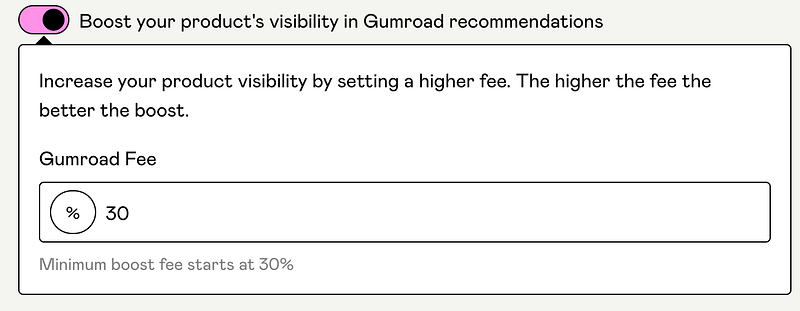
Gumroad

This is basically like Gumroad acting as your affiliate. You agree to pay it a certain percentage of sales in exchange for them promoting you!

It’s one of my top traffic drivers!

Millennial.gumroad.com

Some sales are better than no sales, right?

Use this!

3. NOT using Gumroad Discover

Gumroad Discover is Gumroad’s marketplace. You can browse it to see the products their sellers are selling.

You want your products listed here.
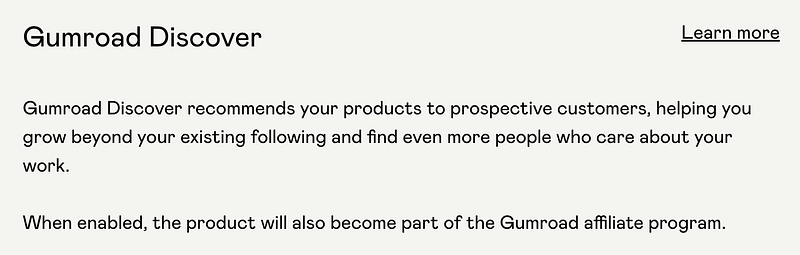
Gumroad Discover

Set your category on the Share page in your product settings…

Gumroad

4. NOT sending posts/emails to your audience

I haven’t really known about this feature for a long time.

It’s right here>>
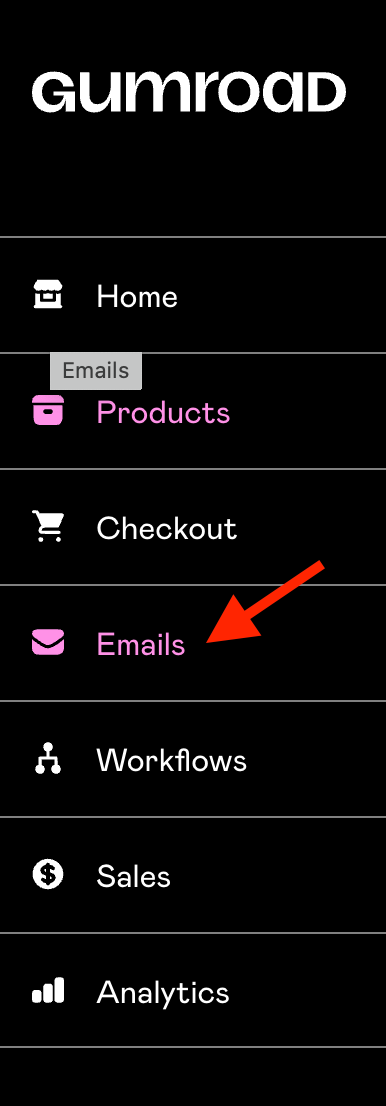
Gumroad

This is a good way to notify your audience of…

  • Upcoming sales
  • Announcements
  • Updates to your products

With my open rates between 55% and 89% and VERY HIGH click-through rates, this is one of my best marketing channels!

It’s excellent for growing your Gumroad sales and connecting with your audience.

5. NOT Marketing

If you’re not marketing your Gumroad products, you are making the #1 biggest mistake!

And leaving so much money on the table.

Here’s how I do it (it doesn’t feel like marketing)…

  1. Use Pinterest
  2. Plug products in my Medium stories
  3. Plug products in my blog posts
  4. Mention products in my email newsletters

Pinterest

All you do is create a pin about your product. Write a keyword-rich description and headline and post it!

Done!

Your Pinterest pin will circulate across the platform and live there forever. I do this MULTIPLE times (10 to 20+ times each) for each product I have.

If you do this, you don’t want to create 10 pins for the same product and post the pins back to back. That could get your Pinterest account flagged for spam.

Instead, create your 10 pins and then use the Pinterest scheduler to drip your pins over a long period of time. You can schedule the dates/times you want your pins posted.

Medium marketing

Mention your products in the Medium stories you’re writing. Or, create a plug at the end of your story to share your Gumroad product.

Here’s one of my plugs:

Join 300+ customers who’ve bought my ebook How to Build a Faceless Business on TikTok and grab your copy!

Easy peasy!

Blog post-marketing

It has the same strategy as Medium.

Plug your products within the content of your blogs and at the end as a takeaway or plug.

Email marketing

You can create full, dedicated emails about your products or mention them casually. You can also plug them throughout your email or at the end.

So many ways to do it with emails.

There you go!

Did I cover it all?

What mistakes can you share for others to avoid with Gumroad selling?

Want to read more stories like this? Check out my Substack, where I talk about side hustles, social media, content creation, and business.

Gumroad
Marketing
Making Money Online
Make Money Online
Business
Recommended from ReadMedium