avatarLucianoSphere (Luciano Abriata, PhD)

Free AI web copilot to create summaries, insights and extended knowledge, download it at here

2161

Abstract

my statistics. I…</h3></div> <div><p>medium.com</p></div> </div> <div> <div style="background-image: url(https://miro.readmedium.com/v2/resize:fit:320/1*J_plTUpLhqH5qoYY78A9Lw.png)"></div> </div> </div> </a> </div><h2 id="77ca">The best way to save the stories to your local computer</h2><p id="552d">At first, I thought this was going to be easy: Just open each article one by one in the browser, and do File →Save. But that didn’t work, because of how the HTML is structured.</p><p id="9500">So I had to do it in a different way: open each story, select the whole article, and copy-paste into an external program, preferably a word processor (you could use for example Word). But here there was another problem, especially for photos and figures: if you copy the contents of a story very quickly, you risk not capturing the figures! Actually, you'll get their low-resolution forms only, and you’ll miss the good picture that you want in your article.</p><p id="9a7f">It turns out that for each figure the platform saves two versions: one of very low resolution that acts basically as a light map to anticipate that a figure is loading, and another that is the actual full-resolution picture. I discovered that <b>before you copy, you need to wait until all figures have been loaded</b> in their full, high-resolution forms. Only then you can press Control-C. If you don’t wait enough, you’ll end up copying only the low-resolution forms!</p><p id="35f9">And even this doesn’t make the whole thing right. When you copy, you actually place in the clipboard the two forms of each figure. So then, when you paste inside your word processor you’ll get each figure twice, one in low and one in high resolution. If you want, you can then manually remove the low-resolution one.</p><p id="9ab8">I hope this prompt and mini-tutorial will help you get ready for any potential problems. You are welcome!</p><figure id="69d4"><img src="https://cdn-images-1.readmedium.com/v2/resize:fit:800/1*Yr7gxo3Otd-LGaJkdYIQlQ.png"><figcaption>Figure composed by the author, rep

Options

resenting the importance of saving articles -here all photostories of the link below, because I will hardly be able to revive these unique situations!</figcaption></figure><div id="ad8f" class="link-block"> <a href="https://lucianosphere.medium.com/top-21-photostories-of-2021-7c23a5ca05ac"> <div> <div> <h2>Top-21 photo-stories of 2021</h2> <div><h3>A selection of 21 entries about photography from my account, featuring content about nature, science outreach, art…</h3></div> <div><p>lucianosphere.medium.com</p></div> </div> <div> <div style="background-image: url(https://miro.readmedium.com/v2/resize:fit:320/1*j2j9LnJ9XhEHFvKP-pcp1Q.png)"></div> </div> </div> </a> </div><p id="152a"><i>I am a nature, science, technology, programming, and DIY enthusiast. Biotechnologist and chemist, in the wet lab and with computers. I write about everything that lies within my broad sphere of interests. Check out my <a href="https://lucianosphere.medium.com/lists">lists</a> for more stories. <a href="https://lucianosphere.medium.com/membership"><b>Become a Medium member</b></a> to access all its stories and <a href="https://lucianosphere.medium.com/subscribe"><b>subscribe to get my new stories</b></a><b> by email</b> (original affiliate links of the platform for which I get small revenues without special costs to you). <a href="https://lucianoabriata.altervista.org/office/donations.html"><b>Donate here</b></a><b> </b>through various means. <a href="https://lucianoabriata.altervista.org/office/contact.html"><b>Contact me here</b></a> for any kind of inquiry.</i></p><p id="1514"><i>To <b>consult about small jobs</b> (on programming, biotech + bioinf project evaluations, science outreach + communication, molecular data analysis and design, molecular graphics, photography, private courses and tutorials, private lessons, teaching and tutoring, etc.) check my <a href="https://lucianoabriata.altervista.org/services/index.html"><b>services page here</b></a>.</i></p></article></body>

Feeling much safer now

I just backed up all my articles!

Because I wonder, what happens if the platform closes or suffers an attack? Saving the articles was not trivial, so here I share with you how I proceeded.

In just under 1 GigaByte of disk space, I just saved to my computer all 193 stories I published during my first 9 months of side hustle here. I also set myself to save every single newly published story from now on. Because I wonder, what happens if the platform closes or suffers an attack?

Have you ever wondered what happens if you accidentally remove your most loved story? Or, reaching catastrophic levels, if the platform closes or suffers an attack?

Well, I did! Therefore I took this holiday break to back up all my published articles. And my main 2022 resolution is to regularly back up all my work in the platform.

In fact I built this backup slowly, spread over two weeks as I compiled data and stats for my recent analyses of article and writing performances:

The best way to save the stories to your local computer

At first, I thought this was going to be easy: Just open each article one by one in the browser, and do File →Save. But that didn’t work, because of how the HTML is structured.

So I had to do it in a different way: open each story, select the whole article, and copy-paste into an external program, preferably a word processor (you could use for example Word). But here there was another problem, especially for photos and figures: if you copy the contents of a story very quickly, you risk not capturing the figures! Actually, you'll get their low-resolution forms only, and you’ll miss the good picture that you want in your article.

It turns out that for each figure the platform saves two versions: one of very low resolution that acts basically as a light map to anticipate that a figure is loading, and another that is the actual full-resolution picture. I discovered that before you copy, you need to wait until all figures have been loaded in their full, high-resolution forms. Only then you can press Control-C. If you don’t wait enough, you’ll end up copying only the low-resolution forms!

And even this doesn’t make the whole thing right. When you copy, you actually place in the clipboard the two forms of each figure. So then, when you paste inside your word processor you’ll get each figure twice, one in low and one in high resolution. If you want, you can then manually remove the low-resolution one.

I hope this prompt and mini-tutorial will help you get ready for any potential problems. You are welcome!
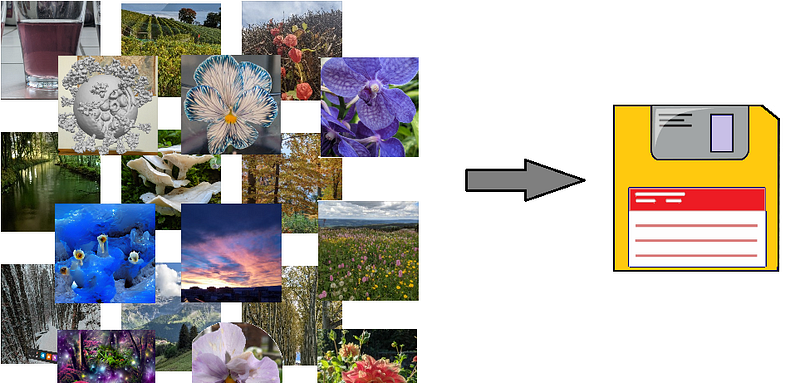
Figure composed by the author, representing the importance of saving articles -here all photostories of the link below, because I will hardly be able to revive these unique situations!

I am a nature, science, technology, programming, and DIY enthusiast. Biotechnologist and chemist, in the wet lab and with computers. I write about everything that lies within my broad sphere of interests. Check out my lists for more stories. Become a Medium member to access all its stories and subscribe to get my new stories by email (original affiliate links of the platform for which I get small revenues without special costs to you). Donate here through various means. Contact me here for any kind of inquiry.

To consult about small jobs (on programming, biotech + bioinf project evaluations, science outreach + communication, molecular data analysis and design, molecular graphics, photography, private courses and tutorials, private lessons, teaching and tutoring, etc.) check my services page here.

Writing
Writing Tips
Life
Blogging
Writing Life
Recommended from ReadMedium