
I Created An AI Influencer
How I use Python and machine learning to automate Instagram
In most situations I can think of, having a large online audience would be beneficial to your endeavors. Writing a book? Well you’d already have a tailored audience to promote it to. Got a cool idea for a new product? Well you’d already have the perfect audience to back your Kickstarter. In fact, so beneficial is a large audience that just having a lot of followers has become a career in and of itself. Enter the Influencer: a person who is paid to endorse products to their big audience.
And frankly, I would like to become one. The problem is, I’m not famous and I don’t want to have to put hours and hours of work in to maintaining an Instagram account and learning silly dances. So I’m out of luck, right?
Wrong. Why? Because I’m an engineer and I can instead put hours and hours of work into creating a machine that can become an Influencer for me.
Disclaimer: Due to moral conflicts about bots on the internet, I won’t be sharing any code from this project, just a detailed explanation of the concepts.
What I Did
I created a program that fully automates every aspect of the social media experience. At the time of this writing my AI has approximately 1,800 followers after 3 months of deployment, and is accelerating it’s growth each month.
it can:
- Source its own, relevant images
- Post those images to Instagram
- Write witty captions for each post and credit the original owner
- Create a Story of the post
- Like comments
- Like and Follow relevant Users
- Unfollow accounts who don’t engage
- Create a database of all accounts it’s engaged with
- Update a webapp that tracks the AI’s growth
I’ll walk though how I am able to achieve each one of the above bullets, but first there is some initial setup that needs to be done before we can release the AI into the wild.
Initial Set up
While once deployed, this AI is fully autonomous, it does take some initial manual set up to get going.
Picking a Theme
Quite possibly the most important part of this entire process was picking the type of account I wanted to create. I figured it would be easiest if I picked a novelty account in a fairly small niche, but that fits into larger categories as well.
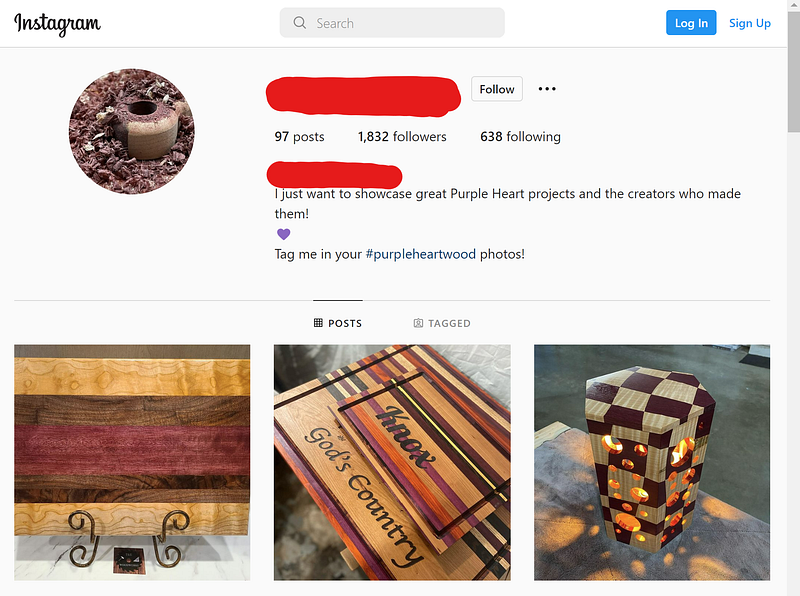
I chose my account to be dedicated to a very specific species of wood: Purple Heart. I chose this theme because it’s fairly specific, photographs well, fits into the much larger categories of “woodworking” and “makers” , has its own hashtag, and has good opportunity for endorsement (lots of woodworking tool companies out there).
# Hashtags
The next thing I needed to do was come up with a list of relevant hashtags. I ended up with a list of about 20 including #purpleheartwood, #woodworking, #chacuterieboards, #cuttingboards, etc.
These will be used to source the images for the AI’s account and find new relevant users to engage with.
Captions
While maybe possible to create with natural language processing, I just chose to write 20 or so prewritten generic captions pertaining to purple heart that the AI will choose from randomly when it posts. Some of my favorite examples are :
- Purple Heart, Am I right?
- When I say Purple, you comment Heart: Purple!
- Favorite wood = Purple Heart
- I’m having a Purple Heart love affair!
Label Image Data
This was one of the most time consuming, but important parts. I wrote a script to download the last 100 photos from each hashtag I came up with and manually labeled them either good (contains purple heart, clear image, no people) or bad (everything else) so that I could later create an image classifier that would be able to source the good images on its own in the future.
How It Works
Now that the setup is out of the way, we can get back to how the autonomous program actual works
Source its own, relevant images
The first thing it has to do is get images, and then pick out the good, relevant ones from the noise. Whenever it gets low on good images, it uses python and Selenium to log into Instagram and search different hashtags. It downloads a handful of the most recently posted images (as well as the account names for future credit) and runs them through a Convoluted Neural Network I created with Tensorflow Model Maker to filter out the good from the bad (you can find a tutorial on how to create your own image classification model here). The good images get stored in an approved images folder for future posts, while the bad get thrown out.
Post The Images to Instagram
Scraping images from Instagram is a fairly easy thing to Google how to do. All that’s really needed is Selenium and a very rudimentary knowledge of HTML. Posting is a whole other animal. The problem lies in that to post an image to Instagram from a computer, you can’t just rely on the Selenium web driver as you actually have to delve into your file system and drag and drop an image into the correct location on the website. The workaround for this is to use a program called Sikuli.
Sikuli allows you to write scripts that use computer vision to take control and navigate your computer’s GUI. You do this by taking screenshots of the things you want your mouse to interact with and the program searches your desktop for a match to the image. Once it matches a location on your desktop, you can have it simulate all sorts of mouse interactions such as double click or click and drag. You can read more about how I use Sikuli here: When Python Automation Falls Short.
First Python and Selenium are used to log into Instagram and navigate to the ‘New Post’ page where an image can be dragged and dropped. Then using the OS library, Python selects a random image out of the ‘approved_images’ folder and moves it to a new folder called ‘stage.’ Sikuli then takes over control of the GUI, opens up a file explorer, navigates to the ‘stage’ folder, and drags and drops the image into the Instagram web browser.
From there, it’s back to Python where a random caption is chosen from the prewritten list and based on the image selected the proper username is queried from the database. This is all combined with a few predefined hashtags and sent to the caption box via Selenium.
This script runs every 24 hours (plus or minus up to 3 hours to incorporate some variation).
Write Witty Captions For Each Post And Credit The Original Owner
While my intent is not to produce original content, I also don’t want to leave the original owners of the pictures I‘m posting high and dry. This has happened to me a few times on my personal account and it’s no fun to see someone else plagiarize your hard work.
When it downloads each image, it also grabs the username of the account that it took the image from. The image name and username are stored as nodes in a graph database called Neo4j with a ‘POSTED’ relationship between the two. This allows the ability to query the username anytime a specific image is referenced and also allows for a way to keep track if there were certain accounts that multiple images were taken from (More on Neo4j below).
The witty captions were pre-written and stored in a Python list. Whenever it comes time to post, a random caption is concatenated with ‘Check out this post by {queried username}’ making sure credit is given to the original content owner.
The only manual thing on this account that I ever do is delete a post if the originator sends a direct message asking for me to take it down. Neo4j also allows me to flag certain usernames as ‘NotToUse’ to respect users wishes and not use any more of their content. This very rarely ever happens. Mostly the AI receives appreciation and a follow.
Create A Story Of The Post
Creating a story is executed in a similar fashion as the good old regular post, with just a slight modification.
Because you can’t create a story from Instagram on a desktop, Selenium is ditched and Sikuli is used exclusively.
First Sikuli takes control of the GUI and opens up a Chrome web browser. From there Sikuli navigates to a website called INSSIST which is a web based iPhone emulator for the Instagram app. From here Sikuli navigates to the account’s profile, selects the most recently posted image, and shares it to a Story. Sikuli doubles down on crediting the original content owner by adding text to the story along the lines of ‘new post featuring: Username.’ This almost always results in the original content owner re-sharing the story, furthering the post’s reach.
Like Comments
Anytime someone comments on one of my AI’s posts, the text is run through a screening that looks for obvious spam text like ‘promote’ or ‘send’ or ‘DM’. If it passes the filter check, the comment is liked using Selenium. As I collect more comments, I hope to be able to create some sort of machine learning model that can do sentiment analysis on the comments and respond appropriately.
Like And Follow Relevant Users
Posting images and sharing stories is not the best way to encourage engagement on your account, though. Through some manual trial and error I found that liking 9 photos and following an account will take up a person’s entire notification screen - what I call ‘LIKED_AND_FOLLOWED’ - and often results in a follow back.
With this in mind the AI loops through the following actions every 3 hours:
- Logs into Instagram and chooses a random hashtag from the predefined list.
- Searches the recent posts that have used that hashtag and collects the usernames of 21 accounts
- for each one of those accounts it checks Neo4j if it’s already following the account, if it is, it moves on to the next account. If not, it then checks Neo4j how many times it’s ‘LIKED_AND_FOLLOWED’ the user and if it is less than a certain threshold (2 as of now), it will like the accounts most recent 9 photos and follow them.
Unfollow Accounts That Don’t Engage
From some online research I realized that there is a limit to how many people you can follow on Instagram. At the time of this writing, that number is 8000. Following 21 people every 3 hours will eventually add up, so I needed the AI to also have the ability to unfollow people.
Immediately after the Like and Follow loop, the program will jump into an unfollow loop. The AI first collects all the names of the accounts it follows as well as its followers. It calculates how many accounts it needs to unfollow by keeping a ratio of 1:10 of following to followers (this is a random ratio I thought sounded reasonable).
The AI creates a list of accounts that it follows ,but do not follow it back. With this list, its checked against the list of users its followed in the last 24 hours and removes them. This leaves the final result of potential accounts to unfollow. The number of accounts to keep the 1:10 ratio are randomly selected from the list and unfollowed on Instagram using Selenium.
The Neo4j Database
Probably the coolest part of this project was creating the Neo4j Database. Neo4j is a graph database that allows you to create Nodes, Relationships, and Properties. My schema can be seen below
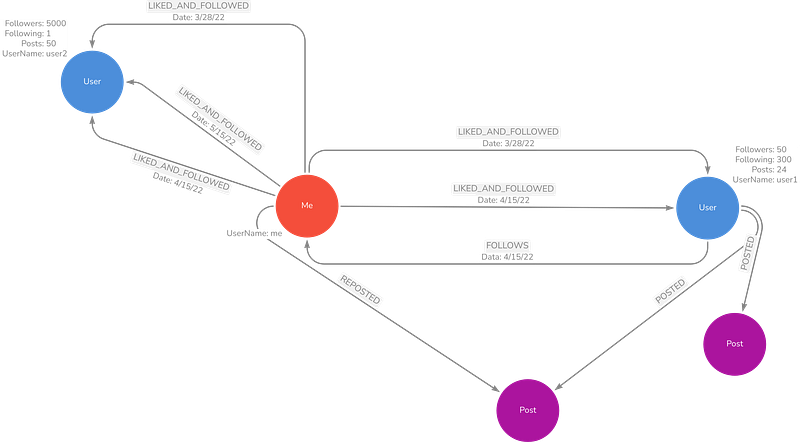
I use two different kinds of nodes: Users and Posts. Every time the AI downloads a photo, a Post node is created with a unique name and a relationship tied to the user node (which is created if it doesn’t already exist) so that the original content owner’s username can be traced and applied in the repost caption alongside the witty caption.
Every time it runs the like and follow loop, each user targeted gets a node and a ‘LIKED_AND_FOLLOWED’ relationship. This allows the AI to take into account how many times its ‘LIKED_AND_FOLLOWED’ a specific user (as well as how recently) when deciding to target them again.
At the end of each like and follow and unfollow loops, The FOLLOWS relationships are updated based on a current snapshot of the AI’s Instagram account.
One of the cool parts of graph databases is queries like this can be run:
match(me:User{UserName:'my username'})-[f:FOLLOWS]->(user) WHERE NOT (user)-[:FOLLOWS]->(me)with collect(user.UserName) as notfollowing, mematch (me)-[lf:LIKED_AND_FOLLOWED]->(a) with count(lf) as cnt, a, notfollowing, lfwhere a.UserName in notfollowing and cnt > 1return a.UserName, cnt, lf.dateThis finds all the users the AI follows who do not follow it back and that it has LIKED_AND_FOLLOWED multiple times - i.e. prime candidates to unfollow on Instagram.
I’ve only scratched the surface with Neo4j and would ultimately like to use it to try to build profiles of the types of accounts that are more or less likely to follow the AI back so as to make the like and follow loop more efficient.
Web App
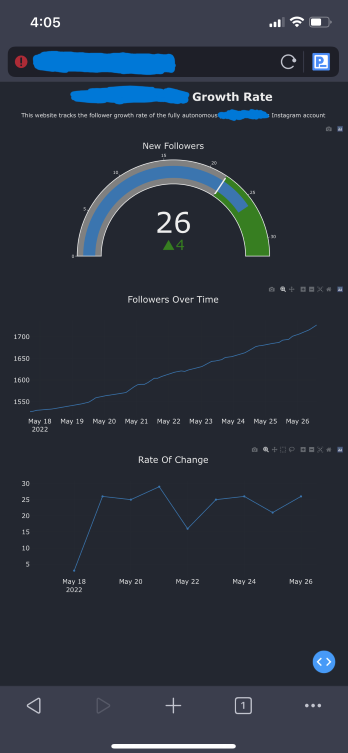
To easily monitor the growth of this account, I used Dash, a web framework built to help make web based dashboards in Python quick and easy to set up. I’m able to pull meta data on the AI’s account from Neo4j (collected and updated during each LIKE_AND_FOLLOW loop) and populate cool dashboard graphs such as the dial that shows how many new followers have been gained that day and how far above or below the average it’s at, a line graph of the total number of followers over time, and another line graph of how many new followers have been gained each day.
Shutting It All Down
Ultimately, I ended up shutting the project down after about 3 months. Partially because I felt bad about using other people’s images for my own gain, and partially because Meta changed their HTML class structure that broke a lot of my Selenium code and I haven’t gotten around to fixing it.
All in all it was a fun project where I got to combine a lot of skills such as web scraping with Selenium, traversing GUIs via Sikuli, Graph database structure with Neo4j, Web development with Dash, and machine learning with Tensorflow. And who knows, I might have implemented some of this automation into the FirthFabrications Instagram account. If you’re not careful, you might end up on the receiving end of a LIKE_AND_FOLLOW loop!


