HTTP Parallelism, Push, “Preload”, And Why Markup Bloat Is The Enemy
Back in 2020 I wrote about how I thought HTTP 2.0 Push and SPDY might be placebo, but it turned out the problem was that the client I was working for just had a garbage website. This is a common affliction as systems like HTTP 2 push, server side result caching, CDN’s, even simple minification and gzip compression are oft blanket applied without thought; in the blind hope that it will be a magical panacea. As opposed to what they really are, tools that require a degree of knowledge, thought, and planning to apply to their full potential.
Quite often in fact they make zero improvement whilst costing you money and time, all because what’s really going on is someone trying to sweep the real problems — massive code bloat, failure to leverage caching at the construction level, copypasta development with idiotic frameworks — under the rug.
There are a lot of just plain bad choices developers make from the start, and most of that stems from simply failing to understand how browsers even load pages in the first place! If you are doing web development professionally — front end or back end — understanding how pages load is a must-have!
Parallelism Delayed
One of the biggest strengths of HTTP and how servers and browsers talk to each-other is their ability to perform more than one file request at a time. Most browsers limit you to six to eight simultaneous connections — and if the server or client are hitting up against connection limits you don’t get the benefit — but in a reasonable world assuming that six files can be downloading side-by-side is the norm. The issue is when and how those parallel downloads can start and run whilst using a website.
In a normal page load — I’ll be using my recent calculator demo as the example — the HTML has to load so that the browser knows what files the markup needs. Then the CSS then has to load before the browser knows what that needs. If you’re loading JavaScript modules or other scripts from inside external scripts those are delayed. etc, etm.

You can see that the JavaScript — which actually builds the page — is given a lower priority than the CSS, not starting until after the CSS is complete. This is partly where the incorrect idea of “moving above the fold CSS into the markup” comes into play, but actually just keeps that same delay. Thus said claim is placebo at best, a lie at worst!
Think about it, what if we moved all the CSS and JS into the markup? Those first three bars on the graph would add up to a single line, with the webp background not starting to load until well after that!
What push (and/or HTML 5 preload) can/should be used for is to level that playing field. If I set push instructions in the .htaccess thus:
<Files calc.app.html>
 Header add Link "<template/images/canvas_1.webp>; rel=preload; as=image;"
 Header add Link "<template/calc.screen.css>; rel=preload; as=style;"
 Header add Link "<scripts/calc.min.js>; rel=preload; as=script;"
 Header add Link "<template/fonts/OPTIEdgarExtended-Regular.woff2>; rel=preload; as=font; crossorigin"
 Header add Link "<template/fonts/interface-Regular.woff2>; rel=preload; as=font; crossorigin"
</Files>
The waterfall changes radically:

As I said in part 3 of the calculator explanation, those two waterfalls are not on the same time scale, so let’s show that by scaling them appropriately:
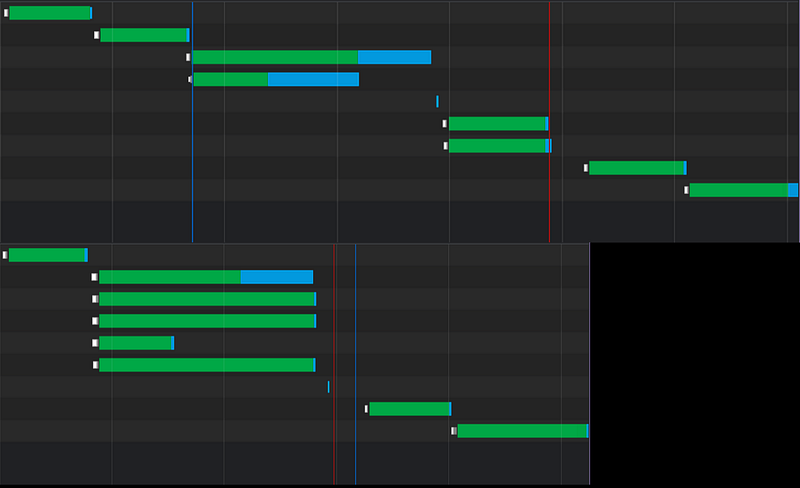
You would think delaying “load” — when the browser can start trying to render the page — would have a negative impact. But that means nothing compared to when the page is “really useful” and when things like “first contextual paint” come into play. In this case, “push” has cut the “time to useful to the user” (that red line) almost in half! That’s what it’s supposed to do!
There are two big things to notice in either version:
- Favicons do not load until after the page itself is user-ready. They are deferred until after all other files during page load are ready. This is great because it means we never really have to worry about optimizing for those as they’re just an extra affectation.
- Even with “push” no other files start downloading until the HTML has finished being loaded AND parsed!
Let me just repeat that for emphasis:
No Other Files On A Page Will Start Downloading Until The HTML Is Complete!
Whether you use push, preload, or any other “trickery” it does not happen. There is not a single blasted thing you can do to change that. Does not exist!
Which is funny because a lot of people claim that’s what push, or <link rel=”preload”> does. So many alleged “experts” say that push lets it start downloading immediately. That’s NOT what it does! All those push does is set up your parallel loading order after the markup has loaded. In no way, shape, or form do they start the download of those other files before the markup has finished. Anyone telling you otherwise is packing your fudge!

Peanut butter fudge at that… With nuts and raisins.
This is — as of the time of this writing in 2023 — a browser level “flaw” because of a lack of multithreaded programming. For all the changes and modernization in browsers, they are still painfully and agonizingly single threaded at so many tasks that would benefit from multithreading. When browsers are busy loading and parsing markup, no other threads can be started up or queued, even downloads. Though it does not disturb already running threads.
Without those who are coding browsers making significant changes to how things are done internally or how they obey things like HTTP header directives, that is not going to change.
That Disadvantage Is An Advantage
I hadn’t considered this until very recently, but if the HTTP header driven “push” still doesn’t start loading files until after the markup is downloaded and parsed, how is it in any way better than HTML 5’s preload?
Well, I tested it… I created this file: https://cutcodedown.com/for_others/medium_articles/htmlCSSCalcScripted/calc.preload.app.html
Which does not get targeted by the .htaccess for push, and added:
<link
  href="template/images/canvas_1.webp"
  rel="preload"
  as="image"
>
<link
  href="template/calc.screen.css"
  rel="preload"
  as="style"
>
<link
  href="scripts/calc.min.js"
  rel="preload"
  as="script"
>
<link
  href="template/fonts/OPTIEdgarExtended-Regular.woff2"
  rel="preload"
  as="font"
  crossorigin
>
<link
  href="template/fonts/interface-Regular.woff2"
  rel="preload"
  as="font"
  crossorigin
>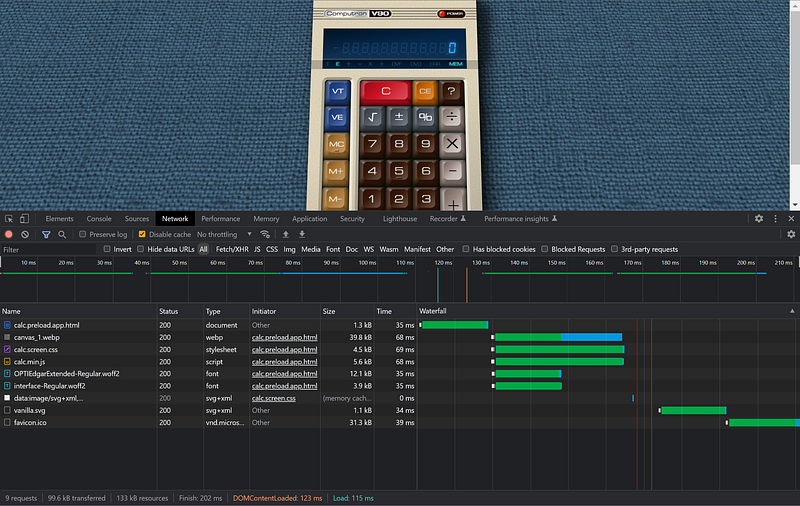
Because of it being delayed, there is no “direct” distinction between stating them in the markup vs. stating them in the HTTP headers. This is further advantageous as HTTP headers are sent “in the clear” with no minification or compression. Markup can be gzipped!
Thus the version using HTTP push ends up 2.02k transferred once you count the 867 byte header, whilst the HTML preload ends up 1.54k because we moved around half a k of code into the markup which gets compressed.
NOT a giant deal-breaker on using “push”. So little difference it might not even throw the total transfer into using an extra packet. But add on “preload” <link> being simpler/easier to implement for “normal developers” thanks to not having to screw with .htaccess, httpd.conf, header() in PHP — or whatever your specific server uses — there is actually no reason to use HTTP push. Just use HTML preload instead making it easier to control. Wait, did I just suggest putting something in the markup instead of somewhere else?

<link rel=”preload”> is simply easier to work with, for at minimum the same benefits, and best squeezing that last bit of blood from the stone.
Firefox is DUMB
You might wonder why I made the fonts crossorigin despite being served from the same server. Basically Firefox is dumb. Without declaring them as crossorigin it will try to load the files an extra time even after already loaded, ignoring cached preload. EVEN WHEN SERVED FROM THE SAME FLIPPING DOMAIN!!! The literal opposite of what crossorigin is even supposed to be for!
Worse if you run it off localhost, it repeats loading AGAIN resulting in burning three full downloads on one .woff or .woff2 file. And it’s only WOFF/WOFF2 that are impacted by this.
Actually when you see this, “dumb” is being very polite about it. Same blasted files over and over and over again.
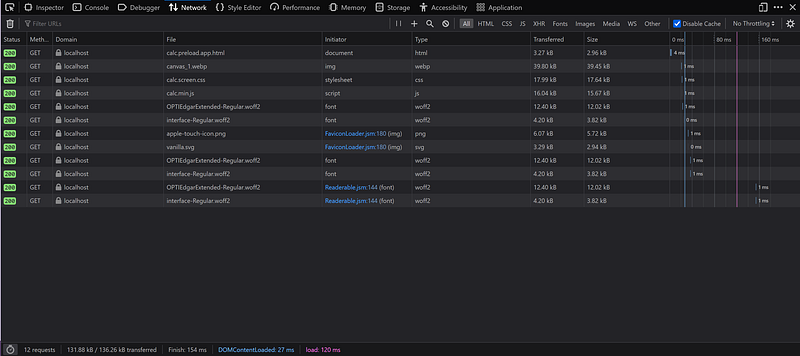
Yes, that’s cache-empty! The ridiculously low response times is that it’s accessing it via localhost, not via the web. Still, it’s loading those two font files THREE flipping times. And you can see it’s actually transferring them all three times as if it weren’t, the “transferred” column would read “cached” instead of listing the size. Adding crossorigin removes ONE of them. Online in theory it gets reduced to just one, but in practice it actually doesn’t seem to work that way all the time, it’s hit or miss.
If anyone knows how to get rid of that behavior entirely, I’d love to hear it.
As To “Markup Bloat”
Remember everything you put into the markup — or as a HTTP header — delays the loading of sub-files. This is another strike against the bad advice of “putting above the fold CSS in the markup”, pissing presentational classes — no matter how much you CALL them “atomic” or “utility” — into the markup, and even systems like BEM encouraging you to slop classes on everything whether they need them or not.
Anything you can get out of the markup will speed up how soon subfiles can start loading, and that includes your push/preload. Also remember that, well… I’ll quote MDN.
specifying resources that your page will need very soon, which you want to start loading early in the page lifecycle, before browsers’ main rendering machinery kicks in.
Preload is render blocking. That is NOT the great big evil people claim and can in fact be an advantage too. Now, I know you’re thinking “we keep hearing render blocking is bad, how can it be good?” Simple: “Flash Of Unstyled Content” (aka FOUC) and “Layout Shift”.
If you organize it so that something like your background image, ALL your CSS, and layout/content building JavaScript are loaded together via preload, by the time the browser gets to rendering it will already have everything needed to build the final version of the page. Thus your content on the first render will be styled and laid out properly. At which point there should be no reason for the layout to “shift” while things are loading or appear without that style.
And I’ll take that behavior in exchange for maybe a quarter second of there being a blank screen and/or the previous page still showing! All day, every day.
But What About Caching?
Something to remember is that all of the above is only meaningful on a cache-empty first-load. Aka 99%+ of the time — not to pull a percentage out my rump — a person visits your website, and around half the time return visitors haven’t been by lately. The latter depending on their cache limits and activity elsewhere.
Thing is the way websites… exist… the contents of the markup are generally treated as ever-changing unless you’re doing forward/back navigation. Content changes, you get new markup on your next visit. It is thus that one of the most efficient ways to speed up pages is to use the smallest most minimal markup possible, because all the other files are treated as static.
We can see this if we look at a network stats with caching enabled.
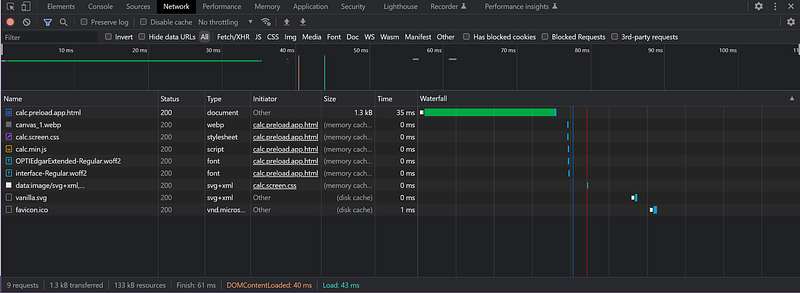
We can see that 43ms to the page being usable is awesome. Thing is if you use a monolithic stylesheet — aka combine all the CSS into one file — and combine your JavaScript down to as few files as possible, You can get that type of speed out of EVERY sub-page on your site! So long as you put all styles used across the entire site per media target into a single file — two at most — you can even pre-cache the appearance of other pages on the site. This is where “dead CSS” removal tools consistently screw over the majority of CSS I’ve ever written. Failing to spider to make sure said styles are used on ALL pages, not just one or two.
Wheretofor:
<center><font size="+2" color="#EF5350">…was dumbass 25 years ago, hitherto:
<div class="text-center font-lg color-400-red">…or whatever is absolutely huffing dumbass ignorant garbage today!
Just as:
<figure class="photo">
  <img class="photo__img" src="me.jpg" alt="A portrait of me">
  <figcaption class="photo__caption">Look at me!</figcaption>
</figure>
Is equally absofragginglutely so dumbass “Red Foreman would break his foot off in its ass” compared to:
<figure class="photo">
  <img src="me.jpg" alt="A portrait of me">
  <figcaption>Look at me!</figcaption>
</figure>
And that BEM fanboys would even TRY to claim the former is “superior” because they’re too huffing stupid to understand specificity? Yeah, to hell with that gibberish.
Just as Carlin joked “not every ejaculation deserves a name” not every blasted HTML element needs a huffing class on it!
Of course even more laughable with the gormless clown-shoes defending such practices claiming even bigger nonsense like “oh you just don’t understand it because you don’t work on large projects.” A blind assumption that
- They’re even working on what should be a large project — usually they’re not…
- They have any clue what you have and haven’t worked on.
- This lunacy scales upwards. The bigger the project it gets worse, not better. No matter how much in their utter and complete ignorance of the most basic aspects of HTML and CSS has left them thinking otherwise.
I’ve said it for well over two decades:
If people would stop wasting 100k of markup to do 12k’s job, 500k of CSS to do 32 to 48k’s job, and megabytes of JavaScript on “apps” that have no reason to be more than 100k of source unminified or websites that might not even warrant the presence of JavaScript… well… maybe, just maybe…
Maybe they wouldn’t be running around looking for sneaky tricks to try and hide the fact that their code is incompetent bloated fatass garbage. As evidenced by the nincompoops like Wathan, Otto, and Thornton who actively promote the practice of writing two to ten times the HTML needed to do the job, and then claim it’s all somehow magically easier or better. What a crock!
Their claims are fraudulent. Their systems/frameworks are fraudulent. Every single merit they trumpet from the rooftops are fraudulent. SOMEBODY call the bunko squad, those guys are FRAUDS!
This is why I also dislike using SVG in the markup. I’d rather load it from a static file or the CSS, even if it makes it harder to micromanage their colours. If you NEED to set colours from the scripting or on the fly inherit them via CSS, then it’s scripting only and they should be loaded from the scripting. Just like most PRESENTATIONAL imagees having no business in the markup.
More Files Are Bad
Every single file request normally has a latency overhead of anywhere from 200ms to 500ms real-world. If you’re lucky and have a direct high speed pipe between you and the server that can drop as low as 30ms, though 60ms is more realistic. Past the first six to eight files — seven to nine if you count the HTML itself — each additional file averages that excess overhead of a fifth of a second to a full-on second. Irregardless of your connection’s transfer speed. That’s just the overhead of “handshaking” which is influenced by the speed of every network switch between you and the server.
A rough estimate of which is to do a “ping” (google it) to the host and see how long it reports, then multiply that number by three. That should be just a sliver less than the handshaking time. For every file past the first seven multiply that by your handshaking time, and that’s a worst-case load time. worst case because if connection limits aren’t choked parallelism reduces that overhead.
Thus if you had a page of 67 separate files — HTML, CSS, Scripting, images, fonts, etm. — and your handshake time is a horrifying second, and the connection limits are being bounced against that could be an entire MINUTE of overhead, even if you’re on the fastest fiber on the planet!
This is why — as I’ve said many the time before — when people go “But it’s fast for me” I yell back in their face “Well Lah-Dee Huffing-Dah for YOU!” I swear the narcissistic sociopatich ego of some people!
Combining down CSS to a single file means one handshake, instead of the five or six. Same for your JavaScript if you can reduce the number of files by copying them together (something I do when I call Google’s closure compiler on a project) reduces that handshaking overhead and allows you to bettter optimize for push/preload. As I said before preload/push seems to work best at around six to eight files, so if you only need two of those for your primary style and scripting, the rest can be used for other important stuff like fonts and larger images.
But what do I know? I still say 99% of websites and crapplets have no legitimate reason for more than 48k of CSS (unminified) in one or two files per media target… Well, beyond an inconsistency of UI that pisses off users, or just plain 3i (ignorance, incompetence, and ineptitude) on the part of the developer. Again, see “HTML/CSS frameworks” for examples of such stupidity in action.
How Many Can We Push/Preload?
I would say stop at six, and prioritize files that call other files first. Aka CSS that calls images/fonts, and any JavaScript that loads other scripts. One aspect to think about is that once all the files that call other files are loaded, push “stops working”. This is because if all those master files are present, the browser knows all the files it needs; the very thing push/preload exists to tell it. Thus if you load up trying to push every little tiny file called by the CSS, if those files don’t start downloading until after said CSS is loaded, push will do nothing!
Think about that. The purpose of push/preload is to tell the browser what it’s going to need ahead of time. If things like the CSS calling those subfiles finishes loading before a connection is free, trying to push those other files is pointless!
Render priority is also a consideration. They would be “second in line” such as larger background images, and of course your fonts. You want the fonts loaded before the page is even drawn (aka to hell with “swap”) you may want to find room for them in your preload stack.
Which is part of why when possible I like to limit my web facing code to three — and only three — files. HTML, stylesheet, and scripting. Leaves me three slots for webfonts and/or background images/sprites.
Conclusion
You want to make fast code for your website? Push/preload can help, just keep in mind the following “guidelines”
- Combine CSS and JS to as few separate files as possible, and set them up to “preload” via an extra tag.
- Keep your markup — or the scripting used to build it — as small as you can. The more you can move out of the markup into the CSS, the better. Thus selectors are your friend, endless pointless idiotic “classes for nothing” and “DIV soup” are not.
- Look at the networking breakdown in a document inspector to see what files are holding things up, and try to determine the best load-order for your preloads.
- Don’t even waste your time trying to push/preload more than six files, as that’s Blink / Chromelike’s limit. FF used to do eight, I’ve not tested, and with Safari aging like milk in the sun next to a rotting corpse, who knows?
- Keep in mind that many off-site files — like advertising — are set up to not be loaded until after DOMContentLoaded, so don’t try to optimize those, they’ve already got you covered.
- Don’t use HTML/CSS frameworks. The very mechanism of action by which they work — see “endless pointless idiotic ‘classes for nothing’ and ‘DIV soup’ ” — are the polar opposite of speed, efficiency, or ease.
No matter how often their propaganda and bald faced lies claim the contrary.


