Speed up development with Vue DevTools
Are you still using console.logs to debug your Vue.js apps? Vue has a dedicated plugin that can help speed up your development. It doesn’t replace your logs — it complements them. It’s called Vue DevTools and here are 3 ways you can use it to speed up the development of your Vue apps.
Installing the Vue DevTools Plugin
Before we jump in, there are 3 versions of the DevTools that you can install depending on your environment. There’s a Chrome Plugin, a Firefox addon, and there’s even an Electron app (works with Mac, Linux, and Windows) that you can download as well.
Click here to see specific installation instructions for each version of the plugin on the DevTools GitHub page.
Once you have the plugin installed, open your browser’s developer tools and then open up the Vue DevTools plugin on a page that is using the development version of Vue, the VueJS docs for example is using the development version of Vue.
Now, let’s jump in and see the 3 ways that you can use the Vue DevTools to speed up the development time of your applications.
1. Live edit your component data
One very convenient feature of the Vue DevTools is live editing your component’s data. This lets you quickly test different variations of your component.
You’re not in your IDE, manually modifying component values in your code anymore. Instead, live editing component data allows you to skip the whole change-refresh-change-refresh dance in your IDE to speed up your development time.

In order to live-edit your component’s data, first click the component you want to edit in the component pane of the Vue DevTools. After clicking, you’ll see a data tab appear with all the data the component has access to. You can edit text values, easily toggle booleans off and on, increment numbers, and even add values to an array.
Editing a component’s data live works even if you’re using a remote API to fetch your data. Once your data comes from the server and loads, it will be available for you to edit in the Vue DevTools Components pane.
2. Debug Vuex with Time Travel
Vue DevTools integrates seamlessly with the Vuex state management library by visualizing it’s predictable nature.
The Vuex state management library is a centralized object store for all the components in your Vue.js application. This store can only be mutated in a predictable way using functions to create new versions of your state instead of modifying values directly.
This allows you to do what’s known as time-travel debugging and The Vue DevTools makes it easy for you to cycle through previous versions of your Vuex state object.
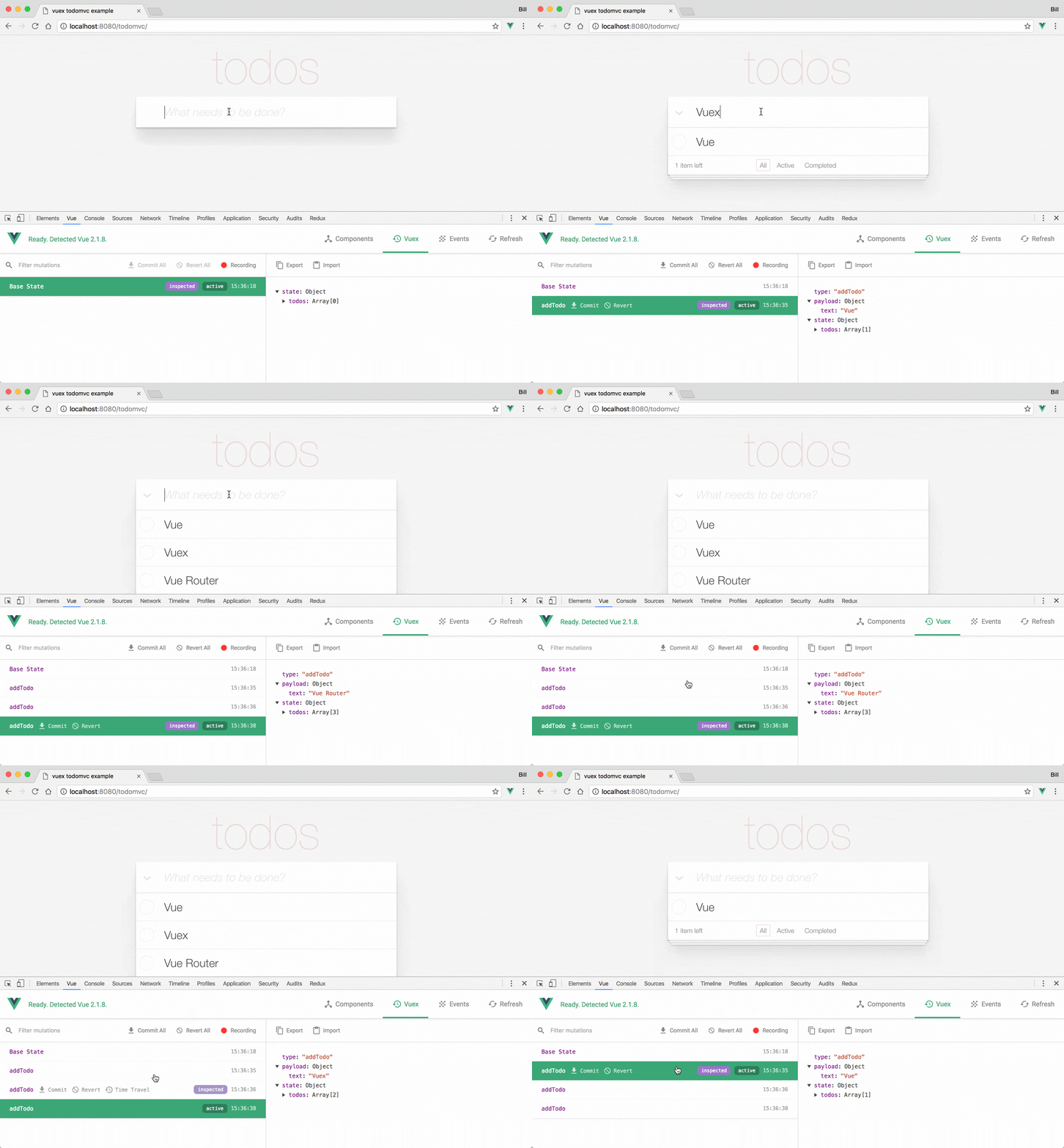
To access this part of the tools, first click on the Vuex clock icon. In here you can go through all of the different mutations that have occurred in your application. After hovering over a mutation, click on the Time Travel button to go back to that state.
Another convenient Vue DevTools feature for Vuex is how you can export and import entire state objects. This can be useful for debugging an issue a user is experiencing that you’re not able to recreate.
3. Track your app’s custom events
If you’re using events in your application you can track them inside of the events tab of the Vue DevTools.
This allows you to keep track of your app’s events, but it only displays your app’s custom events, e.g. the ones that you emit yourself with this.$emit(‘myEvent’), and not the ones natively bound to the component like v-on:click or v-on:keyup.
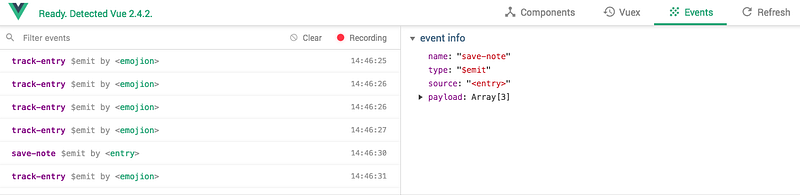
To start tracking your apps’ custom events, click on the Events pane of the Vue DevTools. Afterwards, click on the Record button and you’ll start seeing your custom events appear in the left pane as you go through your application.
Learn more about the Vue DevTools
Those are 3 ways that the Vue DevTools can help speed up your development. There’s a lot more that it can help you with when it comes to debugging.
To learn more about the specifics of what you can do with The Vue DevTools read the What’s New in Vue DevTools 4.0 published on The Vue Point.
Also, if you’re having trouble with installation visit the Vue DevTools Github repo.
Subscribe to our newsletter and get our free Vue Essentials Cheat Sheet!