

How to Use Facebook Groups To Increase Your Readership
The ‘Fair Use’ Way of Sharing Your Work with Others
Update 2023: This article was written back in 2019 and many of the group and approaches have changed. However, while the delivery mechanisms now need some adjustment, the message is still valuable — if you're just getting started on medium (or even if you’re not), being part of a community is imperative. So read, enjoy and, since this article did quite well back in the day, maybe write a better, more up to date version yourself?!
It wasn’t long into my time on Medium that I started to notice lots of people were talking about using Facebook groups to promote their work, but at first I was a little unclear about how this worked and what I was supposed to do.
After a little digging and much reading of stories by established writers, I worked out what they meant. This wasn’t about sharing to your own, social Facebook feed, this was about sharing to specific groups set up by other Medium members to promote their work.
That made sense because the one lesson that all writers must learn on the first day is that your friends and family, with perhaps a few exceptions, are simply NOT going to read anything you write.
I can attest to that. I’m still waiting for those people to read the books I published a couple of years ago. I cant tell you how reassured I was when I found out that this was normal. Up until then, I’d just thought there was something wrong with me.
So, as instructed by numerous writers who had found success on the platform, I began searching out and joining groups. In the end, I found several groups that I liked the look of and asked to join from my main personal account.
They were: (clicking on each will take you to their home page)
Medium Partner Program Friends
Medium Writers Support Network
Medium Writers Support & Marketing
I actually joined all of these with my personal account, but in retrospect it may have been better to join them from my author page as Facebook now allows pages to join other pages. I’m not sure if it makes a difference overall, but it just seems a ‘neater’ fit to me.
Update: I can confirm it is much easier to join as your Author page as this manages your notifications for you and is easier to manage. This route, therefore, is strongly recommended.
Also, there are other excellent Facebook groups and I may yet join those as well (assuming they'll have me) but this was perfectly sufficient to get me started.
Now that I had been accepted — and warmly welcomed — I had to work out what to do.
It took me a couple of weeks to really get to grips with it, but once I ‘got the groove’, there’s no question that this can help your readership and allow you the chance to contribute directly to the community, which is something you should definitely do if you’re not already.
However, belonging to several groups gets messy and can be hard to manage as I found out quite quickly. My notifications icon was permanently red and my inbox was pinging constantly. I couldn’t work out where or what I’d posted, (or where I hadn’t) and what was yielding any results.
What I needed was to find a way to get properly organised to make sure I was a) maximizing my time b) giving back at least as much as I got and c) making sure I was doing everything correctly so as not to annoy the admins.
With that goal in mind, I created a simple system that not only meant I could manage all of the above effectively and quickly, it also provided me with ample reading material from other writers whose work appealed to me. A week or so of tweaking later I’m happy to share what I learned with other writers who want to use these groups but may also find it, initially anyway, confusing or time consuming.
Essentially, it all comes down to three simple, actionable steps:
1. Obey The Rules
You’re a guest in someone else’s house and you’ve been welcomed into it, so make sure you read the rules and obey them. No, thinking you’re being clever and just posting willy-nilly to ‘stand out from the crowd’ is not only annoying for everyone else, it’s a sure way to get you frowned upon and possibly even kicked out.
The rules are posted at the top of each page and you usually have to agree to them when you ask to join. They’re there for the exact reason I’ve alluded to already — if they’re not followed chaos ensues and no-one gains anything. I don’t care how great you think your piece is, don’t do it.
What you’re looking for is a post by one of the admins, usually daily, that invite you to post one story link. ‘One’ means ‘one’, not ‘several’, since posting more than one will lead to that ‘frowning’ we were talking about earlier. Consistent violations will lead to removal.
When you post you also need to double check that you’re posting on the right subject. For example, an admin might request links to a piece of your poetry, or a short story on a particular day. If your work is neither, don’t post. Your turn will come.
In the meantime, support your fellow writers by scanning through the posts, finding a title that takes your interest and read it. Trust me, there’s always something, even if it’s not ‘your thing’, but we’ll cover this a little later on.
I usually post later in the day when other people have already added to the thread because it suits me and allows me to support other writers better as we’ll see shortly. In truth, I haven’t found being at the top or the bottom of the thread being any different in terms of readership overall.
Once you’ve posted and completed the other tasks below, I always think it is good practice to switch off the updates for that post to preserve the sanity of your inbox, notification icon and your brain generally. To do this, got to the top of the thread, click on the down arrow and select ‘Turn off notifications for this thread’ as follows:
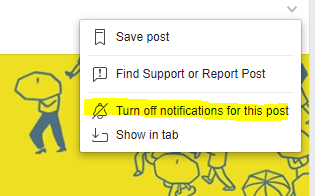
Your post will remain where it is, but you’ll no longer receive updates on new ones added to the thread.
Of course, the disadvantage to this is that you can’t see the responses that people might make to your post, so you may need to check back later on manually. In my experience, this is still easier than getting hundreds of email notifications, but it does add a few minutes to your day.
And if someone has taken the time to comment on your post, make sure you do the right thing and thank them, or, at the very least, simply ‘like’ to show acknowledgement.
Update: If you’re using your Author page, you don’t need to do this and the notifications will help you keep track of who is commenting on what so you can reply. You only need to switch notifications off IF you are using your personal page and don’t want to mix personal and professional notifications, which can get seriously confusing!
2. Give More Than You Take
This is probably the most important of all the rules. If you’re posting in the expectation that other people will read your work, you’d better make sure you’re ready to do the same.
This is all about how you view your time here. At first, it may seem like a blatant waste of it, leading it to be something you do halfheartedly … and nobody wants that. Writers want people to engage and enjoy their work, and having someone read it ‘because they feel they have to’ makes it a chore for everyone.
The reality is actually the complete opposite. The fact is, to be a good writer and to grow beyond where are, we all need to be exposed to new work — even (and perhaps especially) stuff we would not normally consider reading. In short, this is an opportunity for you to learn whilst supporting the community. I promise you, the time you spend doing this is just as important as the time you spend writing.
Take a minute to really let that sink in:
The time you spend doing this is just as important as the time you spend writing.
I’ll be honest, it took me a few days to really understand that, but once I did, it really changed the way I interacted with the writers who had posted. I developed a ‘Banagram’ system of posting and reading that always makes sure I give more than I take AND, as an added bonus, allows me to read some very cool stuff I wouldn’t normally see. This is how it works:
My kids and I love to play ‘Banagram,’ a sort of fast moving, competitive scrabble. At any time when playing, you can swap one of your dud tiles with the ones in the middle (‘Q’ anyone?) by putting that ONE tile in and taking THREE out. Sure, you get more letters, but you get rid of that one that was giving you a mental block and usually end with more possibilities afterwards.
So, for every post I make on any Facebook group, I read and comment on three in the thread. Because by the time I’ve posted there’s usually a couple of dozen stories listed, I pick the ones that catch my eye and immediately and, often, one that’s completely off my radar just to see where it takes me. This is the literary equivalent of boarding a train at random just to see what happens.
Trust me, the best adventures often begin this way.
I ‘right click’ and open them in new tabs, read them, clap them (if appropriate) and often comment not only on the story itself, but on the Facebook post as well. Sometimes, however, I’ll just ‘like’ it the post so if you see one on there from me, you know I’ve read it in full. Often I’ll follow the writer as well if I really like their style.
I have to say I’ve found this is a great way to spread the word of my own work and discover some weird and wonderful stuff. I now consider it one of the most important parts of the day. I urge you to do so too.
Finally, I also scan the comments to see if I can help with any questions people have asked. Sometimes it’s not possible, but occasionally it’s an area I write about and the question can be answered with a few seconds of reassuring text or even by providing a link to a relevant story. If you do the latter, however, make sure the article is directly and wholly relevant, or you'll risk looking a bit self serving. And, of course, it doesn’t even need to be your own article.
But don’t post without reading.
‘It’s just not cricket’ as we like to say in England.
3. Manage Facebook Effectively
It became quickly apparent that being a member of eight very active groups created a different set of problems apart from just notification overload.
I kept getting them mixed up and forgetting where I’d published what. Not only was it taking far longer than it should have done to post my piece and read a few others, I was in danger of breaking the rules by posting more than once or posting the same story on different days. I had to get this organised.
As my favourite coffee mug says in big, bold letters, “I Love Spreadsheets” and I really do. You can do anything with them. This seemed like a great opportunity to link two of my favourite things together and, thus, my ‘Medium Facebook Tracking Spreadsheet’ was born. Immediately, double posting/getting confused issues were a thing of the past.
Here’s what it looks like:
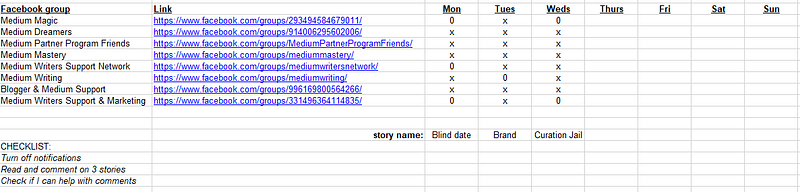
Very simply, each publication is listed and has a direct link to it. Every day, I follow each link and run through the process above: post my chosen story of the day (I tend to keep to the same one to keep it easier for tracking, although I have been known to mix it up a little when I’m feeling a bit rebellious), read and comment on/like three stories and then switch off the notifications. I simply log which story I have posted under each day as shown.
Once done in one group, repeat until the list is exhausted. Each time, I mark with a cross where I posted the story, but sometimes there isn’t a thread where posting my chosen work is appropriate, so I simply mark ‘0’ instead and leave it for the next day.
Update: I have now added in a link to the spreadsheet shown above so you can use the same format without having to redo it. It will open in read only mode, simply save your own version to your device so you can enter your own data! CLICK HERE to go to the spreadsheet.
The great thing about this, especially if you have a large back catalog of work, is that you can submit older as well as newer stories at any time. Sometimes the theme works for you, sometimes it doesn’t, but as long as keep an eye on what you’re doing, and follow the rules, you’ll be playing fair.
Some people advocate simply liking the thread header when they’ve posted and this can work too. However, doing it this was way means you might have to go back and double check each page when you have one of those ‘Did I …?’ moments. And we’re all familiar with those!
You’re welcome to use some, all or none of the above to help you in your daily efforts to publicize your work and if you see me lurking online in a group, please come and say ‘hello’ and tell me about your latest pieces.
After all, that’s what this is all about.
For more useful and practical writing tips, try these:


