avatarStan

Free AI web copilot to create summaries, insights and extended knowledge, download it at here

6229

Abstract

s-attr">p_line</span>= df.plot_bokeh(kind=<span class="hljs-string">"line"</span>,plot_data_points=<span class="hljs-literal">False</span>,show_figure=<span class="hljs-literal">False</span>)</pre></div><div id="a91b"><pre><span class="hljs-comment"># Plot2- Barplot one liner</span> <span class="hljs-attr">p_bar</span> = df.groupby([<span class="hljs-string">'species'</span>]).mean().plot_bokeh(kind=<span class="hljs-string">"bar"</span>,show_figure=<span class="hljs-literal">False</span>)</pre></div><div id="0b02"><pre># Plot3- <span class="hljs-keyword">stacked</span> bar chart one liner df_species=df.<span class="hljs-keyword">drop</span>([‘species’],axis=<span class="hljs-number">1</span>) p_stack=df_species.groupby([‘prediction’]).mean().plot_bokeh(kind=’barh’, <span class="hljs-keyword">stacked</span>=<span class="hljs-keyword">True</span>,show_figure=<span class="hljs-keyword">False</span>)</pre></div><div id="07c6"><pre>pandas_bokeh.plot_grid(<span class="hljs-string">[[p_line, p_bar, p_stack]]</span>, width=<span class="hljs-number">300</span>, height=<span class="hljs-number">300</span>)</pre></div><figure id="642d"><img src="https://cdn-images-1.readmedium.com/v2/resize:fit:800/1*ZA1nngmqwBLNoyt8AauFkw.png"><figcaption></figcaption></figure><p id="0921">Then let’s plot scatter plot and pie chart.</p><div id="2a52"><pre><span class="hljs-comment">#Plot4- Scatterplot</span> p_scatter = df.plot_bokeh(<span class="hljs-attribute">kind</span>=<span class="hljs-string">"scatter"</span>, <span class="hljs-attribute">x</span>=<span class="hljs-string">"petal_width"</span>, <span class="hljs-attribute">y</span>=<span class="hljs-string">"petal_length"</span>,category="prediction",show_figure=False) <span class="hljs-comment">#Plot5- Pie chart</span> p_pie= df.groupby([<span class="hljs-string">'prediction'</span>]).mean().plot_bokeh.pie(<span class="hljs-attribute">y</span>=<span class="hljs-string">'petal_width'</span>,show_figure=False)</pre></div><p id="bf7f"><b>Confusion Matrix and Heat Map in Bokeh</b></p><p id="5219">It is important to plot confusion matrix for classification problems as in sklearn. However, the internal heatmap from Bokeh is a little awkward. It needs few more steps of dataframe manupulation to get the heatmaps we expect.</p><p id="9808">After 30min. stackoverflow search and some testing, here is a function you could use to generate the heatmap for model evaluation.</p><p id="0a50">step 1: use sklearn package to compute confusion matrix; the output in numpy array is then converted to dataframe.</p><div id="bc41"><pre><span class="hljs-comment"># sklearn to calculate confusion Matrix</span></pre></div><div id="5c7f"><pre><span class="hljs-keyword">import</span> pandas <span class="hljs-keyword">as</span> pd <span class="hljs-title">from</span> sklearn.metrics <span class="hljs-keyword">import</span> confusion_matrix</pre></div><div id="ed90"><pre>def <span class="hljs-built_in">compute_confusionmatrix</span>(confM): return pd.<span class="hljs-built_in">DataFrame</span>(<span class="hljs-built_in">confusion_matrix</span>(confM.species, confM.prediction))</pre></div><div id="a4f4"><pre><span class="hljs-attribute">confMdf</span><span class="hljs-operator">=</span>compute_confusionmatrix(confM)</pre></div><p id="e611">step 2: change column and index names and rename columns and indices to have a confusion matrix follows ML convention.</p><div id="c1b5"><pre><span class="hljs-meta">#change names</span> confMdf.<span class="hljs-keyword">index</span>.name = <span class="hljs-string">'Species'</span> confMdf.<span class="hljs-keyword">columns</span>.name = <span class="hljs-string">'Prediction'</span> confMdf.<span class="hljs-keyword">columns</span>=[<span class="hljs-string">'setosa'</span>, <span class="hljs-string">'versicolor'</span>, <span class="hljs-string">'virginica'</span>] confMdf.<span class="hljs-keyword">index</span>=[<span class="hljs-string">'setosa'</span>, <span class="hljs-string">'versicolor'</span>, <span class="hljs-string">'virginica'</span>] confMdf</pre></div><figure id="338e"><img src="https://cdn-images-1.readmedium.com/v2/resize:fit:800/1*xEJvTNjkwsC1EpMGf1zljQ.png"><figcaption>confusion matrix of logistic classification, reasonable good prediction with small amount misclassification of versicolor.</figcaption></figure><p id="1989">step 3 : prepare data in the right format. Bokeh heatmap needs the confusion matrix output in a unpivot format, which is done by stack() function.</p><div id="c19b"><pre># <span class="hljs-keyword">Prepare</span> data.frame <span class="hljs-keyword">in</span> the right <span class="hljs-keyword">format</span> confM_df = confMdf.stack().<span class="hljs-keyword">rename</span>("value").reset_index() confM_df.<span class="hljs-keyword">columns</span>=[<span class="hljs-string">'Species'</span>, <span class="hljs-string">'Prediction'</span>, <span class="hljs-string">'value'</span>] confM_df</pre></div><figure id="e1a8"><img src="https://cdn-images-1.readmedium.com/v2/resize:fit:800/1*q_v6IHKMJovm8VZCJmXu5Q.png"><figcaption>the heatmap dataframe format required by Bokeh</figcaption></figure><p id="5d26">step 4. create heatmap plotting function. Unfortunately, the default heatmap function cannot generate heatmap visually appealing and following machine learning convention. I modified from a good answer form stackoverflow<b>[2]</b> to generate following function to plot. you will need to copy the function and paste into your code and then use it with one line code: <b>heatmap=heat(df)</b></p><div id="7d46"><pre><span class="hljs-keyword">from</span> bokeh.io <span class="hljs-keyword">import</span> output_file, <span class="hljs-keyword">show</span> <span class="hljs-keyword">from</span> bokeh.models <span class="hljs-keyword">import</span> BasicTicker, ColorBar, LinearColorMapper, ColumnDataSource, PrintfTickFormatter <span class="hljs-keyword">from</span> bokeh.plotting <span class="hljs-keyword">import</span> figure <span class="hljs-keyword">from</span> bokeh.<span class="hljs-keyword">transform</span> <span class="hljs-keyword">import</span> <span class="hljs-keyword">transform</span></pre></div><div id="5055"><pre><span class="hl

Options

js-keyword">def</span> <span class="hljs-title function_">heat</span>(<span class="hljs-params">confMdf</span>): <span class="hljs-string">''' plot as heat map '''</span> <span class="hljs-comment"># You can use your own palette here</span> colors = [<span class="hljs-string">'#d7191c'</span>, <span class="hljs-string">'#fdae61'</span>, <span class="hljs-string">'#ffffbf'</span>, <span class="hljs-string">'#a6d96a'</span>, <span class="hljs-string">'#1a9641'</span>] <span class="hljs-comment">#extract col names</span> col1=confMdf.columns.to_list()[<span class="hljs-number">0</span>] col2=confMdf.columns.to_list()[<span class="hljs-number">1</span>] col3=confMdf.columns.to_list()[<span class="hljs-number">2</span>] <span class="hljs-comment"># Had a specific mapper to map color with value</span> mapper = LinearColorMapper( palette=colors, low=confMdf[col3].<span class="hljs-built_in">min</span>(), high=confMdf[col3].<span class="hljs-built_in">max</span>() )</pre></div><div id="ff8f"><pre><span class="hljs-comment"># Define a figure</span> <span class="hljs-attr">p</span> = figure( <span class="hljs-attr">plot_width</span>=<span class="hljs-number">300</span>, <span class="hljs-attr">plot_height</span>=<span class="hljs-number">300</span>, <span class="hljs-attr">title</span>=<span class="hljs-string">"My plot"</span>, <span class="hljs-attr">x_range</span>=list(confMdf[f<span class="hljs-string">'{col1}'</span>].unique()), <span class="hljs-comment">#reverse the order of axis to create heatmap following ML convention</span></pre></div><div id="6b38"><pre> <span class="hljs-attr">y_range</span>=list(confMdf[f<span class="hljs-string">'{col2}'</span>].unique())[::-<span class="hljs-number">1</span>], <span class="hljs-attr">toolbar_location</span>=None, <span class="hljs-attr">tools</span>=<span class="hljs-string">""</span>, <span class="hljs-attr">x_axis_location</span>=<span class="hljs-string">"above"</span>)</pre></div><div id="5731"><pre><span class="hljs-comment"># Create rectangle for heatmap</span> p.rect( <span class="hljs-attribute">x</span>=col1, <span class="hljs-attribute">y</span>=col2, <span class="hljs-attribute">width</span>=1, <span class="hljs-attribute">height</span>=1, <span class="hljs-attribute">source</span>=ColumnDataSource(confMdf), <span class="hljs-attribute">line_color</span>=None, <span class="hljs-attribute">fill_color</span>=transform('value', mapper))</pre></div><div id="5bd8"><pre><span class="hljs-comment"># # Add legend</span> color_bar = ColorBar( <span class="hljs-attribute">color_mapper</span>=mapper, location=(0, 0) ,<span class="hljs-attribute">ticker</span>=BasicTicker(desired_num_ticks=len(colors)) )</pre></div><div id="c1ec"><pre><span class="hljs-selector-tag">p</span><span class="hljs-selector-class">.add_layout</span>(color_bar, <span class="hljs-string">'right'</span>)</pre></div><div id="e242"><pre><span class="hljs-keyword">return</span> p</pre></div><div id="4ffc"><pre><span class="hljs-attr">p_heat</span>=heat(confM_df)</pre></div><figure id="a89a"><img src="https://cdn-images-1.readmedium.com/v2/resize:fit:800/1*yVpHIyKmIvfJbJyxrc-FiQ.png"><figcaption>heatmap from confusion matrix which can be embedded in Bokeh</figcaption></figure><p id="134d">Now we can put all the individual plots into a dashboard with <b>plot_grid()</b></p><div id="ba85"><pre><span class="hljs-comment">#Make Dashboard with Grid Layout: </span> pandas_bokeh.plot_grid([[p_line, p_bar,p_stack],[p_scatter, p_pie, p_heat]], <span class="hljs-attribute">width</span>=300, <span class="hljs-attribute">height</span>=300) </pre></div><figure id="a511"><img src="https://cdn-images-1.readmedium.com/v2/resize:fit:800/1*v3PbL2F22djCn6rAsl1Qgw.png"><figcaption>final dashboard users can interactively query. As it is part of notebook, every time you made update in the model, it can be easily updated by rerunning the workflow. it is easy to have insights such as pedal_length and width are good features to separate setosa from other two species in scatter plot and model prediction is reasonably good.</figcaption></figure><p id="e98d">If this is not impressive to you, check out the Hans Rosling’s <a href="https://www.ted.com/talks/hans_rosling_shows_the_best_stats_you_ve_ever_seen"><b>iconic TED Talk</b></a><b> </b>from <a href="https://demo.bokeh.org/gapminder">bokeh website</a> .</p><p id="a7da">Another tip about learning Bokeh is starting with <a href="https://docs.bokeh.org/en/latest/docs/gallery.html">Bokeh Gallery</a>. Find out the visualization you are interested in and reverse engineer the sample code to fit for your purpose.</p><p id="1451">In summary, the Pandas Bokeh package is convenient, powerful tool and easy to learn. There are some limitation of certain type of plots but it can be overcome by some python coding. and leave some feedback to the developers, your request might be implemented in the next release.</p><p id="d41c">If you found this article useful, please clap or follow or signup my email list, happy learning!</p><p id="7e0b">If you get this far, you might found my another article “<a href="https://readmedium.com/how-to-make-bokeh-dashboard-scalable-63673aca4f71">how to make your dashboard scalable</a>” useful, FYI.</p><p id="e3bc"><b>References</b></p><p id="208a"><b>[1]Bokeh documentation:</b> <a href="https://docs.bokeh.org/en/0.10.0/docs/contributing.html#:~:text=Bokeh%3A%20Python%20library%20for%20interactive,.bokeh.pydata.org.&amp;text=Bokeh%20is%20BSD%20licensed%2C%20so,see%20the%20License%20for%20details">https://docs.bokeh.org/en/0.10.0/docs/contributing.html#:~:text=Bokeh%3A%20Python%20library%20for%20interactive,.bokeh.pydata.org.&amp;text=Bokeh%20is%20BSD%20licensed%2C%20so,see%20the%20License%20for%20details</a>).</p><p id="834f"><b>[2] stackoverflow.com solution to create heatmap:</b> <a href="https://stackoverflow.com/questions/49135741/bokeh-heatmap-from-pandas-confusion-matrix">https://stackoverflow.com/questions/49135741/bokeh-heatmap-from-pandas-confusion-matrix</a></p></article></body>

How to turn your Notebook into a Dashboard using Pandas-Bokeh
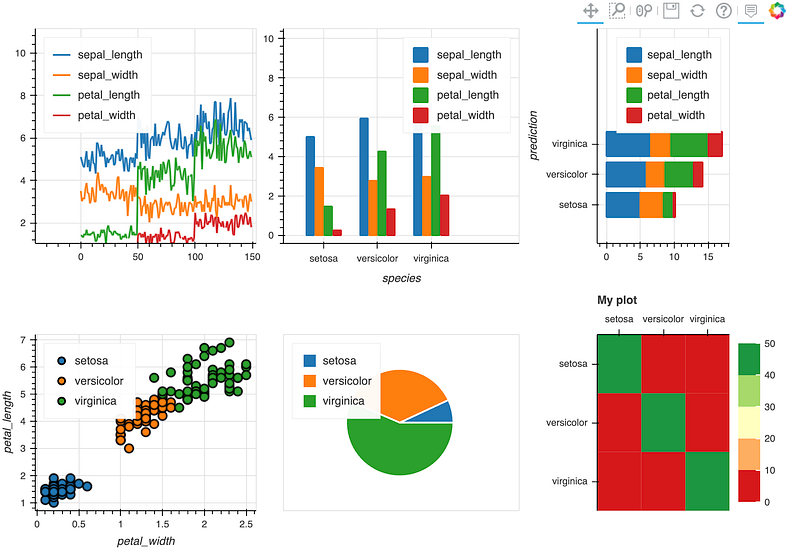
visualization created by author; an interactive dashboard embedded in jupyternotebook

Story telling is the key part of data science daily job. Being able to visualize data and explain thinking process line by line within Jupyter notebook is one of the key reasons companies choose Jupyter notebook for their POC code development.

However, in the real business world, people have to extract jupyternotebook visualizations into a powerpoint presentation or changed into dashboard visualization using BI tools such as PowerBI, Tableu or Grafana.

It will be more efficient if DS can somehow quickly organize and deploy our Jupyter notebook into a “semi-BI dashboard” either embedded in the notebook or exported as a web app.

Recommended by my friend, I recently tested Pandas Bokeh (pronounced as ‘Bow-Key’). I am impressed by following features 1. the convenience and efficiency that Bokeh turns notebook visualization into dashboard. 2. since Bokeh use plotly as backend, all dashboards have nice tool tips, interactively pan and zoom-in/out 3. Last but not least, unlike Atoti or other BI tools, it adopts open source spirit, it is free to use as long as you copy the BSD statement if you redistributed it.

As always, Bokeh has almost seemless integration with Pandas, however, I encountered several limitation during my test such as plotting heat map is not straightforward. However, it is not show-stopper. By some online search and manipulate the dataframe, I am able to generate the plot meets my expectation.

Now, in this article, we provide a tutorial using Iris dataset to build a simple classification model; and then we will visualize data and model prediction using Bokeh.

As always, if it is your first time using Bokeh, you will need to pip install into your notebook.

!pip install pandas_bokeh

After installing pandas_bokeh, lets import packages we will need for this tutorial

import pandas as pd
import numpy as np
import seaborn as sns
import pandas_bokeh
from sklearn.model_selection import train_test_split
from sklearn.linear_model import LogisticRegression

Specify export as part of notebook or file, here we choose to embedding in notebook

# Embedding plots in Jupyter/Colab Notebook
pandas_bokeh.output_notebook()
# Save as HTML
output_file('iris.html', title='iris classification')

Load Iris dataset

df=sns.load_dataset('iris')
df
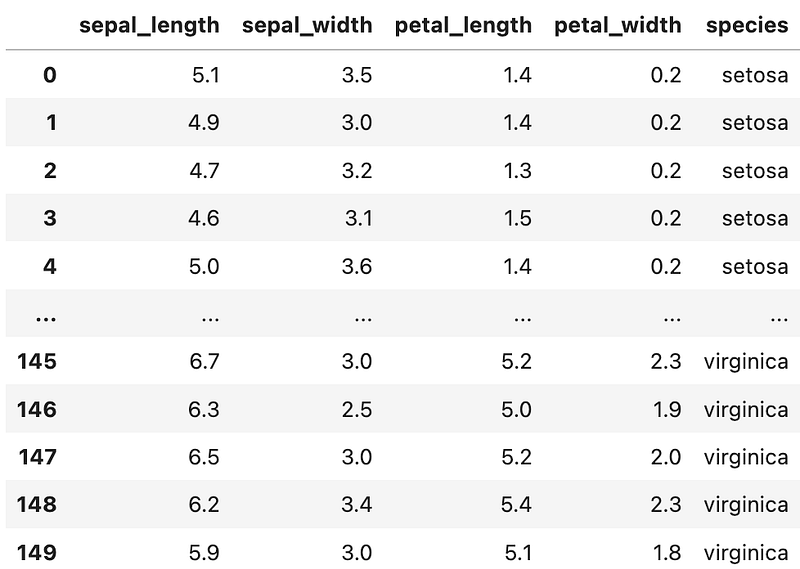
the famous iris dataset, using features of sepal and petal dimensions to classify species

Create a Simple Machine Learning Model To demo the whole workflow , let’s create a quick Logistic Regression model to predict species and compare with ground truth (species column)

# 1. Splitting the df into the Training set and Test set
X = df.iloc[:, [0,1,2, 3]].values
y = df.iloc[:, 4].values
X_train, X_test, y_train, y_test = train_test_split(X, y, test_size = 0.25, random_state = 0)
#2. Fitting Logistic Regression to the Training set

classifier = LogisticRegression(random_state = 0, solver='lbfgs', multi_class='auto')
classifier.fit(X_train, y_train)
#3. Predicting the Test set results
y_pred = classifier.predict(X_test)
# Predict probabilities
probs_y=classifier.predict_proba(X_test)
# 4. use the trained model to predict the whole dataset 
df['prediction']=classifier.predict(X)

Output DataFrame looks like below. A new column called prediction is created by applying logistic regression.
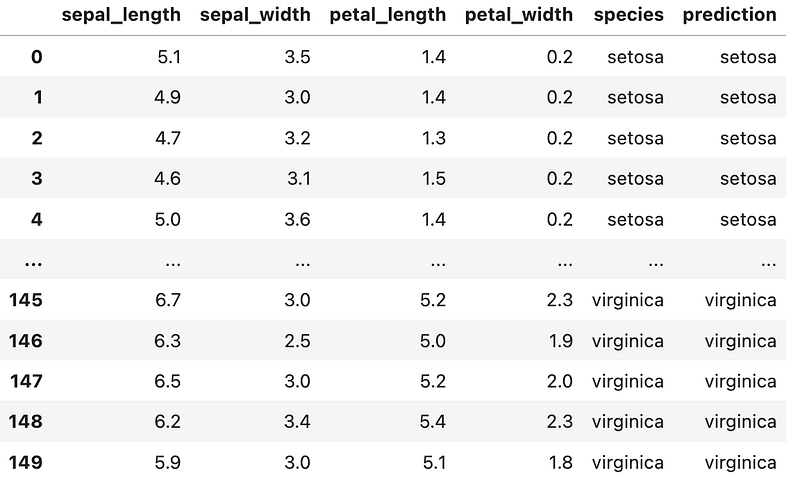
Create Dashboard using Bokeh. similar to python plot(), you just change it to plot_bokeh(). Let’s plot line plot and Barplot and stacked bar chart first.

# Plot1 - Line plot one liner
p_line= df.plot_bokeh(kind="line",plot_data_points=False,show_figure=False)
# Plot2- Barplot one liner
p_bar = df.groupby(['species']).mean().plot_bokeh(kind="bar",show_figure=False)
# Plot3- stacked bar chart one liner
df_species=df.drop([‘species’],axis=1)
p_stack=df_species.groupby([‘prediction’]).mean().plot_bokeh(kind=’barh’, stacked=True,show_figure=False)
pandas_bokeh.plot_grid([[p_line, p_bar, p_stack]], width=300, height=300)
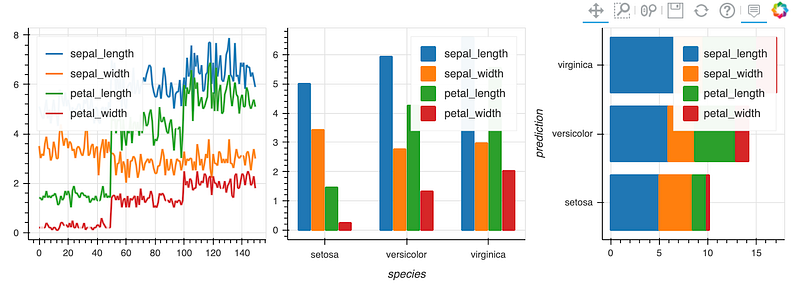
Then let’s plot scatter plot and pie chart.

#Plot4- Scatterplot
p_scatter = df.plot_bokeh(kind="scatter", x="petal_width", y="petal_length",category="prediction",show_figure=False)
#Plot5- Pie chart
p_pie= df.groupby(['prediction']).mean().plot_bokeh.pie(y='petal_width',show_figure=False)

Confusion Matrix and Heat Map in Bokeh

It is important to plot confusion matrix for classification problems as in sklearn. However, the internal heatmap from Bokeh is a little awkward. It needs few more steps of dataframe manupulation to get the heatmaps we expect.

After 30min. stackoverflow search and some testing, here is a function you could use to generate the heatmap for model evaluation.

step 1: use sklearn package to compute confusion matrix; the output in numpy array is then converted to dataframe.

# sklearn to calculate confusion Matrix
import pandas as pd
from sklearn.metrics import confusion_matrix
def compute_confusionmatrix(confM):
    return pd.DataFrame(confusion_matrix(confM.species, confM.prediction))
confMdf=compute_confusionmatrix(confM)

step 2: change column and index names and rename columns and indices to have a confusion matrix follows ML convention.

#change names
confMdf.index.name = 'Species'
confMdf.columns.name = 'Prediction'
confMdf.columns=['setosa', 'versicolor', 'virginica']
confMdf.index=['setosa', 'versicolor', 'virginica']
confMdf
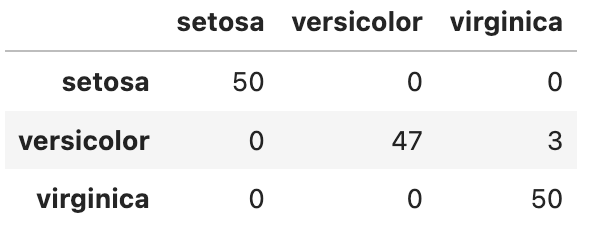
confusion matrix of logistic classification, reasonable good prediction with small amount misclassification of versicolor.

step 3 : prepare data in the right format. Bokeh heatmap needs the confusion matrix output in a unpivot format, which is done by stack() function.

# Prepare data.frame in the right format
confM_df = confMdf.stack().rename("value").reset_index()
confM_df.columns=['Species', 'Prediction', 'value']
confM_df
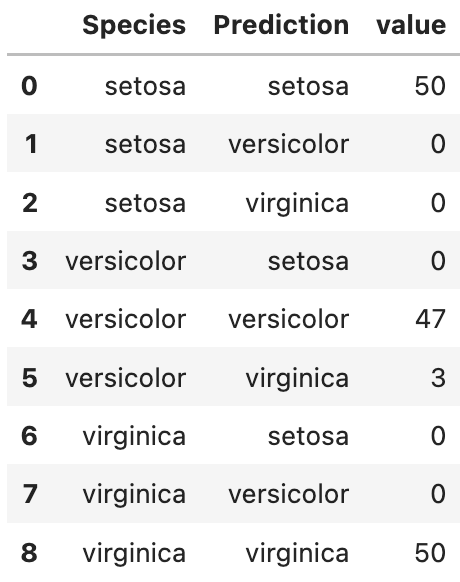
the heatmap dataframe format required by Bokeh

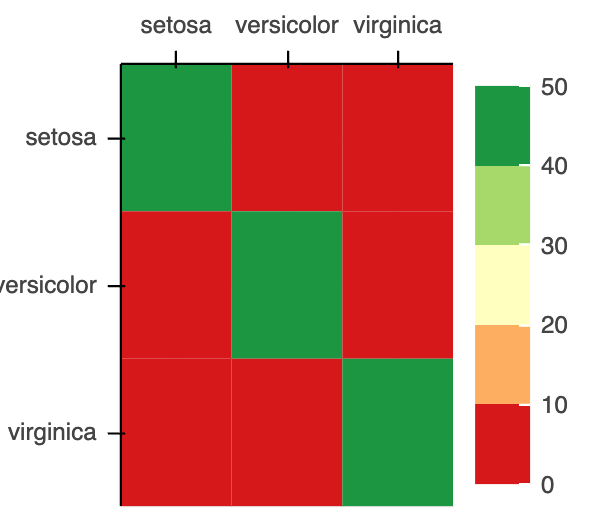
step 4. create heatmap plotting function. Unfortunately, the default heatmap function cannot generate heatmap visually appealing and following machine learning convention. I modified from a good answer form stackoverflow[2] to generate following function to plot. you will need to copy the function and paste into your code and then use it with one line code: heatmap=heat(df)

from bokeh.io import output_file, show
from bokeh.models import BasicTicker, ColorBar, LinearColorMapper, ColumnDataSource, PrintfTickFormatter
from bokeh.plotting import figure
from bokeh.transform import transform
def heat(confMdf):
    ''' plot as heat map
    '''
    # You can use your own palette here
    colors = ['#d7191c', '#fdae61', '#ffffbf', '#a6d96a', '#1a9641']
    #extract col names
    col1=confMdf.columns.to_list()[0]
    col2=confMdf.columns.to_list()[1]
    col3=confMdf.columns.to_list()[2]
    # Had a specific mapper to map color with value
    mapper = LinearColorMapper(
        palette=colors, 
        low=confMdf[col3].min(), high=confMdf[col3].max()
    )
# Define a figure
    p = figure(
    plot_width=300,
    plot_height=300,
    title="My plot",
    x_range=list(confMdf[f'{col1}'].unique()),
#reverse the order of axis to create heatmap following ML convention
    y_range=list(confMdf[f'{col2}'].unique())[::-1],
    toolbar_location=None,
    tools="",
    x_axis_location="above")
# Create rectangle for heatmap
    p.rect(
    x=col1,
    y=col2,
    width=1,
    height=1,
    source=ColumnDataSource(confMdf),
    line_color=None,
    fill_color=transform('value', mapper))
# # Add legend
    color_bar = ColorBar(
        color_mapper=mapper,
        location=(0, 0)
        ,ticker=BasicTicker(desired_num_ticks=len(colors))
                          )
p.add_layout(color_bar, 'right')
return p
p_heat=heat(confM_df)
heatmap from confusion matrix which can be embedded in Bokeh

Now we can put all the individual plots into a dashboard with plot_grid()

#Make Dashboard with Grid Layout: 
pandas_bokeh.plot_grid([[p_line, p_bar,p_stack],[p_scatter, p_pie, p_heat]], width=300, height=300) 
final dashboard users can interactively query. As it is part of notebook, every time you made update in the model, it can be easily updated by rerunning the workflow. it is easy to have insights such as pedal_length and width are good features to separate setosa from other two species in scatter plot and model prediction is reasonably good.

If this is not impressive to you, check out the Hans Rosling’s iconic TED Talk from bokeh website .

Another tip about learning Bokeh is starting with Bokeh Gallery. Find out the visualization you are interested in and reverse engineer the sample code to fit for your purpose.

In summary, the Pandas Bokeh package is convenient, powerful tool and easy to learn. There are some limitation of certain type of plots but it can be overcome by some python coding. and leave some feedback to the developers, your request might be implemented in the next release.

If you found this article useful, please clap or follow or signup my email list, happy learning!

If you get this far, you might found my another article “how to make your dashboard scalable” useful, FYI.

References

[1]Bokeh documentation: https://docs.bokeh.org/en/0.10.0/docs/contributing.html#:~:text=Bokeh%3A%20Python%20library%20for%20interactive,.bokeh.pydata.org.&text=Bokeh%20is%20BSD%20licensed%2C%20so,see%20the%20License%20for%20details).

[2] stackoverflow.com solution to create heatmap: https://stackoverflow.com/questions/49135741/bokeh-heatmap-from-pandas-confusion-matrix

Dashboar
Machine Learning
Bokeh
Pandas
Recommended from ReadMedium