
How to Tell if You’re Inside a Container
ACM.279 Commands you can execute to try to figure out if your commands are executing inside a container
~~~~~~~~~~~~~~~~~~~~~~~~~~~~~~~~~~~~~~~~~~~~~~~~~~~~~~~
⚙️ Check out my series on Automating Cybersecurity Metrics | Code.
🔒 Related Stories: AWS Security | Application Security | Container Security.
💻 Free Content on Jobs in Cybersecurity | ✉️ Sign up for the Email List
~~~~~~~~~~~~~~~~~~~~~~~~~~~~~~~~~~~~~~~~~~~~~~~~~~~~~~~
The last post demonstrated how to install git in a container.
If you follow those instructions you had two tabs open. In one terminal tab you were inside the container. In the other tab, you were executing commands directly on the EC2 instance on which the container was running.
But let’s say you forgot which tab was which? How could you tell if you were running inside a container? I’ll show you some commands that can help with that.
By the way, this is also handy for penetration testers and attackers. Once an exploit allows an attacker to get onto a running system where they can execute commands, they need some type of way to figure out what type of environment they are in. Understanding their environment helps them understand what other types of commands and exploits they may want to use next.
If an attacker is inside a container then the next step might be to search for a container escape. If the container is misconfigured in some way, the attacker might be able to figure out how to run commands on the host where the container is running — in our case to try to run commands from within the container that execute on the EC2 instance itself. I demonstrated such things in my classes. Our objective in this series is to properly configure containers to prevent such exploits.
So how can you tell if you’re running inside a container?
Let’s start with Docker containers on Linux. You may be able to look for LXC below if someone is using that instead of docker.
One way to tell is to run this command and see if the .dockerenv file exists.
ls -al | grep .dockerenvIf the .dockerenv file exists, there’s a good change your running inside a container.
You can also try running this command. If you see output
cat /proc/1/cgroupWhen you run that command outside of a container on Amazon Linux, all the control groups (cgroups end in /) like this:
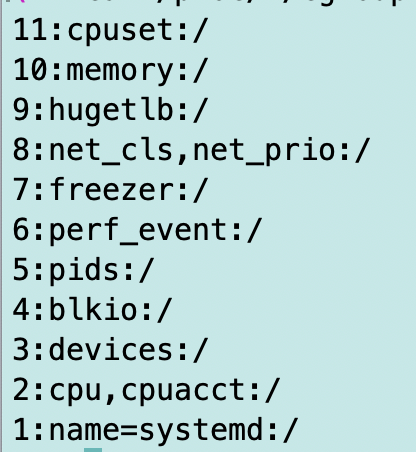
Other operating systems may have different output.
When inside a docker container the control groups will look something more like this — with docker in the name — but again, this will depend on your specific container and environment.
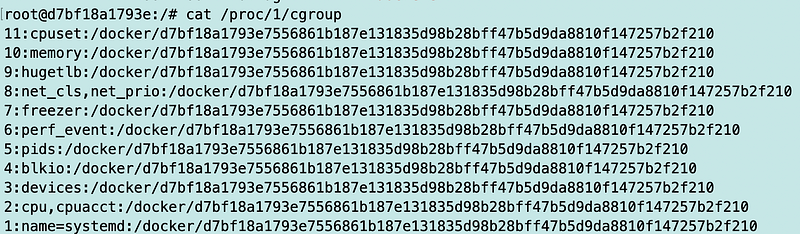
cat /proc/1/sched | head -n 1When you run that on Amazon Linux 2 you get:

When you run that on other types of Linux systems you may get init instead of systemd.
When you run that command inside of our container:

For some other variations of what you might see in different environments check out this page and add your own information as you test different operating systems and container engines and runtimes.
How do you tell if your container is running on Kubnernetes?
If you want to know if your container is running inside of Kubnernetes you may be able to check for the KUBERNETES_SERVICE_HOST environment variable.
Why might an attacker want to know this? Perhaps it is possible to access and control Kubernetes from inside the container if Kubernetes is not properly configured. That is why you might hear the recommendation “Separate the control plane from the data plane” to make sure that is not possible.
What if you’re running inside a Windows container?
I found a lot less information on this topic so I presume Windows containers are less widely used. In fact, many of the systems that run on Azure are linux systems. However, you may run across some application where you need to figure this out and this post lists some options. I’m not sure how consistent and reliable these options are. I don’t deal with Windows containers too much.
There may be different environment variables or processes if someone is using a container runtime, orchestrator, or images other than the types listed above, but this gives you the idea. If you are inside a system and you don’t see Docker, see if you can find any other indicators of some other type of container environment. Look at the processes and compare to a system that is not running in a container. On Windows look at registry keys. Check for files and environment variables indicative of containers.
And now you know what attackers will do if they are able to somehow get inside your container. They want to understand if they are in a container and figure out what they can do from inside that container. We’ll want to take steps to lock containers down so the answer is, “Not much!”
Follow for updates.
Teri Radichel | © 2nd Sight Lab 2023
About Teri Radichel:
~~~~~~~~~~~~~~~~~~~~
⭐️ Author: Cybersecurity Books
⭐️ Presentations: Presentations by Teri Radichel
⭐️ Recognition: SANS Award, AWS Security Hero, IANS Faculty
⭐️ Certifications: SANS ~ GSE 240
⭐️ Education: BA Business, Master of Software Engineering, Master of Infosec
⭐️ Company: Penetration Tests, Assessments, Phone Consulting ~ 2nd Sight Lab
Need Help With Cybersecurity, Cloud, or Application Security?
~~~~~~~~~~~~~~~~~~~~~~~~~~~~~~~~~~~~~~~~~~~~~~~~~~~~~~~~~~~~~
🔒 Request a penetration test or security assessment
🔒 Schedule a consulting call
🔒 Cybersecurity Speaker for PresentationFollow for more stories like this:
~~~~~~~~~~~~~~~~~~~~~~~~~~~~~~~~~~~~~~~~~~~~~~~~~~~~~~~~~~~~~
❤️ Sign Up my Medium Email List
❤️ Twitter: @teriradichel
❤️ LinkedIn: https://www.linkedin.com/in/teriradichel
❤️ Mastodon: @teriradichel@infosec.exchange
❤️ Facebook: 2nd Sight Lab
❤️ YouTube: @2ndsightlab


