
NON-TECHNICAL TECH TIPS
How to Spot & Handle Email Phishing Scams
Quick and easy ways to spot and deal with email cybercrime

Books on email scams, often known as phishing, identity theft, fraud, and other cybercrimes are abundant. This is a simple overview for the casual email user who needs to understand how to spot a suspicious email, what to do if they open one, and how to be cautious online.
Sections 1 through 3 are the most critical.
Americans lost over $10.3 billion in online phishing scams in 2022, up from $6.9 billion in 2021 according to the FBI. This figure represents only what individuals reported to the FBI, and does not reflect the many ways companies lose revenue, experience productivity interruptions, become infected with malware or keylogging programs, are held hostage, or have data or proprietary information stolen. In addition, phishing scams — in which emails are sent to individual or company accounts, can result in identity theft, blackmail, or corporate espionage.
Think of it as leaving your front door open when the mail is delivered, then finding strangers with bad intentions rummaging through your home and personal files.
The rise in popularity of Artificial Intelligence (AI) allows bad actors to craft and execute more compelling and sophisticated automated scams. Since one of the features of popular new AI tools like OpenAI’s ChatGPT, Bard, and others is the ability to write convincing text and code, I expect cybercrime to become more sophisticated and prevalent.
This essay will start with the basics and introduce more sophisticated tips and tools used by bad actors to spread problems and ways potential victims of email scams can protect themselves.
Because giving too much information can aid those who wish to commit crimes, this essay will not go into specific technical detail. If you have a legitimate need to know, there are books, guides, and free YouTube videos with more detail.
1. Example of phishing email
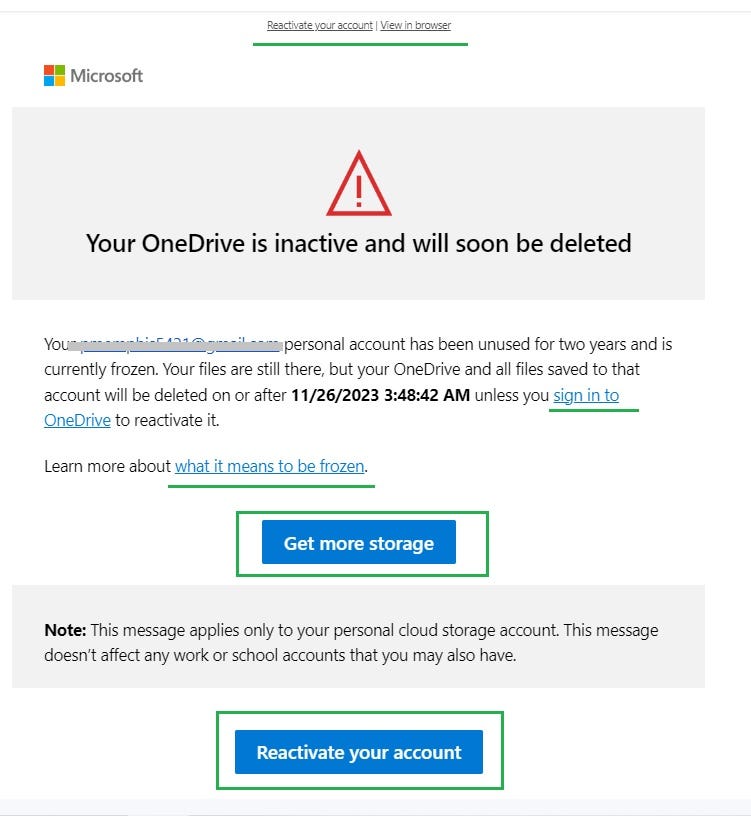
I noticed an email in my Gmail account saying my Microsoft OneDrive account would be deleted shortly.

There is no obvious sign of trouble in this notification.
My Gmail account is the emergency contact for a seldom-used Microsoft account. If the name of the sender or the subject line included odd characters or misspellings it would have immediately raised red flags.
I have a tech background with experience in cybersecurity so normally wouldn’t have opened it, but -
- I was tired and didn’t verify who it was from
- The subject was reasonable — I don’t use Microsoft products often
- It went to my inbox instead of Spam so made me curious
The email looked authentic with appropriate graphics but the originating email address was suspicious.
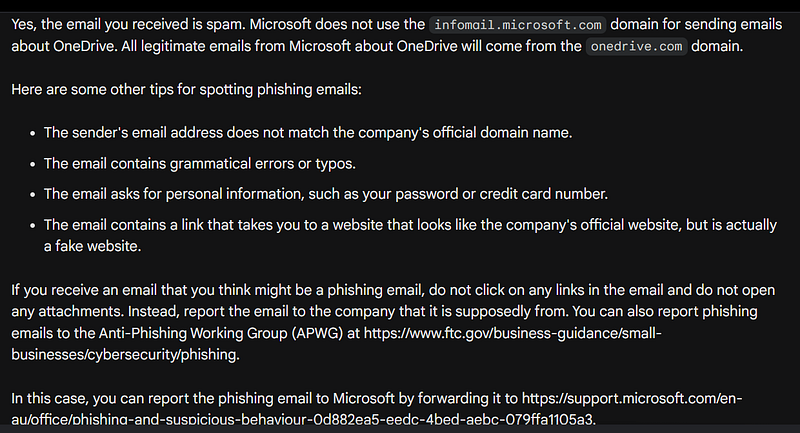
I quickly copied the sender's address and closed the email without clicking on links. I pasted the email address in Google’s AI Bard and wrote “Please check this address for scams: <[email protected]>”
Bard’s response:
2. How to identify suspicious emails
The email I received looked legitimate, but hovering over any one of the links I’ve noted in green shows a URL link to the domain “t.infomail.microsoft.com”. Note the ‘t.’ in front. This is a clone (spoofed) site registered in the US with privacy protection. It might as well have been called “hackingyou.com”. Clicking on any of the links would prompt the user for their name, password, and further authentication, capturing and keeping this data.
It likely wouldn’t be obvious to the user they weren’t on a Microsoft site as they entered their name, address, phone number, and credit card information to ensure their cloud storage wasn’t deleted.
A site can be hosted in the US but operated from anywhere in the world. Hackers often use sophisticated masking and routing safeguards bouncing their activity through multiple computers and locations to avoid detection.
- Look at the sender’s email address. If the email is from a company you don’t recognize, or if the email address doesn’t match the company’s official domain name, it’s probably a phishing email.
- Check the subject line. Phishing emails often have urgent or alarming subject lines, such as “Your account is about to be suspended!” or “You have won a free prize!” or “New job opportunity from your old boss from___. “ Long subject lines can trick users into believing a legitimate source was truncated and is hidden.
- Hover over any links in the email. If the link doesn’t go to the company’s official website, it’s probably a phishing email. You can usually see the destination URL in the bottom left corner of your browser window when you hover over a link. If you’re uncertain, look up the name of the company website using a search engine.
- Look for grammatical errors and typos. Phishing emails often contain grammatical errors and typos, as they are often sent from outside of the United States. China and Indonesia are often the origins.
- Be careful about opening attachments. Phishing emails often contain attachments to malware. If you’re not sure whether or not an attachment is safe, don’t open it.
3. What to do if you open and follow the links in a suspicious email
Bots, malware, programs, viruses, scripts, and code all refer to executable processes running without a person. When a process runs in the background reading, copying, writing, and scanning, it increases network traffic. This can degrade your system’s performance.
Don’t panic, but do take the following precautions.
1. Make a note of the URL landing page. This is displayed in the address bar. I recommend copying and pasting it into a notes app, email, or other editor with the ability to capture hidden characters.
2. Take and keep a screen print (usually
3. Hover over links but do not hit enter or provide personal information. Copy the URLs appearing as underlined or highlighted text. The buttons are links as well.
4. Note who the website is spoofing, or copying.
5. Exit and check your downloads folder to make sure you haven’t accidentally downloaded malware, a script, or Java code. Search for the website in your browser's cookies and delete them.
6. If at work, alert the system admin to the issue so they can run diagnostics and check network traffic.
7. Close the browser and reboot the system. This will interrupt any script, malware, or logging program you may have inadvertently loaded.
Notify the company their website was spoofed (copied and exploited) and report the site to the services listed above. Normally, this can be done quickly and easily with an email. Provide the URL, link names, and screen image captured in the steps above.
When your system reboots, make sure your virus detection and system defender software is current. If necessary, run a scan. This normally happens automatically in the background without interrupting normal processes or disrupting normal functions.
Initiate an automatic backup should you need to isolate the incident.
This happens to the best of us and usually doesn’t result in harm. If your system was installed correctly files should be backed up. Most files reside on cloud or platform storage and can be retrieved easily.
4. Additional tips for managing and identifying safe email
- Use uncommon naming conventions for common senders like Google, Microsoft, Medium, and Facebook. More in section 7.
- Use a spam filter. A spam filter can help to block phishing emails from reaching your inbox.
- Keep your software up to date. Software updates often include security patches to protect you from phishing attacks.
- Be careful about what information you share online. Don’t share your personal information on social media or other websites unless you know they’re safe. I limit activity on Facebook and Twitter.
If you’re ever unsure whether or not an email is legitimate, it’s always best to err on the side of caution and not open it. Report phishing emails to the company they pretend to be from. Often, the company being spoofed will get their legal team involved to take the site down.
Before submitting personal or financial information, search for and link to the legitimate source from their website unless you’re certain the site is safe. I normally bookmark safe sites and access them through the browser. This eliminates having the activity tracked from your email account.
5. Other examples of bogus phishing accounts
- If you receive an email from “PayPal” but the sender’s email address is paypal.microsoft.com, it's a red flag. The official PayPal domain name is paypal.com.
- If the subject line of an email is “Your account is about to be suspended!” and you’re not expecting any emails from this company, it’s another red flag. Legitimate companies will typically give you advance notice before suspending your account and don’t usually use urgent messages with exclamation points.
- If you hover over a link in an email and the destination URL is not the company’s official website, and it doesn’t match the name of the sender’s address, that’s a third red flag. For example, if you receive an email from “Netflix” but the link is for netflix-support.com, or t.netflixsupport.com, it's a phishing email.
- If an email contains grammatical errors or typos, it’s a fourth red flag. Legitimate companies typically have professional proofreaders review their emails before they’re sent out.
- If an email contains an attachment from a company you’re not expecting an attachment from, that’s a fifth red flag. It’s best to err on the side of caution and not open the attachment.
- Email addresses usually are shown as Company Name
. Pay attention to the email address within <>. Most legitimate sites have domain names that mirror the company name. Sometimes non-printable characters are embedded, or special characters such as those appearing below. These are red flags as well.
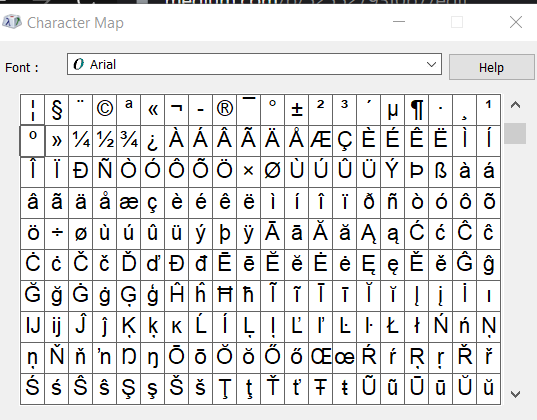
A non-printable or displayable character like
By following these tips, you can help protect yourself from phishing attacks and keep your personal information safe.
6. Why you are a target
Almost everyone receives unwanted advertisements and spam. If you or any of your contacts are exploitable, you may receive targeted attacks so cybercriminals can gain access to your contact information and emails.
Most of us choose convenience over security. We link to our employers, schools, friends and family, banks, healthcare providers, and more. Nearly every website visited, subscription ordered, and video watched are stored by default.
Losing control of your email account can compromise not just yourself, but all of your contacts, and by extension, all of theirs.
7. Best practices for managing email
Assign unique email names to your contacts if they have common names. For example, make John Doe and Tom Jones “John Doe 10/23.1” and “Tom Jones from Magic Castle.” Don’t save your contact’s email addresses using common names like “Mom,” “Dad,” “Bestie,” or “Boss.” These are often used by scammers.
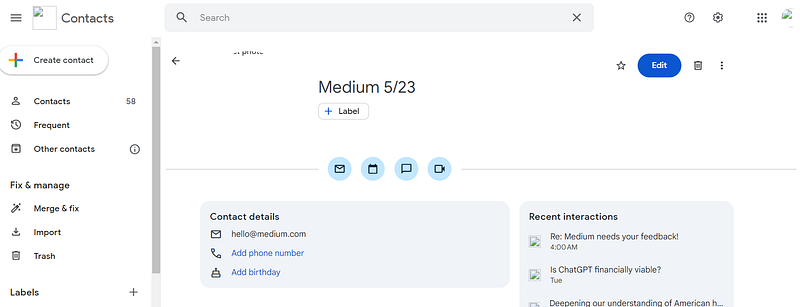
If I’d saved previous notices from Microsoft OneDrive as “Microsoft 123.88” I’d have recognized the false sender. The same goes for “Twitter,” “Facebook,” and other platforms. I get notices from Medium frequently, so I saved the contact as “Medium 5/23.”
In Gmail, click on the grid of dots at the top right and select Contacts to make changes.
Export your contacts and data to ensure safety.
Keep your contacts current and as manageable as possible.
My mom was duped into downloading malware a number of times and inadvertently caused it to spread to her contacts. They in turn may have infected their own contacts.
If infected with a virus or other malware, inform your contacts your email has been hacked and alert them not to open emails from your address if they don’t reference a signal in the subject line, such as a date or other unique identifier. If necessary, set up a new account.
Using reputable email providers, safeguarding your personal information, and exploring Virtual Private Networks (VPNs) help keep your data safe.
8. Other options for email providers, browsers, and settings
I don’t allow third-party scripts to run on websites I visit unless I’m familiar with them. This is a setting in Chrome and Microsoft browsers.
Google (Chrome) and Microsoft offer the most popular browser options and associated email providers. Accounts are free to set up and relatively quick — about 10 minutes.
Other popular browsers include Safari, Mozilla’s Firefox, and Linux.
Take the extra few minutes to turn off activity tracking and safeguard your privacy settings. This will help protect your identity and ability to access content not dictated by history and an AI algorithm. Don’t share personal information — there’s no law stating you must provide your legal full name, gender, address, and phone number. However, you may wish to include a recovery phone number should you lose access to your account. As an alternative, you can request unique account keys for future validation if you don’t wish to use your phone number.
These steps and issues will be explored further in future writing.
Decades of experience have taught me data is vulnerable to theft, loss, leakage, and abandonment. This is usually due to human error on the side of website and platform hosting. For this reason, I make a habit of exporting my data to an external drive or secondary location the same day I pay recurring monthly bills. It takes just a few minutes and provides peace of mind should I need to recover or transport data.
I make no endorsements or guarantees for the products showcased in the following videos.
Some of the more private email providers — both paid and free — are evaluated in the following video.
Online service providers based outside the US may not comply with US and European privacy laws. Encryption options may not be fully explained or standard. Encryption methods vary and may be limited to addresses, text, or one or the other.
9. Conclusion
The old adage “You get what you pay for,” applies to free online tools including browsers, VPNs, and email providers.
The licensing costs of Microsoft and Chrome (Google) products are often built into the purchase price of your electronic device and supplemented with ads or add-on features.
Service providers must make money to stay in business. This is possible through subscriptions, ads, or paid services.
If a provider has no visible means of support, there’s a chance they may be incentivized to harvest your data and are not to be trusted. Exercise caution and fully research services before using online tools as they often don’t limit their tracking to their own sites, but can potentially harvest data from each website you visit.
Free Virtual Private Network (VPN) software providers are notorious for harvesting personal information, sometimes plagiarizing content, or selling personal information on the Dark Web.
If an extension, plug-in, or online service (including apps) is free, I view it as suspicious if they don’t have an established reputation and authentic reviews. If identifying the provider and their contact information is difficult, it’s a red flag.
Free services like Canva, ChatGPT, Dall-E, and other reputable providers usually limit the users’ abilities and attempt to upgrade subscriptions for enhanced features.
If you’re uncertain about any area of online privacy and security, I recommend erring on the side of caution. I use Chrome and Android primarily and research products before downloading.
Future writings will cover how to disable tracking and custom ads on websites and social media, as well as an introduction to managing AI recommender algorithms in control of what users are exposed to. This will help in mitigating the threat of misinformation and becoming lost in an ever-deepening well or echo chamber.
Thanks for reading.
Thanks to Andrew Rodwin for expert edits and support.
Imaginative fiction
My alter-ego satirist Lizzie Lizard Brain is sometimes offensive, funny, and a narcissist at heart.


