
SECURITY | PRIVACY | MEDIUM | PROPER OpSec
How to Secure Your Anonymous Medium Account
Follow the steps below if you want a truly private and secure account

I was inspired by a discussion I had with Benighted in the comment section of this article of mine and by another story I read by Jewels Of Denial to write an article about proper privacy & security -henceforth OpSec- for those of you who have a pen or anonymous account.
As a rule of thumb the stronger the OpSec the harder it is to use. So there are multiple OpSec levels. One extreme is Google and Facebook, which know more about you than what Stasi knew about the persons they breathed closest down their neck.
Let’s rate their OpSec = 0 and their ease of use as 9. These two companies are data harvesters that invest top dollar to know everything about you so that they can make even more money. Your personal data and habits are their currency.
The other extreme is to use the Linux Tails OS which runs on a disposable USB stick only, along with the highly secure Tor Browser, a PGP app for sending encrypted e-mails, a secure VPN like Proton’s VPN for when connection speed is of the essence, Proton’s own e-mail service, DuckDuckGo as a search engine, and finally Signal for instant messaging.
Let’s rate their collective OpSec with 9.5 and their ease of use with 4. You don’t need all for an anonymous Medium account. You need them if you’re a whistleblower or foreign agent in China or Saudi Arabia reporting to The Guardian or your handler — or if you are the one getting those reports. The Guardian, for instance, securely accepts PGP encrypted e-mails and files.
For a Medium anonymous account our target is an OpSec and ease of use of 7, assuming the vanilla use of Medium has an ease of use of 9. The following steps apply both for new anonymous accounts and for securing one after the fact.
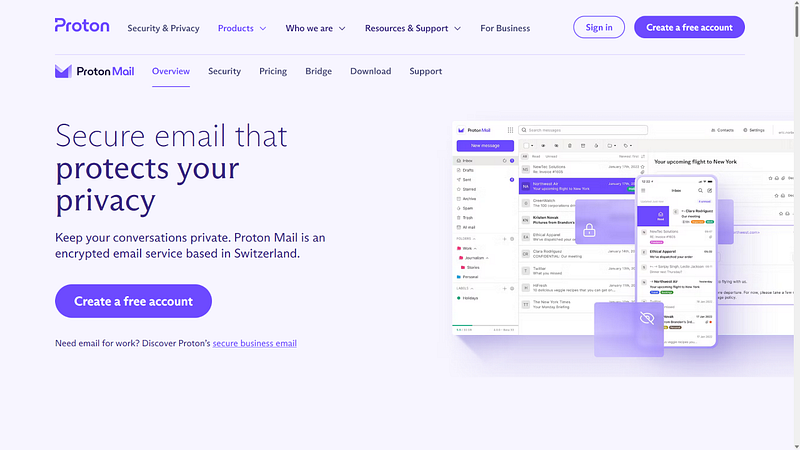
The first step is to ditch your Gmail -restrict it to your eponymous online activity- and open a new e-mail account here. You need to strictly segregate your eponymous online activity from your anonymous one. No interaction between them. Preferably you should use your new Proton email solely for Medium.
If you maintain both an eponymous and an anonymous account on Medium you should not interact between them at all, unless your anonymous account is for ‘virtual’ OpSec. I.e. so that it’s not immediately obvious the words are yours, unless someone looks closer. If that’s the case you don’t need to change anything, so the following do not apply to you.
After you set up a new Proton email open your anonymous account or change the email of the existing one. Bear in mind, as I wrote in my linked article in the first line, that your email is visible to everyone you subscribe to.
We can all see the emails of our subscribers here: https://medium.com/@skordilis/audience/email-subscribers That’s a private page only I can see. Replace ‘skordilis’ with your own handle -or Stats → ‘Audience stats’ → under ‘Email Subscribers’ → ‘View details’- and you’ll see the emails of all your subscribers.
They are not in public view, but if you subscribe to 100 Medium accounts 100 people can see them. If it’s not a fresh anonymous email any of them can find your true name via your email.
By the way I looked up neither of them, not even for testing. I am not in the habit of exploiting OpSec gaps to pry into people who placed their trust in me. I tested googling my own email, to see how easily others would find me if I was anonymous here. It was trivial, since my email has been all over the web for 10+ years.
Unless you have neither joined Medium’s MPP program nor are you a paying member this article assumes that we can trust Medium itself, since in both cases they have our personal data; and in the case of MPP they additionally have our banking and tax data, so that they can pay us.
So, after opening or securing your account, ditch Chrome. There are two alternatives: Either Firefox -without being connected to Google or Microsoft, and also selecting to have the cookies erased each time you close it- or the Tor Browser I mentioned above.
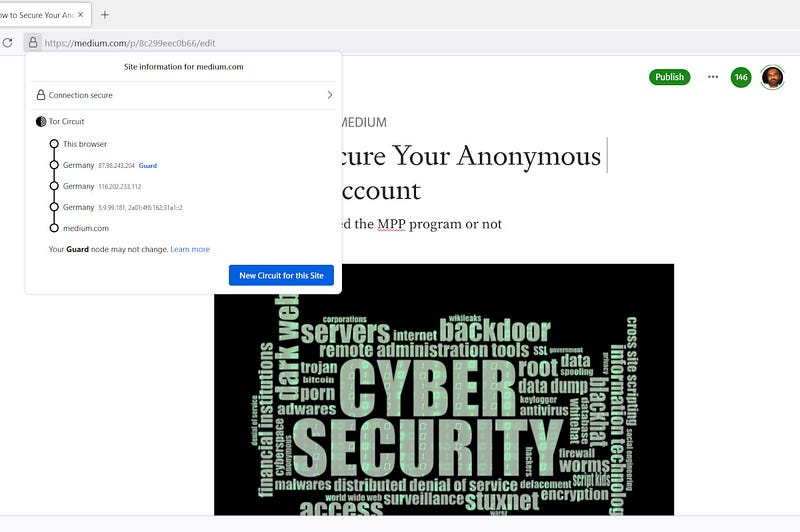
Tor Browser is based on Firefox but it employs a triple relay of nodes, computers or servers that can be anywhere in the world. They encrypt all your traffic and ‘tunnel’ it through them. It’s like a free, but slower, VPN. The relays are dynamic, i.e. they change frequently, so every few minutes you connect from a new IP.
I tested logging in to Medium for the first time via the Tor Browser and it actually works. I expected Javascript issues but I had none in my short testing. I opened this draft and exposed the three relays through which I was connected. Somehow all three are from Germany, a rarity:
The Tor Browser provides true privacy and security. You can use it for your private stuff and use Chrome or whatever else you use for your public ones. I’d rate its OpSec with ~8.5 on Win10/11, 9 on a normal Linux distro like Ubuntu, ~9.5 on Tails and 8 on Android. There is no port for iOS but there is one for macOS.
The above OpSec target of 7 applies if you use Firefox the proper way (no permanent cookies etc), along with DuckDuckGo as a search engine. Unless someone targets you specifically Firefox is enough. But feel free to test Tor Browser. It’s also the only browser via which you can access the hidden .onion websites of the infamous dark web.
The ease of use of Firefox drops from 9 to 7 because of choosing to erase your cookies each time you close it. You may store your password and e-mail in its password manager so that you do not write them each time, but without stored cookies you lose the automatic log-in, so -1 point.
Do not connect into Medium via Facebook, Google, Apple or Twitter. If you use a middleman you leave digital breadcrumbs for their datahounds to follow. Since you cannot do that you lose 1 more point, hence the 7 of ease of use. If you absolutely want a middleman choose Twitter. But not your normal account (see below).
It goes without saying that you cannot share the words of your anonymous account to your eponymous social media. You’d need new anonymous social accounts to share everything, accounts not linked to or interacting with your eponymous accounts.
I think I covered the basics. Questions, clarifications, remarks etc in the comments. I’d love to hear what you think.
An OpSec article by Nikolaos Skordilis.


