avatarProto Bioengineering

Free AI web copilot to create summaries, insights and extended knowledge, download it at here

16808

Abstract

Step 3: Create a table in each database</h1><p id="ad6b">To create a table, we’ll use the SQL <code>CREATE</code> command inside of <code>cursor.execute()</code>.</p><div id="feb2"><pre><span class="hljs-keyword">def</span> <span class="hljs-title function_">create_database_table</span>(<span class="hljs-params">cursor</span>): cursor.execute(<span class="hljs-string">''' CREATE TABLE IF NOT EXISTS free_acceleration ( id integer PRIMARY KEY, bluetooth_address char(36), unix_timestamp real, dot_timestamp integer, accel_x real, accel_y real, accel_z real ); '''</span>)</pre></div><p id="c0fd">In color format, this looks like:</p><figure id="d7ca"><img src="https://cdn-images-1.readmedium.com/v2/resize:fit:800/1*Zmd1ylOfdjmD2FG34bAsAA.png"><figcaption></figcaption></figure><p id="adef">Above, we <code>CREATE</code> a table named <code>free_acceleration</code> with these columns:</p><ul><li><code>id </code>— a key to signify which row in the database it is. This isn’t 100% necessary, but reduces headaches for large datasets.</li><li><code>bluetooth_address</code> — the UUID address of the Movella DOT</li><li><code>unix_timestamp</code> — the <a href="https://www.unixtimestamp.com/">actual time</a> that the data was received</li><li><code>dot_timestamp</code> — the timestamp from the DOT, which is made up by the device and doesn’t correlate with any human timezone</li><li><code>accel_x</code> — the X of the accelerometer</li><li><code>accel_y</code> — the Y of the accelerometer</li><li><code>accel_z</code> — the Z of the accelerometer</li></ul><p id="fc08">Having a few timestamps, IDs, and addresses will help us keep track of all of the data when a lot of signals are coming in in realtime. The <code>unix_timestamp</code> will help especially, since the DOT’s timestamps appear arbitrary. (A timestamp of <code>1343451821</code> as seen below looks close to but is not actually related to any <a href="https://www.unixtimestamp.com/">real timezone or time-keeping standard</a>.)</p><figure id="8558"><img src="https://cdn-images-1.readmedium.com/v2/resize:fit:800/1*brY46qzHUv6sGPA9zPWYGg.png"><figcaption></figcaption></figure><p id="8c2f">Add the above <code>create_database_table()</code> function near the top of your code and add a line to call it near the top of the main <code>connect()</code> function:</p><div id="f2b5"><pre><span class="hljs-keyword">async</span> <span class="hljs-keyword">def</span> <span class="hljs-title function_">connect</span>(<span class="hljs-params">address</span>): number = address[:<span class="hljs-number">3</span>] connection = start_database(<span class="hljs-string">f"movella_dot<span class="hljs-subst">{number}</span>.db"</span>) database = connection.cursor() create_database_table(database) <span class="hljs-comment"># Add this line</span></pre></div><p id="2859">The full script with database creation looks like so:</p><div id="46db"><pre><span class="hljs-comment"># Create a database to save Free Acceleration data from multiple Movella DOTs</span>

<span class="hljs-keyword">import</span> asyncio <span class="hljs-keyword">import</span> numpy <span class="hljs-keyword">as</span> np <span class="hljs-keyword">import</span> sqlite3 <span class="hljs-keyword">from</span> bleak <span class="hljs-keyword">import</span> BleakClient

measurement_char_uuid = <span class="hljs-string">"15172001-4947-11e9-8646-d663bd873d93"</span> short_payload_char_uuid = <span class="hljs-string">"15172004-4947-11e9-8646-d663bd873d93"</span>

<span class="hljs-comment"># Replace this with a list of your DOT's UUID addresses </span> <span class="hljs-comment"># (or "MAC addresses" for Windows and Linux users)</span> addresses = [ <span class="hljs-string">"509808FF-ECFE-895D-C1FE-BE5AC5DB6204"</span>, <span class="hljs-string">"338312FA-C3D1-183F-325A-0726AFDBEB78"</span> ]

<span class="hljs-keyword">class</span> <span class="hljs-title class_">NotificationHandler</span>: <span class="hljs-string">'''This class allows us to add the DOT's UUID address to the data that gets printed'''</span> <span class="hljs-keyword">def</span> <span class="hljs-title function_">init</span>(<span class="hljs-params">self, device_address</span>): self.device_address = device_address

<span class="hljs-keyword">def</span> <span class="hljs-title function_">callback</span>(<span class="hljs-params">self, sender, data</span>):
    free_acceleration = encode_free_acceleration(data)[<span class="hljs-number">0</span>]
    free_acceleration = <span class="hljs-built_in">str</span>(free_acceleration)[<span class="hljs-number">1</span>:-<span class="hljs-number">1</span>]
    <span class="hljs-built_in">print</span>(<span class="hljs-string">f"<span class="hljs-subst">{self.device_address}</span> -- <span class="hljs-subst">{free_acceleration}</span>"</span>)

<span class="hljs-keyword">def</span> <span class="hljs-title function_">start_database</span>(<span class="hljs-params">filename</span>): conn = sqlite3.connect(filename) <span class="hljs-keyword">return</span> conn

<span class="hljs-keyword">def</span> <span class="hljs-title function_">create_database_table</span>(<span class="hljs-params">cursor</span>): cursor.execute(<span class="hljs-string">''' CREATE TABLE IF NOT EXISTS free_acceleration ( id integer PRIMARY KEY, bluetooth_address char(36), unix_timestamp real, dot_timestamp integer, accel_x real, accel_y real, accel_z real ); '''</span>)

<span class="hljs-keyword">def</span> <span class="hljs-title function_">encode_free_acceleration</span>(<span class="hljs-params">bytes_</span>): data_segments = np.dtype([ (<span class="hljs-string">'timestamp'</span>, np.uint32), (<span class="hljs-string">'x'</span>, np.float32), (<span class="hljs-string">'y'</span>, np.float32), (<span class="hljs-string">'z'</span>, np.float32), (<span class="hljs-string">'zero_padding'</span>, np.uint32) ]) formatted_data = np.frombuffer(bytes_, dtype=data_segments) <span class="hljs-keyword">return</span> formatted_data

<span class="hljs-keyword">async</span> <span class="hljs-keyword">def</span> <span class="hljs-title function_">connect</span>(<span class="hljs-params">address</span>): number = address[:<span class="hljs-number">2</span>] connection = start_database(<span class="hljs-string">f"movella_dot<span class="hljs-subst">{number}</span>.db"</span>) database = connection.cursor() create_database_table(database)

nh = NotificationHandler(address)
<span class="hljs-comment"># Connect to the DOT and stream data</span>
<span class="hljs-keyword">async</span> <span class="hljs-keyword">with</span> BleakClient(address) <span class="hljs-keyword">as</span> client:
    <span class="hljs-built_in">print</span>(<span class="hljs-string">f"Client connection to `<span class="hljs-subst">{client.address}</span>: <span class="hljs-subst">{client.is_connected}</span>"</span>)

    <span class="hljs-comment"># Subscribe to data notifications</span>
    <span class="hljs-keyword">await</span> client.start_notify(short_payload_char_uuid, nh.callback)

    <span class="hljs-comment"># Set and turn on measurement mode</span>
    binary_message = <span class="hljs-string">b"\x01\x01\x06"</span>
    <span class="hljs-keyword">await</span> client.write_gatt_char(measurement_char_uuid, binary_message, response=<span class="hljs-literal">True</span>)

    <span class="hljs-comment"># Stream data for 10 seconds</span>
    <span class="hljs-keyword">await</span> asyncio.sleep(<span class="hljs-number">10.0</span>)

<span class="hljs-keyword">async</span> <span class="hljs-keyword">def</span> <span class="hljs-title function_">main</span>(): <span class="hljs-keyword">await</span> asyncio.gather(*(connect(addr) <span class="hljs-keyword">for</span> addr <span class="hljs-keyword">in</span> addresses))

<span class="hljs-keyword">if</span> name == <span class="hljs-string">"main"</span>: asyncio.run(main())</pre></div><p id="61e6"><b>After you run the script above,</b> you can preview your new empty databases, <code>movella_dot*.db</code>, in a <a href="https://sqlitebrowser.org/">free app like SQLite Browser</a>. If you open any of them, you’ll see that they have one empty table with all of the columns that we just made.</p><figure id="ae6e"><img src="https://cdn-images-1.readmedium.com/v2/resize:fit:800/1*NlIfAjqhJDeNc-x639sw9A.png"><figcaption></figcaption></figure><p id="7f1b"><b>The last steps are to format the incoming data and save it to the databases.</b> We’ll do this by putting a formatting function and a SQL statement in the same <code>callback()</code> function that prints the data.</p><h1 id="28d2">Step 4: Format the data</h1><p id="4599"><b>Right now, the accelerometer data is in a string.</b> We need to extract it and format it, so that we can write it to our SQLite databases.</p><p id="35e8">The data looks like this, which is <i>close</i> to what we want:</p><figure id="247c"><img src="https://cdn-images-1.readmedium.com/v2/resize:fit:800/1*aKDakqw428_mwObayBFNEw.png"><figcaption></figcaption></figure><p id="9e18">But we’ll make a new formatting function and rewrite the <code>callback()</code> to prep the data for SQL.</p><p id="0930">Right now, we’re combining the address with the timestamp, and XYZ accelerometer data (and a zero for padding that the DOT happens to give us) as:</p><div id="3d15"><pre><span class="hljs-selector-tag">address</span> -- timestamp, X, Y, Z, <span class="hljs-number">0</span></pre></div><p id="356a">Let’s change our callback like so to extract the variables (and <code>import time</code>):</p><div id="7123"><pre><span class="hljs-keyword">import</span> time ... <span class="hljs-keyword">def</span> <span class="hljs-title function_">callback</span>(<span class="hljs-params">self, sender, data</span>): free_acceleration = encode_free_acceleration(data)[<span class="hljs-number">0</span>] free_acceleration = <span class="hljs-built_in">str</span>(free_acceleration)[<span class="hljs-number">1</span>:-<span class="hljs-number">1</span>] dot_timestamp, x, y, z, zero = free_acceleration.split(<span class="hljs-string">","</span>) unix_timestamp = time.time() <span class="hljs-built_in">print</span>(<span class="hljs-string">f"<span class="hljs-subst">{self.device_address}</span>, <span class="hljs-subst">{unix_timestamp}</span>, <span class="hljs-subst">{dot_timestamp}</span>, <span class="hljs-subst">{x}</span>, <span class="hljs-subst">{y}</span>, <span class="hljs-subst">{z}</span>"</span>)</pre></div><p id="95dd">We’re extracting the data into separate variables. And we’re printing it back out for now as a sanity check before giving it to SQL.</p><figure id="fa63"><img src="https://cdn-images-1.readmedium.com/v2/resize:fit:800/1*EBpVp1b2uOOXOalhEnlLLg.png"><figcaption></figcaption></figure><p id="832f">The data looks appropriately formatted. Now, we can write it to our database.</p><h1 id="f6e5">Step 5: Write the data to the databases</h1><p id="4062">We’ll write each piece of accelerometer data we get to each database with the SQL <code>INSERT</code> command:</p><div id="9a0d"><pre>database.execute(<span class="hljs-string">''' INSERT INTO free_acceleration (bluetooth_address, unix_timestamp, dot_timestamp, accel_x, accel_y, accel_z) VALUES ({... we'll put our newly extracted variables here ...}) ); '''</span>)

</pre></div><p id="cc9d">And we’ll put this into a new function, <code>write_to_database()</code>, below.</p><p id="9102">Note that there is no <code>id</code> column, like we had in our <code>CREATE TABLE</code> statement. That’s because <code>id</code> is a random value automatically generated by SQLite for each row of data.</p><p id="1654">Create a new function <code>write_to_database()</code> with the following:</p><div id="bc8a"><pre>def write_to_database(database, address, unix_time, dot_time, x, y, z): database.execute(f''' <span class="hljs-type">INSERT</span> <span class="hljs-type">INTO</span> free_acceleration (bluetooth_address, unix_timestamp, dot_timestamp, accel_x, accel_y, accel_z) <span class="hljs-type">VALUES</span> (<span class="hljs-string">"{address}<span class="hljs-subst">"</span>, <span class="hljs-subst">"</span>{unix_time}<span class="hljs-subst">"</span>, <span class="hljs-subst">"</span>{dot_time}<span class="hljs-subst">"</span>, <span class="hljs-subst">"</span>{x}<span class="hljs-subst">"</span>, <span class="hljs-subst">"</span>{y}<span class="hljs-subst">"</span>, <span class="hljs-subst">"</span>{z}<span class="hljs-subst">"</span>); ''') </span></pre></div><p id="7b04">This takes the arguments to <code>write_to_database()</code> and formats that them into the <code>VALUES (...)</code> section of the <code>INSERT</code> command.</p><p id="32f7">Note how we use <a href="https://realpython.com/python-f-strings/">f-strings</a> to insert the <code>{variables}</code> into the SQL.</p><p id="14f6">Now, we can put <code>write_to_database()</code> into our original <code>callback()</code> function, so that every piece of incoming data gets written to the appropriate database:</p><div id="cb27"><pre><span class="hljs-keyword">def</span> <span class="hljs-title function_">callback</span>(<span class="hljs-params">self, sender, data</span>): free_acceleration = encode_free_acceleration(data)[<span class="hljs-number">0</span>] free_acceleration = <span class="hljs-built_in">str</span>(free_acceleration)[<span class="hljs-number">1</span>:-<span class="hljs-number">1</span>] dot_timestamp, x, y, z, zero = free_acceleration.split(<span class="hljs-string">","</span>) unix_timestamp = time.time()

    <span class="hljs-comment"># This is the new line</span>
    write_to_database(self.database, self.device_address, unix_timestamp, dot_timestamp, x, y, z)
    
    <span class="hljs-built_in">print</span>(<span class="hljs-string">f"<span class="hljs-subst">{self.device_address}</span>, <span class="hljs-subst">{unix_timestamp}</span>, <span class="hljs-subst">{dot_timestamp}</span>, <span class="hljs-subst">{x}</span>, <span class="hljs-subst">{y}</span>, <span class="hljs-subst">{z}</span>"</span>)</pre></div><p id="52f3">One extra thing is necessary. In order to give the <code>NotificationHandler</code> class (and thus the <code>callback()</code> function) access to the database, we have to store the database a <code>self.databas</code>e variable in the class. That means we have to write a way to give <code>NotificationHandler</code> the database when both are created.</p><p id="2829">We have to change two things:</p><ul><li>The <code>__init__</code> function of <code>NotificationHandler</code>, so that it can accept and store the database object</li><li>Give the <code>database</code> to <code>nh = NotificationHandler()</code> when we create <code>nh</code></li></ul><p id="61d8">Change the top of the NotificationHandler class to the following:</p><div id="4183"><pre><span class="hljs-keyword">class</span> <span class="hljs-title class_">NotificationHandler</span>:
<span class="hljs-string">'''This class allows us to add the DOT's UUID address to the data that gets printed'''</span>
<span class="hljs-keyword">def</span> <span class="hljs-title function_">__init__</span>(<span class="hljs-params">self, device_address, database</span>):
    self.device_address = device_address
    self.database = database <span class="hljs-comment"># Now we can use the database in callback()</span></pre></div><p id="4a09">And change the <code>nh = NotificationHandler(...)</code> part to:</p><div id="442d"><pre><span class="hljs-keyword">async</span> <span class="hljs-keyword">def</span> <span class="hljs-title function_">connect</span>(<span class="hljs-params">address</span>):
number = address[:<span class="hljs-number">2</span>]
connection = start_database(<span class="hljs-string">f"movella_dot<span class="hljs-subst">{number}</span>.db"</span>)
database = connection.cursor()
create_database_table(database)

<span class="hljs-comment"># Add `database` as a second argument here</span>
nh = NotificationHandler(address, database)</pre></div><p id="a0a9">This changes the full script to:</p><div id="b345"><pre><span class="hljs-comment"># Stream Free Acceleration d

Options

ata from multiple Movella DOTs</span>

<span class="hljs-keyword">import</span> asyncio <span class="hljs-keyword">import</span> numpy <span class="hljs-keyword">as</span> np <span class="hljs-keyword">import</span> sqlite3 <span class="hljs-keyword">import</span> time <span class="hljs-keyword">from</span> bleak <span class="hljs-keyword">import</span> BleakClient

measurement_char_uuid = <span class="hljs-string">"15172001-4947-11e9-8646-d663bd873d93"</span> short_payload_char_uuid = <span class="hljs-string">"15172004-4947-11e9-8646-d663bd873d93"</span>

<span class="hljs-comment"># Replace this with a list of your DOT's UUID addresses </span> <span class="hljs-comment"># (or "MAC addresses" for Windows and Linux users)</span> addresses = [ <span class="hljs-string">"509808FF-ECFE-895D-C1FE-BE5AC5DB6204"</span>, <span class="hljs-string">"338312FA-C3D1-183F-325A-0726AFDBEB78"</span> ]

<span class="hljs-keyword">class</span> <span class="hljs-title class_">NotificationHandler</span>: <span class="hljs-string">'''This class allows us to add the DOT's UUID address to the data that gets printed'''</span> <span class="hljs-keyword">def</span> <span class="hljs-title function_">init</span>(<span class="hljs-params">self, device_address, database</span>): self.device_address = device_address self.database = database

<span class="hljs-keyword">def</span> <span class="hljs-title function_">callback</span>(<span class="hljs-params">self, sender, data</span>):
    free_acceleration = encode_free_acceleration(data)[<span class="hljs-number">0</span>]
    free_acceleration = <span class="hljs-built_in">str</span>(free_acceleration)[<span class="hljs-number">1</span>:-<span class="hljs-number">1</span>]
    dot_timestamp, x, y, z, zero = free_acceleration.split(<span class="hljs-string">","</span>)
    unix_timestamp = time.time()
    write_to_database(self.database, self.device_address, unix_timestamp, dot_timestamp, x, y, z)
    <span class="hljs-built_in">print</span>(<span class="hljs-string">f"<span class="hljs-subst">{self.device_address}</span>, <span class="hljs-subst">{unix_timestamp}</span>, <span class="hljs-subst">{dot_timestamp}</span>, <span class="hljs-subst">{x}</span>, <span class="hljs-subst">{y}</span>, <span class="hljs-subst">{z}</span>"</span>)

<span class="hljs-keyword">def</span> <span class="hljs-title function_">start_database</span>(<span class="hljs-params">filename</span>): conn = sqlite3.connect(filename) <span class="hljs-keyword">return</span> conn

<span class="hljs-keyword">def</span> <span class="hljs-title function_">create_database_table</span>(<span class="hljs-params">cursor</span>): cursor.execute(<span class="hljs-string">''' CREATE TABLE IF NOT EXISTS free_acceleration ( id integer PRIMARY KEY, bluetooth_address char(36), unix_timestamp real, dot_timestamp integer, accel_x real, accel_y real, accel_z real ); '''</span>)

<span class="hljs-keyword">def</span> <span class="hljs-title function_">write_to_database</span>(<span class="hljs-params">database, address, unix_time, dot_time, x, y, z</span>): database.execute(<span class="hljs-string">f''' INSERT INTO free_acceleration (bluetooth_address, unix_timestamp, dot_timestamp, accel_x, accel_y, accel_z) VALUES ("<span class="hljs-subst">{address}</span>", "<span class="hljs-subst">{unix_time}</span>", "<span class="hljs-subst">{dot_time}</span>", "<span class="hljs-subst">{x}</span>", "<span class="hljs-subst">{y}</span>", "<span class="hljs-subst">{z}</span>"); '''</span>)

<span class="hljs-keyword">def</span> <span class="hljs-title function_">encode_free_acceleration</span>(<span class="hljs-params">bytes_</span>): data_segments = np.dtype([ (<span class="hljs-string">'timestamp'</span>, np.uint32), (<span class="hljs-string">'x'</span>, np.float32), (<span class="hljs-string">'y'</span>, np.float32), (<span class="hljs-string">'z'</span>, np.float32), (<span class="hljs-string">'zero_padding'</span>, np.uint32) ]) formatted_data = np.frombuffer(bytes_, dtype=data_segments) <span class="hljs-keyword">return</span> formatted_data

<span class="hljs-keyword">async</span> <span class="hljs-keyword">def</span> <span class="hljs-title function_">connect</span>(<span class="hljs-params">address</span>): number = address[:<span class="hljs-number">2</span>] connection = start_database(<span class="hljs-string">f"movella_dot<span class="hljs-subst">{number}</span>.db"</span>) database = connection.cursor() create_database_table(database)

nh = NotificationHandler(address, database)
<span class="hljs-comment"># Connect to the DOT and stream data</span>
<span class="hljs-keyword">async</span> <span class="hljs-keyword">with</span> BleakClient(address) <span class="hljs-keyword">as</span> client:
    <span class="hljs-built_in">print</span>(<span class="hljs-string">f"Client connection to `<span class="hljs-subst">{client.address}</span>: <span class="hljs-subst">{client.is_connected}</span>"</span>)

    <span class="hljs-comment"># Subscribe to data notifications</span>
    <span class="hljs-keyword">await</span> client.start_notify(short_payload_char_uuid, nh.callback)

    <span class="hljs-comment"># Set and turn on measurement mode</span>
    binary_message = <span class="hljs-string">b"\x01\x01\x06"</span>
    <span class="hljs-keyword">await</span> client.write_gatt_char(measurement_char_uuid, binary_message, response=<span class="hljs-literal">True</span>)

    <span class="hljs-comment"># Stream data for 10 seconds</span>
    <span class="hljs-keyword">await</span> asyncio.sleep(<span class="hljs-number">10.0</span>)

<span class="hljs-keyword">async</span> <span class="hljs-keyword">def</span> <span class="hljs-title function_">main</span>(): <span class="hljs-keyword">await</span> asyncio.gather(*(connect(addr) <span class="hljs-keyword">for</span> addr <span class="hljs-keyword">in</span> addresses))

<span class="hljs-keyword">if</span> name == <span class="hljs-string">"main"</span>: asyncio.run(main())</pre></div><p id="4023">This will start sending data to our databases! However, we need one last step: Saving the data with SQLite’s <code>commit()</code> function.</p><h1 id="eff9">Step 6: Save the data to the databases</h1><p id="ea1c">If we run the script from Step 5 and open one of our <code>movella_dot*.db</code> files in SQLite Browser, we won’t see any actual data.</p><figure id="00ed"><img src="https://cdn-images-1.readmedium.com/v2/resize:fit:800/1*79Su9fLEiaJoOr4wSzroHw.png"><figcaption>Our free_acceleration table is empty, because we didn’t run the commit() function on our database.</figcaption></figure><p id="1687">That’s because we didn’t save the database with <code>commit()</code>.</p><p id="caf7">To fix this, at the very end of <code>async def connect()</code> , add a single <code>connection.commit()</code>:</p><div id="ceef"><pre><span class="hljs-keyword">async</span> <span class="hljs-keyword">def</span> <span class="hljs-title function_">connect</span>(<span class="hljs-params">address</span>): ... <span class="hljs-keyword">async</span> <span class="hljs-keyword">with</span> BleakClient(address) <span class="hljs-keyword">as</span> client: ...

connection.commit() <span class="hljs-comment"># Add this line</span></pre></div><p id="1a90">This will save all the data in our databases. Make sure it is in the <code>connect() </code>function but outside of the <code>BleakClient() as client</code> block.</p><p id="1122">If we run the script again and open one our movella_dot*.db files, we’ll see our saved DOT data.</p><figure id="99e6"><img src="https://cdn-images-1.readmedium.com/v2/resize:fit:800/1*1pEwYhOZD8BDWSnTBU6aqg.png"><figcaption></figcaption></figure><p id="0f2c">We have the DOT’s UUID address, the unix timestamp, the DOT’s timestamp, and the accelerometer’s X, Y, and Z values.</p><p id="9241">That is all that is needed to get your Movella/Xsens DOT data into SQLite. There were actually a lot of weird quirks to overcome with code. Thanks for sticking it out and reading.</p><h1 id="2e3d">Questions and Feedback</h1><p id="b521">If you have questions or feedback, email us at [email protected] or message us on <a href="http://instagram.com/protobioengineering">Instagram (@protobioengineering)</a>.</p><p id="7f59">If you found this article useful, you can help us complete more content like this by <a href="https://ko-fi.com/protobio/">donating a coffee</a>!</p><h1 id="8db1">The Full Script</h1><div id="8098"><pre><span class="hljs-comment"># Stream Free Acceleration data from multiple Movella DOTs</span>

<span class="hljs-keyword">import</span> asyncio <span class="hljs-keyword">import</span> numpy <span class="hljs-keyword">as</span> np <span class="hljs-keyword">import</span> sqlite3 <span class="hljs-keyword">import</span> time <span class="hljs-keyword">from</span> bleak <span class="hljs-keyword">import</span> BleakClient

measurement_char_uuid = <span class="hljs-string">"15172001-4947-11e9-8646-d663bd873d93"</span> short_payload_char_uuid = <span class="hljs-string">"15172004-4947-11e9-8646-d663bd873d93"</span>

<span class="hljs-comment"># Replace this with a list of your DOT's UUID addresses </span> <span class="hljs-comment"># (or "MAC addresses" for Windows and Linux users)</span> addresses = [ <span class="hljs-string">"509808FF-ECFE-895D-C1FE-BE5AC5DB6204"</span>, <span class="hljs-string">"338312FA-C3D1-183F-325A-0726AFDBEB78"</span> ]

<span class="hljs-keyword">class</span> <span class="hljs-title class_">NotificationHandler</span>: <span class="hljs-string">'''This class allows us to add the DOT's UUID address to the data that gets printed'''</span> <span class="hljs-keyword">def</span> <span class="hljs-title function_">init</span>(<span class="hljs-params">self, device_address, database</span>): self.device_address = device_address self.database = database

<span class="hljs-keyword">def</span> <span class="hljs-title function_">callback</span>(<span class="hljs-params">self, sender, data</span>):
    free_acceleration = encode_free_acceleration(data)[<span class="hljs-number">0</span>]
    free_acceleration = <span class="hljs-built_in">str</span>(free_acceleration)[<span class="hljs-number">1</span>:-<span class="hljs-number">1</span>]
    dot_timestamp, x, y, z, zero = free_acceleration.split(<span class="hljs-string">","</span>)
    unix_timestamp = time.time()
    write_to_database(self.database, self.device_address, unix_timestamp, dot_timestamp, x, y, z)
    <span class="hljs-built_in">print</span>(<span class="hljs-string">f"<span class="hljs-subst">{self.device_address}</span>, <span class="hljs-subst">{unix_timestamp}</span>, <span class="hljs-subst">{dot_timestamp}</span>, <span class="hljs-subst">{x}</span>, <span class="hljs-subst">{y}</span>, <span class="hljs-subst">{z}</span>"</span>)

<span class="hljs-keyword">def</span> <span class="hljs-title function_">start_database</span>(<span class="hljs-params">filename</span>): conn = sqlite3.connect(filename) <span class="hljs-keyword">return</span> conn

<span class="hljs-keyword">def</span> <span class="hljs-title function_">create_database_table</span>(<span class="hljs-params">cursor</span>): cursor.execute(<span class="hljs-string">''' CREATE TABLE IF NOT EXISTS free_acceleration ( id integer PRIMARY KEY, bluetooth_address char(36), unix_timestamp real, dot_timestamp integer, accel_x real, accel_y real, accel_z real ); '''</span>)

<span class="hljs-keyword">def</span> <span class="hljs-title function_">write_to_database</span>(<span class="hljs-params">database, address, unix_time, dot_time, x, y, z</span>): database.execute(<span class="hljs-string">f''' INSERT INTO free_acceleration (bluetooth_address, unix_timestamp, dot_timestamp, accel_x, accel_y, accel_z) VALUES ("<span class="hljs-subst">{address}</span>", "<span class="hljs-subst">{unix_time}</span>", "<span class="hljs-subst">{dot_time}</span>", "<span class="hljs-subst">{x}</span>", "<span class="hljs-subst">{y}</span>", "<span class="hljs-subst">{z}</span>"); '''</span>)

<span class="hljs-keyword">def</span> <span class="hljs-title function_">encode_free_acceleration</span>(<span class="hljs-params">bytes_</span>): data_segments = np.dtype([ (<span class="hljs-string">'timestamp'</span>, np.uint32), (<span class="hljs-string">'x'</span>, np.float32), (<span class="hljs-string">'y'</span>, np.float32), (<span class="hljs-string">'z'</span>, np.float32), (<span class="hljs-string">'zero_padding'</span>, np.uint32) ]) formatted_data = np.frombuffer(bytes_, dtype=data_segments) <span class="hljs-keyword">return</span> formatted_data

<span class="hljs-keyword">async</span> <span class="hljs-keyword">def</span> <span class="hljs-title function_">connect</span>(<span class="hljs-params">address</span>): number = address[:<span class="hljs-number">2</span>] connection = start_database(<span class="hljs-string">f"movella_dot<span class="hljs-subst">{number}</span>.db"</span>) database = connection.cursor() create_database_table(database)

nh = NotificationHandler(address, database)
<span class="hljs-comment"># Connect to the DOT and stream data</span>
<span class="hljs-keyword">async</span> <span class="hljs-keyword">with</span> BleakClient(address) <span class="hljs-keyword">as</span> client:
    <span class="hljs-built_in">print</span>(<span class="hljs-string">f"Client connection to `<span class="hljs-subst">{client.address}</span>: <span class="hljs-subst">{client.is_connected}</span>"</span>)

    <span class="hljs-comment"># Subscribe to data notifications</span>
    <span class="hljs-keyword">await</span> client.start_notify(short_payload_char_uuid, nh.callback)

    <span class="hljs-comment"># Set and turn on measurement mode</span>
    binary_message = <span class="hljs-string">b"\x01\x01\x06"</span>
    <span class="hljs-keyword">await</span> client.write_gatt_char(measurement_char_uuid, binary_message, response=<span class="hljs-literal">True</span>)

    <span class="hljs-comment"># Stream data for 10 seconds</span>
    <span class="hljs-keyword">await</span> asyncio.sleep(<span class="hljs-number">10.0</span>)

connection.commit()

<span class="hljs-keyword">async</span> <span class="hljs-keyword">def</span> <span class="hljs-title function_">main</span>(): <span class="hljs-keyword">await</span> asyncio.gather(*(connect(addr) <span class="hljs-keyword">for</span> addr <span class="hljs-keyword">in</span> addresses))

<span class="hljs-keyword">if</span> name == <span class="hljs-string">"main"</span>: asyncio.run(main())</pre></div><h1 id="92c6">Related Resources</h1><ul><li><a href="https://base.xsens.com/s/xsens-dot-landing-page">Movella Support and Knowledge Base</a></li><li><a href="https://www.movella.com/support/software-documentation">Movella SDKs and Bluetooth Documentation</a></li><li><a href="https://realpython.com/async-io-python/">AsyncIO in Python: A Complete Walkthrough</a></li></ul><h1 id="df30">Questions and Feedback</h1><p id="50ec">If you have questions or feedback, email us at [email protected] or message us on <a href="http://instagram.com/protobioengineering">Instagram (@protobioengineering)</a>.</p><p id="0837">If you liked this article, consider supporting us by <a href="https://www.buymeacoffee.com/protobio">donating a coffee</a>.</p><h1 id="cd57">Other Bluetooth and Python Stuff</h1><ul><li><a href="https://readmedium.com/how-to-stream-data-from-a-movella-dot-wearable-sensor-with-a-mac-and-python-5822e76fb43e">How to Stream Data from a Single Movella DOT with a Mac and Python</a></li><li><a href="https://readmedium.com/how-to-make-a-detailed-bluetooth-le-scanner-with-a-macbook-and-python-8e2c7dccfd39?postPublishedType=repub">How to Make a Detailed Bluetooth LE Scanner with a MacBook and Python</a></li><li><a href="https://readmedium.com/how-to-make-a-simple-bluetooth-scanner-on-windows-with-python-245b58b53793">How to Make a Simple Bluetooth Scanner on Windows with Python</a></li></ul></article></body>

How to Save Movella DOT Data to a SQLite Database

Store your human movement data easily with SQLite and Python on Mac OS.
Photo by benjamin lehman on Unsplash

You’ve completed our other tutorials on How to Connect to or Stream Data from Movella DOT wearable sensors with a Mac and Python. But what do we do with all that data? How do we store it?

Let’s use SQLite, a lightweight database, to store it and easily access it, so that we can do data analysis and visualization on it later.

What is SQLite?

SQLite is the toy version of big SQL databases like MySQL and Postgres, which makes it ideal for small projects.

Whereas bigger databases require passwords and database servers, SQLite allows us to use the power of the SQL language on what is basically a fancy text file. No passwords, no servers, no ports, etc.

Unlike text files or CSVs, SQLite will allow us to:

  • grab data out of order
  • use the data in a live dashboard or other real-time visualization

Bonus: SQLite is built-in to every Python install.

End Goal

Save data from two Movella DOTs to a SQLite database, so that we can query it, analyze it, or use it in a live dashboard.

We’ll do this with Python 3 on a Mac computer, along with the Bleak, NumPy and SQLite libraries.

Requirements

  • a Mac computer (Windows/Linux might work with some tweaking)
  • Python 3
  • Bleak (a Python Bluetooth LE library)
  • NumPy (a Python math library)
  • 1+ Movella DOT sensors

Steps

  1. Copy the code from our Movella DOT streaming tutorial
  2. Create a SQLite database
  3. Create a table with columns
  4. Format the DOT data
  5. Write the DOT data to the database as it comes in
  6. Save the database

The full script is available at the end of this tutorial.

Step 1: Copy the code from our last tutorial

We assume you’ve gone through our tutorial on How to Stream Data from Multiple Movella DOTs.

We’ll start where that tutorial leaves off with the following Python script. It is available at the very bottom of the streaming tutorial.

# Stream Free Acceleration data from multiple Movella DOTs

import numpy as np
import asyncio
from bleak import BleakClient

measurement_char_uuid = "15172001-4947-11e9-8646-d663bd873d93"
short_payload_char_uuid = "15172004-4947-11e9-8646-d663bd873d93"

# Replace this with a list of your DOT's UUID addresses 
# (or "MAC addresses" for Windows and Linux users)
addresses = [
    "509808FF-ECFE-895D-C1FE-BE5AC5DB6204",
    "338312FA-C3D1-183F-325A-0726AFDBEB78"
]

class NotificationHandler:
    '''This class allows us to add the DOT's UUID address to the data that gets printed'''
    def __init__(self, device_address):
        self.device_address = device_address

    def callback(self, sender, data):
        free_acceleration = encode_free_acceleration(data)[0]
        free_acceleration = str(free_acceleration)[1:-1]
        print(f"{self.device_address} -- {free_acceleration}")

def encode_free_acceleration(bytes_):
    data_segments = np.dtype([
        ('timestamp', np.uint32),
        ('x', np.float32),
        ('y', np.float32),
        ('z', np.float32),
        ('zero_padding', np.uint32)
        ])
    formatted_data = np.frombuffer(bytes_, dtype=data_segments)
    return formatted_data

async def connect(address):
    nh = NotificationHandler(address)
    # Connect to the DOT and stream data
    async with BleakClient(address) as client:
        print(f"Client connection to `{client.address}: {client.is_connected}")
    
        # Subscribe to data notifications
        await client.start_notify(short_payload_char_uuid, nh.callback)

        # Set and turn on measurement mode
        binary_message = b"\x01\x01\x06"
        await client.write_gatt_char(measurement_char_uuid, binary_message, response=True)

        # Stream data for 10 seconds
        await asyncio.sleep(10.0)

async def main():
    await asyncio.gather(*(connect(addr) for addr in addresses))

if __name__ == "__main__":
    asyncio.run(main())

Right now, this script streams Free Acceleration data (accelerometer X, Y, and Z) from multiple Movella DOTs and prints it to Terminal:
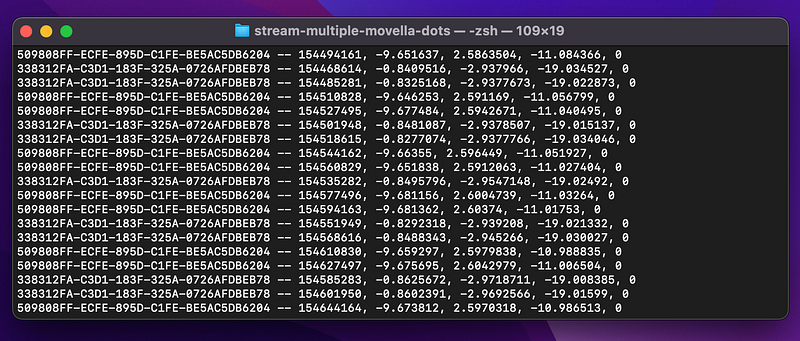
We’ll send all of this data to a SQLite database in the next steps.

Step 2: Create a SQLite Database

The easiest way to create a SQLite database in Python for any project is:

import sqlite3

conn = sqlite3.connect("test.db")

SQLite will connect to a database called test.db. If one doesn’t exist, SQLite will create one.

Multiple Databases

What we’re going to do is actually create multiple databases, one for each device. This is unorthodox, but needed, because SQLite won’t let multiple asyncio processes write to one database at the same time. However, we don’t want to upgrade to a bigger SQL version, because it requires servers and user accounts.

The next steps after that are:

  • Create a table to hold our data (like a spreadsheet)
  • Add rows to the table with DOT measurement data

We’ll end up with multiple movella_dot*.db files, with * being some number to differentiate them by DOT device. For example: movella_dot1.db and movella_dot2.db.

Creating the DOT databases

To create our databases, we’ll add this code to stream.py:

import sqlite3
...
def start_database(filename):
    conn = sqlite3.connect(filename)
    return conn
...
# This is the original connect() from the streaming script
async def connect(address):
    number = address[:2]
    connection = start_database(f"movella_dot{number}.db")
    database = connection.cursor()
    ...

We import SQLite, create a function to connect to the databases (start_database()), then call that function with our custom database name, movella_dot{number}.db.

To give the databases unique names, we grab the first two characters from the DOT’s address and put it in the database name with f"...{number}". (This type of formatting is called an f-string.)

If we run the code as-is, all it will do is create a few blank databases named movella_dot*.db. Since we’re using 2 DOTs for this example, we get two databases, movella_dot50.db and movella_dot33.db.
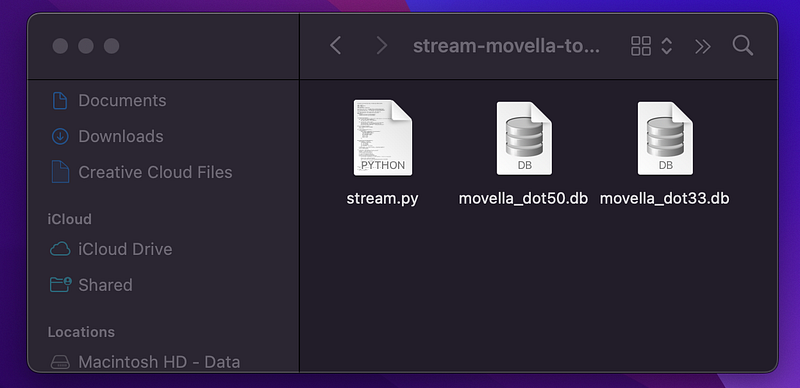
This is the full script with database-creation code:

# Stream Free Acceleration data from multiple Movella DOTs

import asyncio
import numpy as np
import sqlite3
from bleak import BleakClient

measurement_char_uuid = "15172001-4947-11e9-8646-d663bd873d93"
short_payload_char_uuid = "15172004-4947-11e9-8646-d663bd873d93"

# Replace this with a list of your DOT's UUID addresses 
# (or "MAC addresses" for Windows and Linux users)
addresses = [
    "509808FF-ECFE-895D-C1FE-BE5AC5DB6204",
    "338312FA-C3D1-183F-325A-0726AFDBEB78"
]

class NotificationHandler:
    '''This class allows us to add the DOT's UUID address to the data that gets printed'''
    def __init__(self, device_address):
        self.device_address = device_address

    def callback(self, sender, data):
        free_acceleration = encode_free_acceleration(data)[0]
        free_acceleration = str(free_acceleration)[1:-1]
        print(f"{self.device_address} -- {free_acceleration}")

def start_database(filename):
    conn = sqlite3.connect(filename)
    return conn

def encode_free_acceleration(bytes_):
    data_segments = np.dtype([
        ('timestamp', np.uint32),
        ('x', np.float32),
        ('y', np.float32),
        ('z', np.float32),
        ('zero_padding', np.uint32)
        ])
    formatted_data = np.frombuffer(bytes_, dtype=data_segments)
    return formatted_data

async def connect(address):
    # Connect to the database (and create it if it doesn't exist yet)
    number = address[:2]
    connection = start_database(f"movella_dot{number}.db")
    database = connection.cursor()

    nh = NotificationHandler(address)
    # Connect to the DOT and stream data
    async with BleakClient(address) as client:
        print(f"Client connection to `{client.address}: {client.is_connected}")
    
        # Subscribe to data notifications
        await client.start_notify(short_payload_char_uuid, nh.callback)

        # Set and turn on measurement mode
        binary_message = b"\x01\x01\x06"
        await client.write_gatt_char(measurement_char_uuid, binary_message, response=True)

        # Stream data for 10 seconds
        await asyncio.sleep(10.0)

async def main():
    await asyncio.gather(*(connect(addr) for addr in addresses))

if __name__ == "__main__":
    asyncio.run(main())

Let’s add a table to store the DOT data in.

Step 3: Create a table in each database

To create a table, we’ll use the SQL CREATE command inside of cursor.execute().

def create_database_table(cursor):
    cursor.execute('''
        CREATE TABLE IF NOT EXISTS free_acceleration (
            id integer PRIMARY KEY,
            bluetooth_address char(36),
            unix_timestamp real,
            dot_timestamp integer,
            accel_x real,
            accel_y real,
            accel_z real
        );
        ''')

In color format, this looks like:
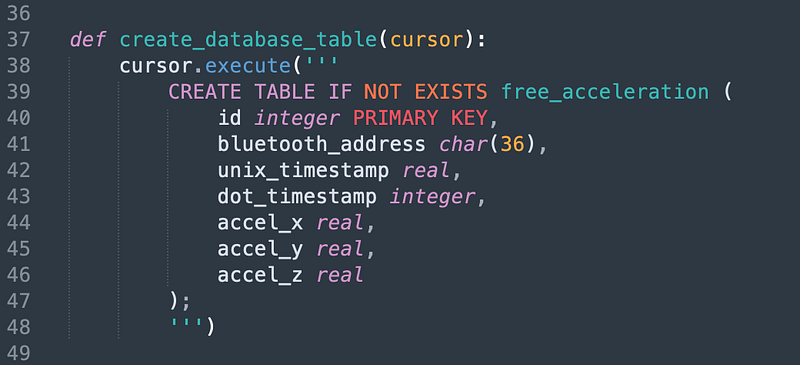
Above, we CREATE a table named free_acceleration with these columns:

  • id — a key to signify which row in the database it is. This isn’t 100% necessary, but reduces headaches for large datasets.
  • bluetooth_address — the UUID address of the Movella DOT
  • unix_timestamp — the actual time that the data was received
  • dot_timestamp — the timestamp from the DOT, which is made up by the device and doesn’t correlate with any human timezone
  • accel_x — the X of the accelerometer
  • accel_y — the Y of the accelerometer
  • accel_z — the Z of the accelerometer

Having a few timestamps, IDs, and addresses will help us keep track of all of the data when a lot of signals are coming in in realtime. The unix_timestamp will help especially, since the DOT’s timestamps appear arbitrary. (A timestamp of 1343451821 as seen below looks close to but is not actually related to any real timezone or time-keeping standard.)
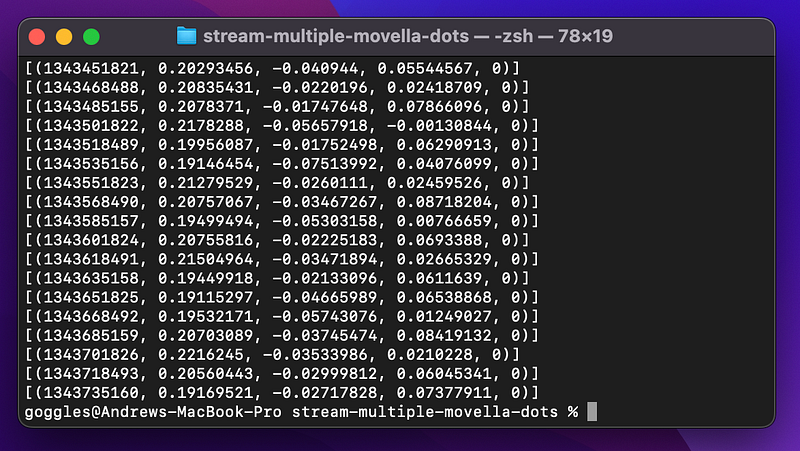
Add the above create_database_table() function near the top of your code and add a line to call it near the top of the main connect() function:

async def connect(address):
    number = address[:3]
    connection = start_database(f"movella_dot{number}.db")
    database = connection.cursor()
    create_database_table(database) # Add this line

The full script with database creation looks like so:

# Create a database to save Free Acceleration data from multiple Movella DOTs

import asyncio
import numpy as np
import sqlite3
from bleak import BleakClient

measurement_char_uuid = "15172001-4947-11e9-8646-d663bd873d93"
short_payload_char_uuid = "15172004-4947-11e9-8646-d663bd873d93"

# Replace this with a list of your DOT's UUID addresses 
# (or "MAC addresses" for Windows and Linux users)
addresses = [
    "509808FF-ECFE-895D-C1FE-BE5AC5DB6204",
    "338312FA-C3D1-183F-325A-0726AFDBEB78"
]

class NotificationHandler:
    '''This class allows us to add the DOT's UUID address to the data that gets printed'''
    def __init__(self, device_address):
        self.device_address = device_address

    def callback(self, sender, data):
        free_acceleration = encode_free_acceleration(data)[0]
        free_acceleration = str(free_acceleration)[1:-1]
        print(f"{self.device_address} -- {free_acceleration}")

def start_database(filename):
    conn = sqlite3.connect(filename)
    return conn

def create_database_table(cursor):
    cursor.execute('''
        CREATE TABLE IF NOT EXISTS free_acceleration (
            id integer PRIMARY KEY,
            bluetooth_address char(36),
            unix_timestamp real,
            dot_timestamp integer,
            accel_x real,
            accel_y real,
            accel_z real
        );
        ''')

def encode_free_acceleration(bytes_):
    data_segments = np.dtype([
        ('timestamp', np.uint32),
        ('x', np.float32),
        ('y', np.float32),
        ('z', np.float32),
        ('zero_padding', np.uint32)
        ])
    formatted_data = np.frombuffer(bytes_, dtype=data_segments)
    return formatted_data

async def connect(address):
    number = address[:2]
    connection = start_database(f"movella_dot{number}.db")
    database = connection.cursor()
    create_database_table(database)

    nh = NotificationHandler(address)
    # Connect to the DOT and stream data
    async with BleakClient(address) as client:
        print(f"Client connection to `{client.address}: {client.is_connected}")
    
        # Subscribe to data notifications
        await client.start_notify(short_payload_char_uuid, nh.callback)

        # Set and turn on measurement mode
        binary_message = b"\x01\x01\x06"
        await client.write_gatt_char(measurement_char_uuid, binary_message, response=True)

        # Stream data for 10 seconds
        await asyncio.sleep(10.0)

async def main():
    await asyncio.gather(*(connect(addr) for addr in addresses))

if __name__ == "__main__":
    asyncio.run(main())

After you run the script above, you can preview your new empty databases, movella_dot*.db, in a free app like SQLite Browser. If you open any of them, you’ll see that they have one empty table with all of the columns that we just made.
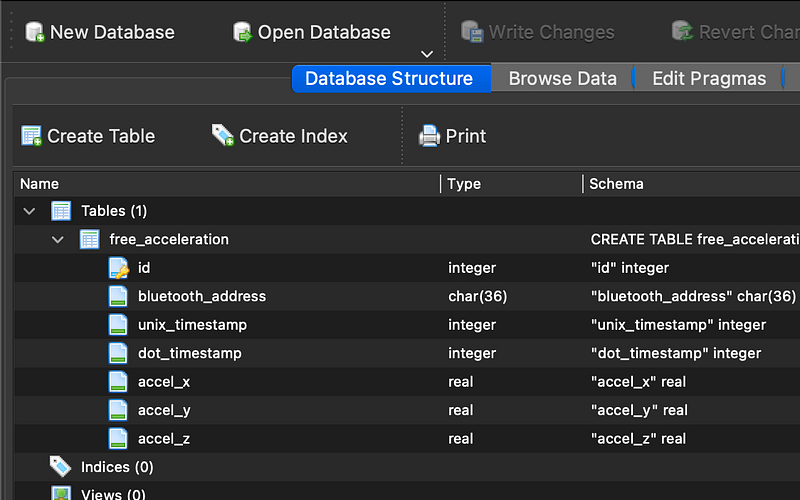
The last steps are to format the incoming data and save it to the databases. We’ll do this by putting a formatting function and a SQL statement in the same callback() function that prints the data.

Step 4: Format the data

Right now, the accelerometer data is in a string. We need to extract it and format it, so that we can write it to our SQLite databases.

The data looks like this, which is close to what we want:

But we’ll make a new formatting function and rewrite the callback() to prep the data for SQL.

Right now, we’re combining the address with the timestamp, and XYZ accelerometer data (and a zero for padding that the DOT happens to give us) as:

address -- timestamp, X, Y, Z, 0

Let’s change our callback like so to extract the variables (and import time):

import time
...
def callback(self, sender, data):
    free_acceleration = encode_free_acceleration(data)[0]
    free_acceleration = str(free_acceleration)[1:-1]
    dot_timestamp, x, y, z, zero = free_acceleration.split(",")
    unix_timestamp = time.time()
    print(f"{self.device_address}, {unix_timestamp}, {dot_timestamp}, {x}, {y}, {z}")

We’re extracting the data into separate variables. And we’re printing it back out for now as a sanity check before giving it to SQL.
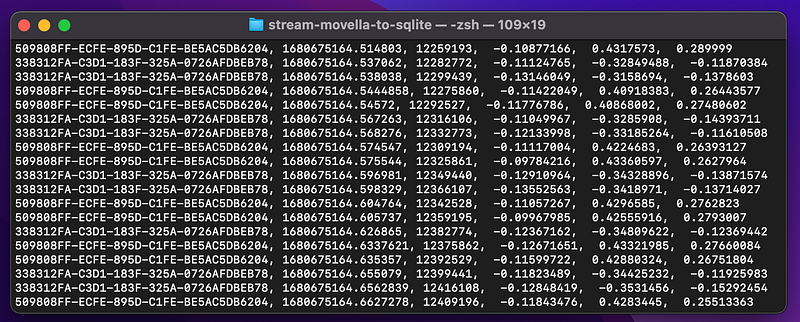
The data looks appropriately formatted. Now, we can write it to our database.

Step 5: Write the data to the databases

We’ll write each piece of accelerometer data we get to each database with the SQL INSERT command:

database.execute('''
    INSERT INTO free_acceleration
    (bluetooth_address, unix_timestamp, dot_timestamp, accel_x, accel_y, accel_z)
    VALUES
    ({... we'll put our newly extracted variables here ...})
    );
    ''')
        

And we’ll put this into a new function, write_to_database(), below.

Note that there is no id column, like we had in our CREATE TABLE statement. That’s because id is a random value automatically generated by SQLite for each row of data.

Create a new function write_to_database() with the following:

def write_to_database(database, address, unix_time, dot_time, x, y, z):
    database.execute(f'''
        INSERT INTO free_acceleration
        (bluetooth_address, unix_timestamp, dot_timestamp, accel_x, accel_y, accel_z)
        VALUES
        (\"{address}\", \"{unix_time}\", \"{dot_time}\", \"{x}\", \"{y}\", \"{z}\");
        ''')

This takes the arguments to write_to_database() and formats that them into the VALUES (...) section of the INSERT command.

Note how we use f-strings to insert the {variables} into the SQL.

Now, we can put write_to_database() into our original callback() function, so that every piece of incoming data gets written to the appropriate database:

def callback(self, sender, data):
        free_acceleration = encode_free_acceleration(data)[0]
        free_acceleration = str(free_acceleration)[1:-1]
        dot_timestamp, x, y, z, zero = free_acceleration.split(",")
        unix_timestamp = time.time()

        # This is the new line
        write_to_database(self.database, self.device_address, unix_timestamp, dot_timestamp, x, y, z)
        
        print(f"{self.device_address}, {unix_timestamp}, {dot_timestamp}, {x}, {y}, {z}")

One extra thing is necessary. In order to give the NotificationHandler class (and thus the callback() function) access to the database, we have to store the database a self.database variable in the class. That means we have to write a way to give NotificationHandler the database when both are created.

We have to change two things:

  • The __init__ function of NotificationHandler, so that it can accept and store the database object
  • Give the database to nh = NotificationHandler() when we create nh

Change the top of the NotificationHandler class to the following:

class NotificationHandler:
    '''This class allows us to add the DOT's UUID address to the data that gets printed'''
    def __init__(self, device_address, database):
        self.device_address = device_address
        self.database = database # Now we can use the database in callback()

And change the nh = NotificationHandler(...) part to:

async def connect(address):
    number = address[:2]
    connection = start_database(f"movella_dot{number}.db")
    database = connection.cursor()
    create_database_table(database)

    # Add `database` as a second argument here
    nh = NotificationHandler(address, database)

This changes the full script to:

# Stream Free Acceleration data from multiple Movella DOTs

import asyncio
import numpy as np
import sqlite3
import time
from bleak import BleakClient

measurement_char_uuid = "15172001-4947-11e9-8646-d663bd873d93"
short_payload_char_uuid = "15172004-4947-11e9-8646-d663bd873d93"

# Replace this with a list of your DOT's UUID addresses 
# (or "MAC addresses" for Windows and Linux users)
addresses = [
    "509808FF-ECFE-895D-C1FE-BE5AC5DB6204",
    "338312FA-C3D1-183F-325A-0726AFDBEB78"
]

class NotificationHandler:
    '''This class allows us to add the DOT's UUID address to the data that gets printed'''
    def __init__(self, device_address, database):
        self.device_address = device_address
        self.database = database

    def callback(self, sender, data):
        free_acceleration = encode_free_acceleration(data)[0]
        free_acceleration = str(free_acceleration)[1:-1]
        dot_timestamp, x, y, z, zero = free_acceleration.split(",")
        unix_timestamp = time.time()
        write_to_database(self.database, self.device_address, unix_timestamp, dot_timestamp, x, y, z)
        print(f"{self.device_address}, {unix_timestamp}, {dot_timestamp}, {x}, {y}, {z}")

def start_database(filename):
    conn = sqlite3.connect(filename)
    return conn

def create_database_table(cursor):
    cursor.execute('''
        CREATE TABLE IF NOT EXISTS free_acceleration (
            id integer PRIMARY KEY,
            bluetooth_address char(36),
            unix_timestamp real,
            dot_timestamp integer,
            accel_x real,
            accel_y real,
            accel_z real
        );
        ''')

def write_to_database(database, address, unix_time, dot_time, x, y, z):
    database.execute(f'''
        INSERT INTO free_acceleration
        (bluetooth_address, unix_timestamp, dot_timestamp, accel_x, accel_y, accel_z)
        VALUES
        (\"{address}\", \"{unix_time}\", \"{dot_time}\", \"{x}\", \"{y}\", \"{z}\");
        ''')

def encode_free_acceleration(bytes_):
    data_segments = np.dtype([
        ('timestamp', np.uint32),
        ('x', np.float32),
        ('y', np.float32),
        ('z', np.float32),
        ('zero_padding', np.uint32)
        ])
    formatted_data = np.frombuffer(bytes_, dtype=data_segments)
    return formatted_data

async def connect(address):
    number = address[:2]
    connection = start_database(f"movella_dot{number}.db")
    database = connection.cursor()
    create_database_table(database)

    nh = NotificationHandler(address, database)
    # Connect to the DOT and stream data
    async with BleakClient(address) as client:
        print(f"Client connection to `{client.address}: {client.is_connected}")
    
        # Subscribe to data notifications
        await client.start_notify(short_payload_char_uuid, nh.callback)

        # Set and turn on measurement mode
        binary_message = b"\x01\x01\x06"
        await client.write_gatt_char(measurement_char_uuid, binary_message, response=True)

        # Stream data for 10 seconds
        await asyncio.sleep(10.0)

async def main():
    await asyncio.gather(*(connect(addr) for addr in addresses))

if __name__ == "__main__":
    asyncio.run(main())

This will start sending data to our databases! However, we need one last step: Saving the data with SQLite’s commit() function.

Step 6: Save the data to the databases

If we run the script from Step 5 and open one of our movella_dot*.db files in SQLite Browser, we won’t see any actual data.
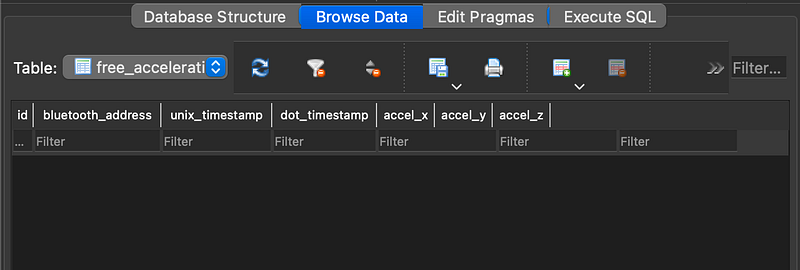
Our `free_acceleration` table is empty, because we didn’t run the commit() function on our database.

That’s because we didn’t save the database with commit().

To fix this, at the very end of async def connect() , add a single connection.commit():

async def connect(address):
    ...
    async with BleakClient(address) as client:
        ...

    connection.commit() # Add this line

This will save all the data in our databases. Make sure it is in the connect() function but outside of the BleakClient() as client block.

If we run the script again and open one our movella_dot*.db files, we’ll see our saved DOT data.
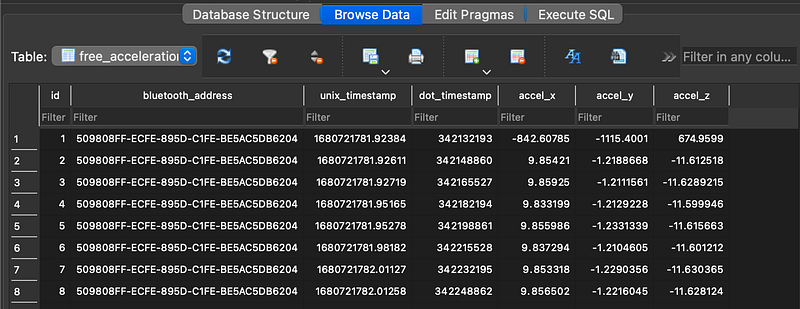
We have the DOT’s UUID address, the unix timestamp, the DOT’s timestamp, and the accelerometer’s X, Y, and Z values.

That is all that is needed to get your Movella/Xsens DOT data into SQLite. There were actually a lot of weird quirks to overcome with code. Thanks for sticking it out and reading.

Questions and Feedback

If you have questions or feedback, email us at [email protected] or message us on Instagram (@protobioengineering).

If you found this article useful, you can help us complete more content like this by donating a coffee!

The Full Script

# Stream Free Acceleration data from multiple Movella DOTs

import asyncio
import numpy as np
import sqlite3
import time
from bleak import BleakClient

measurement_char_uuid = "15172001-4947-11e9-8646-d663bd873d93"
short_payload_char_uuid = "15172004-4947-11e9-8646-d663bd873d93"

# Replace this with a list of your DOT's UUID addresses 
# (or "MAC addresses" for Windows and Linux users)
addresses = [
    "509808FF-ECFE-895D-C1FE-BE5AC5DB6204",
    "338312FA-C3D1-183F-325A-0726AFDBEB78"
]

class NotificationHandler:
    '''This class allows us to add the DOT's UUID address to the data that gets printed'''
    def __init__(self, device_address, database):
        self.device_address = device_address
        self.database = database

    def callback(self, sender, data):
        free_acceleration = encode_free_acceleration(data)[0]
        free_acceleration = str(free_acceleration)[1:-1]
        dot_timestamp, x, y, z, zero = free_acceleration.split(",")
        unix_timestamp = time.time()
        write_to_database(self.database, self.device_address, unix_timestamp, dot_timestamp, x, y, z)
        print(f"{self.device_address}, {unix_timestamp}, {dot_timestamp}, {x}, {y}, {z}")

def start_database(filename):
    conn = sqlite3.connect(filename)
    return conn

def create_database_table(cursor):
    cursor.execute('''
        CREATE TABLE IF NOT EXISTS free_acceleration (
            id integer PRIMARY KEY,
            bluetooth_address char(36),
            unix_timestamp real,
            dot_timestamp integer,
            accel_x real,
            accel_y real,
            accel_z real
        );
        ''')

def write_to_database(database, address, unix_time, dot_time, x, y, z):
    database.execute(f'''
        INSERT INTO free_acceleration
        (bluetooth_address, unix_timestamp, dot_timestamp, accel_x, accel_y, accel_z)
        VALUES
        (\"{address}\", \"{unix_time}\", \"{dot_time}\", \"{x}\", \"{y}\", \"{z}\");
        ''')

def encode_free_acceleration(bytes_):
    data_segments = np.dtype([
        ('timestamp', np.uint32),
        ('x', np.float32),
        ('y', np.float32),
        ('z', np.float32),
        ('zero_padding', np.uint32)
        ])
    formatted_data = np.frombuffer(bytes_, dtype=data_segments)
    return formatted_data

async def connect(address):
    number = address[:2]
    connection = start_database(f"movella_dot{number}.db")
    database = connection.cursor()
    create_database_table(database)

    nh = NotificationHandler(address, database)
    # Connect to the DOT and stream data
    async with BleakClient(address) as client:
        print(f"Client connection to `{client.address}: {client.is_connected}")
    
        # Subscribe to data notifications
        await client.start_notify(short_payload_char_uuid, nh.callback)

        # Set and turn on measurement mode
        binary_message = b"\x01\x01\x06"
        await client.write_gatt_char(measurement_char_uuid, binary_message, response=True)

        # Stream data for 10 seconds
        await asyncio.sleep(10.0)

    connection.commit()

async def main():
    await asyncio.gather(*(connect(addr) for addr in addresses))

if __name__ == "__main__":
    asyncio.run(main())

Related Resources

Questions and Feedback

If you have questions or feedback, email us at [email protected] or message us on Instagram (@protobioengineering).

If you liked this article, consider supporting us by donating a coffee.

Other Bluetooth and Python Stuff

Python
Bluetooth
Wearables
Mac
Kinesiology
Recommended from ReadMedium