
ILLUMINATION CHALLENGE 100 — DAY 35
How to Save Data with Live Transcribe
Details for the IVANA method
This post is a response to the comment by the esteemed Dr. Preeti Singh on how to save data for the voice transcripts using my IVANA method.
I figured others might also have the same question so here is a detailed response with screenshots.
App Details
The Voice Transcript App I am using is called “Live Transcribe” with a green logo as seen below. It is FREE on Android mobile apps Play Store. Once installed, this is how it looks on my phone.
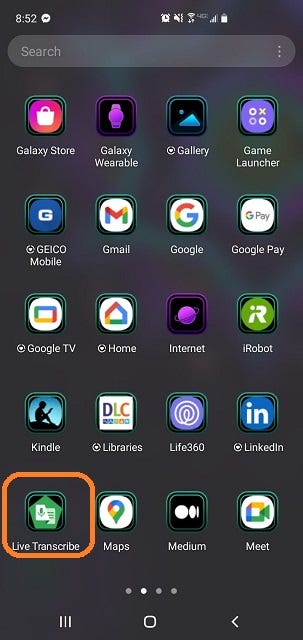
Inside the app, in the app settings, there is a toggle button to save transcripts for 3 days. Please enable it!
Using the App
Whenever you are ready to dictate, open the app. A mic will appear on an empty screen. Start dictating — transcripts will appear automatically in real-time!
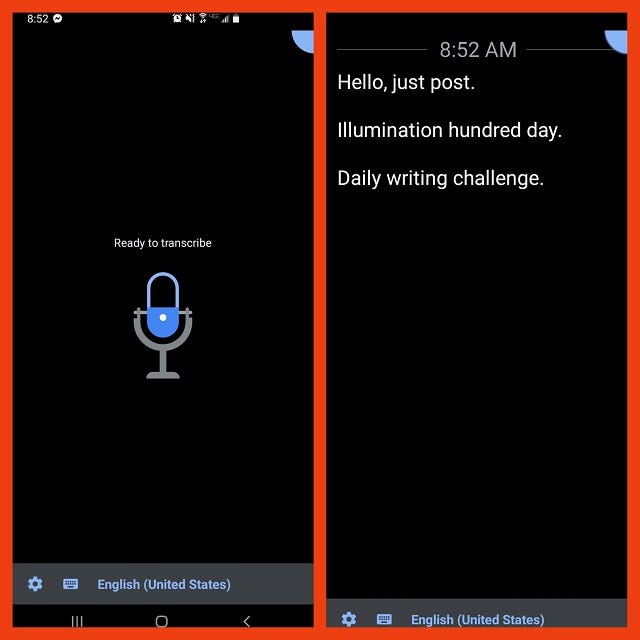
I have used this app holding my phone at distances of 3 feet or fewer. It transcribes everything even coughing, baby crying; so if you are in a noisy environment use headphones. For me, this app helps reduce typing time and I can dictate while cooking/ rocking the baby/ etc. Hence I love it! You may not agree based on your goals; more pros and cons in the original article. (link above)
Saving the Transcript
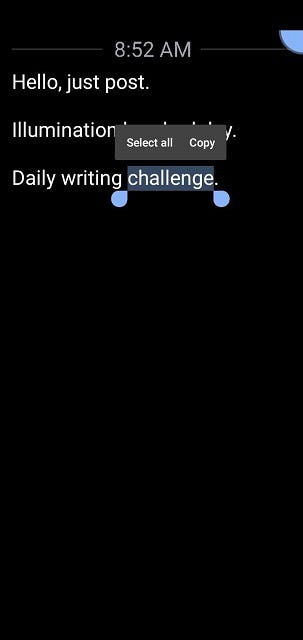
Once you complete dictating, simply click anywhere in the transcript. You get the two options above. I always use “select all” followed by “copy” and paste it into my handy Evernote app (another mobile app). Evernote is cloud-based so I can access it across all my devices and even online!
If you need to select only a subset of the transcript, use the cursor with your fingers to choose what you want. I rarely, if ever, do that.
All done!
That is it. Once the app is installed, it is open-dictate-copy-save! Easy peasy steps to get your ideas on paper!


