
How To Procrastinate Productively On Medium
Yes, it is possible to accomplish this oxymoron

I like making pretty tables and spreadsheets.
Somehow, the neat lines and clean presentation make me feel at peace. Maybe I have a heightened need for organization, maybe I am lowkey OCD, but I don’t mind. I enjoy myself this way.
All through school and university I used this table-making method to help me study. Finding a home for information and categorizing things is more relaxing and less overwhelming than just reading words or thinking in an unproductive loop.
What is interesting is that categorizing information into pretty tables isn’t just a useless, purely aesthetic pastime. It is actually productive. But it feels like procrastination. Why, you ask? Because the brain learns better through categorical thinking. Research says so:
The ability to group items and events into functional categories is a fundamental characteristic of sophisticated thought.
So here you are, you and your sophisticated brain. You want to work, but are uninspired to write. You could do a million things, but instead, you choose to be ‘productive’.
So you open up yours truly: Microsoft Excel. It’s a hate-love relationship at this point, but you know you can count on it to look productive.
Your eyes glisten at the sight of the white canvas, ready to be decorated by your mind's playground of so-called ‘unproductive thoughts’. The truth is, all thoughts are productive. Okay maybe not. But let’s say they are.
You start with a single column: “Articles”. All those brief eureka moments that overwhelm your day now have a home. So you start typing. Ideas, words, or maybe even, funny titles. They are all there before you, and you are already feeling the fuel.
Great, so what now? I have a list of drafts on Excel and Medium?
No, my friend, that was just the beginning. Now is where the real magic begins.
Build the Foundation
Every home needs a foundation. I have no idea why this analogy felt appropriate, but we are going with it.
Once your Excel is up and running, you will start by labeling the sheets at the bottom of your spreadsheet. These will help you to navigate smoothly through your writer’s mind.

The first sheet is your main entrance: Pubs. No, not the bar, I am not promoting drunk writing. The Publications sheet is where you list all of the publications you are a writer for, or, that you wish to be a writer for.
It’s a good way to take note of where your stories can go. Sometimes you might write a piece and not know where to put it. This solves that problem.
Next, we have the open-space. This is where you spend most of your day. The Monthly Articles. Pretty self-explanatory, but we’ll get into more details in a minute.
Finally, we have the bedroom. The Top Tags tab. This analogy has officially stopped making any sense, and I’m just milking it. This tab is where you will make a list of all the top tags you’re interested in, and group them into categories for easy access.
Let’s take a house tour now, shall we?
The Pubs Tab
So as I mentioned above, this first tab is the groundwork of your productive procrastination. If you’re eager to explore Medium, and all the niches and publications it has to offer, it’s important to get organized.
These are the features that this spreadsheet provides:
- A column for all the pubs you are interested in writing for
- A column indicating which of these pubs you are currently a writer for, which you are not writing for yet, and those that are still pending approval.
- A column describing each of these pubs so that you know where to pitch which stories to.
- A column that tells you the response time of each pub. Sometimes this is written in the pub’s submission guidelines, other times, you just find out from experience. Be sure to include this one to avoid overlapping submissions and sending a piece to two pubs at once by mistake (been there, done that, never again).
- A column that lists how many times you have been published in each pub.
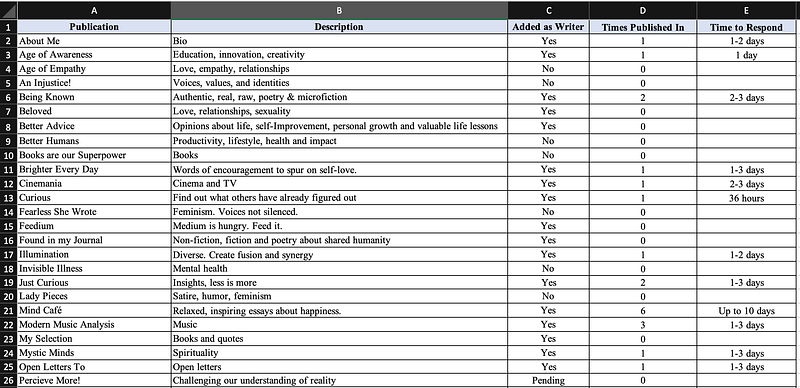
This is a section of my list. It goes on, and I keep adding to it because there is much to explore on Medium. And that’s the fun of it, right?
The Monthly Articles Tab
We have arrived in the grand open space. The tab where you spill your ideas of the month and turn them into published stories.
This tab is easy to replicate for each new month. It will not only help you to keep track of your whirlwind of ideas, but it will also keep you accountable, motivated, and organized in case you’re writing a lot that month.
The features of this tab include:
- A column with all of your article ideas/titles
- A column with the publications you want to submit those pieces to
- A column with the percentage of how much of each story you have written
- A column with the date you submitted each piece to a publication
- A column with the designated time limit in which you should have heard back from the publication. This is arguably the most important feature because it will let you know when it’s okay to submit to your plan B, C or W. Don’t touch anything before that date.
- A column that lists when your story has been accepted
- A column that lists when your story has been published. No, accepted and published are not the same thing. Your story can be accepted but scheduled to be published on a different day.
- 5 columns for the 5 tags you can add to each story. If you are into getting a top writer status, this can be useful so that you keep track of which top tags you are using and how often. I put all the top tags I use in bold.
- A column that lists how many of your stories were chosen for further distribution. (Note: stories about Medium don’t get curated.)
- A column with a friend link to your story. (In case your mom or Medium-free relative wants to read your story and you can’t be bothered to go through all your articles to find the link. Easy access = happy relatives.)
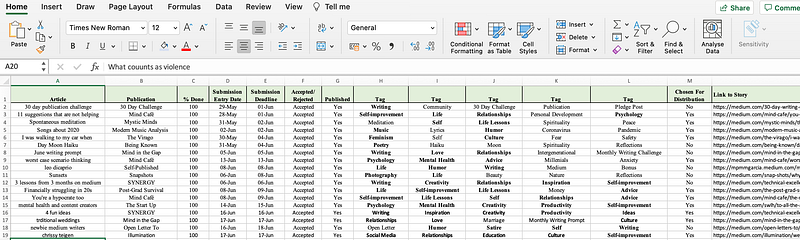
At the end of each month, you can analyze your data if you want to. This could mean adding up the total number of stories you wrote, or counting how many got curated, how many of the same tags you used, how many stories got rejected/accepted, and how many ideas were left unwritten.
You can always push these unwritten stories to the next month, or you can leave them in the reject pile of that month. Up to you.
The Top Tags Tab
Last but not least, we have arrived at the bedroom. No, it still doesn’t work. It’s just the Top Tags tab. End of story.
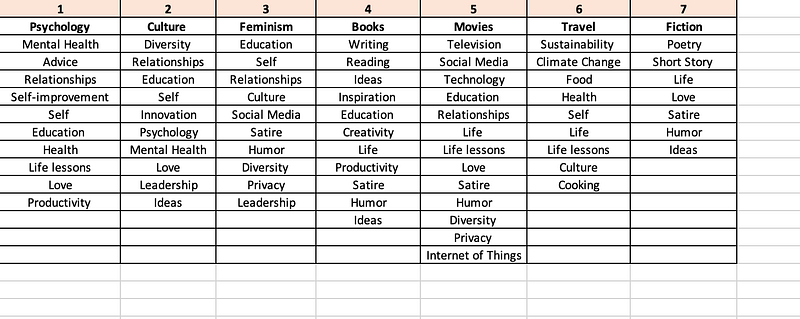
This tab is quite self-explanatory. You just go through the handy-dandy list of all the top tags on Medium and select the ones you like. Then, you group them into categories.
I like to make the first tag bold, as it sets the mood for that category. Then I just exhaust all the others into each column until they saturate. I like to find intersections in my writing, so I make sure to repeat the same tag in more than one column.
That’s All Folks!
You can now feel productive and sleep well knowing that although you didn’t publish or write a story, you organized the living day out of your work, and you are ready for the writing inspiration when it hits.
That’s what I call productive procrastination.
If you would like a template of these Excel spreadsheets, I have got you covered. Sign up for my weekly newsletter and receive a template for free.


