
Work Flow Automation
How to Post Giant 10,000+ Sets of NFTs on OpenSea
So, you’ve got 10,000 graphic files as NFTs and need to mint and list them. That is time consuming for sure! Can it be automated?
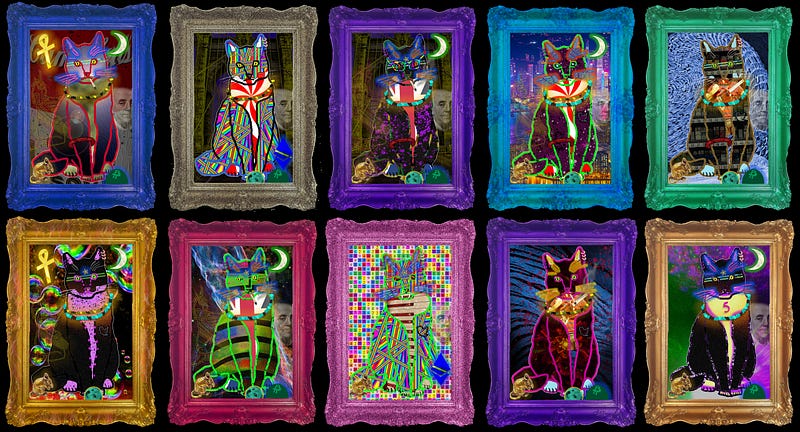
TLDR UPDATE #2: The article on this page (meaning, skip the link below and just keep on reading) talks about automating the “lazy-minting” / “gasless minting” that Opensea offers. But this is completely different from mint-on-demand style NFT offerings, which is probably what you really want / need. For that, you need generative art coding, a minting page, and a smart contract. So for mint-on-demand information, go here:
But, as I said, for the original article text, which talks about using macro software to kinda-sorta get 10,000 items up onto Opensea, read on:
As NFTs are relatively new (well, newly popularized), it’s not surprising that, even for the largest marketplace, the available API does not seem to be as fully functional as one might hope at this stage. I mean, I could be wrong, but it seems that the OpenSea API (as of this writing) is more about retrieving than it is about posting / minting / listing. All I see is:
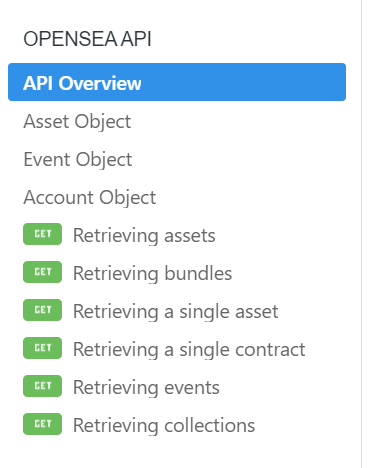
And that’s great, of course. I’ve already tapped into that API to help me pull data from my collection into other scripts. But, wow, when you’ve just generated 10,000 unique NFTs and now want to post them, that’s a herculean task — and one made up of largely repetitive tasks. It seems ripe for an API, and I imagine that one surely must be in the works, if it isn’t already there and I just can’t seem to find it!
(UPDATE: As far as I am into NFTs these days, I’ve come to realize that you need your own smart contract in order to batch mint. You can’t programmatically interact with OpenSea’s shared gasless contract in the way that many want to. But, really, even with your own smart contract, you usually would not want to batch-mint, as the gas fees would be crazy right now. What you want is a mint-on-demand system where buyers can come to your web site and mint them themselves via a transaction that makes the purchase and delivers the NFT to their wallet, thus showing it on their OpenSea account and within your OpenSea collection, and for which the buyer pays gas fees. I have information on that here, as well as info on my generative programming services.)
Anyway, it seemed like just brute force / manual labor must be the only way. That is, until I got to thinking that, with so many repetitive tasks, maybe I could just setup a macro. (I say “just” as though it were easy, which I wouldn’t exactly call it.)
Anyway, here’s what I did, and how it’s working so far!
Enter the Macro World
I got to thinking about an early programming gig I had where, quite by chance, a woman at the Better Business Bureaus HQ, which was in Arlington, VA, at the time, mentioned to me that they were going to spend like $30k on a project converting one type of file into another, and it was going to take like 3 months. As she described the challenge to me, I thought about macros and boldly stated I could do it in about a month for half the cost. And that was how I got into freelancing in the first place.
I remember it took me a couple of days to perfect that macro but, once I got it truly dialed in, I kind of just sat there and watched the computer do all of the work lightning-fast. It gave me time to calculate my profitability, which was absolutely outrageous.
Anyway, listing on OpenSea struck me as the same kind of thing. So, I went out and searched for some macro software. There are a zillion options, and I honestly don’t know if I got the best one. But, “Macro Scheduler” seemed decent to me — powerful, and fairly priced. (That’s not an affiliate link. It’s just FYI.) I think it’s normally like $20/mo., but there’s a 20% off coupon at the moment, which gives you an ongoing monthly subscription at around $16. Not bad at all, if you’re going to use the software.
The Learning Curve
As expected, it didn’t just do everything right out of the box. You have to figure out how the thing works and go from there. I poked around a bit, probably dived in a little quicker than I should have, and figured maybe the best way was for me to just press “record” and see what code comes up as it records all of the things I did. (And that recording, btw, was a complete mess. BUT, it also showed me some of the code for various functionality within the software — and, if you’re already a programmer, that’s just super-helpful.)
My Approach
Again, you almost need to be a programmer to really make use of this kind of thing. For me, the task was to fill out web forms based on an Excel spreadsheet. (To get to this part, of course, I wrote a program to output all of my NFT data — NFT name/description, file location on my PC, price, etc. — into a spreadsheet first.) Well, on their “proof of concept” video showing their macro program doing this exact thing, numerous people complained that they do not offer any code samples of how to accomplish this. Some said that they’re just showing this in order to get clients to hire them to write custom scripts. I don’t know … I mean, it would have been nice to have some starting points for this, but again, if you’re a programmer and see something working in a video, you pretty much figure you can work something up.
Anyway, so I bought it and just dove in. And, like I said, I figured that the easiest (or, best) way to do this would be if I made a spreadsheet first. So I did that and got to work.
Most macro software records mouse coordinates and various events such as keyboard entry, mouse clicks, and window loads, etc. So, what I wound up with was a very precise setup (meaning, I had comments atop my code to place the OpenSea window in an exact spot, and in an exact size window, and then Excel just below it). There may be better ways to do this, but this wasn’t for general release; it was just meant to be functional on my personal machine.
And so I got a lot of code like this:
// MOVE MOUSE TO EXCEL
MouseMove>487,1170
Wait>0.1
LClick
Wait>0.1
// PRESS COPY (cursor to be in target cell to begin with!)
Press LCTRL
Wait>0.1
Send>c
Wait>0.1
Release LCTRL
Wait>0.1// CLICK MOUSE TO ABOVE SCREEN:
MouseMove>354,1084
LClick
Wait>0.1// PASTE INFO FROM EXCEL INTO **TITLE** FORM INPUT
Press LCTRL
Wait>0.1
Send>v
Wait>0.1
Release LCTRL
Wait>0.1// MOVE MOUSE TO RIGHT OF SCREEN, CLICK TO scroll down:
MouseMove>1521,1084
Wait>0.1
LClick
Wait>0.1// MOVE MOUSE TO **DESCRIPTION** FORM and CLICK!:
MouseMove>711,802
Wait>0.1
LClick
Wait>0.1// PASTE INFO FROM EXCEL
Press LCTRL
Wait>0.1
Send>v
Wait>0.1
Release LCTRL
Wait>0.1… and so on. (I won’t paste my whole code here, as it won’t pertain to other projects. But, you can kind of make sense of some of that just by looking at it.) In a pseudo-code description, I’d summarize the process like this:
- Have OpenSea’s “create” page open in your collection
- Go down to Excel and copy the title
- Go back up to the OpenSea browser and paste it in the title
- (For me, I reused the title in the description also.)
- Go back to excel, tab over to where I kept the file location path
- Go back to OpenSea and click the file upload / paste that path. This loads the file (which I figured would be 100x easier than having a File Explorer window open and trying to iterate through that).
- Click to create the asset / NFT
- Wait for that page to load / then click to VISIT the NFT
- Then click to SELL the NFT
- Then go back to Excel and grab the price for that one
- Then go back to OpenSea and paste the price, and click to list it.
- Then wait for MetaMask and have the macro “sign”
- Then wait for that to finish
- Then load up a new “create page”
- Then go to Excel, mark the last one as done, and down-arrow to the next row.
- Then repeat the whole thing X times. (My initial macro routine went on for 222 lines of code, and included a loop so I could have it repeat the process X times.) For the repeat, you just set up a loop, like so:
// SETUP LOOP:
Let>loop_count=0
Repeat>loop_count
// YOUR ENTIRE CODE HERE //Let>loop_count=loop_count+1
Until>loop_count=2// and of course you change the loop_count as you like.Note: Their command reference is a giant help!
So, How Did It Work?
Well, so far … decent. With macros you have to “tune” them, as there’s always room for improvement, wither it’s fixing bugs or just improving/optimizing timing, etc. I know that I used to be able to knock out almost two of these listings in a minute manually. And, with this macro, it handles … still two per minute. lol. So, no giant time saving (as I really did have a slick manual process down).
BUT, the big advantage is that it’s now 100% automated, and I can do other stuff while this is ongoing. I’ve listed 200 NFTuxedoCats so far using this method. But it’s not yet perfected.
As any programmer knows, testing is paramount. Once it “worked,” I had it do multiples, and then it didn’t work. And then I fixed those issues and retested, and it worked. And then it didn’t work. And so on.
Having it sign my MetaMask proved more tricky that it should have. I’m not sure why, but that particular popup window failed to cooperate with me for a while. I finally got that to work (almost all of the time) by first clicking into the popup, and then double-clicking twice on the “sign” button. (I have no idea why this worked, but I’ll take it.) (That code was:)
// SIGN METAMASK! -- kina weird clicking to make this work!!
WaitWindowOpen>MetaMask Notification
MouseMove>1229,672   // this was coords for just clicking into it
LClick
Wait>0.8
MouseMove>1400,840   // and this was where the "SIGN" button was
LDblClick
Wait>0.2
LDblClick
Wait>0.8     // and all of that above was me trying to get it to
             // actually click! (Which now it does.)
I think the toughest challenge is the screwiness of the internet, as you’re always waiting for windows to open or reload, and sometimes there are just glitches in that process. I turned the program on this morning and had it set to do 50 repetitions while I ran to the store. When I came home, it had crashed out on the 3rd or 4th iteration. So I cleaned up the mess and reset it, this time asking it for 20 reps. And I sat there and watched it execute flawlessly.
And, that makes it tough because, as a programmer, you want something to break right in front of you so you can understand what the issue is and build in some error handling for whatever it was. But, in truth, I know it was just various slow-loading pages that crop up. OpenSea in particular can get slightly glitchy at times. I’ve noticed that over the months. It’s usually short-lived, though — perhaps as they push new code or experience traffic spikes. It’s to be expected.
Other benefits!
One other cool thing from all of this is that I found you can make your pricing a whole lot more dynamic by doing it this way. While some generative NFT sets are all the same price, many like to ramp up pricing for rarer NFTs in the set. For example, imagine that you can assign a rarity score to your NFTs, ranging from commons to the most rare. Well, if you can do that (which I can from my system, and I imagine is fairly routine for others, too), then you can output custom pricing for the Excel spreadsheet. For example, this cat…
… is rarer than 99.45% of the others minted / listed so far. So, when I was generating the Excel sheet for use in listing, I dynamically set the price at .1ETH higher than the commons. That may not mean much to a reader out of context. But basically this is way of integrating your NFT pricing into your code to make the listing a little simpler. I recall putting one line in the Excel output code that says, “If this is the 10000th NFTuxedoCat, make the price 1 ETH. Just because.”
Anyway, my goal is to have this macro become a highly dependable method that I *can* switch on and leave home while it runs (at least until I can leverage an API to do it in a much better way!). I’m sure I’ll get there in time. For now, at least it’s a general improvement.
→ Did you like this article? If so, buy yourself a NFTuxedoCat! ←
UPDATE: For reasons unrelated to this macro, I actually decided to mint only (not mint and list) at this point in my NFTuxedoCats project. And this made the macro considerably easier (fewer steps / fewer opportunities for something to go wrong). Today, for example (7–20–21), I had it mint about 500+ cats during a few sessions when I was able to leave my computer alone. The macro died on me a couple of times (likely from OpenSea server outages, which happened a few times today), but otherwise ran well! I’m sure I’ll be at 10,000 minted cats within a few weeks.
Again, this article now seems pretty rudimentary to me, even though at the time I wrote it, it served its purpose. But really, the start of the rabbit hole is in this piece:
