
How to Memorize Things Easily: Anki

When it comes to memorizing things, a well-known method exists to make the process easier: spaced repetition learning.
What is spaced repetition learning, what is Anki, how to use it to memorize things… I’ll answer these questions today.
Spaced Repetition Learning
It’s not new, we remember better things that repeat over time, and we forget things that don’t. For example, do you remember where you parked your car last car in a big parking next to a shopping center? I’m sure you don’t, but you probably remember the birthdays of the people you love, because they repeat each year.
This is how natural memory works. The information stored as these repeating over time. Spaced repetition learning consists of taking advantage of this natural behavior to learn things easily. And it works with everything you can learn.
Perhaps you want to learn a new language, or you want to learn a piano piece, etc… I’m myself a pianist, so I will tell you how I use spaced repetition learning to learn complex pieces:
- I learn the piece a first time, to a fluent state.
- I take a break of a few months without playing the piece.
- I learn the piece again as if it was a complete new piece.
- Break again of at least a year.
- I learn again.
After these 5 steps, I know near perfectly the piece.
For more general learning, you can also take advantage of the spaced repetition learning. For example, if you want to learn the capital of each country, you can start with learning them in one day. The next day, you learn them again. Then, you wait 3 days and you learn them again. Then, you wait 1 week. Then, 1 month. Etc…
You can set up something like this using reminders, but it’s not very convenient. The best way to do this is to use Anki.
What is Anki
Anki is a spaced repetition learning software you can use to build flashcards, and memorize them. For example, I use Anki after reading a book to memorize specific things in the book.
Anki makes the process easier as it includes an algorithm suggesting you the flashcards you have to learn every day. If you have difficulties learning the flashcard, it will show it to you the next day. If you found the card easy to learn, it will show it to you 3 days later. Etc…
How to Install Anki
I have some good new for you. Anki is free, so you can download it now. Just go to https://apps.ankiweb.net/#download and download the version compatible with your OS. Anki can work on Windows, Linux, and macOS. It can also work on mobile because mobile apps exist. It can also run in the web browser because it exists a web client.
How to Use Anki
Once Anki is installed, you have to create flashcards or import existing ones from other users to start learning.
By clicking “Add” in Anki, you can add a new flashcard. In the modal, you can choose a deck for your flashcard. Decks are just collections of cards. A flashcard has a front and a back. The front is the question, and the back is the answer. You can also add tags to indentify flashcards. I use tags a lot, and I think you should do the same because this way it’s easier to navigate through thousands of flashcards.
To download cards from other users, you just have to click on “Get Shared” at the bottom. Then, you can search in categories or use the search bar to find a deck you want. You can then download it. Finally, you have to double-click on the deck file to open it in Anki and get your cards.
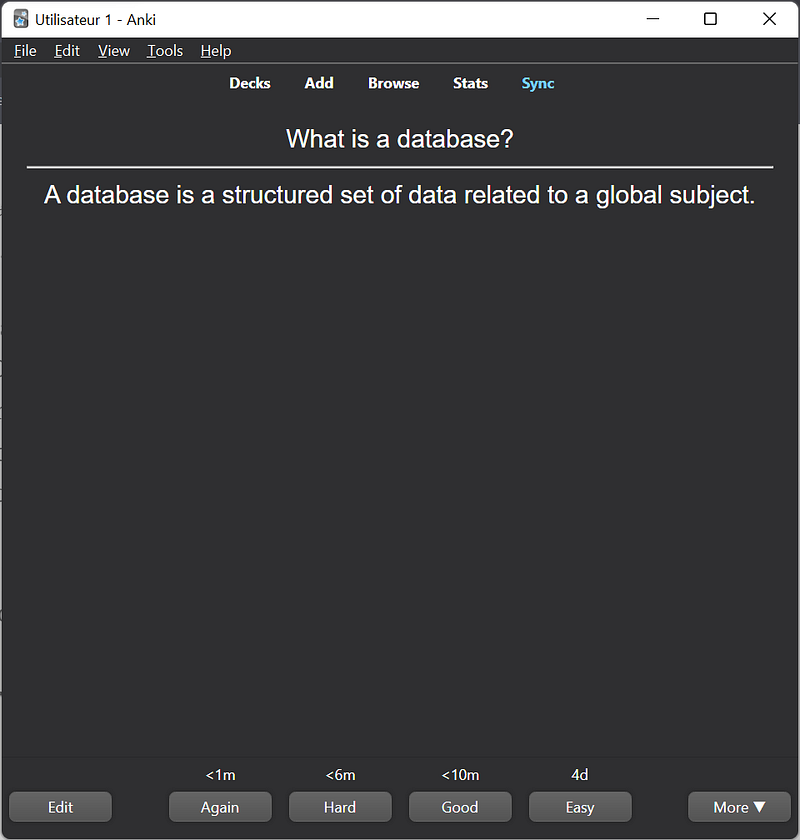
Once you have a deck, you can start learning. Click on it, then “Study Now”. As you can see, the front of the card is a question whose you have to memorize the answer. Once you think you have the answer, you can click on “Show Answer”. If your answer is incorrect, you click on “Again”. If it was hard to find, you click on “Hard”, etc…
Depending on your answer, the card will be shown again either in a short time, or in a long time.
Sync Data between Multiple Devices
If you want to back up your flashcards or use Anki on several different devices, it can be good to sync your flashcard to a cloud account. Just click on “Sync”, and it should tell you to create an accout. You can also click on the following link: https://ankiweb.net/account/register
Once you’ve signed up, you can sign in on your devices and click sync to sync the flashcards with your account.
Add-Ons
Add-Ons are plugins made by the Anki community adding new functionalities to the software. To open the Add-ons modal, just go to “Tools”, and “Add-ons”. You can then click on “Get Add-ons”, and enter the add-on code.
You can find add-ons here: https://ankiweb.net/shared/addons/2.1. By clicking on any add-on, you can find a code that you have to type in Anki.
Final Note
Memory is something you can work on to get better. And using Anki, it makes the process of training your memory and learning new things easier.
Since I know Anki, I use it every day, whether it is to learn new things, or just to train my memory. I think you should do the same because having a good memory can really change your life.
I have some more things to learn you about memory, such as some efficient techniques to memorize things, but it’s beyond the scope of this story so I’ll talk about this later!
To explore more of my self-improvement stories, click here! You can also access all my content by checking this page.
If you liked the story, don’t forget to clap, comment, and maybe follow me if you want to explore more of my content :)
You can also subscribe to me via email to be notified every time I publish a new story, just click here!
If you’re not subscribed to Medium yet and wish to support me or get access to all my stories, you can use my link:


