avatarProto Bioengineering

Free AI web copilot to create summaries, insights and extended knowledge, download it at here

2183

Abstract

d Pandas dataframes wherever their District columns match. The <code>DISTRICT_N</code> and <code>Residence District</code> columns are both 12 rows of names of New Zealand’s districts.</li></ul><div id="ab83"><pre>merged_dataframe = map_dataframe.merge(firearm_licenses, left_on=[<span class="hljs-string">"DISTRICT_N"</span>], right_on=[<span class="hljs-string">"Residence District"</span>])</pre></div><ul><li>Give the combined dataframe to Matplotlib to make the actual map.</li></ul><div id="d2d6"><pre>merged_dataframe.plot(column=<span class="hljs-string">"Licenses"</span>, cmap=<span class="hljs-string">"Blues"</span>, legend=<span class="hljs-literal">True</span>)</pre></div><ul><li>Save the map as an image, and open it.</li></ul><div id="fad9"><pre>plt<span class="hljs-selector-class">.savefig</span>("nz_firearm_licenses.png", dpi=<span class="hljs-number">300</span>) plt<span class="hljs-selector-class">.show</span>()</pre></div><h1 id="cdbf">Full Script</h1><div id="beb3"><pre><span class="hljs-keyword">import</span> pandas <span class="hljs-keyword">as</span> pd <span class="hljs-keyword">import</span> geopandas <span class="hljs-keyword">as</span> gpd <span class="hljs-keyword">import</span> matplotlib.pyplot <span class="hljs-keyword">as</span> plt

<span class="hljs-comment"># Load New Zealand coordinates into Geopandas</span> map_dataframe = gpd.read_file(<span class="hljs-string">"nz-police-district-boundaries.shx"</span>)

<span class="hljs-comment"># Load firearm license data into Pandas</span> firearm_licenses = pd.read_csv(<span class="hljs-string">"nz_firearm_licenses.csv"</span>)

<span class="hljs-comment"># Combine both dataframes along their district columns</span> merged_dataframe = map_dataframe.merge(firearm_licenses, left_on=[<span class="hljs-string">"DISTRICT_N"</span>], right_on=[<span class="hljs-string">"Residence District"</span>])

<span class="hljs-comment"># Create a Matplotlib plot/map with the combined dataframe. Use the "Licenses" column to decide colors.</span> merged_dataframe.plot(column=<span class="hljs-string">"Licenses"</span>, cmap=<span class="hljs-string">"Blues"</span>, legend=<span class="hljs-lite

Options

ral">True</span>)

<span class="hljs-comment"># Save and show the map</span> plt.savefig(<span class="hljs-string">"nz_firearm_licenses.png"</span>, dpi=<span class="hljs-number">300</span>) plt.show()</pre></div><h1 id="6ac4">Result</h1><figure id="ff16"><img src="https://cdn-images-1.readmedium.com/v2/resize:fit:800/1*0sJYKklvCnZ7nAS1jIhffA.png"><figcaption>The output of the above script that gets saved as a PNG on your computer.</figcaption></figure><p id="3887"><a href="https://readmedium.com/c8b3c887b284">How do I make my Matplotlib graphs look better?</a></p><h1 id="37ef">Questions and Feedback</h1><p id="3caf">If you have questions or feedback, email us at [email protected] or message us on <a href="http://instagram.com/protobioengineering">Instagram (@protobioengineering)</a>.</p><p id="ac00">If you liked this article, consider supporting us by <a href="https://ko-fi.com/protobio">donating a coffee</a>.</p><h1 id="e428">Terms</h1><p id="9b42"><a href="https://en.wikipedia.org/wiki/Choropleth_map"><b>Choropleth maps</b></a><b> </b>are colored maps of states, countries, etc. that show data.</p><p id="4364"><a href="https://pandas.pydata.org/"><b>Pandas</b></a> is a Python library that helps you mess with data sets, like those in CSVs and Excel sheets.</p><p id="e8b0"><a href="https://matplotlib.org/"><b>Matplotlib</b></a> is the most popular way to make graphs and charts in Python. Works well with Pandas.</p><p id="4823"><a href="https://geopandas.org/"><b>Geopandas</b></a> is Pandas with extra geographical/GIS functions added, which makes map-making easier.</p><p id="fd09"><a href="https://en.wikipedia.org/wiki/Shapefile"><b>shapefile</b> </a>— the file that has the coordinates for our map. It knows the shape of the states/provinces/countries/etc.</p><h1 id="e857">Further Reading</h1><ul><li>Original article: <a href="https://readmedium.com/making-colored-country-maps-with-real-data-using-matplotlib-and-geopandas-2d10687ca7ac">Making Colored Country Maps with Real Data Using Matplotlib and Geopandas</a></li><li><a href="https://readmedium.com/c8b3c887b284">Make Awesome Maps in Python and Geopandas</a></li></ul></article></body>

How to Make Colored Country Maps in Python (TLDR Edition)

A quick how-to on turning a map of New Zealand into a “choropleth” map (i.e., a colored heatmap).
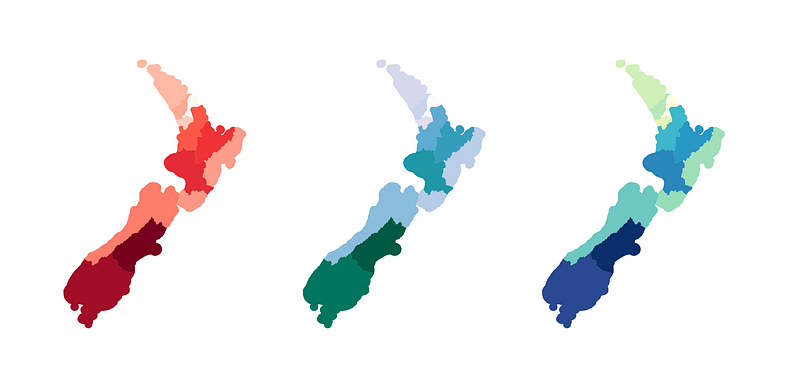
Choropleth maps of New Zealand’s police districts.

This is a TL;DR version of this article, which explains all of these steps, as well as maps and data wrangling, in more detail. Both of these articles have the same author.

Steps

import geopandas as gpd

map_dataframe = gpd.read_file('nz-police-district-boundaries.shx')
import pandas as pd

firearm_licenses = pd.read_file('nz_firearm_licenses.csv')
  • Combine the Geopandas and Pandas dataframes wherever their District columns match. The DISTRICT_N and Residence District columns are both 12 rows of names of New Zealand’s districts.
merged_dataframe = map_dataframe.merge(firearm_licenses, left_on=["DISTRICT_N"], right_on=["Residence District"])
  • Give the combined dataframe to Matplotlib to make the actual map.
merged_dataframe.plot(column="Licenses", cmap="Blues", legend=True)
  • Save the map as an image, and open it.
plt.savefig("nz_firearm_licenses.png", dpi=300)
plt.show()

Full Script

import pandas as pd
import geopandas as gpd
import matplotlib.pyplot as plt

# Load New Zealand coordinates into Geopandas
map_dataframe = gpd.read_file("nz-police-district-boundaries.shx")

# Load firearm license data into Pandas
firearm_licenses = pd.read_csv("nz_firearm_licenses.csv")

# Combine both dataframes along their district columns
merged_dataframe = map_dataframe.merge(firearm_licenses, left_on=["DISTRICT_N"], right_on=["Residence District"])

# Create a Matplotlib plot/map with the combined dataframe. Use the "Licenses" column to decide colors.
merged_dataframe.plot(column="Licenses", cmap="Blues", legend=True)

# Save and show the map
plt.savefig("nz_firearm_licenses.png", dpi=300)
plt.show()

Result
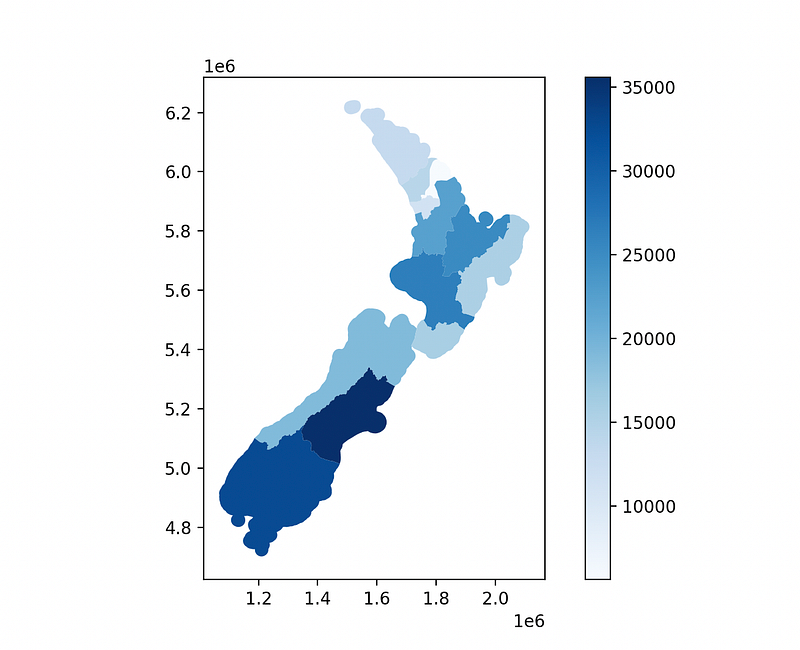
The output of the above script that gets saved as a PNG on your computer.

How do I make my Matplotlib graphs look better?

Questions and Feedback

If you have questions or feedback, email us at [email protected] or message us on Instagram (@protobioengineering).

If you liked this article, consider supporting us by donating a coffee.

Terms

Choropleth maps are colored maps of states, countries, etc. that show data.

Pandas is a Python library that helps you mess with data sets, like those in CSVs and Excel sheets.

Matplotlib is the most popular way to make graphs and charts in Python. Works well with Pandas.

Geopandas is Pandas with extra geographical/GIS functions added, which makes map-making easier.

shapefile — the file that has the coordinates for our map. It knows the shape of the states/provinces/countries/etc.

Further Reading

Python
Geopandas
GIS
Data Visualization
Pandas
Recommended from ReadMedium