
How to Integrate Great Expectations with Databricks
Get better data quality metrics with one change to Great Expectations

A common challenge data engineering teams face is how to best measure data quality. Poor data quality leads to wrong insights and potentially bad business decisions. An integrated data quality framework reduces the team’s workload when assessing data quality issues.
Great Expectations (GE) is a great python library for data quality. It comes with integrations for Apache Spark and dozens of preconfigured data expectations. Databricks is a top-tier data platform built on Spark. So you’d expect them to integrate seamlessly, but that is not quite the case.
So in this article, I’ll walk through a simple change you can make to one GE class that allows for a more integrated solution between GE and Databricks.
All the code for this article is available in the repo here.
The Problem
I was hoping for a simple way to integrate GE with Databricks without switching between PySpark and configuration files. I’ve found that using GE in a hosted environment is challenging. GE does offer a step-by-step guide on ‘How to Use Great Expectations in Databricks.’ If you follow the guide step-by-step, you end up with a mountain of configuration setup.
Specifically, I wanted a data quality framework that would fit nicely with the Databricks Medallion Architecture and hit these areas:
- Minimal overhead, and it ‘just works’ with Databricks
- Able to write data quality tests in line with other PySpark code
- Throw an error if the underlying data changed in an unexpected way
- Save results as a file to a storage location
The end state would be an architectural pattern similar to this:
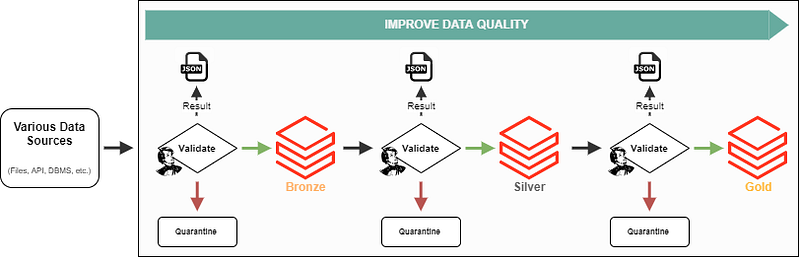
Data quality is progressively improved as data passes through each level. Along the way, each time the data is validated, the result is saved as JSON, and bad data is quarantined before loading it to the next level.
The Solution: Extending the SparkDFDataset class
One of the base dataset classes of GE is the SparkDFDataset. The SparkDFDataset inherits the PySpark DataFrame and has all the expectations implemented as methods.
By extending the SparkDFDataset class, you can add new methods to enhance integrations with Databricks.
The code below demonstrates how I’ve added a handful of the methods to integrate GE with Databricks.
The method get_notebook_metdata() collects all the metadata about the notebook using the Databricks dbutils object and returns a python dictionary.
The most significant addition is the .validate_and_save() method, which does the following:
- Adds in Databricks metadata as a GE citation
- Runs
.validate()to generate the ‘validation object.’ - Saves the ‘validation object’ as JSON to a storage location
- Asserts that no expectations failed and prints out a message to the notebook
These are minor adjustments to the main class, but they help smooth out using GE and Databricks together.
Using the ExtendedSparkDFDataset class
Keeping it consistent with the GE tutorial, the example below uses a similar NYC taxi dataset. This dataset is preloaded into a Databricks workspace under the location ‘/databricks-datasets/’. The provided code below goes through the process of using the ExtendedSparkDFDataset as part of a ‘validate’ step.
When running the validate_and_save() method in a notebook, a print message is provided for number of expectations evaluated and location to where the JSON file is written in storage.

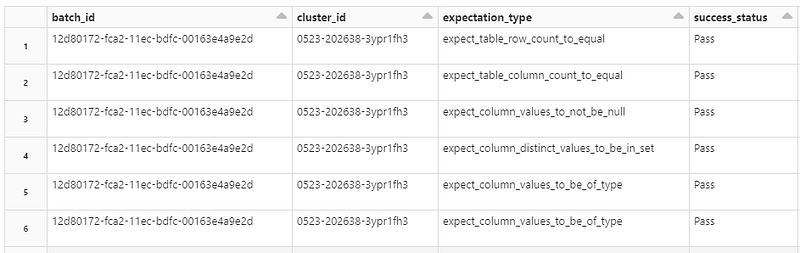
Since all the validation results are JSON, you can natively query the result using Databricks. Here is what the output of querying the JSON files might look like:
Conversely, if an expectation does not pass during validate_and_save(), the output message would like the below with an AssertionError:

Callouts
Even though this method removes some configuration overhead to get GE up and running, you lose out on some features. Below are some pros and cons of extending SparkDFDataset:
Pros
- Cleaner pipeline code with less configuration setup
- Expectations are in line with PySpark
- Asserting the success of the expectations will throw an error and stop processing
- Results are saved as JSON and can be queried with native Databricks functions
Cons
- Lose the ability to easily render the GE Data Docs
- Can not use an ‘expectation suite’, or ‘checkpoints’ as described in the GE documentation
- You must write every expectation without using the profiler class to generate a base expectation suite quickly
As a final callout, Databricks has a new Delta Live Tables feature with built-in quality control. The catch is that you must develop your pipeline specifically for Delta Live Tables to work. I plan on diving deeper into DLT in the future for sure!
Wrapping it all up!
In this article, I’ve shown how you can extend a base GE dataset for additional integrations with Databricks. I use a similar custom class in my data engineering so that my team can accurately track data quality over time. I believe this method is more straightforward and efficient than setting up GE to work in a hosted environment.
Again, all the code for this article is available in the repo here.
Check out my other article on how to quarantine bad data now that you’ve identified it:


