
How To Improve Your Rag System for More Efficient Question-Answering
Improve your RAG system with tools learned in this article
This article continues my last article on making a RAG system. This article will improve on the RAG system developed in the previous article by splitting the data more intuitively, giving the RAG system more options for retrieval, and using a better LLM.

Motivation
My motivation for this article is similar to my last article: to create a RAG system that can search emails for me instead of having to find emails myself with a direct word search. If you have not read my last article, I recommend reading that first, as I will build on my code from there. In this article, I will implement several improvements to the RAG system that make it more viable to use in a real-world setting.
Table of Contents
· Motivation · Improving chunking · Adding an option for returning info from a specific email · Using a better LLM · Upgrading the context window · Conclusion
Improving chunking
First, you can import all required packages:
# import packages
from langchain_community.document_loaders import WebBaseLoader
from langchain_text_splitters import RecursiveCharacterTextSplitter
from langchain_community.embeddings import GPT4AllEmbeddings
from langchain_community.vectorstores import Chroma
from langchain_community.llms import LlamaCpp
from langchain_core.output_parsers import StrOutputParser
from langchain_core.prompts import PromptTemplate
from langchain.docstore.document import Document
from langchain import hub
from langchain_core.runnables import RunnablePassthrough, RunnablePick
import pandas as pd
from langchain.embeddings import HuggingFaceEmbeddings
from langchain_community.llms import GPT4All
The first significant improvement I want to make is the chunking. Previously, I added all the text from all the emails and chunked them based on the number of characters. Instead, I want one email per chunk, which makes more intuitive sense when searching for specific emails.
I have a dataframe containing my information as follows:
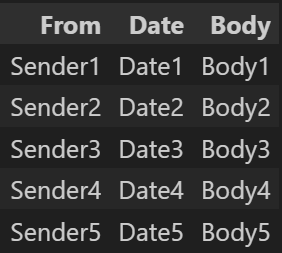
I then make chunks manually with the following code:
all_documents = []
for sender, date, body in df[["From", "Date", "Body"]].to_numpy(): #TODO here you can also add additional info
 document_content = f"Sender: {sender}, Date: {date}, Body: {body}"
 document = Document(page_content=document_content, metadata={"source": "local"})
 all_documents.append(document)
The chunks are a Langchain Document type, containing information on the mails. In addition to using the text in an email, I added additional information for the LLM to use when answering my questions. This information includes the date of the email, the sender, the subject of the email, and so on. Adding more details to the RAG system will allow the LLM to give better and more up-to-date answers, which is essential for the performance of the RAG system. You can add further information about each mail if relevant to the RAG system.
The chunks for the example dataframe shown above will then look like below, where each line is one chunk:

All documents now contain all the chunks you can vectorize with the code:
vectorstore = Chroma.from_documents(documents=all_documents, embedding=GPT4AllEmbeddings())
I am using GPT4AllEmbeddings since they are easy to use in this case, but if you want to learn more about creating your own embeddings, I have written an extensive article about that topic in the article linked below:
You can now also query the RAG regarding information like sender and date. You should note, however, that if you are only searching for a date, it can be difficult for the document retriever to retrieve the correct document. The relevant documents are retrieved with a vector similarity search, which might not work perfectly with the dates since the dates are only a tiny part of the embedded email. You can improve on this by searching separately for dates, for example. If the correct documents have been retrieved, processing the data and answering questions about it should be no problem for the LLM.
Adding an option for returning info from a specific email
Sometimes, it is helpful to see which chunks the RAG system used to give you a response. Therefore, you can add an option to see which chunks are used, showing you the relevant email containing the necessary answers.
In the previous article, I showed you that this can quickly be done with the function:
def get_retrieved_docs(question):
 docs = vectorstore.similarity_search(question)
 return docs
Which returns the documents given as context for the LLM to answer your question.
You can then call the RAG system with:
def invoke_RAG(question):
 res = qa_chain.invoke(question)
 docs = get_retrieved_docs(question)
 return res, docs
This then returns the response from the RAG in the res variable and documents the RAG system used in the docs variable. This can both allow the user of the RAG system to look further into the relevant email of their question and allow for easier debugging since you can see why the RAG system is giving its answer
Using a better LLM
An excellent way to improve the performance of your RAG system is to improve the LLM you are using. In the last article, I used a quantized version of Llama2. This LLM is decent, though there are better options if you have a computer with enough computing. You could go for other open-source language models like Mistral or Falcon, but the easiest way to improve your language model is to choose a larger model. Instead of using Llama2 7B-Chat, I moved on to a Llama2 13B-chat, which should increase performance when answering questions about my emails. You should be aware, however, that using a larger model will require a lot more disk space to store and RAM/VRAM to use, so you should ensure your system can handle the requirements of the LLM before implementing the model on your local system. You can read more about implementing Llama2 in my article on downloading and running Llama2.
Upgrading the context window
Another simple upgrade to your RAG system is upgrading the context window. This can be done in two parts. First, you can retrieve more documents than previously, giving the RAG more context to answer its given question. This can be beneficial because you are more likely to retrieve information relevant to the LLM to answer a question. However, adding more context can also have downsides since you can give the LLM more noise (nonrelevant data), making it harder for the LLM to answer the question. Additionally, retrieving more documents will require more processing time for the LLM to respond, making the RAG system slower.
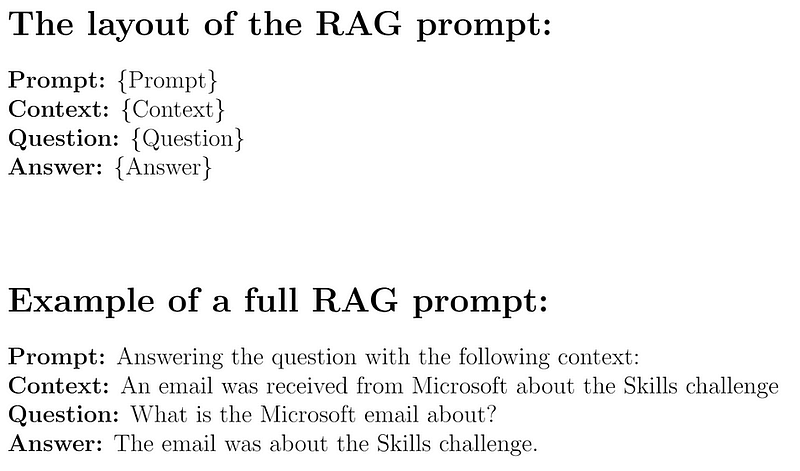
Furthermore, when increasing the number of documents you retrieve, you should also be sure to increase the context window of the LLM so the LLM can fit all relevant information within its context window. The context window of the LLM is essentially the memory of the large language model, and anything not available within the context window of the LLM will have to be learned by the LLM during training, which highlights the importance of making sure you can fit all relevant context into the context window of the LLM.
Conclusion
In this article, I have discussed a few different approaches you can take to increase the performance of your RAG system. The different improvements I discussed were:
- Improving chunking
- Returning to the context (emails), the LLM used to answer questions
- Using a better LLM
- Upgrading the context window
This is not a complete list, so there are more improvements you can make to your RAG system. Additionally, the effects of these improvements on your system will depend on its specifics and the task you are using it for.
You can also read my articles on WordPress.


