
How to Implement ChatGPT API in PHP ?
How to use chatgpt in php?

ChatGPT is an amazing tool by OpenAI that flipped thinking on its head with regard to AI and conversational technology. Now, imagine bringing a really smart AI directly into your projects in PHP-to power things like chatbots, customer support, or even create content.
With tihs blog, allow me to take you through using ChatGPT with PHP in very simple and friendly language so you can use AI yourself in creating smarter, more engaging applications.
Before Start To Code
Before we begin with the code, let me cover what you’re going to need. First and foremost, you will need an OpenAI API key — this is literally going to be your golden ticket to enter ChatGPT.
Better head over to the OpenAI platform if you haven’t already, and create one. You will also need PHP installed on your system. If you are not sure, you can just open your terminal and type php -v to verify.
Finally, make sure cURL is activated in PHP. This is a handy extension that will allow us to send HTTP requests; we’ll use it to talk to OpenAI’s servers.
Sending Requests to ChatGPT
Now that you have everything set up, let’s get into the good stuff: how we’ll be talking with ChatGPT. We send the magic over via a POST request to the OpenAI API.
The endpoint we will use to send our questions, or “prompts,” and get responses from the AI is https://api.openai.com/v1/completions.
To make this request, we need a few things:
- The API URL, which tells our program where to send the request.
- A couple of headers, including one for authorization (this is where your API key goes) and one to indicate we’re sending a JSON request.
- A payload, which is just a fancy word for the data we’re sending. This includes things like the prompt (what we want to ask ChatGPT), the model (like gpt-3.5-turbo or gpt-4), and some optional settings like how long the response should be.
Let’s Code
Let’s break down the PHP code you’ll use into three manageable parts: setting up, sending the request, and handling the response.
Step 1: Setting Up
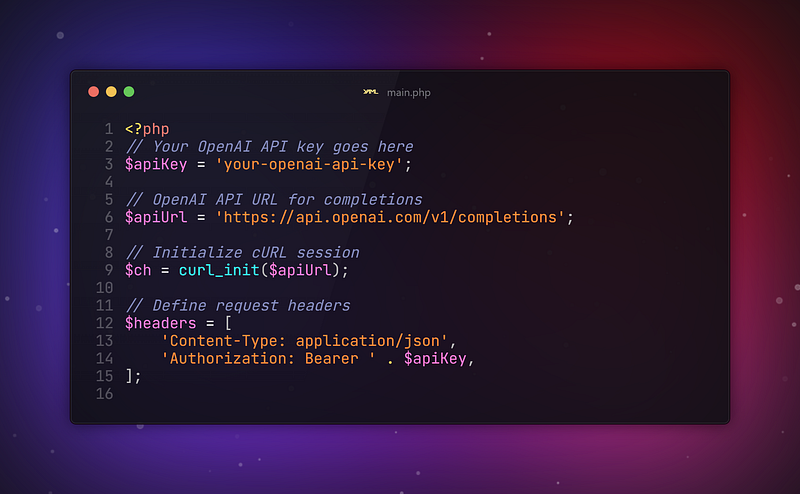
Here we’re defining: First of all, your API key and the URL where the request is to be sent. The headers are to inform OpenAI that we are sending JSON data, and we provide an authorization on those headers through your API key.
Step 2: Preparing the Request
Now, let’s build the information that we want to pass over to ChatGPT. This will include which model to use, what question to answer, and how creative the AI can be.
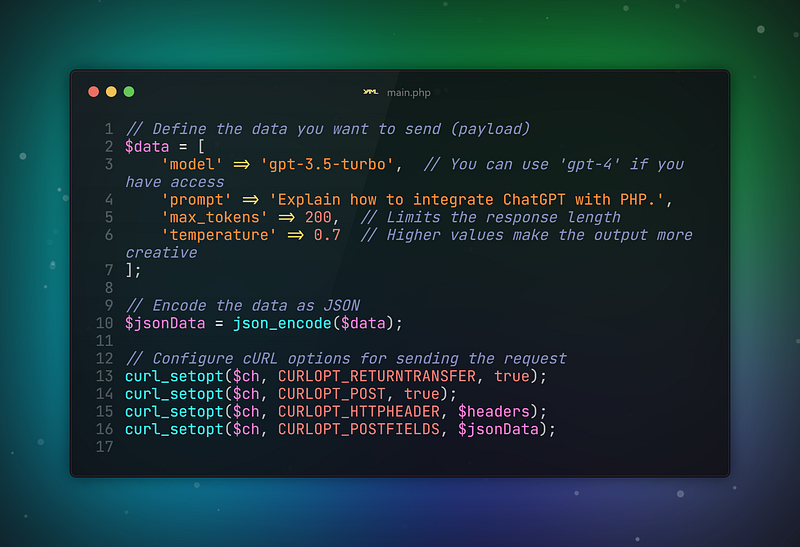
The key components that make up the payload we send include the model — a version of GPT desired. Prompt is the question you ask and max_tokens determines the length of your response.
You can also set the temperature, which decides how creative or random the AI should be. A higher temperature, near 1, will make it more creative, whereas a lower value closer to 0 makes the output more focused and deterministic.
Step 3: Handling the Response
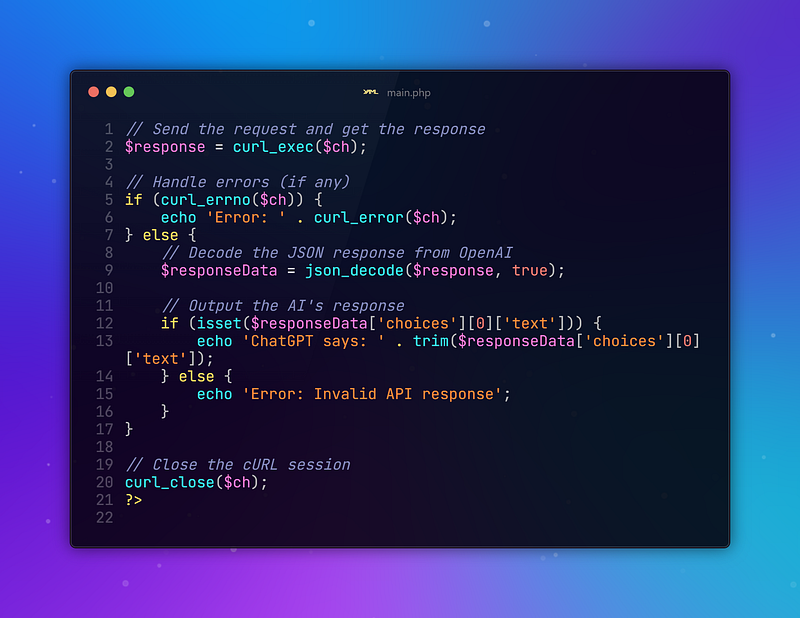
Here, we execute the curl request and then check for any errors. If all goes well, then we decode the JSON response and output the generated text from ChatGPT. If something goes wrong, we print out the error message.
Customizing Your ChatGPT Integration
Now that you have a basic understanding of how to interact with ChatGPT, let’s dive into how you can further customize this interaction.
First, you can change the model to deal with — for example, gpt-3.5-turbo or gpt-4 — based on what is available and also based on what your project requires.
You can also adjust the max_tokens setting; this will allow you to make the responses more or less verbose. If you would like longer answers, increase the value.
Another fun setting is temperature. A higher temperature, such as 0.9 or 1, will make ChatGPT’s responses more creative, and even a little unpredictable. A lower temperature, such as 0.3, will make its answers more straight-forward and factual. You could experiment to see what works best for your app!
You can even include previous messages in the prompt you send to, or use sessions to keep track of context between questions if you plan to build a multi-turn conversation. This really opens up possibilities for much more interactive and dynamic applications.
Handling Errors
First, remember that no API is perfect, and there may be issues that crop up, such as rate limits or invalid responses. OpenAI has rate limits in place to prevent abuse, which means it can detect whether too many requests are coming in at once and will need to back off a little.
Take the time to always handle errors in your code — either whether it’s an issue with the network or something is wrong with the response of an API — so users aren’t left in the dark.
Conclusion
And there you have it! You have just commented on how to integrate ChatGPT into a PHP application. Follow these simple steps, and you can add AI-powered responses, build chatbots, and make your web applications even smarter.
The possibilities in which ChatGPT can be used are virtually unlimited; therefore, do not be afraid to fiddle with the settings a bit to see what works for your use case.
Be it for a personal project or one from your clients, ChatGPT can help give life to your PHP applications by making use of the power of AI. Happy coding, and feel free to ask me if anything’s unclear!
Have a wonderful day!
Stay conected, Stay online.
Thanks for coming this far 🎉
- 👏 Could you please clap the story to help spread the article? (50 applause).
- 📩 Also if you want to my newsletter: https://yunus-emre-adas.ck.page/c090914848
You can reach me from the links below:
To access my other articles:


