
How to get orders with Amazon SP-API
In this third episode of “How to get X using Amazon SP-API”, I will explain you how to get seller’s orders and order’s details using this quite complicated Selling Partner API.
The first article was about getting listings through the ReportAPI. The second one will help you if you need to get sessions, page views, return rate, negative feedbacks and much more other metrics.
If you are here, you might have noticed how this 1200+ issues API can be challenging to use. Multiple documentations and versions, long process to set it up, incomprehensible limitations and so on can make simple use cases become nightmares 🤯.
If you haven’t implemented the Login With Amazon part yet, you can check here how to do. This article might also help you if you need set up a PHP SDK for SP-API or to synchronize seller’s listings.
Let’s go !
All example bellow are based on PHP with Laravel framework and the non-official yet complete amazon-php/sp-api-sdk.
1. Get orders
We will be focusing on the OrderAPI. You first need to use the getOrders endpoint. But before that, let’s prepare the sdk so we can get a client instance easily. In my case I choose to have a static method that instantiate a client from a store model. My store model have methods to return the client ID and client secret needed.
Here is how it look like.
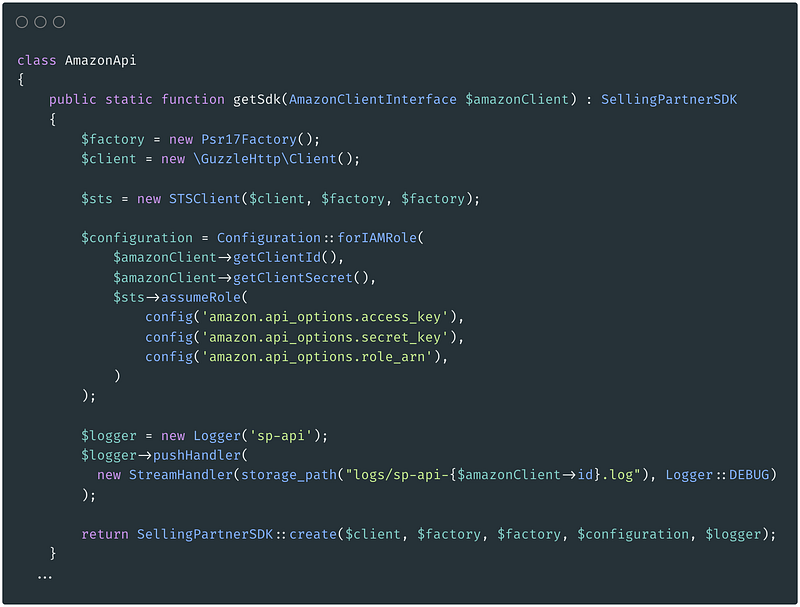
From this instance we can get the orders SDK to call the endpoints we need.
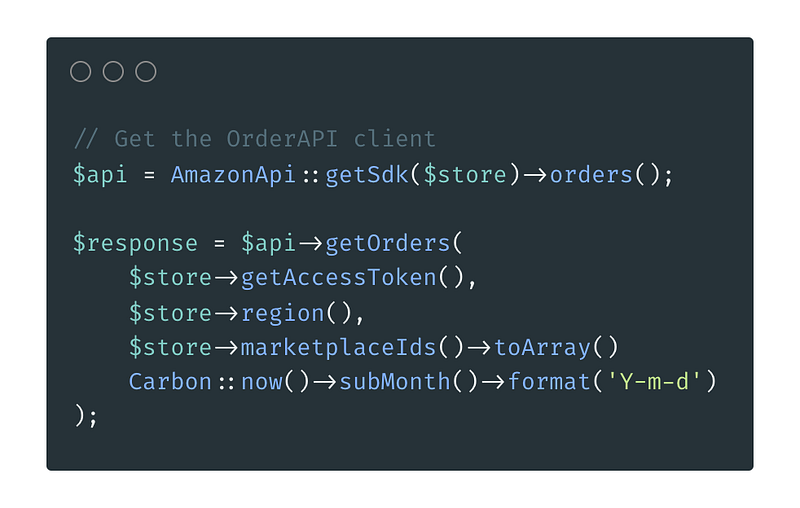
Let met explain what the getOrders() parameters are:
- $store->getAccessToken() returns a valid accessToken using the refreshToken that we get after LWA connection. This accessToken is valid for one hour. You can store it and get a new one when it expires. Check this if you need to know more about this step.
- $store->region() should be “us-east-1” for North America region, eu-west-1 for Europe or us-west-2 for Far east.
- $store->marketplaceIds()->toArray() is an array for marketplaces ids 🙃. Here are the official ids to use.
- Matches the “CreatedAfter” field of the API. In this case I will get all orders created after within the last month.
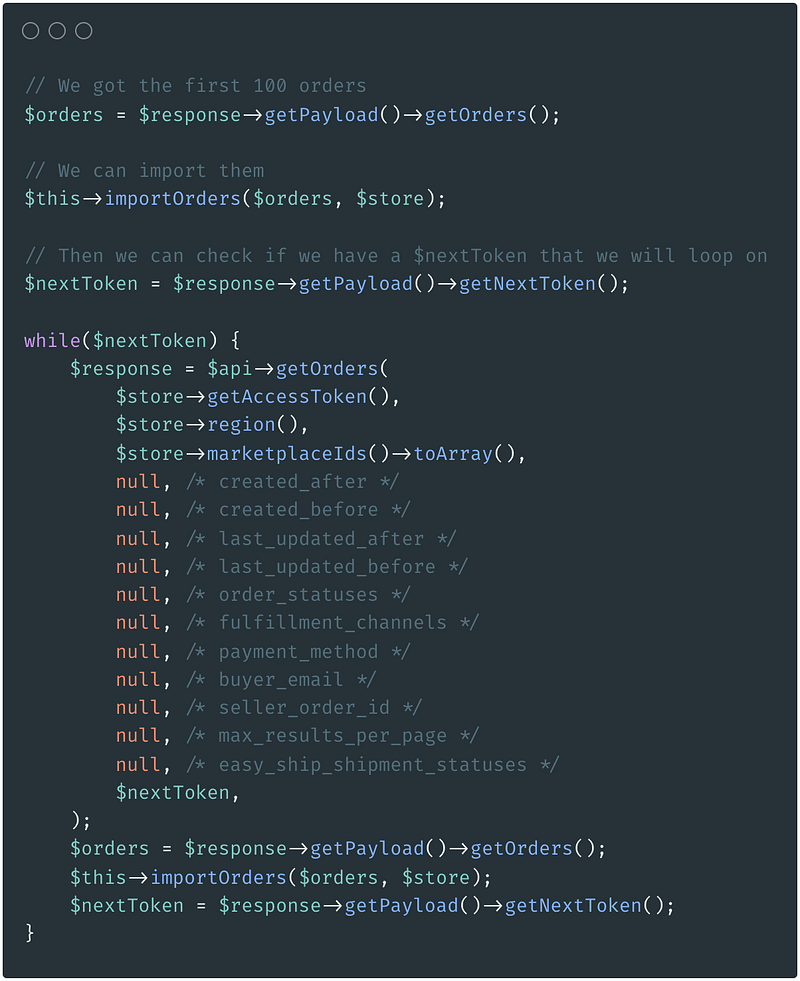
All orders ? Well, not really. The response might contain 100 orders maximum. If there is more, you will get a “nextToken” to get the next 100 orders.
Here is how it looks:
🛑 Limits.
You can see on the code above that there is no limitation management at all. Well that might be an issue with the SP-API. As you might know they have a pretty tricky rate limit system. You can see the official documentation here.
So, you have a bucket that can have a maximum size, the burst. For example the get orders API have a burst of 20. Meaning that you can make 20 requests before hitting the limit. Then you have a rate. It is simply the number of request that are added to you bucket each second. The get orders API have a rate of 0.0167. That’s 1 request added to your bucket every minute.
In our case, we can get the 20 first pages of orders then we will hit the limit and will have to wait 60 seconds from the first call to perform a new one.
That’s it for the theory. In practice I have made some test and it appear that sometimes I could call the API much more than the expected limit. Sometimes it was the opposite, I had to wait more than 60 seconds after hitting the limit before being able to perform a new call.
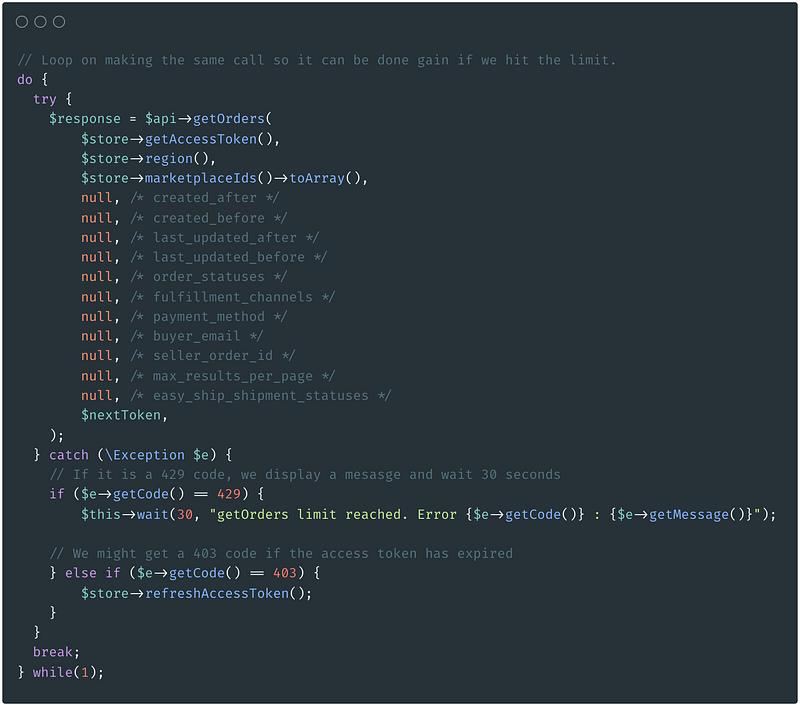
So the solution I implemented is simple to keep calling and wait 30s if I get the 429 response code (limit reached).
Fine points.
You now know how to get an Amazon seller’s order and a way to deal with API limits rates.
It’s time to know about some subtleties.
- When an order is in PENDING state. The price is not provided ! That led me to have some mistakes on the dashboard displayed sales. If your aim is to regularly synchronize your orders, you must get the orders of the last 3 days each time in case you stored PENDING orders that needs to be updated. While your order is pending, you can get the order items to link it with your listings and have an estimate price. Be careful tho ! That estimation can be wrong if the order includes coupon for example.
- Individual calls to get order’s items. If you want to link your order with the right products you have no choice but to make one call per order to the order items API. Each call will return a list of items, with SKU, ASIN etc. If you need to synchronize your listings you can use the report API as explained in this article.
- Client personal data. You might need to have the client personal information. Maybe the address to manage shipping of make location stats. In this case you need to apply for a RDT, Restricted Data Token. Unfortunately I still did not figured out how to get it so if you had a better experience on this please let me know on the comment below !
You are ready !
I hope this article helped you build amazing thing using the Amazon SP-API ! I think we are a lot struggling with this API. Would be great to help each other out and connect with SP-API developers. Let me know what you are building with it ! I would be keen to help.


