
How to get a seller’s listings using Amazon SP-API ?
You might be developing an app that needs to get a seller / store’s products ? Maybe you want to track listing changes or just provide a simplier dashboard than the Amazon Seller Central’s one ? Either way, you are certainly here because this simple use case makes you feel like this.
Already have all set up ?
If you already got through the 28 setting up steps to set up your Amazon SP-API, congrats 👏🏿 You can skip the Login With Amazon part and go directly here
Login With Amazon
The 5 first steps of the set up documentation are very important to understand and follow slowly. You will be guided to register as a developer, create an AWS account, an “IAM User”, an “IAM Role”, policies, and create your selling partner application.
Once your application is ready to use your will need to implement a Login With Amazon process which might be pretty fast with the JS SDK.
Here is the LWA process:
- The seller accepts your application.
- Amazon calls your callback URL with an authorization code parameter.
- You trade this authorization code with a long term refresh token that you can store.
- When you want to make SP-API calls, you use this refresh token to get an access token that will be valid for 1 hour.
You might notice that the default scope (“profile”) does not give you access to the user’s stores. To do so, you need to add “advertising::campaign_management” scope, which involve registering to the Advertising API.
It should take 2 to 3 days for you application to be validated.
Then just add this scope LWA.
options.scope = 'profile advertising::campaign_management';From now, each time a seller logs in with amazon, you will be granted to get his advertising profiles, which are his stores. Here is how it looks like using PHP Laravel
$response = Http::withHeaders([
    'Authorization' => 'bearer ' . $user->getAccessToken(),
    'Amazon-Advertising-API-ClientId' => env('LWA_CLIENT_ID'),
])->get('https://advertising-api-eu.amazon.com/v2/profiles');
This call will return all the seller’s stores, so you can save them (mainly id, name, country code and the store’s marketplaces…)
Connecting seller store 🔌
Before getting the seller’s listings, you need the seller to accept connecting his store to your application.
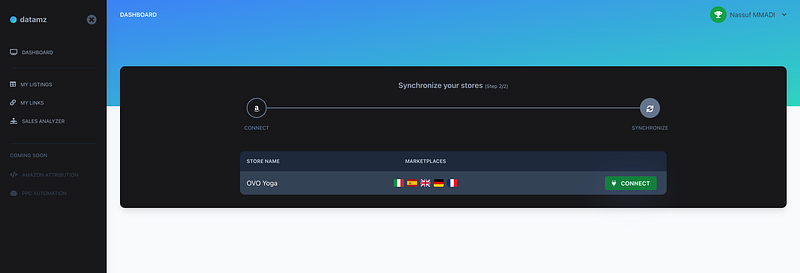
Now that you have the seller’s stores, you just have to build a connect URL for each store. This URL is the concatenation of: - Selling Partner API endpoint (depends of the store’s region) - /apps/authorize/consent?application_id=YOUR_SELLING_PARTNER_APP_ID - &redirect_uri=YOUR_REDIRECT_URL (Your redirect URL should be one of those you provided in your SP Application settings OAuth Redirect URI
In my case, this looks like this
/**
 * Method from my Store model
 *
 * Note 1: You can optionally provide a "state" parameter
 * that will be sent back by Amazon so you can verify
 * the request with your own
 * method.
 *
 * Note 2: Add "version=beta" parameter to test
 * your app in dev mode before publishing it.
 */
public function connectionUrl()
{
    return config("amazon.regions.{$this->selling_region}.seller_central_url") .
        '/apps/authorize/consent?application_id=' . env('APP_ID') .
        '&redirect_uri=' .  route('seller_connect_store') .
        '&state=' . md5(magicSauceState($this)) .
        '&version=beta';
}
The seller will have to authorize your application to access his store data. Amazon will then send you back an authorization code (as in user LWA process) that you should trade for a long term refresh token within 5 minutes.
Done the most complicated part… really ?
Well, a use case as simple as getting seller’s product per marketplaces should be very easy right ? We should just call an endpoint like GET https://[listing_api]/listings with user access token and voila.
But as strange as is seem, Amazon SP-API does not provide any API to get seller’s products easily.
When I am writing this (2022–01–25) there are two versions in the CatalogAPI that give us access to: - searchCatalogItems : To search on all Amazon catalog - getCatalogItem: To get a product detail by providing it’s ASIN
There is a ListingsItems API that allows us to edit or get a listing by it’s id but no GET listings endpoint.
There is also the FbaInventoryApi that should do the work. The problems are: 1. It only concern FBA products. So it seems impossible to get any FBM products through that API. 2. It is not working in Europe and Far East regions (even if they say they plan to release this API in 2021)
“Today this API is available only in the North America region. In 2021 we plan to release this API in the Europe and Far East regions.”
What does a developer do when stuck in this kind of issue ?
Yeah, you got it. I guess that’s exactly how you end up here.
He searches on the Internet. Asking to “uncle Stack Overflow” for example.
That’s how I found Borda’s solution !
Use ReportsAPI !
Thanks Stack Overflow. Thanks Borda 🙏🏿
Getting listings though Reports API
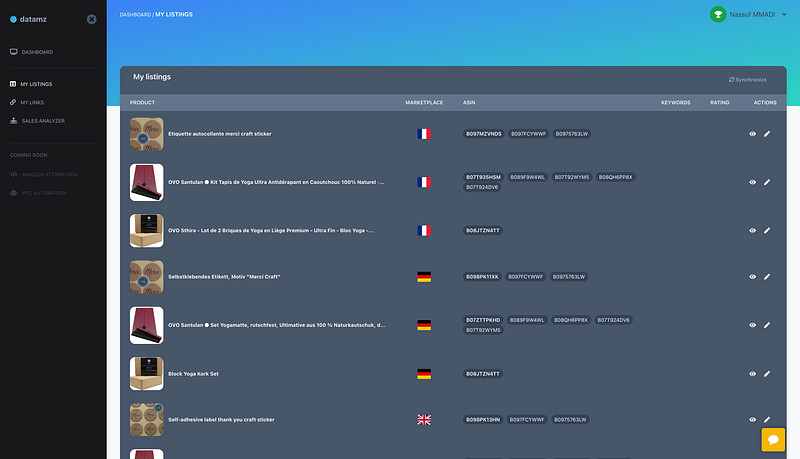
Time to get our listings. Ideally we want at least the title, main picture URL, SKU, ASIN and variations ASINs.
There is 3 steps to get a report:
- Create it using the “POST /reports/2021–06–30/reports” endpoint with required parameters “reportType” and “marketplaceIds”. It will return a reportId
- Check report status until it is ready to be downloaded
- Download and decrypt the CSV report file (some reports can be xslx or xml, in our case we are requesting reports that are simple CSVs).
0. 🙃 Prepare SDK
You can skip this part if you already have your SDK set up.
Which PHP SDK ? Today, Amazon does not provide any PHP SDK for their SP-API. After trying clousale/amazon-sp-api-php I switched to amazon-php/sp-api-sdk which have more implemented APIs and is using more up to date versions of those APIs.
To call a SP-API with amazon-php/sp-api-sdk we need to create a SellingPartnerSDK instance.
I chose to create a “AmazonApi::getSdk()” helper that receive an “AmazonClientInterface” (in my case a User or a Store model) and instantiate a SellingPartnerSDK object.
class AmazonApi
{
    public static function getSdk(AmazonClientInterface $amazonClient)
    {
        $factory = new Psr17Factory();
        $client = new \GuzzleHttp\Client();

        $sts = new STSClient($client, $factory, $factory);

        $configuration = Configuration::forIAMRole(
            $amazonClient->getClientId(),
            $amazonClient->getClientSecret(),
            $sts->assumeRole(
                config('amazon.api_options.access_key'),
                config('amazon.api_options.secret_key'),
                config('amazon.api_options.role_arn'),
            )
        );

        $logger = new Logger('sp-api');
        $logger->pushHandler(new StreamHandler(storage_path( "logs/sp-api-{$amazonClient->id}.log"), Logger::DEBUG));

        return SellingPartnerSDK::create($client, $factory, $factory, $configuration, $logger);
    }
1. Create a report
First of all, we want to be able to get any kind of CSV report, by providing the concerned store, marketplace and report type. This method’s signature should good:
public function getReport(Store $store, $marketplaceCountryCode, string $reportType);Let’s create that report !
$reportApi = AmazonApi::getSdk($store)->reports();
$marketplaceId = AmazonApi::marketplaceId($marketplaceCountryCode); // Just to get marketplaceId based on country code, looking in a config file
// AmazonPHP\SellingPartner\Model\Reports\CreateReportSpecification
$body = new CreateReportSpecification();
$body->setReportType($reportType);// I am doing it marketplace by marketplace but you can provided multiple marketplaces in one time
$body->setMarketplaceIds([$marketplaceId]);
/** @var CreateReportResponse $result */
$result = $reportApi->createReport($store->getAccessToken(), $store->region(), $body);
$reportId = $result->getPayload()->getReportId();
if ($result->getErrors() || !$reportId) {
return false;
}We now have the reportId that we can use to check the report status !
2. Check report status
We want to keep checking the report status until it is ready.
To make it easy, we will simply loop and wait at each loop.
We could improve that by doing it in a queue system for example. With delayed retries etc. Considering this process is temporary until Amazon releases an API that do the job, I will just “sleep” at each loop.
/** @var GetReportResponse $report */
$report = $reportApi->getReport($store->getAccessToken(), $store->region(), $reportId);

// Wait and retry every 8 seconds
while (in_array($report->getPayload()->getProcessingStatus(), ['IN_PROGRESS', 'IN_QUEUE'])) {
  sleep(8);
  $report = $reportApi->getReport($store->getAccessToken(), $store->region(), $reportId);
}

// Report is CANCEL or FATAL
if ($report->getPayload()->getProcessingStatus() !== 'DONE') {
  return false;
}
Here we are ready to get that report document !
3. Download and decrypt report file
When the document is ready (DONE status), we need to call the GET report_document endpoint.
$reportDocument = $reportApi->getReportDocument($store->getAccessToken(), $store->region(), $report->getPayload()->getReportDocumentId());
$documentUrl = $reportDocument->getPayload()->getUrl();
if (!$documentUrl) {
  return false;
}
This URL is public so we can directly download the file.
But for security reasons, it is AES-256 encrypted. The getReportDocument’s response include what needed to decrypt the file.
$iv = base64_decode($reportDocument->getPayload()->getEncryptionDetails()->getInitializationVector());
$key = base64_decode($reportDocument->getPayload()->getEncryptionDetails()->getKey());

$encryptedDocument = file_get_contents($documentUrl);
$decryptedData = openssl_decrypt($encryptedDocument, 'AES-256-CBC', $key, OPENSSL_RAW_DATA, $iv);
That’s it !
You now have the seller’s listings… at least in CSV format. You easily can convert it to array with this function
// Default report separator is a tabulation.
public static function csvToArray(string $csvContent, string $separator = "\t")
{
  $array = [];
  $lines = str_getcsv($csvContent, "\n");
  $keys = str_getcsv($lines[0], $se);

  for ($i = 1; $i < count($lines); ++$i) {
    $array[] = array_combine(
       $keys,
       str_getcsv($lines[$i], "\t")
    );
  }

  return $array;
}
Everything is ready, we just have to call our getReport method with the report type GET_MERCHANT_LISTINGS_ALL_DATA
$products = $this->getReport($store, $marketplaceCountryCode, ‘GET_MERCHANT_LISTINGS_ALL_DATA’);Done ? Not really yet…
The downloaded report includes data such as listing title, id, price, sku, status, product-id and asin… but it does not include main picture, variations relations.
And for some reason, it does not include any ASIN for FR marketplace 🤯 !
Let’s find out how to get those missing data.
Well, we will have to get the missing ASINs and the main pictures.
For missing ASINs we can get another report, the GET_FLAT_FILE_OPEN_LISTINGS_DATA type.
Good thing that we now have a dedicated method to get a report from a store / marketplace / report type !
// This field is not there in FR marketplace
if (empty($products[0]['asin1'])) {
   $report = $this->getReport($store, $marketplaceCountryCode, 'GET_FLAT_FILE_OPEN_LISTINGS_DATA');

   $skuAsins = collect($report)->mapWithKeys(function ($item, $key) {
       return [$item['sku'] => $item['asin']];
   });

   $products = collect($products)->map(function ($item) use ($skuAsins) {
       if (!empty($item['seller-sku']) && empty($item['asin1'])) {
           $item['asin1'] = $skuAsins->get($item['seller-sku']);
       }

       return $item;
   });
}
Great !
That’s too bad we have to create and get another report just for that but unfortunately there is no other solution today.
Almost done !
Get the main picture and variations ASIN with the CatalogItems API.
We will need the store accessToken, marketplace(s), region and asin.
$item = AmazonApi::getSdk($listing->store)->catalogItem()->getCatalogItem(
   $listing->store->getAccessToken(),
   $listing->store->region(),
   $listing->asin,
   [$listing->marketplaceId()],
   ['images', 'summaries','variations']
);
// Set the main picture
$images = $item->getImages();

if (count($images) && count($images[0]->getImages())) {
   $listing->main_picture = $images[0]->getImages()[0]['link'];
}
You can navigate through variations like this.
$variations = $item->getVariations();Each variation have a type that can be CHILD or PARENT.
In my example I am browsing items that have childs so I can link them to their parent items.
It also allows me to get the parents items from CatalogAPI if I dont got them from previous report calls (which occurred…).
$variations = $item->getVariations();

if (count($variations) && $variations[0]->getVariationType() === 'CHILD') {

   $parentAsin = $variations[0]->getAsins()[0];

   // Check if we have parent ASIN in DB, otherwise get it from API
   $parentListing = Listing::where('asin', $parentAsin)->where('marketplace_country_code', $listing->marketplace_country_code)->first();

   if ($parentListing === null) {
       $parentListing = new Listing();
       $parentListing->asin = $parentAsin;
       $parentListing->store_id = $store->id;
       $parentListing->user_id = $store->user->id;
       $parentListing->marketplace_country_code = $listing->marketplace_country_code;

       AmazonApi::hydrateListingFromCatalogItem($parentListing);

       $parentListing->save();
   }

   $listing->parent_listing_id = $parentListing->id;

   $this->info("Set {$listing->asin} child of {$parentListing->asin}");
}

$listing->save();
After 28 set up steps, multiple reports creation, download and decrypt, calls to catalogItem API to complete data, we finally have what should have been very basic data: Seller’s listings !
I hope this article helped you !
Leave a comment if you have any question or ideas to improve / simplify this tricky process.
One more thing…
You might find it quite overkill to have to go though all those steps just to get a listing details.
And even with that you dont get all the images, bullet points, reviews count, rating etc.
What if we could get all listing details, title, images etc, just with one GET endpoint ?
Well I am pleased to introduce you, a revolution 😆
Easiest way to get listing details, search result and keyword ranking:
☞ https://rapidapi.com/datamz-datamz-default/api/datamz/
I first made it for the SaaS I was developing and as I was contacted by a lot of you I though it would be helpful to made it available as a simple API.
Today there is 3 endpoints that will allows you get GET effortlessly:
- Product details, including images, reviews count, rating, bullet points and much more by just calling the endpoint /api/us/product/{asin}
- Keyword search results with summarized JSON of all product results. Let say you want to get the “yoga mats” results in Germany, you just have to call /api/de/keywords/yoga mats/results …
- Keyword ranking for the ASINs you want, on a specific keyword. An endpoint that returns both organic and sponsored ranking. Accessible via GET /api/{countryCode}/keywords/yoga mats/ranking?asin=[“ASIN1”,”ASIN2"]
It includes a free version so you can test it and see if it helps. I will be focusing on maintaining the crawler so you just have to focus on what brings value to what you are building.
Let me know if it helps and if you need more use cases, I will pleased to discuss with you ! 😊
Nas


