
How to get Dark/Night Mode on Medium in your browser?
Undeniably, Medium has grown to one of the largest blogging/online publishing platform in these last few years. Since the Medium is free to use and publish the contents online, these days it has become the first choice for most of the ICOs, Blockchain Projects to use it as their product’s page.
Medium is easy to navigate, publish contents, get your own opinions heard and you can even earn money for publishing content if eligible for Medium Partner Program, but there is a little downside to the Medium; the Medium website’s user interface.
Everything is nice and beautiful looking on Medium — black texts on white background — in a broad daylight, but for browsing the Medium at night, it could be an eye-aching. And so to get over with it, you can either use the Windows’ Night Light [or any third-party software] feature or you can use the universal dark reader extension to make Medium dark and beautiful.
How to use Dark theme/Night mode on Medium in your browser?
Not rocket science, just follow the below simple steps and you are good to go on Medium;
- Follow the link to Dark Reader and download the extension for your respective browser.
- A “ghost looking with red glasses on” icon appears on the extension bar in your browser.

- You can then toggle the dark mode on/off for the Medium from the extension or do it directly on the current website by pressing Alt+Shift+A.

So, you might be wondering, why Dark Reader? There are tons of other extensions, why this? — Because unlike other dark mode enabling extensions that are functional for pretty specific websites, Dark Reader is functional in any website. Plus, Dark Reader has an intelligent filter that you can use to increase/decrease Brightness, Contrast, Sepia and Grayscale of the browser as a whole or only for specific websites.
Update Feb 15, 2020: Here’s how you can use dark mode in Medium, and all webpages that doesn’t support native dark/night mode interface.
Now that Chrome, Brave, and every other Chromium-based browsers support “force enable dark mode”, you don’t need to install browser extensions to get night mode interface.
Here’s how you can enable dark mode in Medium without any 3rd party extensions
WARNING: EXPERIMENTAL FEATURES AHEAD!
By enabling these features, you could lose browser data or compromise your security or privacy. Enabled features apply to all users of this browser.
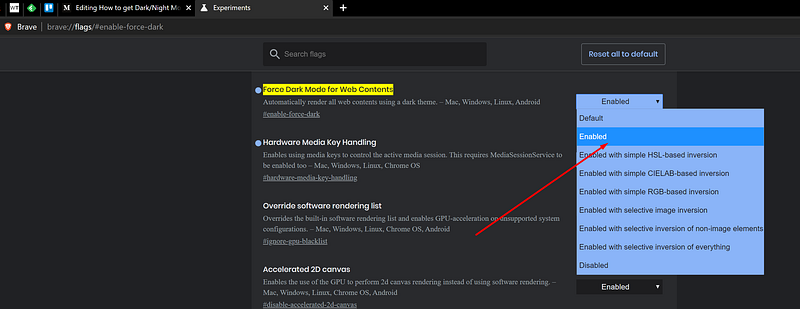
- Open a new tab on your Chrome, Brave or any other Chromium browser.
- Copy-paste this “chrome://flags/#enable-force-dark” on your URL bar, works the same command on Brave browser too. Or, you can also use “brave://flags/#enable-force-dark” for the Brave browser.
- Select “Enabled” from the drop-down menu for the “ Force Dark Mode for Web Contents” experiment option.
- Relaunch the browser.
Unlike the Dark Reader extension where you can enable dark mode interface for specific webpages and toggle on/off, using this default browser-experimental method, the dark mode is activated for all the webpages at once. No option to turn on/off for only selected webpages. Well, that’s a compromise to make if you don’t want to download 3rd party extensions!
This unavailability of dark mode might be the only issue for the Medium webpage. However, the Medium Android and iOS apps have an inbuilt feature to toggle the mode on/off.
But now with this awesome extension, this even might not be an issue anymore, no matter where you browse the Medium on!
Read more articles on:


