
LinkedIn Benefits: Get 3 / 6 Months of LinkedIn Premium & Learning For Free
Update: March 10, 2020, LinkedIn Learning is giving free access to 16 Remote Working courses including tips on how to: stay productive, build relationships when you’re not face-to-face, use virtual meeting tools (Microsoft Teams, Skype, BlueJeans, Cisco Webex and Zoom), and balance family and work dynamics in a healthy way amid this coronavirus (COVID-19) outbreak.
Whether it be any kind of business you are into, or if you are an entrepreneur, LinkedIn has become a go-to platform for the professionals to share their opinions and meet world-class personnel. And similarly, to learn the skills you desire and interested in, LinkedIn Learning is one of the best-growing e-learning platforms.
The free LinkedIn membership does most of the things but to truly stand out and reach out to larger mass and make most out of the LinkedIn, LinkedIn Premium membership is definitely for you. However, without first trying out, you might feel a little uncomfortable to spend your money to subscribe to the premium membership. So, don’t take my word for it because LinkedIn offers you the LinkedIn Premium trial service to help you make your mind if the LinkedIn Premium membership is right for you or not.
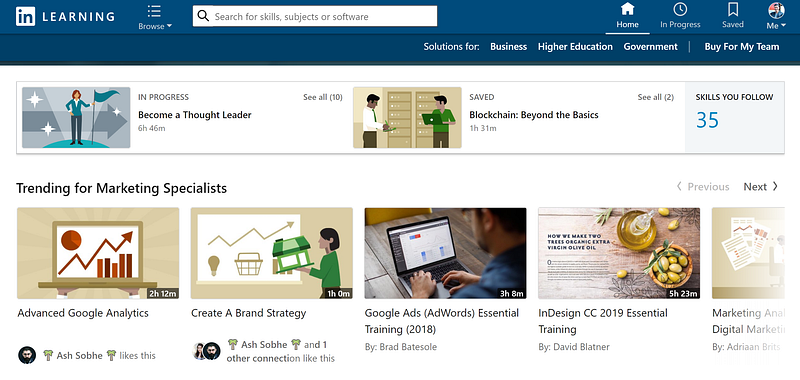
And since both services — LinkedIn Premium membership and LinkedIn Learning — are from LinkedIn, the best thing is, once you subscribe to any of one service, you’ll be benefited from both benefits. This means, if you subscribe to LinkedIn Premium service, LinkedIn Learning will be automatically accessible to your LinkedIn account. Amazing, right!
So, let’s not beat around and get to how you can access and try out LinkedIn Premium and LinkedIn Learning for free. There are three methods, each method will give a month of free premium access to LinkedIn and LinkedIn Learning.
Method 1: 1-Month LinkedIn Premium / LinkedIn Learning Free Trial
LinkedIn Premium free trial shouldn’t be a hard one to access unless you don’t have a credit card to enter while activating the trial. It is pretty straight forward and LinkedIn regularly promotes the free trial offer on the users’ feed and email digests.
To activate the trial, follow the steps below:
Step 1: Visit LinkedIn Learning here or visit below 👇
Step 2: Click on “Start my free month”
Step 3: Choose “Try for free” under “Premium” Column to get access to a free trial to both LinkedIn Premium and LinkedIn Learning.
Step 4: Login to your account and enter your payment details for verification purposes.
Step 5: Woo-hoo, the LinkedIn Premium is activated and now you can access LinkedIn Premium features and LinkedIn Learning uninterrupted.
Method 2: 1-Month LinkedIn Premium / LinkedIn Learning Free (BEST ONE)
And secondly, this is one of the best methods to get the LinkedIn Premium and LinkedIn Learning for free as it doesn’t ask you to enter your payment details. Yeah, for real.
And to activate the premium membership, you just need to follow the steps mentioned below;
Step 1: Log into your LinkedIn account.
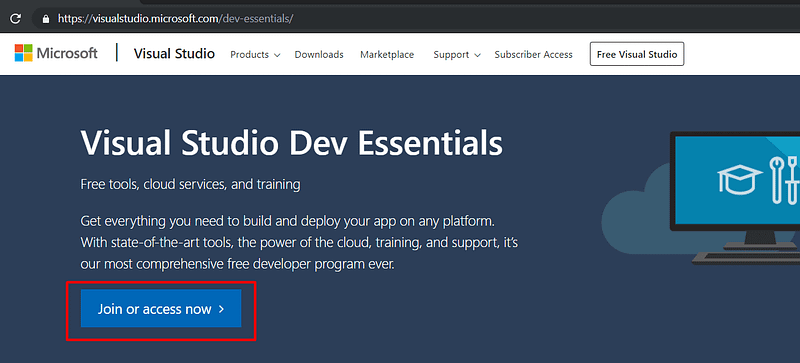
Step 2: Now visit Visual Studio Dev Essentials on another tab
Make sure you have a Microsoft Outlook account, if not create one and then click on the “Join or access now” button to log into the Visual Studio Dev Essentials.
Step 3: Click on the “Activate”.
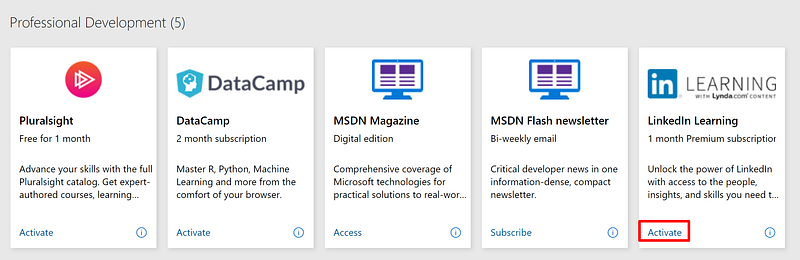
It is on the LinkedIn Learning box under the Professional Development section
Step 4: Click on “Try for Free”
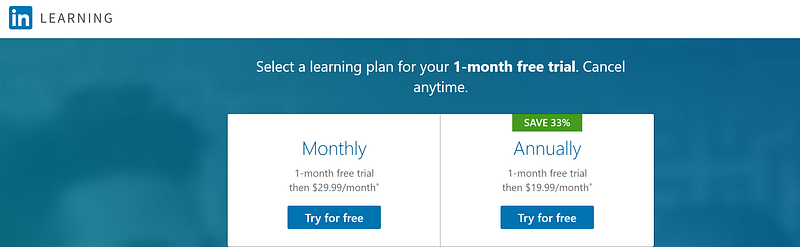
Select any of the offers and click on “Try for free” for the newly opened tab.
Step 6: Congratulations, you have successfully activated LinkedIn Premium and LinkedIn Learning for free.
Method 3: Extended 1-Month LinkedIn Premium / LinkedIn Learning Free Trial
LinkedIn has always been generous to its userbase, and which is why they provide another extended 1-month free trial after you have used your two months from the above methods. The only thing you need to do is, wait for a week after you subscribed to the 1-month LinkedIn Premium free from method-2. And you’ll be notified to reactivate the LinkedIn Premium on your LinkedIn feed or via email.
Get 3 months or 6 months of LinkedIn Premium & Learning Free via Visual Studio Annual Subscription
Even with the free Visual Studio standard plan, LinkedIn was offering 3 months of free access to LinkedIn Premium & LinkedIn Learning. Recently, LinkedIn dropped the 3-month benefit to a 1-month for free Visual Studio subscribers.
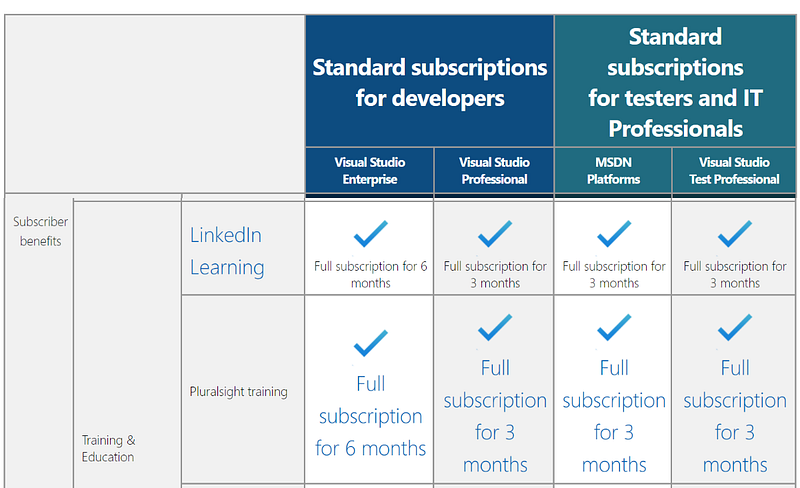
However, there still stands benefits of 6-month and 3-month free access to LinkedIn Premium and Learning but this comes with a catch. To enjoy these benefits, one must have subscribed to Visual Studio Annual Standard Plan.
To activate these LinkedIn benefits, please follow the steps mentioned below:
How to get 6 months and 3 months of LinkedIn Premium & Learning free subscription in 2019 / 2020?
Step 1: Sign up for the LinkedIn account or login if you already have one.
Step 2: Login to your Visual Studio account.
Step 3: Visit my.visualstudio.com and locate and select LinkedIn Learning benefit.
Step 4: Now depending on your Visual Studio Annual subscription, you will be offered either 6 months or 3 months of free access to LinkedIn Premium & LinkedIn Learning.
- 6 months of free LinkedIn Premium & LinkedIn Learning access: If you are a Visual Studio Enterprise user.
- 3 months of free LinkedIn Premium & LinkedIn Learning access: If you are Visual Studio Professional user, or MSDN Platforms user, or Visual Studio Test Professional user.
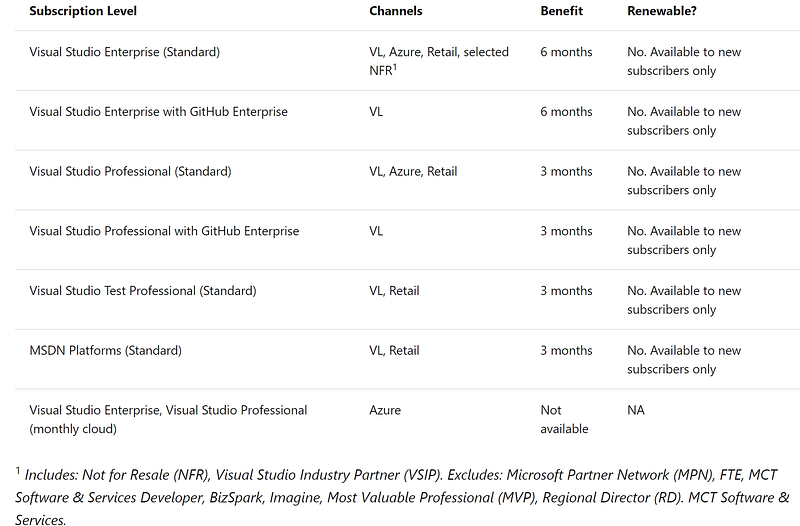
To note, this benefit is one-time only to new Visual Studio Annual Plan subscribers. And if you are unsure which Visual Studio subscription you’re using, visit https://my.visualstudio.com/subscriptions to see all the subscriptions assigned to your email address.
Disclaimer: These above methods are for accessing and trying out if the LinkedIn Premium and LinkedIn Learning are for you or not. So, if the services really prove to be beneficial and improve your productivity and growth, please consider subscribing to LinkedIn Premium and LinkedIn Learning. Below we have shared detailed prices and plans for LinkedIn Learning and LinkedIn Premium.
How much does LinkedIn Learning cost?
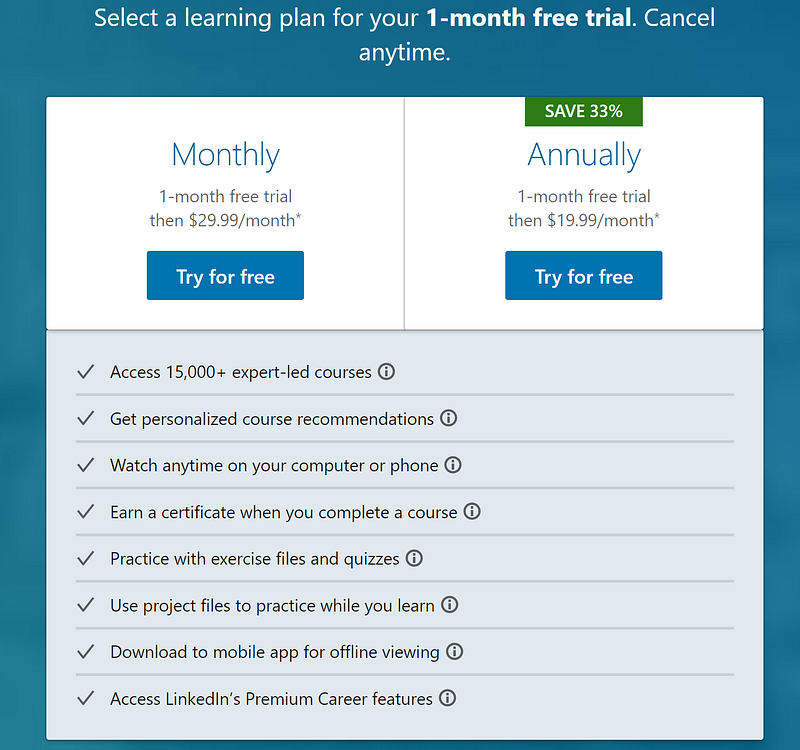
LinkedIn Learning comes in two different tiers; Basic and Premium. The Basic Plan offers only LinkedIn Learning features for a price of $24.99 a month, or $239.88 a year ($19.99/month when billed annually). And the other Premium Plan offers the benefits of both LinkedIn Learning and LinkedIn Premium features for a price of $29.99 a month, or $299.99 a year ($24.00/month when billed annually). In fact, this LinkedIn Learning’s Premium Plan is nothing but the same Premium Career version of LinkedIn Premium.
How much does LinkedIn Premium cost?
Unlike LinkedIn Learning, LinkedIn Premium is available in four plans; Premium Career, Premium Business, Sales Navigator, and Premium Recruiter Lite.
LinkedIn Premium Career will cost $29.99 a month or $239.98 a year ($24.99/month) for job seekers with 3 InMail messages, features like who viewed your profiles, direct messaging to recruiters, application insights, standing out as a featured applicant and online video courses.
The other plan, LinkedIn Premium Business, is set for $59.99 price a month, $575.88 a year ($47.99/month when billed annually) and offers 15 InMail messages, business insights, unlimited people searching, and online video courses.
Sales Navigator Professional for $79.99 a month, $779.88 a year ($64.99/month when billed annually) comes with 20 InMail messages, 1500 saved leads, sales insights such as lead and account insights, job changes, company growth, lead-builder tool and everything Premium Business offers. Besides, Sales Navigator Team, which is for multiple users, costs as much as $139.99 a month or $1,240 a year ($103.33/month when billed annually) and offers all features from Sales Navigator Professional plus +10 additional InMail messages, +3500 additional saved leads, 10 PointDrive presentations per month, 25 Out-of-network unlocks per month and more.
And the last of all, Premium Recruiter Lite is priced at $119.95 a month or $1,199.40 ($99.95/month when billed annually) which gives you 30 InMail messages, advanced search, smart suggestions, automatic candidate tracking, integrated hiring and enhanced recruiting-specific LinkedIn interface experience and all of LinkedIn Business plan.
Welcome to Prabidhi Info and follow us to get the information and review about the latest tech, gadgets, and products.
Prabidhi Info is supported by its readers. When you purchase through links on our site, we may earn an affiliate commission.


