How to get a free lifetime domain with eu.org
Sometimes you may want to start a brand or something like that but don't want to spend money on a domain, but you probably know a website is needed. That is where eu.org chips in. They have offered free domains since 1996, and it's relatively easy to get one, just follow the steps.

Getting started
Go to nic.eu.org. After that, you will be prompted with a relatively outdated site. It may seem confusing, but all you have to do is press sign up here. Then, press register.
Here is how it will look
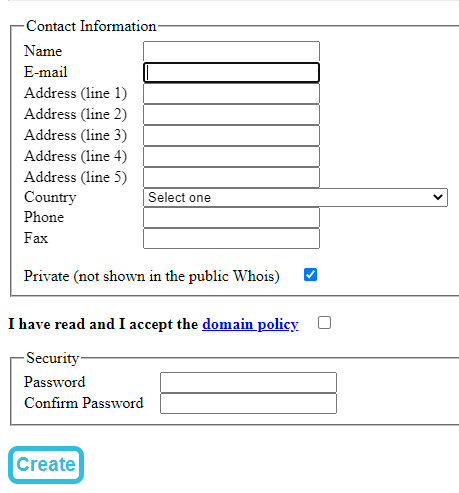
You don't have to fill in all the details, the only ones you need to are Name, Email, Country, and address lines 1&2. The other details are not required. Just don't forget to add a strong password.
Once you have created your account, you will be sent an email to verify. Press the link and press validate if It's the correct information.
After that, login. Before you go on to register your domain, you have to do something else.
Creating a Cloud DNS account etc
Go to cloudns.net and create a free account. You have to do that because when you get your domain, you can create subdomains, etc., and also because it is required to register with eu.org.
When you have created your account, you will be prompted with a dashboard. There go to the following:
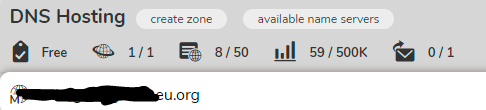
In DNS hosting (as in image), press on "create a zone," then on Master Zone. You will be prompted with this:

Where it says "Domain name:" enter the .eu.org domain you would like to register, so do, e.g., example.eu.org.
Then, press on create. Now you are on the Domain settings page.
Registering
Now, go back to nic.eu.org and press on New domain
Where it says "Complete domain name," enter your domain, and make sure it is the same as you added in cloudns.
After that, scroll down to nameservers and "tick" the box saying "server names," not the ones that have server names and +
Now in Name1 until Name4, paste the nameserver domains given in cloudns. You won't have to input the IP next to it because you have selected only the" server names" option, and that is why you should select it because you don't have to input an IP.
Now once you input the Names, you can register your domain. It will take about one month to receive the domain since the eu.org team has to review your details. You will be notified through email by them.
Please let me know if you would like to know how to set up the domain, so it directs to your website. I can make another article for that. https://readmedium.com/directing-your-domain-to-your-website-eu-org-part-2-658f298fc8ae
Thank you for reading my article!
Read every story from TGM (and thousands of other writers on Medium). https://medium.com/@thegreatgm20/membership Your membership fee directly supports TGM and other writers you read. You’ll also get full access to every story on Medium.


